
Ransomware Data Recovery Services: Encrypted Servers, Wiped Backups and Virtual Machines
Ransomware has encrypted your file servers, the virtual machines on your hosts, or the backup repository you were counting on to restore them. Gillware’s ransomware data recovery service is for the point where the backups won’t restore, the decryptor didn’t work, or there is nothing clean left to roll back to. Our engineers work at the storage layer, on the disks, arrays, datastores, backup files and file systems the attack touched, to recover everything the attack did not completely destroy.
Servers or backups encrypted?
Before anyone wipes, reformats or restores over the affected storage, talk with one of our enterprise storage engineers. The consultation is free.
This page is written for IT managers, MSPs, incident response firms and insurance adjusters working a ransomware event. It explains what is usually still recoverable after an attack, what to do (and not do) in the first hour, how we work alongside your incident response team, and how to start a case. If the situation is broader than ransomware, such as a failed array or a deleted repository, our emergency data recovery page covers the full process.
What we recover, and what no lab can promise
Let’s be clear about the work first. Gillware recovers storage, not encryption keys. Modern ransomware uses strong encryption, and no honest lab can promise to break it. If a file was fully encrypted and the key is not available, the contents of that file can’t be read. We don’t sell decryptors, we don’t promise decryption, and we don’t advise on whether to engage with attackers. That decision belongs to you, your counsel, your carrier and your incident response firm.
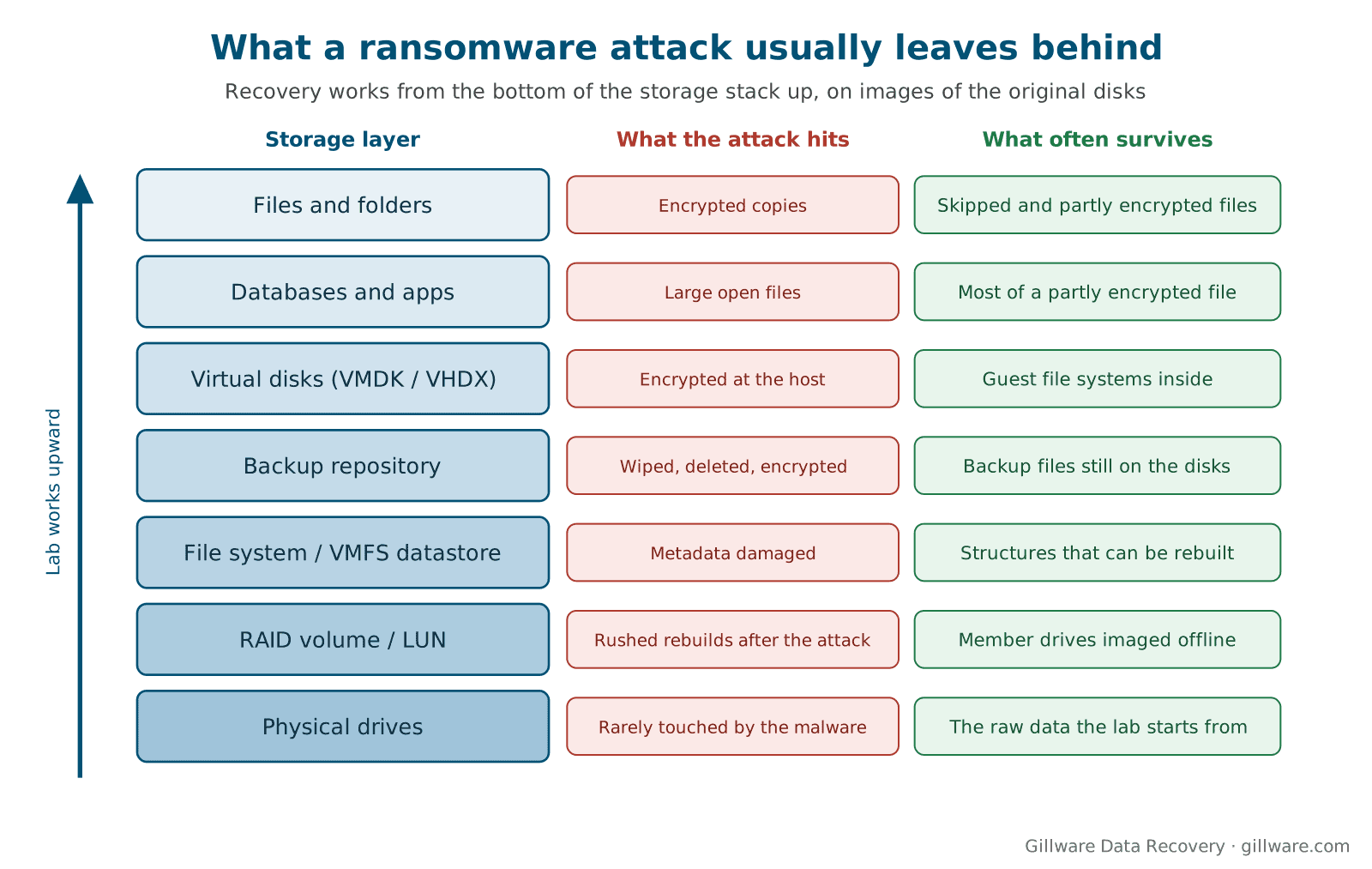
What we do is find and rebuild everything the attack did not fully destroy, and in real ransomware cases that is often a great deal. Attacks are built for speed, not thoroughness, and they leave gaps:
- Files that were skipped or only partly encrypted. To work quickly, many ransomware strains encrypt only part of each large file, or stop partway through a volume when a host is shut down. Large files such as virtual disks, databases and backup files can keep most of their contents intact.
- Deleted originals. Some ransomware writes an encrypted copy of each file and deletes the original. Until that space is reused, the original data can still be on the disk.
- Snapshots, shadow copies and older versions that the attacker deleted from the management console but whose data still sits on the underlying storage.
- Backup repositories that were wiped, reformatted or partly encrypted, where the backup files themselves can be rebuilt from what remains on the repository disks.
- Damaged file systems and volumes, including VMFS datastores, NTFS and ReFS volumes and RAID metadata that were corrupted during the attack or the cleanup that followed.
- Data behind a decryptor that failed. When a decryptor crashes partway through or produces damaged output, the encrypted originals and the partial output together often give us more to work with than either one alone.
The ransomware cases we see most often
Virtual machines encrypted at the hypervisor
Attackers increasingly go straight for the virtualization host. They encrypt the virtual disk files on VMware ESXi or Hyper-V storage, which takes every server on that host down at once. Because virtual disks are very large, they are a common target for partial encryption, and the guest file systems inside them are often largely readable once the virtual disk structure is rebuilt. Our pages on VMware data recovery, ESXi data recovery, VMDK recovery and Hyper-V data recovery go deeper on that layer.
Backups deleted, wiped or encrypted first
Modern attacks go after the backups before the production systems. The repository volume is wiped or encrypted, retention points are deleted, or a setting everyone thought made the backups immutable turns out not to have covered them. When the backup software can no longer see its own chain, the data is often still on the repository disks. We work the raw backup files for the common platforms, including Veeam repositories, corrupted Veeam backup files, Veeam backups that have become unavailable, Acronis backup files, StorageCraft image chains and VHDX virtual disks.
File servers, NAS units and arrays
Shared file servers and NAS units hold the documents a business runs on, so they are usually encrypted early. Many of these systems sit on RAID, and an attack (or a hurried rebuild afterward) can leave the array itself in trouble. Our RAID data recovery, server data recovery, NAS data recovery and SAN data recovery engineers image every member drive and rebuild the volume offline, so nothing is written to the originals.
Databases and line-of-business applications
Database files are large and constantly open, which makes them prone to partial encryption and to damage when servers are shut down mid-attack. Where the database file itself can be rebuilt, the records inside it can often be extracted even if the application can’t open it. See our database data recovery page for the systems we work on.
Backup repository wiped or encrypted? Start with a free consultation with one of our enterprise storage engineers.
What to do in the first hour
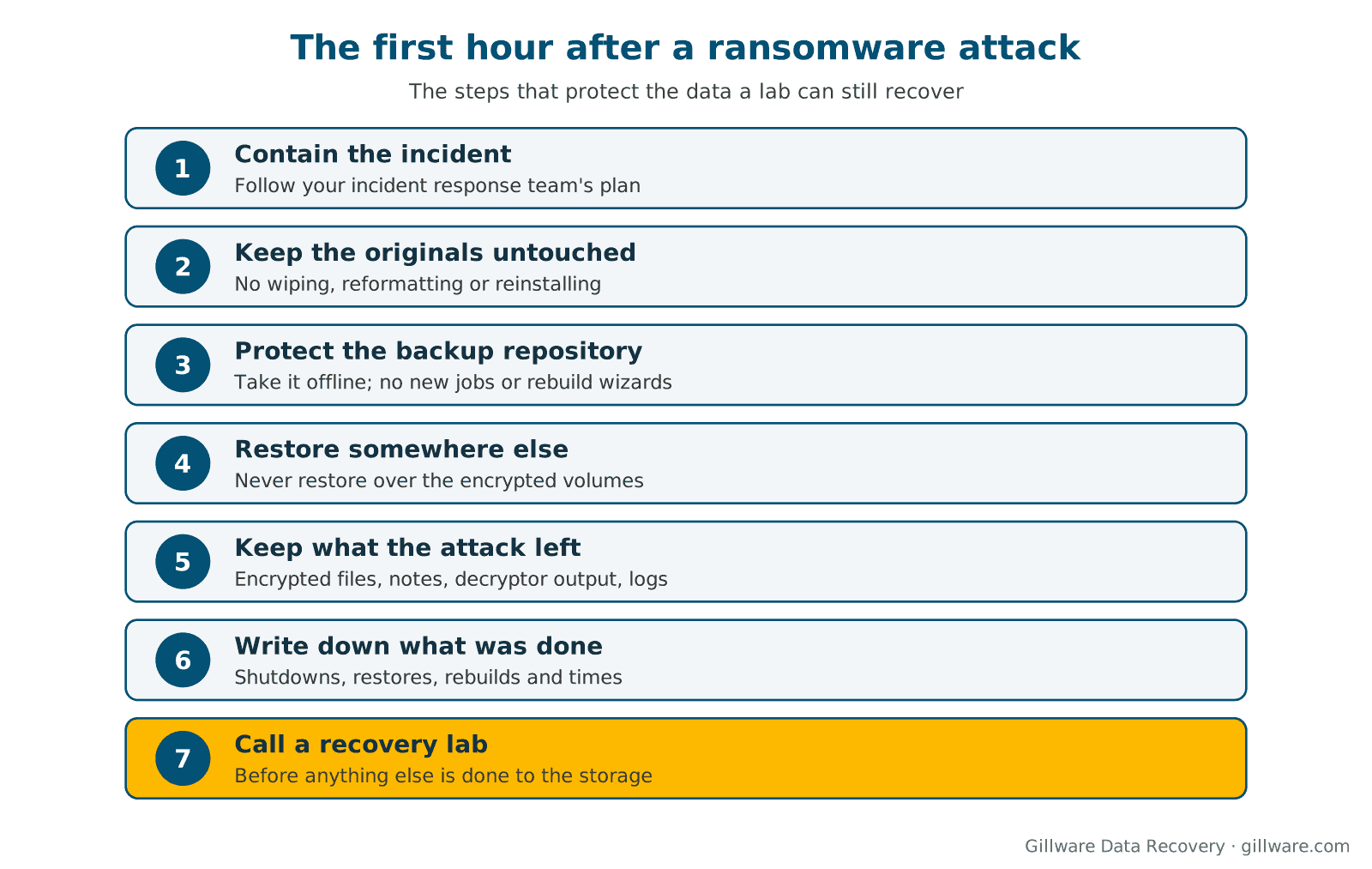
The first decisions after an attack decide how much data is left to recover. Containment comes first, and your incident response team leads it. Once the environment is contained, the most damaging step is usually a well-meant one: wiping and rebuilding, re-running backup jobs, or restoring over the affected volumes. If you do nothing else, do these things:
- Follow your incident response plan for containment. Isolate affected systems as your incident response firm directs. If you need to keep a host running for their investigation, keep it running; if not, shut it down cleanly.
- Do not wipe, reformat or reinstall the affected servers, hosts or repository. Rebuilding clean systems is often the right business decision, but do it on new hardware, and keep the original disks untouched until the recovery question is answered.
- Protect the backup repository. Take it offline. Do not run new backup jobs into it, do not re-initialize it, and do not let a consistency check or rebuild wizard rewrite the backup chain.
- Do not restore over the encrypted volumes. Restore onto separate storage if you have clean backups. Overwriting the originals destroys the data a lab would recover from them.
- Keep everything the attack produced. Encrypted files, ransom notes, any decryptor and its output, and logs. Don’t delete encrypted files to free up space.
- Record what has been done. Which systems were shut down, restored, rebuilt or reimaged, and when. That tells our engineers where the remaining data is likely to be.
- Call us before anything else is done to the storage. A short consultation with an enterprise storage engineer will tell you which systems are worth sending, what to send, and what to leave alone.
How a ransomware recovery case works
Consultation and scoping. We start with a call with your IT lead, MSP or incident response lead, and the adjuster if one is involved. We cover what was hit, what has been done since, and which systems the business needs back first. You leave the call knowing which systems are worth sending and what the work will involve.
Imaging before anything else. In our lab, every drive is imaged before any analysis. We work only on those images, so nothing is ever written to your original disks. Arrays are rebuilt virtually from the member images.
Assessment of what survived. Our engineers map what the attack touched: which files and virtual disks are fully encrypted, partly encrypted or untouched, what deleted data and older versions remain, and which file system and backup structures can be rebuilt. You get that assessment in plain language before recovery work goes further.
Recovery in priority order. We recover the systems you name first, so the business can restart before every last file is processed. When the standard approach stops, our engineers build what the case needs; see the software Gillware uses to recover data.
Verification and secure delivery. Recovered data is checked and delivered on an encrypted drive or by secure transfer, with a clear record of what was recovered.
When the hardware is healthy and the damage is logical, some cases can be worked through a secure remote session instead of shipping drives. Our remote data recovery page explains when that is possible.
Working with incident response firms, insurers and adjusters
Ransomware cases almost always involve more people than the business that owns the data. It is common for an incident response firm, a breach coach and an insurance adjuster to be part of the case from the first call, and we are used to working that way.
- We are not incident response. We do not contain breaches, hunt threats, negotiate with attackers or handle breach notification. Your incident response firm leads the incident; we scope the recovery portion and coordinate with them on timing, evidence handling and which systems to recover first.
- The adjuster can join the scoping call, so everyone hears the same assessment of what is recoverable and what the work involves.
- Written scope and terms before anything ships, which your finance team and the adjuster can review alongside you.
- Documentation of what was recovered at the end of the case, to support your own reporting and claim documentation.
Whether a policy covers recovery work is between you and your carrier. We can’t advise on coverage or claims, but we can make sure the people reviewing the work have what they need.
How pricing works
Every case starts with a free consultation, and you approve all recovery fees in writing before any recovery work begins. Ransomware cases vary widely, from a single encrypted file server to a cluster of hosts, a SAN and a backup repository, so the scope and terms are set out after the consultation and before anything ships. Emergency handling is available for business-critical downtime. For a sense of how multi-drive cases are scoped, see RAID and server data recovery cost.
Why Gillware
Gillware has spent more than two decades recovering data from failed and damaged storage, and since 2004 we have recovered data from more than 100,000 storage devices, from single drives to multi-controller SANs. More than 1,500 IT professionals refer their clients to us. Our engineers work in an ISO 5 (Class 100) cleanroom with a deep donor parts library, and they have rebuilt RAID arrays, VMFS datastores, virtual disks and backup chains for businesses across the country. For larger environments, our enterprise data recovery page describes how we work with IT teams on multi-system cases.
Ransomware data recovery FAQ
Can you decrypt our files?
No lab can honestly promise to break modern ransomware encryption, and we don’t. What we recover is the data the encryption did not reach: skipped and partly encrypted files, deleted originals, older versions and snapshots, and backup files and volumes that can be rebuilt from the disks.
Our backups were encrypted or deleted too. Is the data gone?
Not necessarily. Wiped or partly encrypted repositories and backup files can often be rebuilt from what remains on the repository disks. The sooner writes to the repository stop, the more is usually left.
Should we wipe and rebuild the servers?
Rebuild on new hardware if the business needs to, but keep the original disks untouched until you know what can be recovered from them. Wiping or reimaging the originals overwrites the data we would recover.
A decryptor ran but the files are still damaged. Can you help?
Often, yes. Keep the encrypted originals, the decryptor’s output and any logs. Together they frequently give our engineers enough to rebuild files the decryptor damaged or skipped.
Do you work with our incident response firm and our insurer?
Yes. Your incident response firm handles the incident; we handle the storage. Adjusters can join the scoping call and, with your permission, are copied on case correspondence and invoices.
What should we send?
Usually the drives from the affected systems and the backup repository, labeled with their slot or bay numbers. For SANs, clustered hosts and large repositories, we agree the details before anything ships, and some cases can be worked remotely.
Hit by ransomware? Let’s find what the attack left behind.
Our highly experienced engineers strive for the highest success rates in the industry. Talk with one of our enterprise storage engineers before anything else is done to the system.
- Free technical consultation with one of our enterprise storage engineers
- A written recovery agreement before work begins
- No billing surprises: you approve all recovery fees in advance
- Emergency service for business-critical downtime