
Emergency Data Recovery Services
Ransomware has encrypted your file servers and the backup repository with them. A RAID or SAN array has dropped offline in the middle of the business day. Someone deleted, or an attacker wiped, the backups you were counting on. When storage fails like this, every hour of downtime costs money, and the decisions made in the first hour often decide how much data can still be recovered. Gillware’s emergency data recovery service is built for exactly this situation: business-critical systems, compressed timelines, and an engineering team that has spent more than two decades recovering data from failed and damaged storage.
Ransomware, wiped backups or a failed array?
Stop changes to the affected systems and talk with one of our enterprise recovery experts first. The consultation is free.
This page explains what to do in the first hour, how emergency service works in our lab, what turnaround realistically looks like for different kinds of storage, how we work alongside cyber-insurance carriers, adjusters and incident response firms, and how to start an emergency case right now.
The emergencies we see most often
Emergency cases rarely start with a single dead hard drive. Most of them come from business systems where the failure takes production, and sometimes the recovery safety net, down with it.
Ransomware events. Attackers encrypt production servers, virtual machines and file shares, and they increasingly go after the backups first. Sometimes the ransom is paid and the decryptor fails partway through, leaving files damaged in a different way. Our ransomware data recovery work starts at the storage layer: what is still physically on the disks, what the encryption actually touched, and which structures can be rebuilt.
Deleted or wiped backups. A backup repository that was deleted, reformatted, encrypted or overwritten during an attack, or by mistake during cleanup, is one of the most urgent cases we handle, because it is often the last copy. That includes Veeam repositories (see our pages on Veeam data recovery, corrupted Veeam backup files and “backup files are unavailable” errors), StorageCraft image chains that will not consolidate, Acronis backups that will not restore, and Hyper-V virtual disks (VHDX file recovery).
Failed RAID, SAN and server arrays. Multiple drives drop out, a controller fails, a rebuild stalls or goes wrong, or a LUN suddenly shows as empty. These cases belong with RAID data recovery, SAN data recovery, server data recovery and NAS data recovery engineers who can image every member and rebuild the array offline.
Single devices that cannot wait. A failed drive holding the only copy of a filing, a production edit or a regulatory archive can also be an emergency. The same priority process applies; the device class sets how fast the work can physically go.
What to do in the first hour
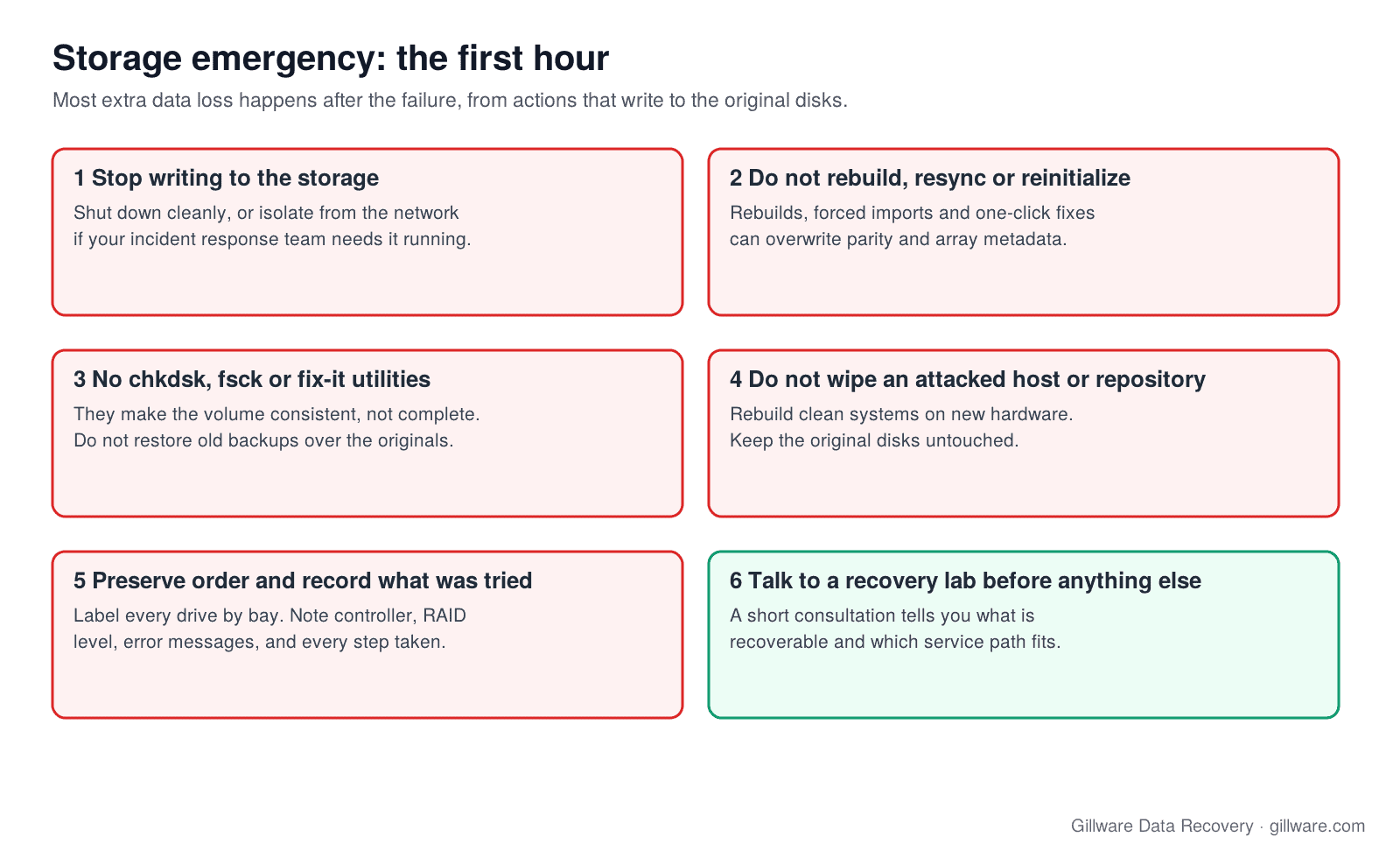
The first hour is when well-meant actions do the most damage. Rebuilds, file system checks and reinstallations all write to the very disks that hold the data. If you do nothing else, do these things:
- Stop writing to the affected storage. Shut down affected servers and arrays cleanly if you can, or isolate them from the network if your incident response team needs them running. Do not let anyone keep experimenting on the original disks.
- Do not rebuild, resync or reinitialize an array. A rebuild onto a replacement drive, a forced import, or a one-click fix in a storage console can overwrite the parity and metadata a lab needs to reconstruct the volume.
- Do not run chkdsk, fsck or vendor fix-it utilities on a damaged volume, and do not restore an old backup over the affected volumes. Those tools change the disk to make it consistent, not to get your files back.
- Do not wipe, reformat or reinstall an attacked host or backup repository. Rebuilding clean systems is often the right business decision, but do it on new hardware, and keep the original disks untouched until the recovery question is answered.
- Preserve drive order and configuration. Label every drive with its bay or slot number before anything is removed. Note the controller model, RAID level, stripe settings and any error messages, and take photos of the screens. Keep failed drives, even ones you think are dead.
- Write down what has already been tried. Which drives were swapped, which rebuilds were started, which tools were run and when. This tells our engineers where the remaining data is likely to be.
- Call us before anything else is done to the system. A short consultation with an enterprise recovery expert will tell you whether the storage is recoverable, which service path fits, and what to ship or leave in place.
If a ransomware incident is still active, follow your incident response team’s containment plan first. We work on the storage once the environment is safe to touch, and we coordinate with that team so that recovery does not interfere with their investigation.
What “emergency” means in our lab
Every case Gillware handles moves through the same stages: intake, evaluation, engineering, verification and delivery. Each stage has a queue. A standard case waits its turn in each one. An emergency case moves to the front of every queue.
Evaluation is accelerated. An emergency evaluation goes to the next available senior engineer, often within hours of the device arriving at the lab, so you get a clear picture of the failure and the recovery path quickly.
Engineering time is dedicated. Once a recovery path is agreed, engineering hours are assigned to your case rather than shared with the standard queue. On complex cases that can mean engineers working the case in extended shifts to compress calendar time.
Verification and delivery are prioritized. Recovered data is checked and delivered ahead of the outbound queue. The delivery method, whether an encrypted destination drive, secure electronic transfer or physical media shipped overnight, is agreed at intake so nothing waits on logistics at the end.
Emergency service is not a promise that every case finishes faster. It is a promise that every hour the case allows is spent working it. The failure itself sets the floor.
Realistic turnaround, and why physics sets the floor
How fast a recovery can go depends on what failed, how much data there is, and how damaged the media is. Some steps cannot be rushed: a drive with weak heads has to be read slowly or it fails completely, and imaging a large array takes as long as it takes to read every sector of every member.
Single hard drives with mechanical or firmware failures. When matching donor parts are on hand, straightforward cases are typically completed within 24 to 72 hours of arrival. Platter damage or very weak media takes longer, because the drive has to be read gently.
SSDs and flash storage. These depend on the controller and on whether the data is encrypted at the hardware level. Some cases move quickly; others need firmware-level work that cannot be compressed much.
RAID, SAN and NAS arrays. Large multi-drive arrays usually take several business days even on emergency priority, because every member drive has to be imaged before the array is rebuilt offline. Machine time dominates the schedule, so we image drives in parallel and rebuild as soon as enough members are imaged.
Backup repositories and virtual machines. Once the underlying disks are imaged, the work moves to rebuilding the backup files, virtual disks and file systems inside them. We prioritize the systems you name first, so the business can restart before every last file is processed.
During the consultation we will give you a realistic turnaround range for your specific case, and we would rather give you an honest estimate than an optimistic one.
Production systems down? Start with a free consultation with one of our enterprise recovery experts.
Emergency service options
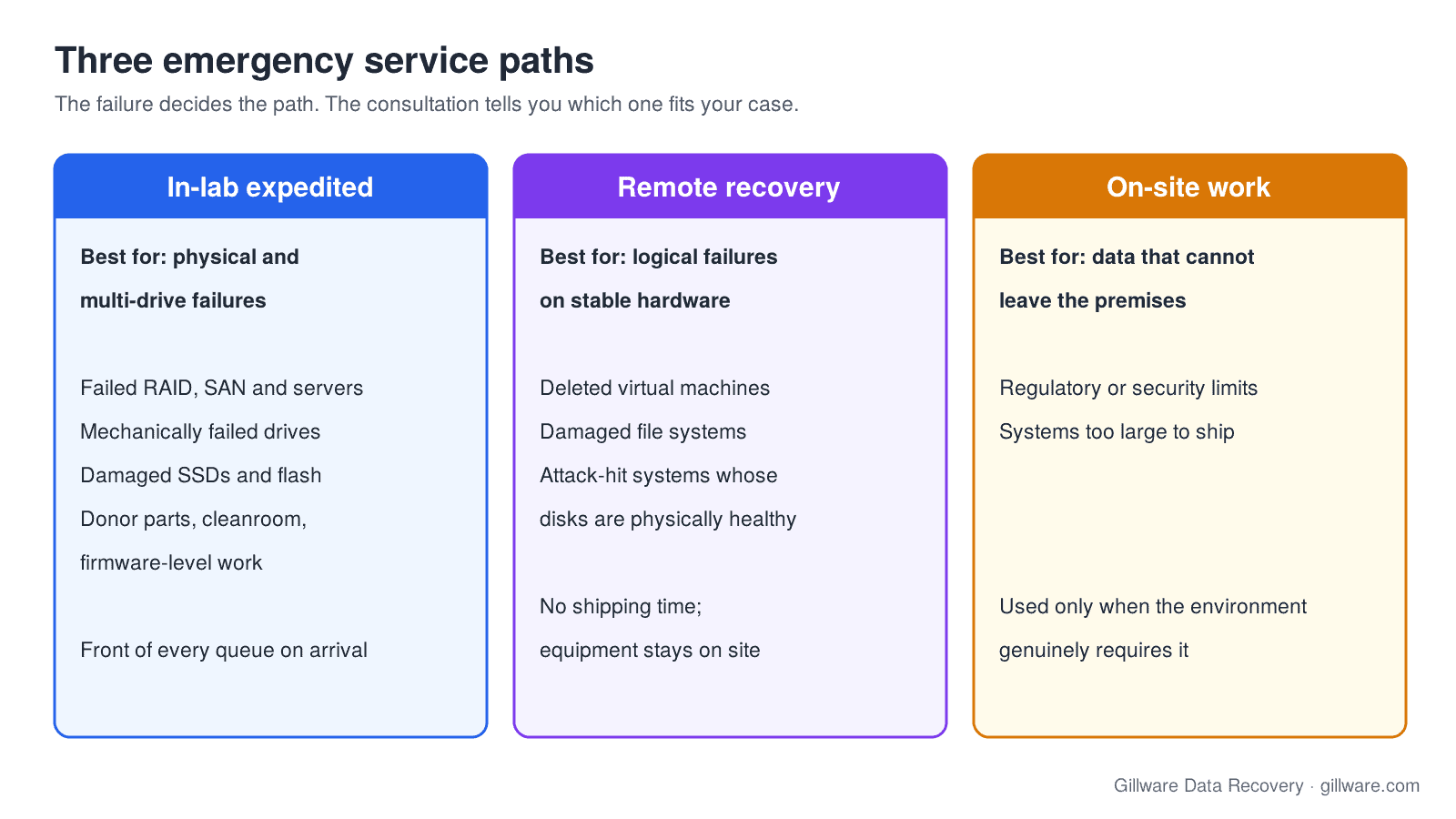
In-lab expedited service. The default emergency path. Your drives come to our lab in Madison, Wisconsin, move to the front of every queue on arrival, and are worked continuously until the recovery is done. This is the right path for failed RAID arrays and SANs, failed servers, mechanically failed hard drives, damaged SSDs, and any case that needs donor parts, cleanroom work or firmware-level engineering.
Remote recovery. When the hardware is stable and the problem is logical, such as a deleted virtual machine, a damaged file system, or ransomware-hit systems whose disks are physically healthy, our engineers can often work through a secure encrypted session without the equipment leaving your site. Remote work avoids shipping time and chain-of-custody questions. Learn more about remote data recovery.
On-site work. For data that cannot leave the premises for regulatory or security reasons, or systems too large to ship practically, an engineer can travel to your site with the equipment needed. This option is for environments that genuinely require it; most emergencies are resolved faster in the lab.
Working with cyber-insurance carriers, adjusters and incident response firms
Many emergency cases, especially ransomware events, involve more parties than the business that owns the data. It is common for an insurance adjuster, a breach coach or an incident response firm to be part of the case from the first call. We are used to working that way.
- The adjuster can join the scoping call. We are happy to have the carrier’s adjuster or your incident response lead on the consultation, so everyone hears the same assessment of what is recoverable and what the work involves.
- Written scope and terms they can review. Before anything ships, you receive the scope of work and terms in writing, so the adjuster and your finance team can review them alongside you.
- Documentation of what was recovered. At the end of the case you receive a clear record of what was recovered, which supports your own reporting and any claim documentation you need to provide.
- Billing transparency. With your permission we copy the adjuster on case correspondence and invoices, so nobody is surprised by a fee and nothing waits on forwarded emails.
Whether a policy covers recovery work is between you and your carrier. We cannot tell you what your policy covers or advise on a claim, but we can make sure the people who need to review the work have what they need, when they need it.
Who emergency service is for
IT managers and MSPs responsible for production servers, virtualization hosts and client environments under a service-level agreement, where the business is effectively offline until the storage comes back.
Legal. File servers and document management storage during active litigation, where a filing deadline or discovery schedule cannot move.
Healthcare. EMR, imaging archive and scheduling storage, where downtime means cancelled procedures and the data carries strict handling requirements.
Finance and accounting. Accounting systems and compliance archives with reporting windows that do not wait.
Media and production. Editorial storage during post-production and footage that cannot be shot again, with delivery dates fixed by contract.
Manufacturing. Production, historian and quality-system storage where a line-down condition is measured per hour and per shift.
For larger environments, our enterprise data recovery page describes how we work with IT teams on multi-system cases.
How emergency intake works
Our online case intake is available 24 hours a day, every day of the year. A submission marked as an emergency notifies our on-call client advisors and engineering leads directly, at any hour. Outside business hours, an advisor contacts you as soon as the notification reaches them, often well before the next morning.
Our client advisor line, 877-624-7206, is staffed during business hours for consultations, scoping and case status. If you already know the device and the failure, such as an array that dropped offline or a server that will not boot, the fastest path is to open the case online straight away. Shipping arrangements, including overnight options, are confirmed in your written terms before anything ships.
How emergency pricing works
Emergency service carries different terms from a standard single-device case. Priority handling and dedicated engineering time are priced above standard service, and shipping terms differ. How much depends on how far the calendar has to compress, the size and complexity of the system, and whether the work happens in our lab, remotely or on site.
Every case starts with a free consultation, and you approve all recovery fees in writing before any recovery work begins. Your terms, covering what the service includes, priority and shipping arrangements and how fees are approved, are set out before anything ships, so there are no surprises once the clock is running. For a sense of how multi-drive cases are scoped, see RAID and server data recovery cost.
Why lab capability matters under time pressure
A lab that can really deliver emergency service needs three things in place before your call: a working cleanroom, engineers experienced enough to make the right call quickly, and a donor parts library deep enough that the case is not stuck waiting for a component. None of those can be set up on the day of an emergency.
Gillware works in an ISO 5 (Class 100) cleanroom environment, keeps a hard drive donor library covering thousands of drive families and firmware revisions, and has engineers who have spent their careers on failed hard drives, RAID arrays, servers and virtual environments. Since 2004, Gillware has recovered data from more than 100,000 storage devices, from single drives to multi-controller SANs. When standard tools stop, our engineers build what the case needs; see the software Gillware uses to recover data.
What emergency service is not
Emergency data recovery is storage-layer recovery: getting data back from physically or logically failed storage, including storage damaged by an attack. It is not incident response. We do not contain breaches, hunt threats, negotiate with attackers or handle breach notification. If you are in the middle of an incident, your incident response firm leads; we scope the recovery portion and coordinate with them on timing, evidence handling and which systems to recover first.
Emergency data recovery FAQ
Is the emergency evaluation free?
The consultation with an enterprise recovery expert is free. Emergency cases carry different terms from standard cases, including priority handling and shipping, and those terms are set out in writing before anything ships.
Should we rebuild the array or restore from backup first?
Not on the original disks. A rebuild or a restore over the affected volumes can overwrite the data a lab would recover. Restore onto separate hardware if you need to, and leave the originals untouched until you have spoken with us.
Our backups were encrypted or deleted in the attack. Is the data gone?
Not necessarily. Deleted or partially encrypted backup files and repositories can often be rebuilt from what remains on the disks. The sooner writes stop, the more is usually left to work with.
Can our insurance adjuster be involved?
Yes. Adjusters often join the scoping call and are copied on correspondence and invoices with your permission. We cannot advise on coverage or claims, but we provide written scope, terms and documentation of what was recovered.
Do you work with our incident response firm?
Yes. We work on the storage, they handle the incident. We coordinate with them on when systems can be touched and which data to recover first.
How fast can you start?
An emergency submission notifies our on-call team at any hour. Once your drives arrive, or a remote session is set up, the case moves to the front of every queue. The consultation will give you a realistic turnaround for your case.
Business systems down? Talk to an engineer before anything else.
Our highly experienced engineers strive for the highest success rates in the industry. Talk with one of our enterprise storage engineers before anything else is done to the system.
- Free technical consultation with one of our enterprise storage engineers
- A written recovery agreement before work begins
- No billing surprises: you approve all recovery fees in advance
- Emergency service for business-critical downtime