
Video Recovery Experts
When footage won’t play, won’t import, or has simply vanished, it rarely means the video is gone. In almost every case we see — a cinema camera that lost power mid-take, a field recorder whose clip won’t open, a security DVR that shows an error instead of last night’s recording — the footage is still physically on the card, SSD, or hard drive. What’s missing is the structure a player needs to read it. Rebuilding that structure is what we do.
Gillware has recovered video for filmmakers, production houses, IT teams, insurers, investigators, and law firms for more than two decades, out of an ISO-5 Class 100 cleanroom in Madison, Wisconsin. This page is the overview: the common thread behind every video-loss case, the specific situations we handle, the storage underneath it all, and how a professional recovery actually works.
The problem is almost always the same
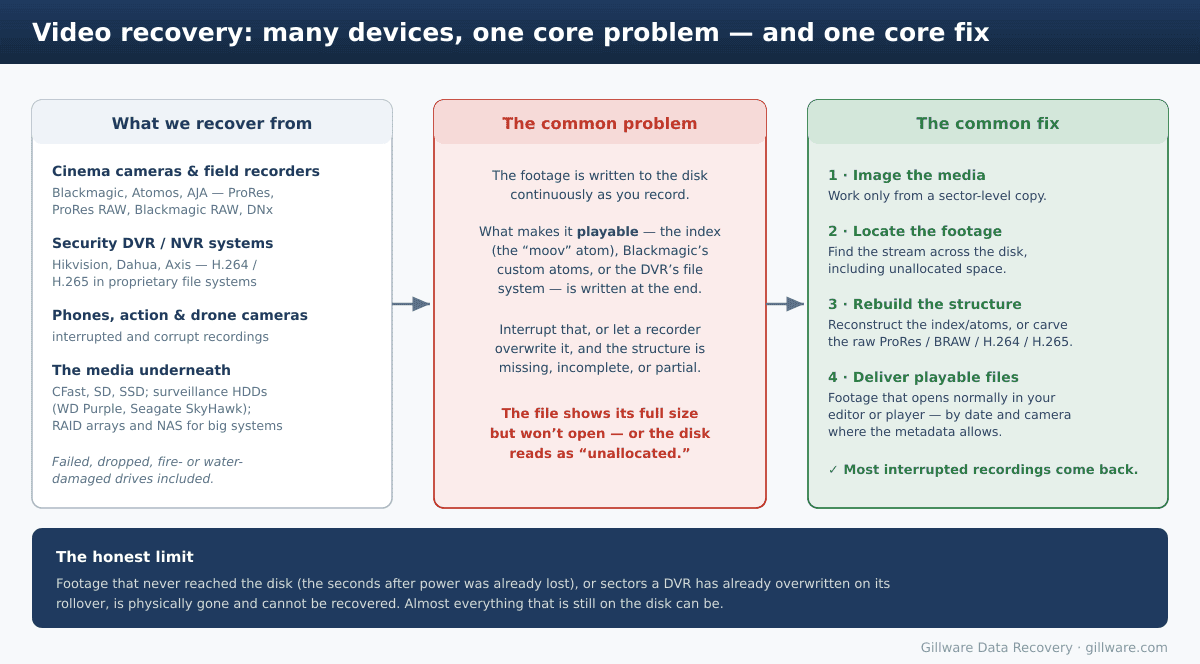
Whatever the device, video is written to the disk continuously while you record. The piece that turns that raw stream into a file a player can open — the index (in QuickTime-based formats, the “moov” atom), Blackmagic RAW’s own custom atoms, or a security recorder’s proprietary file system — is written at the end, when the recording finalizes. Interrupt that step, and the footage is on the disk but the map to it never gets saved. The clip shows its full size yet won’t open, or the disk reads as “unallocated” on a computer.
That single pattern explains the great majority of video recovery. The honest exception is overwriting: footage that never reached the disk, or sectors a recorder has already reused on its loop, is physically gone and cannot be brought back. Everything still on the disk almost always can be.
Camera and external-recorder footage
Recordings from cinema cameras and on-set recorders most often fail because of a power loss, a dead battery, a pulled drive, or media that couldn’t keep up. The fix is to carve the recorded stream off the media and rebuild the container around it.
We cover the specifics by platform:
- Unfinalized and power-loss recordings — the general case behind a clip that records, ends abruptly, and then won’t play.
- Atomos Ninja and Shogun footage — when the on-unit recovery prompt “does nothing” and a ProRes or ProRes RAW clip won’t reopen.
- Blackmagic BRAW and HyperDeck recordings — black-thumbnail BRAW clips that won’t open in DaVinci Resolve, and the “bad public movie atom” error on ProRes.
- Video files that show 0 bytes on a Mac — large recordings on exFAT media that a Mac suddenly reports as empty.
- GoPro camera and microSD recovery — bent or crushed microSD cards from helmet and drone mounts, water damage from housing failures, “SD Error” on the display, missing files, and broken .MP4 recordings from mid-shoot battery loss.
- A live-event recovery from a failed recorder module — a documented case study of footage rebuilt from a recorder that died during a shoot.
Security camera, DVR, and NVR footage
Surveillance recorders are a world of their own: they store footage in proprietary file systems no computer can read, and they record in a loop, overwriting the oldest video once the disk fills. That makes two questions decisive — whether the footage you need was already overwritten, and whether the recorder’s format can be parsed or has to be carved.
Our security DVR and CCTV footage recovery page covers the major systems (Hikvision, Dahua, Axis and the rest), the rollover limit, fire- and water-damaged units, and the forensic handling that legal and insurance work requires. If the issue is simply a locked recorder no one can get into, see recovering a lost DVR/CCTV password.
Post-production and editorial storage recovery
Post-production is its own layer of the pipeline, and it fails differently than cameras and DVRs. Corrupt project files, editing shared storage that dropped a workspace, and the kind of database damage that hits when an NLE update lands on a Sunday night — these are recoveries for editors, DITs, and post houses, and they run through the same lab from a different starting point.
Our video production data recovery hub is the routing page for post. It covers Adobe Premiere Pro projects (the “project appears to be damaged” error and poisoned autosaves), Final Cut Pro libraries (the CurrentVersion.flexolibrary error and broken .fcpbundle packages), DaVinci Resolve project databases (corrupt project.db after major version upgrades), Avid Media Composer bins and MediaFiles indexes, and editorial RAID and shared storage on Avid Nexis, Facilis TerraBlock, EditShare EFS, and high-throughput NAS and Fibre Channel SAN configurations.
The storage your video lives on
Underneath every one of these cases is a piece of storage, and recovering the footage often starts with recovering the media itself:
- Surveillance hard drives run 24/7 and fail like any other drive. We handle the two most common lines directly: WD Purple and Seagate SkyHawk, alongside every other hard drive brand.
- Camera media — CFast cards, SD cards, and USB-C SSDs — falls under our flash and SSD recovery work, as do the microSD cards in a dash cam.
- Enterprise NVRs frequently record to a RAID array or a NAS rather than a single disk. Those become a RAID or NAS recovery first, after which we parse out the footage — see NVR RAID and surveillance server recovery for that case.
How professional video recovery works
The process is consistent across all of it. We image the card, SSD, or hard drive sector by sector and work only from that copy, so nothing we do can reduce your chances. We locate the recorded stream across the disk, including unallocated space, and reassemble fragmented pieces in their correct order. Then we rebuild the structure the file needs — the QuickTime index for ProRes, Blackmagic RAW’s custom frame index, or a DVR’s proprietary file-system metadata — or, where that’s gone, carve the raw stream directly. Finally we deliver footage that opens and plays normally, organized by date and camera where the metadata allows.
That work spans the formats professionals actually shoot and store: ProRes, ProRes RAW, Blackmagic RAW, Avid DNx, and H.264/H.265, in QuickTime containers and in vendor-specific surveillance formats alike. When the drive is physically damaged — a head crash, or a unit pulled from a fire — the platters are rebuilt in our cleanroom before any of that begins. And for evidentiary work, we produce write-blocked forensic images with MD5/SHA hashing and a documented chain of custody.
The honest limits, and what it costs
Most interrupted recordings come back largely intact, but recovery isn’t magic. Anything that never reached the disk — the final seconds after power was already lost, or frames dropped by media that couldn’t keep up — can’t be recovered, and neither can footage a DVR has already overwritten on its rollover.
For standard, single-piece recoveries our model is risk-free: no data, no charge. More involved cases — multi-disk arrays, fire-damaged units, ProRes RAW and BRAW reconstruction, and the overwritten-footage and court-order scenarios common in legal work — involve hands-on engineering time, so we evaluate them individually and give you a clear, honest assessment and a quote before any work begins. You’ll always know where your case stands before you commit.
Lost Footage You Can’t Reshoot? Let’s Take a Look
Set the card, drive, or recorder aside and talk to us. Free, confidential evaluation across cameras, recorders, and security systems.
Or call us: 877-624-7206