
ESXi and VMware Ransomware Recovery: Encrypted VMDK and Flat Files
When ransomware reaches a VMware ESXi host, it does not need to touch every server in the building. It encrypts the virtual disks on the datastore, and every virtual machine on that host goes down at once: file servers, domain controllers, databases, line-of-business applications, and often the backup server that was supposed to bring them back. If the decryptor is unavailable, fails partway, or the backups were destroyed first, what is left is a datastore full of encrypted VMDK and flat files. This page explains what hypervisor-level ransomware actually does to those files, what to do in the first hour, and what a recovery lab can and cannot rebuild from what remains.
ESXi host hit by ransomware?
Stop changes to the host and datastores before anyone reinstalls or reformats. Talk with one of our enterprise storage engineers first; the consultation is free.
One thing up front, because it shapes everything below: Gillware recovers the storage, not the encryption. We do not break or bypass modern encryption, and no lab can honestly promise to. What we recover is everything the attack did not fully destroy, and on a hypervisor that is often far more than it first appears. For the wider picture of how we handle ransomware cases across servers, NAS units and backup repositories, see our ransomware data recovery service.
Why attackers go after ESXi hosts
A single hypervisor can run dozens of virtual machines. Encrypting the host’s datastores takes every one of them offline in one step, without the attacker needing to break into each guest operating system. Security software inside the guests often never sees it happen, because the encryption runs on the host, underneath them. That is why hypervisors, and the backup servers that protect them, have become a priority target in business ransomware incidents.
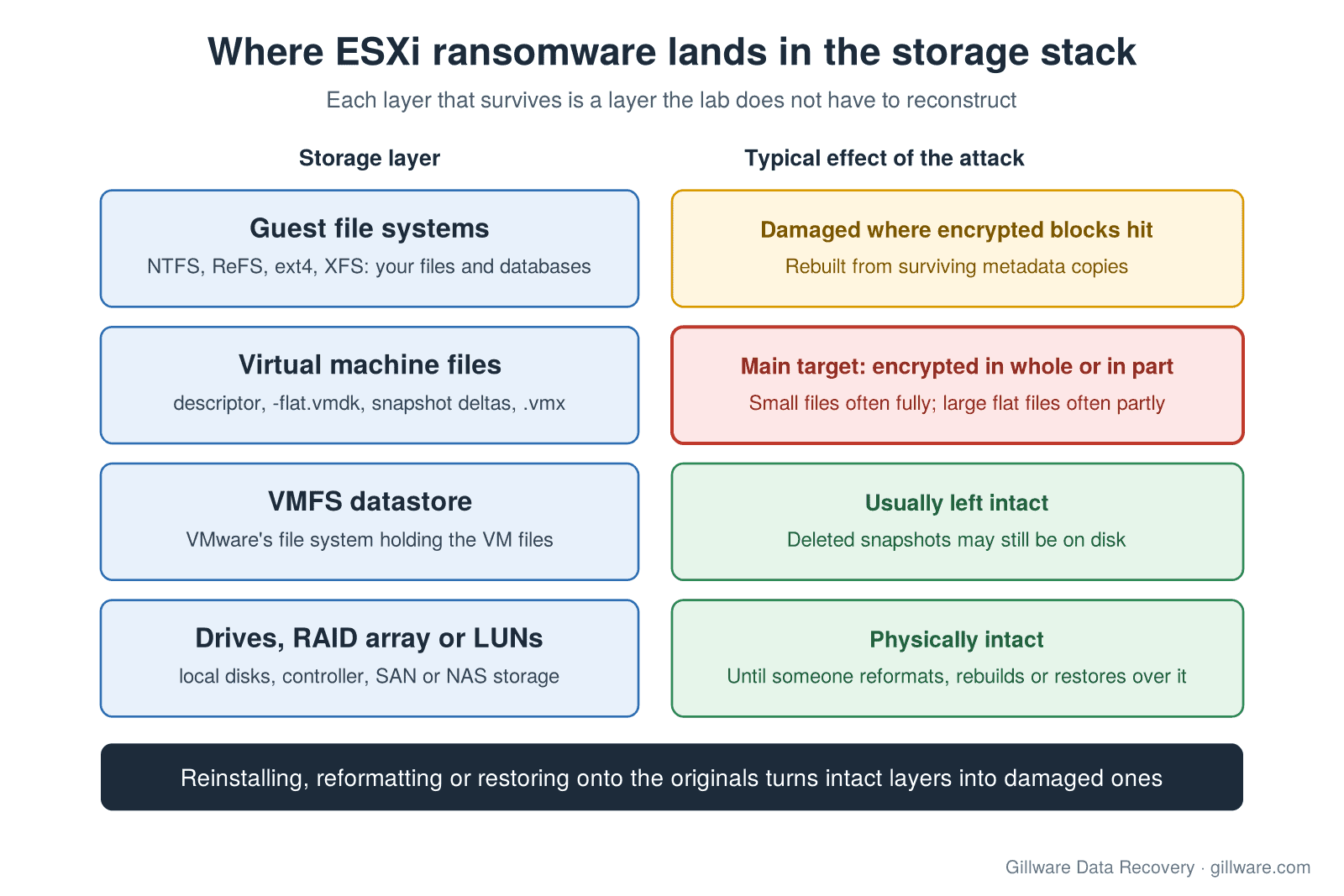
The storage stack under a VMware environment has several layers, and the attack usually lands on only one or two of them:
- Physical storage: the drives in the host, a RAID array behind a hardware controller, or LUNs presented by a SAN or NAS.
- VMFS datastore: VMware’s own file system, which holds the files that make up each virtual machine.
- Virtual machine files: for each VM, a small descriptor file, the large flat file that holds the actual disk contents, snapshot delta files, and configuration files such as the .vmx.
- Guest file systems: NTFS, ReFS, ext4, XFS and others inside each virtual disk, holding the databases, mailboxes, shares and documents the business actually needs.
Hypervisor ransomware typically works at the third layer. It encrypts the virtual machine files sitting on the datastore and leaves the datastore, the array and the drives physically intact. That matters, because each layer that survives is a layer a lab does not have to reconstruct.
What hypervisor ransomware does to VMDK and flat files
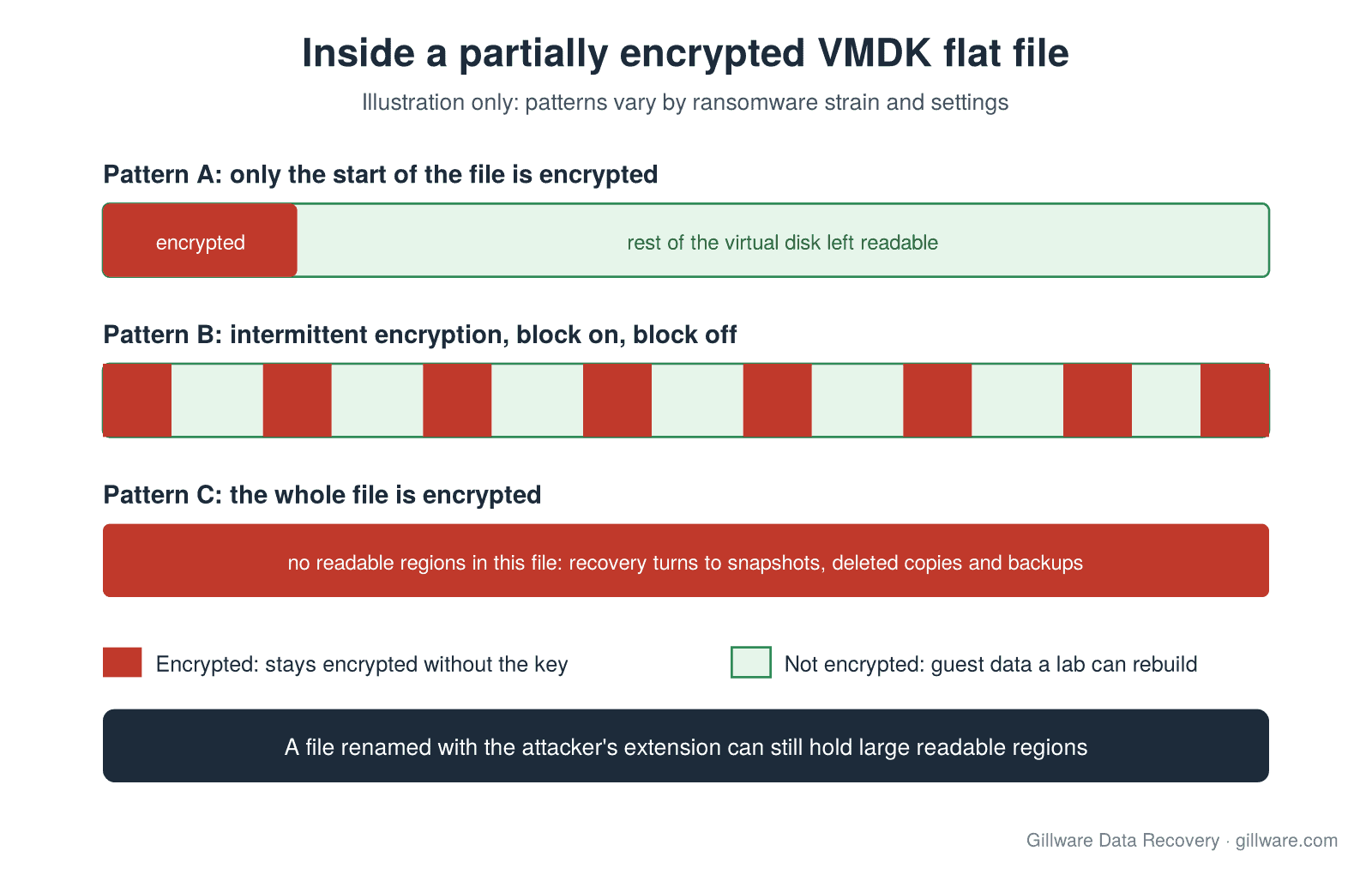
Virtual disks are large. A file server’s flat file can run to many terabytes, and encrypting every byte of every virtual disk on a busy host takes time an attacker does not want to spend. So many ESXi-targeting strains do not encrypt whole files. Depending on the strain and its settings, the encryption may cover only the beginning of each file, or work through it intermittently, encrypting one block and skipping the next, or skip files over a certain size entirely. Smaller files, such as descriptors and configuration files, are often encrypted completely or replaced.
The result is that a “fully encrypted” datastore is frequently nothing of the kind. Inside a partially encrypted flat file, large regions of the guest’s disk may still be sitting there in the clear: whole folders of documents, database pages, mailbox stores, virtual machine images within backups. The guest file system’s own structures are damaged where an encrypted block landed on them, but most modern file systems keep redundant copies of key metadata in more than one place, and the file data between encrypted blocks can often be located and reassembled.
Other things we commonly see on attacked hosts:
- Renamed or extended file names. The VM files are still there, renamed with the attacker’s extension. Renaming them back does nothing; the content is what changed.
- Destroyed or encrypted configuration. The .vmx and descriptor files are encrypted or overwritten, so ESXi no longer knows how to open the virtual disks even where the disk content is largely intact. Descriptors are small and can be rebuilt from what the flat file itself reveals.
- Deleted snapshots and backups. Attackers often delete snapshots and target backup servers and repositories before encrypting production. Deleted data on a VMFS volume is not necessarily gone; until it is overwritten, it can still be on the disks.
- Failed decryption. Where a ransom was paid or a decryptor was obtained, it may crash partway through, skip files, or corrupt the ones it touches. A file that was partially decrypted and then damaged is a different recovery problem from an encrypted one, and it is important to know which files the tool touched.
The first hour: what to do and what not to do
The choices made in the first hour decide how much data is still recoverable. Rebuilding, reformatting and restoring are all writes, and every write lands on the same disks that hold the recoverable regions. If your incident response team is leading containment, follow their plan first; the steps below are about protecting the storage while they work.
- Do not reinstall ESXi on the attacked host. Rebuilding a clean host is often the right business decision, but do it on new hardware or new boot media, and leave the original datastores untouched.
- Do not reformat, delete or re-create datastores. Re-creating a VMFS volume over the original LUN can overwrite the very metadata a lab needs to find the virtual machine files.
- Do not restore backups onto the original datastore. Restore to separate storage. A restore over the attacked volume replaces encrypted data with old data and destroys the recoverable regions between them.
- Preserve the drives and LUNs. Keep the array intact. Do not rebuild or re-initialize it from the controller or storage console. If drives must be removed, label each one with its slot or bay first, and note the controller model and RAID settings.
- Do not run file system checks or recovery tools against the originals. Anything that “fixes” a volume writes to it. Work, if any, belongs on copies.
- Keep the ransom note, the renamed files and any decryptor output. They tell an engineer which strain was involved and which files were touched. If a decryptor has been run, record which systems it was run against and whether it finished.
- Write down what has already been done. Which hosts were rebooted, which datastores were mounted elsewhere, which restores were started. This tells us where the remaining data is likely to be.
- Talk to a recovery engineer before anything else is done to the storage. A short consultation will tell you whether the datastores are worth preserving, what to ship or leave in place, and whether remote work is possible.
For the full first-hour checklist that applies to any business-critical failure, including RAID and SAN arrays, see our emergency data recovery page.
Encrypted VMDKs or wiped backups? Talk with an enterprise storage engineer before anything is rebuilt.
What a recovery lab can rebuild
Every ESXi ransomware case starts the same way: we image the underlying storage, every drive or LUN, so all of the work happens on copies and nothing is written to the originals. From there, the work moves up the stack.
- The array and the datastore. If the host used a hardware RAID controller, we rebuild the array virtually from the drive images. If the storage came from a SAN or NAS, we work from images of the LUNs. Then we read the VMFS datastore directly, including entries for files that were deleted, without depending on ESXi to mount it. Where the datastore metadata itself was damaged or re-created, we locate the virtual machine files from the structures that remain.
- The virtual disks. We map each flat file and its snapshot deltas, work out which regions were encrypted and which were not, and rebuild missing or encrypted descriptor and configuration files so the virtual disk can be read again. Snapshot chains are reassembled in the right order where the deltas survived. For more on this layer, see our pages on VMDK file recovery and corrupted VMDK files.
- The guest file systems. Inside each virtual disk, we rebuild the guest’s file system from whatever metadata survived, using redundant copies where the primary structures were hit, and recover files from the unencrypted regions. Databases and mailbox stores get extra attention, because a partially readable database can often be brought back to a usable state with the damaged pages identified.
- Deleted snapshots and earlier versions. Snapshot files, swap files and older copies of virtual disks deleted before the encryption ran may still be recoverable from the datastore’s free space.
- The backups. If the backup repository was wiped or encrypted too, the backup files are often recoverable from the repository’s own storage, and a single intact backup file can be worth more than everything else on the datastore. See Veeam backup file corruption and Veeam backup files that have become unavailable.
We prioritize the systems you name first. In most incidents a handful of virtual machines matter far more than the rest, such as the accounting database, the file share or the mail server, and getting those back lets the business restart while the remaining machines are worked.
What a lab cannot do
Being clear about limits is part of giving you an honest answer:
- We cannot decrypt data encrypted with modern cryptography without the key. Regions of a virtual disk that were fully encrypted stay encrypted. Recovery comes from what the attack skipped, what it damaged without encrypting, and what still exists elsewhere on the storage.
- We cannot bring back data that has been overwritten. Deleted files survive only until something writes over them, which is why the first-hour steps above matter so much.
- Results vary by strain and by incident. Some strains encrypt far more of each file than others. How much of a given virtual machine can be rebuilt depends on how its files were hit, and we will tell you what we find rather than guess in advance.
- We are not an incident response firm. We do not contain attacks, hunt threats, negotiate with attackers or advise on whether to pay. We work on the storage, alongside the team that does those things.
Working with incident response firms, insurers and counsel
Most ESXi ransomware cases involve several parties: the business, its IT provider, an incident response firm, a cyber-insurance carrier and adjuster, and sometimes breach counsel. We fit into that picture as the recovery lab. In practice that means:
- Coordinating with the incident response team so that preserving and imaging the storage does not interfere with their investigation, and so that we only work on the environment once it is safe to touch.
- Documented intake and handling of drives and images, so the chain of custody is clear if the incident later involves a claim, a dispute or law enforcement.
- Clear, written scoping of what will be attempted and what it will cost, agreed before any recovery work begins, so the business and the carrier know where they stand.
- Remote work where the hardware is healthy and the environment allows it, which avoids shipping time; in-lab work in Madison, Wisconsin, where the array needs physical recovery or the incident requires it.
Because these incidents are business-critical, emergency service is available: the case moves to the front of every queue and engineering time is dedicated to it. Every case starts with a free consultation, and you approve all recovery fees in writing before any recovery work begins. For how enterprise recovery is scoped, see RAID and server data recovery cost.
How we approach VMware ransomware recovery
Gillware has been recovering data from failed and damaged storage for more than two decades, and our team includes reverse engineers and software developers as well as storage engineers. That combination matters on hypervisor cases, where the work spans RAID reconstruction, VMFS, virtual disk formats and the guest file systems inside them, and where no single off-the-shelf tool covers the whole stack. When a case needs something no existing tool does, we build it. Since 2004, Gillware has recovered data from more than 100,000 storage devices.
If the host also showed a purple diagnostic screen or failed for reasons other than the attack, our page on VMware purple screen (PSOD) data recovery covers that path. For VMware failures that are not ransomware, such as failed arrays, damaged datastores and deleted virtual machines, see VMware data recovery. Hyper-V environments follow a similar approach; see Hyper-V data recovery. Proxmox hosts are covered in our guide to Proxmox ZFS, LVM-thin and Ceph recovery. For the underlying storage, see our RAID data recovery and server data recovery services.
ESXi Ransomware Recovery FAQ
Can you decrypt our VMDK files?
No. We do not break modern encryption, and you should be wary of anyone who promises to. What we do is recover the data the encryption did not reach: unencrypted regions inside partially encrypted virtual disks, deleted snapshots and earlier copies on the datastore, and backup files that survived on the repository’s storage.
The whole datastore shows renamed, encrypted files. Is anything recoverable?
Often, yes. Many strains that target ESXi encrypt only part of each large virtual disk to work faster, so a file that looks fully encrypted from its name may still hold large readable regions. The only way to know is to image the storage and examine the flat files themselves.
We ran a decryptor and some VMs still won’t boot. What now?
Stop running it against further systems, keep the decryptor’s output and logs, and do not overwrite the files it produced or the originals it worked from. A failed or partial decryption leaves its own kind of damage, and an engineer needs to know exactly which files it touched.
Our backups were deleted or encrypted too. Can you recover those?
In many cases. Backup repositories are usually large files on their own storage, and deleted or partially encrypted backup files can often be recovered from that storage, especially if nothing has been written to it since the attack. A single surviving backup chain may restore more than the production datastore can.
Do we have to ship the servers to you?
Not always. If the hardware is healthy and the environment allows a secure connection, our engineers can often work remotely. If drives have failed, the array needs physical work, or the incident requires it, the drives come to our lab in Madison, Wisconsin. We will tell you which applies during the consultation.
Can you work with our incident response firm and insurer?
Yes. We regularly work alongside incident response firms, cyber-insurance carriers and adjusters, and in-house or outsourced IT teams. Our role is recovering the data from the storage; theirs is containment, investigation and the claim.
Ransomware hit your ESXi hosts? Let’s rebuild what’s left.
Our highly experienced engineers strive for the highest success rates in the industry. Talk with one of our enterprise storage engineers before anything else is done to the system.
- Free technical consultation with one of our enterprise storage engineers
- A written recovery agreement before work begins
- No billing surprises: you approve all recovery fees in advance
- Emergency service for business-critical downtime