
Database Recovery Services: SQL Server, Oracle, MySQL, PostgreSQL, Exchange & Legacy Databases
A database that will not attach, mount or open after a storage failure is one of the most expensive kinds of downtime a business can have. The data files are still there, the logs are still there, but the database engine reports the file as corrupt, suspect or “not a database,” and every built-in fix it offers would throw away records to get the database online. Gillware’s database recovery services start where those tools stop: our engineers recover the drives, the array and the filesystem the database lived on, then rebuild the database files themselves until they mount again.
Database won’t attach, mount or open?
Stop running checks and restores against the original files. Talk with one of our enterprise storage engineers first; the consultation is free.
This page is for database administrators, IT managers, MSPs and business owners whose SQL Server, Oracle, MySQL, PostgreSQL, Exchange, QuickBooks or legacy database went down with the storage underneath it. If you already know the platform, our SQL Server data recovery, Oracle, MySQL and MariaDB and PostgreSQL pages go deeper on each engine. Every platform we recover is listed further down.
What our database recovery service covers
We are a data recovery lab, not a database software vendor. We don’t sell a utility that runs against a damaged file and promises to fix it. What we do is recover the storage the database was living on, at the sector level, and then reconstruct the database files from what that storage still holds. Typical cases include:
- A RAID or SAN failure under a database server. A second drive dropped during a rebuild, a controller failed mid-write, or a LUN went offline, and the database came back corrupt or not at all.
- A virtual machine that hosted the database. The datastore is missing, the virtual disk will not open, or a snapshot chain broke on the VM that ran SQL Server, Exchange or an ERP system.
- A single failed drive or SSD. A desktop or small server holding a QuickBooks company file, an Access database or a line-of-business application stopped booting or started throwing read errors.
- A database that mounts but returns nonsense. Pages that pass basic checks but hold the wrong data, because the storage returned stale or misplaced blocks.
- Ransomware or deleted backups. The production database was encrypted and the backup repository was wiped or encrypted too, so the only remaining copy is whatever the storage still holds.
The deliverable is a database file that mounts in its own engine, or an export of the tables and records you need most, plus a written account of anything that could not be recovered and why.
When database corruption is really storage corruption
Most advice on database corruption assumes the storage is healthy. It walks you through the engine’s own consistency checks and recovery modes, which work on one assumption: the file on disk is the file the engine wrote, and the damage is a logical inconsistency the engine can reason its way out of.
That assumption breaks the moment the storage stops telling the truth. A degraded RAID can return stale stripes, so a page header looks intact while its contents belong to yesterday. A storage controller that failed over mid-write can hand back pages from two different points in time. A filesystem journal that replayed after a crash can leave the filesystem consistent and the database file in a state that matches no real version of itself. A failing SSD can return pages that pass a checksum but are simply the wrong pages, because its internal mapping of logical to physical blocks has been damaged.
When that has happened, the engine’s built-in tools tend to produce one of two outcomes. The better one is that they refuse to run. The worse one is that they succeed: they rebuild indexes over the wrong data, discard pages they cannot read, truncate transaction logs and bring the database online with records that no longer match anything real. Once that is committed, recovery becomes much harder than it was when the database simply would not mount.
The first hour: what not to run
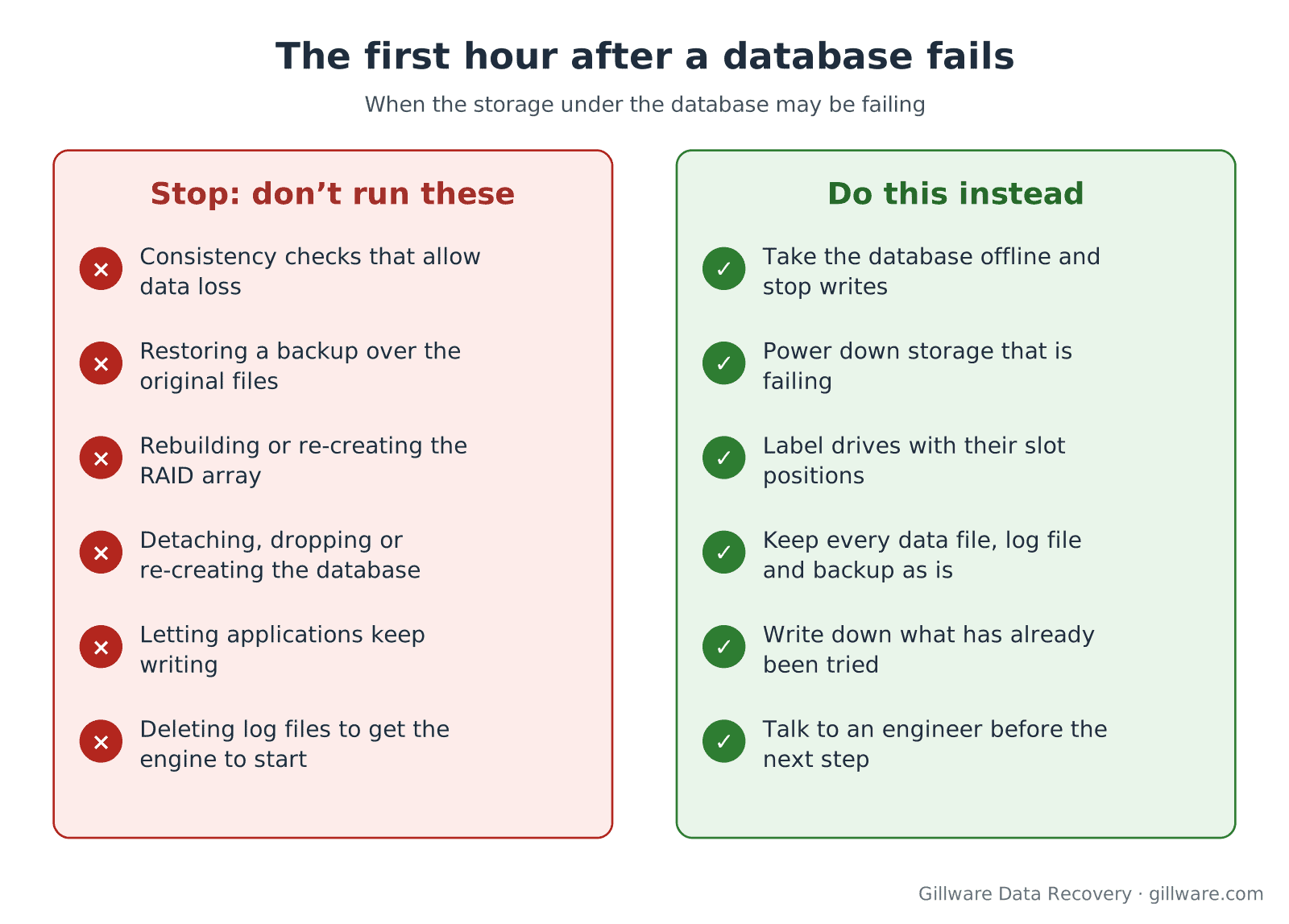
What happens right after the failure often decides how much can be recovered. If the storage under the database may be failing, or you are not sure why the database went down, these are the steps that most often make a recoverable case worse:
- Running a consistency check with an option that allows data loss. These options exist to get a database online, not to keep every record. On damaged storage they can discard exactly the pages a recovery would need.
- Restoring a backup over the original files or volume. If the backup turns out to be incomplete or corrupt, the original files, which may have been recoverable, are gone. Restore to different storage instead.
- Rebuilding, re-initializing or re-creating the array. A rebuild onto a marginal drive, or a new array created over the old one, rewrites the data the database depends on.
- Detaching, dropping or re-creating the database. Re-creating a database with the same name and files can overwrite the space the old files used.
- Letting applications keep writing. Every new transaction lands on the storage you are trying to recover.
- Deleting log files to get the engine to start. Transaction logs, write-ahead logs, binary logs and QuickBooks transaction log files can hold the newest changes. Keep every one of them.
Instead: take the database offline, stop writes to the volume, power down storage that is clicking, dropping drives or throwing errors, label drives with their slot positions, keep every data file, log file and backup exactly as it is, and write down what has already been tried. Then talk to an engineer before the next step.
Database down after a drive, RAID or SAN failure? A free consultation with an enterprise storage engineer comes before anything else.
Database platforms we recover
We recover database files from storage failures across the major commercial and open-source engines, plus the legacy formats that still run dispatch, inventory, accounting and records systems in the field.
Modern relational databases
- SQL Server data recovery: primary, secondary and log files (.mdf, .ndf, .ldf), suspect and recovery-pending databases, dirty shutdowns and damaged backup chains. For SQL Server on a failed array, see also SQL Server recovery from RAID.
- Oracle database recovery: datafile block corruption, ASM disk group failures, lost control files and damaged backup sets.
- MySQL and MariaDB recovery: InnoDB page corruption, tablespace (.ibd) extraction, MyISAM tables and binary logs.
- PostgreSQL data recovery: heap and index corruption, “invalid page in block” errors and damaged write-ahead log segments.
Email and small-business systems
- Exchange Server recovery: EDB databases after dirty shutdowns, missing transaction logs and mailbox-level extraction.
- Microsoft Access data recovery: .accdb and .mdb files with unrecognized-format errors and torn writes.
- QuickBooks data recovery: company files (.qbw) that went to zero bytes or will not open, and their transaction log files.
Legacy business databases still in production
- dBASE data recovery: .dbf tables with their memo and index files.
- FoxPro and Visual FoxPro recovery: free tables through database containers.
- Paradox data recovery: .db tables with primary index, blob and validity files.
- Informix data recovery: dbspace and chunk-level reconstruction.
- InterBase and Firebird recovery: .gdb, .ib and .fdb database files.
If your platform isn’t listed, call us anyway. The storage-level work is the same, and our engineers have rebuilt plenty of formats that never had a page of their own.
Where the database was living
Database recovery usually begins with the storage, so the right starting point depends on what the database ran on:
- A RAID array or server. Most production databases sit on RAID 5, 6 or 10 behind a hardware controller. Our RAID data recovery and server data recovery engineers rebuild the array from drive images, working out its layout from the data itself rather than from a controller that may have failed mid-write.
- A virtual machine. SQL Server, Exchange and ERP systems often run inside VMware or Hyper-V guests. See virtual machine data recovery and VMware data recovery.
- A Linux host. MySQL, MariaDB and PostgreSQL commonly sit on ext4, XFS, ZFS or Btrfs volumes; see Linux data recovery.
- A ransomware event. When the database and its backups were encrypted or deleted, our ransomware data recovery engineers look for what the attack left behind at the storage level. We work alongside your incident response team; we don’t do containment or negotiation.
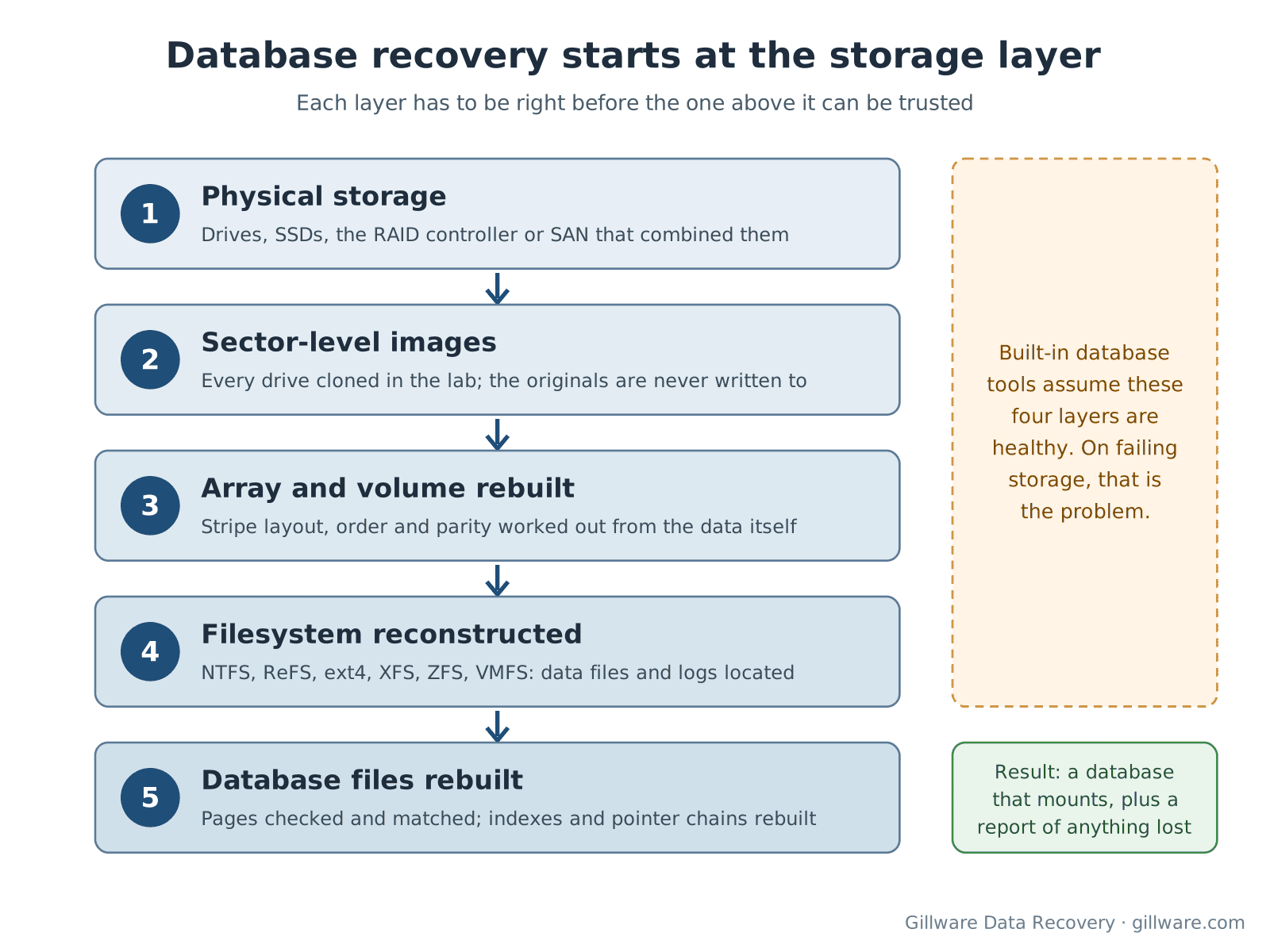
How we recover a database from the storage layer up
- Consultation. An engineer asks how the storage was built, what failed, in what order, and what has been tried. Some operations can’t be undone, and they change which recovery methods are still open.
- Image every drive. Each drive involved is cloned sector by sector in our lab, with failing drives handled in our ISO 5 (Class 100) cleanroom when they need physical work. We never work on the original media, and nothing is written back to it.
- Rebuild the array and volume. For RAID and SAN storage we determine the stripe layout, order and parity from the drive images, then rebuild the volume as a virtual disk.
- Reconstruct the filesystem. NTFS, ReFS, ext4, XFS, ZFS, VMFS or whatever the database lived on, so the data files and log files can be located even if the directory structure is damaged.
- Rebuild the database files. Our engineers walk the pages, blocks or extents of each file, verify checksums where the format has them, match page structures where it doesn’t, and rebuild the indexes and pointer chains that damaged pages used to hold.
- Verify with you and deliver. We mount the result in its own engine, check the tables and records you named as priorities, and return the database files or an export, along with a report of which pages or records could not be recovered.
What we don’t do
We don’t sell self-service database tools or run remote sessions where someone logs into your server and runs a utility against storage that may still be failing. The risk of committing more damage is too high for that to be an honest service.
We also can’t undo a delete that the database engine committed cleanly on healthy storage. If a table was truncated, the change was logged and the storage recorded it correctly, there is usually nothing left on disk to rebuild from; that is a job for your backups. Where we can help is when the delete happened alongside a failure: the change was in flight during a power loss, the log sat on a failing drive, or the backup that should have caught it turned out to be damaged too.
Working with your team
Database cases rarely involve one person. We regularly work alongside in-house DBAs, IT managers, MSPs, the vendors of line-of-business applications, and, after a ransomware event, incident response firms and cyber-insurance adjusters. Our engineers explain findings in plain terms, put the scope in writing, and tell you which tables or records are at risk before you decide anything.
Our engineers have been recovering data from servers, arrays and databases for more than two decades, and since 2004 Gillware has recovered data from more than 100,000 storage devices. More than 1,500 IT professionals refer their clients to us. Every case starts with a free consultation, and you approve all recovery fees in writing before any recovery work begins. For how server and enterprise cases are scoped, see what RAID and server recovery costs. If the business is down right now, our emergency data recovery service exists for exactly that.
Database Recovery Services FAQ
Our SQL Server database is marked suspect after a RAID failure. What should we do first?
Stop. Don’t run a consistency check that allows data loss, and don’t rebuild the array. Take the database offline, keep the data and log files as they are, power down the array if drives are failing, and call us. A suspect database on damaged storage is usually far more recoverable before anyone tries to force it online.
Can you recover a database if the backups are also gone?
Often, yes. When backups were deleted or encrypted, the production storage and the backup storage are both candidates for recovery. We look at what each still holds and recover from whichever gives you the newest complete data.
Do you need the whole server or just the drives?
Usually just the drives, labeled with their slot positions, plus anything you know about the array and the controller settings. For SANs and multi-host setups we’ll go through exactly what to send during the consultation.
Will you return a working database or just files?
Our goal is a database that mounts in its own engine at the version you were running. Where that isn’t possible, we return the tables and records we could recover in a format your team can import.
Is our data handled securely?
Yes. Your drives and their images stay in our secure lab in Madison, Wisconsin, and recovered data is returned on an encrypted drive. If your organization has its own handling requirements, raise them on the consultation call and we’ll put them in the written agreement before anything ships.
The database is on a QuickBooks or Access file on a single PC. Is that still a database case?
Yes. Small-business databases fail the same way when the drive under them fails. Stop using the computer, don’t run file-fixing utilities on the company file, and talk to us. The same engineers handle it.
Database down after a storage failure? Let’s get it back.
Our highly experienced engineers strive for the highest success rates in the industry. Talk with one of our enterprise storage engineers before anything else is done to the system.
- Free technical consultation with one of our enterprise storage engineers
- A written recovery agreement before work begins
- No billing surprises: you approve all recovery fees in advance
- Emergency service for business-critical downtime