
The restore started, ran for a while, and stopped. Or validation reported that a backup version cannot be read. Or the software opened the backup location and found nothing it recognized. If Acronis can no longer open a backup you are depending on, this page explains what has usually gone wrong, what to stop doing right now, and how a data recovery lab works on a .tib or .tibx archive set that the software itself has given up on.
Acronis backup won’t restore?
Stop retrying the restore and pause any scheduled jobs that write to the backup location. Then talk with one of our enterprise storage engineers. The consultation is free.
This page is written for the people who end up holding the problem: small-business owners, IT generalists and managed service providers. It covers Acronis home and business products alike, because the failure patterns are the same whether the backup came from a single workstation or a fleet of servers.
What a .tib or .tibx backup actually is
Acronis stores backups as archive files. Depending on the product version and its settings, those archives use the older .tib format or the newer .tibx format. Either way, the files are not a plain copy of your data. They are containers that hold compressed (and often encrypted) data plus the metadata the software needs to find each file and each backup version inside them.
Most real-world backup plans are chains rather than single files. A full backup is taken first, then incremental or differential backups record only what changed. A later version depends on the earlier pieces it was built on. That design saves space and time, but it means one damaged or missing piece can make every version that depends on it unreadable, even when most of the data is physically still there.
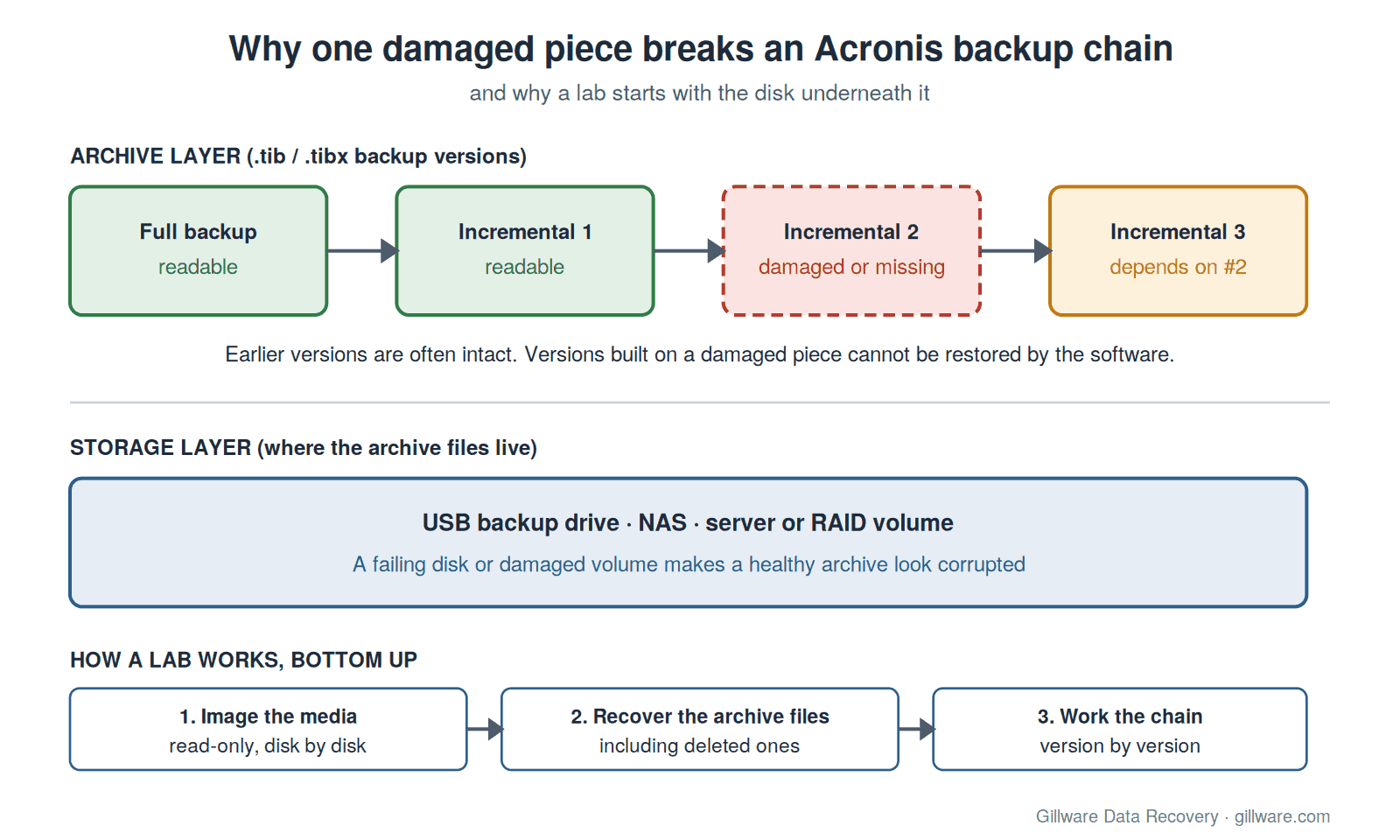
There is also a second layer under the archive: the disk, NAS or server volume that holds the backup files. Often the trouble starts there, with a failing USB backup drive, a degraded NAS array or a damaged file system on the backup volume, rather than in the archive format itself.
Why Acronis says the backup is corrupted or will not restore
The software can only report what it can read. When it cannot read part of an archive, the message usually says the archive is corrupted, a version is missing, or the backup cannot be found. The underlying cause is usually one of these:
- The backup disk is failing. Slow restores, restores that stop at the same point every time, clicking or disconnecting external drives, and read errors in the system log all point to the media, not the archive.
- The backup volume or NAS is damaged. A NAS that crashed or degraded, a RAID volume that dropped a member, or a file system that now shows as RAW or needs to be initialized will make a healthy archive look broken.
- Part of the chain is missing. Retention rules, cleanup jobs, a manual tidy-up of the backup folder or a copy to new storage that skipped a file can leave later versions without the pieces they depend on.
- The archive was damaged when it was written or moved. A power loss or network drop during a backup, or a copy between disks that did not finish, can leave a version incomplete.
- Ransomware reached the backups. Attackers commonly target backup files and backup servers so that a restore is not an option. Archives may be encrypted, deleted or both. Our ransomware data recovery page covers that situation in more depth.
- The backup is password-protected and the password is lost. This one is different, and we cover it plainly below.
Stop here: what not to do with a backup that will not restore
Every extra attempt has a cost when the disk under the backup is failing or the chain is fragile. Before anything else:
- Stop retrying the restore. Repeated full reads are hard on a failing disk, and the result will not change.
- Pause scheduled backup and cleanup jobs that write to the backup location. A new full backup, a retention cleanup or a consolidation can overwrite or delete the very versions you need.
- Do not run disk-checking or file-system fix utilities (such as chkdsk) on the backup volume. They write to the disk and can remove the damaged structures a lab would otherwise work from.
- Do not reformat, reinitialize or rebuild the backup drive, NAS or array, even if the operating system or NAS offers to.
- Do not delete anything from the backup folder, including files that look small, old or out of place. Leave the archive set exactly as it is.
- Do not keep copying the backup folder from a failing disk. If the disk is making noise, disconnecting or reading slowly, power it down.
- Write down what you know: the Acronis product and version, where the backups were stored, the backup scheme, whether encryption was on, and when the last good restore or validation happened.
If the computer or server you backed up is also damaged, keep it powered off too. Its own disks may still hold data that the backup was meant to protect. Our server data recovery and Windows Server data recovery pages explain that side of the work.
Where the software’s own tools stop
Acronis includes tools to validate backups and to browse and restore from them, and its product support is the right first stop for configuration and software problems. Those tools are built to read archives that are complete and stored on healthy media. They are not built to work around unreadable sectors on a failing disk, to rebuild a crashed NAS volume, to find archive files that were deleted from a backup volume, or to pull data out of the readable parts of a damaged archive. When the problem is the media, or support has run out of options, that is lab work.
Not sure whether the archive or the disk under it failed? A free consultation with one of our engineers will tell you where to start.
How a lab recovers data from a broken Acronis backup
We work from the bottom up, so nothing we do later can make the situation worse.
1. The storage layer: get a stable image of the backup media
The disks that hold the backup are imaged first, read-only, with hardware that handles weak and unreadable sectors gently. A drive with failed heads or other internal damage is opened in our ISO 5 (Class 100) cleanroom and stabilized before imaging. If the backups lived on a NAS or a RAID volume, each member disk is imaged and the array is rebuilt virtually from those images; we never rebuild on the original disks. See RAID data recovery and NAS data recovery for how that works.
2. The file-system layer: recover the archive files themselves
From the images, we recover the backup files from the volume’s file system. When archive files were deleted by a cleanup job, a person or an attacker, the data they occupied can often still be found on the disk as long as it has not been overwritten. That is why pausing backup jobs matters so much.
3. The archive layer: work out what each version still holds
With the archive set recovered, our engineers examine it as a chain: which versions are complete, which are damaged, and what each damaged version still depends on. Earlier versions in a chain are often intact even when a later one is not. Where a version is damaged, we work with its readable portions to extract the data that remains. You get a clear picture of what can be recovered from which point in time before any recovery work begins.
This is the same approach we take with other backup platforms. If your environment also uses other products, our pages on Veeam backup file corruption and StorageCraft backups that will not consolidate cover those formats.
Password-protected Acronis backups
Acronis can encrypt backups with a password. If the backup disk failed but you still have the password, encryption is not a barrier: we recover the archive files from the failed media, and your password unlocks them. If the password itself is lost, we will say so plainly: we do not break encryption, and an encrypted archive cannot be read without its password. In that case the better route is often the original computer or server, if its disks are still available.
When the backup was the last line of defense
A broken backup often turns up at the worst moment: a server has already failed, or an attack has already taken the production systems down. In that situation, two recovery paths usually run side by side: the backup set and the original machine’s disks. We can work both. If the business is down, tell us when you call so the case is handled as an emergency.
Why Gillware
Gillware has been recovering data for more than two decades, and more than 1,500 IT professionals across the country refer their clients to us. Our engineers work at the storage layer every day, in our own lab with an ISO 5 (Class 100) cleanroom, which is exactly where most broken-backup cases need to start. Every case starts with a free consultation, and you approve all recovery fees in writing before any recovery work begins. For a sense of how pricing works on multi-disk and server cases, see RAID and server data recovery cost.
Frequently asked questions
Can you recover files from a .tib or .tibx file that Acronis says is corrupted?
Often, yes. The first question is whether the archive is damaged or the disk under it is failing; many cases turn out to be the disk. When the archive itself is damaged, earlier versions in the chain are often intact, and readable portions of a damaged version can still yield data. We tell you what is recoverable before any recovery work begins.
The computer is fine but the drive with our Acronis backups failed. Do we need a lab?
Only if you need what was in the backups and nowhere else, such as older versions or deleted files. If you do, power the backup drive down and do not keep trying to copy from it. Our hard drive data recovery page explains what happens to a failed drive in the lab. If it was just a spare copy of data that still exists, a new backup to a new disk may be all you need.
Ransomware deleted or encrypted our Acronis backups. Is anything left?
Sometimes. Deleted archive files can often be recovered from the backup disk if they were not overwritten, and the original systems’ disks may hold data as well. Do not wipe or rebuild the backup server or repository, and keep the affected disks as they are. Our ransomware data recovery page explains how we work with your incident response team.
Our backups are password-protected and nobody has the password. Can you get in?
No. We do not break encryption, and an encrypted archive cannot be read without its password. If the original computer or server still has its disks, that is usually the better place to start.
Should we contact Acronis support first?
For software, licensing or configuration problems, yes. Product support is the right first stop. When the backup media is failing, the backup volume is damaged, archive files are missing, or support has run out of options, call us before trying anything that writes to the backup disk.
How is an Acronis backup recovery priced?
Every case starts with a free consultation, and you approve all recovery fees in writing before any recovery work begins. The scope depends on what failed: a single external backup drive is a different job from a crashed multi-disk NAS or a damaged chain on a server volume.
Acronis backup unreadable? Let’s get your data back.
Our highly experienced engineers strive for the highest success rates in the industry. Talk with one of our enterprise storage engineers before anything else is done to the system.
- Free technical consultation with one of our enterprise storage engineers
- A written recovery agreement before work begins
- No billing surprises: you approve all recovery fees in advance
- Emergency service for business-critical downtime