
RAID 10 Data Recovery
If your RAID 10 array has failed and you need the data back, you’ve landed in the right place. RAID 10 (sometimes written RAID 1+0) combines mirroring and striping — pairs of disks are mirrored to each other for redundancy, then those pairs are striped together for performance. It’s the configuration of choice for high-performance databases, virtualization datastores, and other workloads where both speed and fault tolerance are non-negotiable. Gillware has been recovering RAID 10 arrays for more than two decades in our ISO 5 (Class 100) cleanroom in Madison, Wisconsin. Every case starts with a free consultation, and you approve all recovery fees in writing before any recovery work begins. See also our RAID data recovery hub.
Start a free RAID 10 recovery evaluation →
How RAID 10 Works
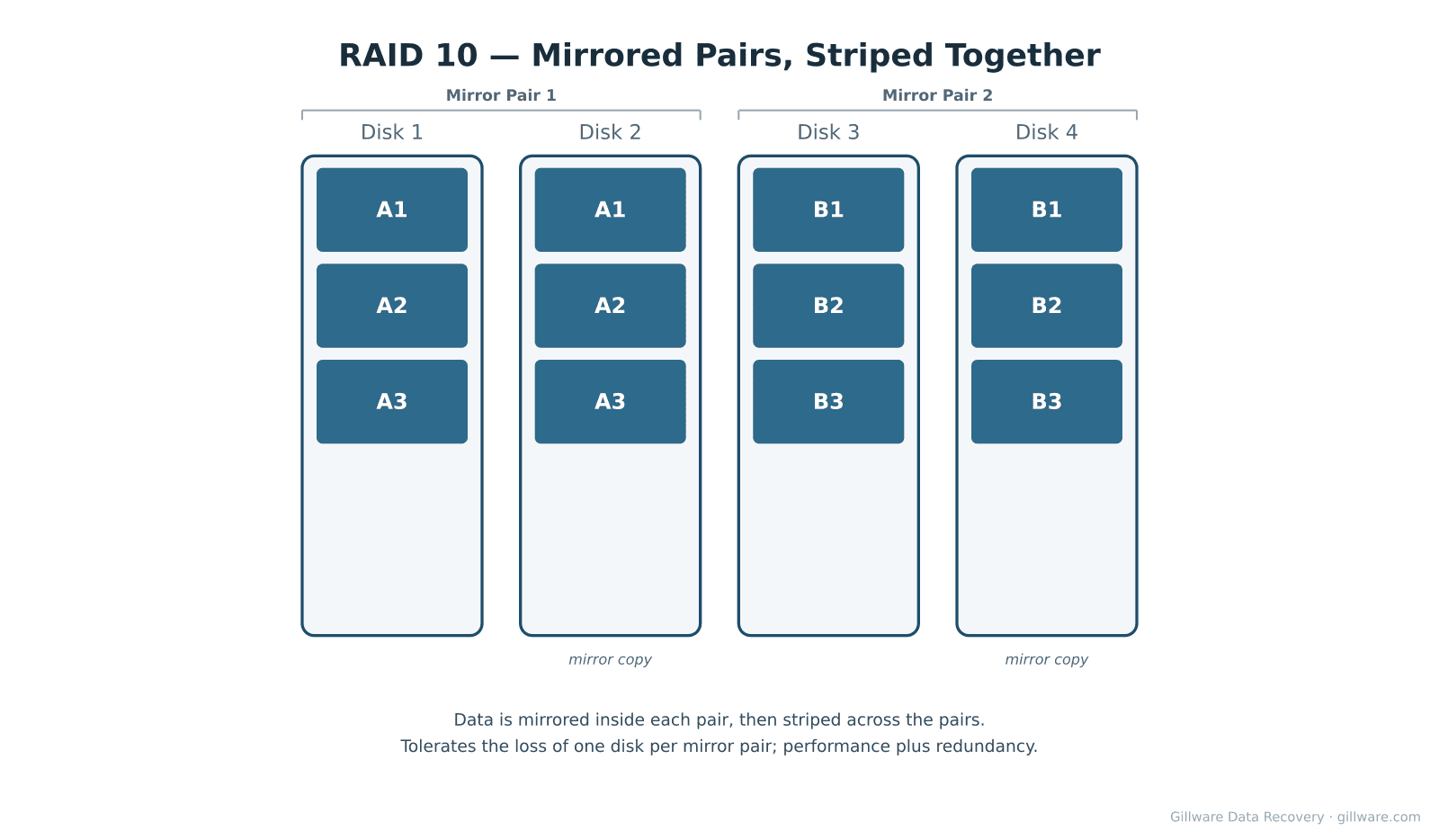
RAID 10 organizes disks into mirror pairs and then stripes data across the pairs. A four-disk RAID 10 has two mirror pairs — disks 1+2 mirror each other, disks 3+4 mirror each other, and the array stripes data so that the first chunk goes to pair 1 (writing identical copies on disks 1 and 2), the second chunk goes to pair 2 (writing on disks 3 and 4), and so on. The result is the read/write performance benefit of striping combined with the fault tolerance of mirroring. The array tolerates the loss of one disk from each mirror pair without data loss; it does not tolerate the loss of both disks in any single pair.
Why RAID 10 Arrays Fail
Both disks in one mirror pair fail. The defining RAID 10 failure mode. The two drives in a single pair were almost always purchased together, came from the same manufacturing lot, and have been doing identical work for the same number of operating hours. When the first one fails, the second is statistically likely to follow within weeks or months. If a rebuild hasn’t completed before the second failure, the entire array is offline because one of the stripe positions is gone.
Multiple disks across multiple pairs fail. Less common, but devastating when it happens — especially on older arrays where the entire drive population is reaching end of life simultaneously.
Controller failure or stripe metadata loss. When the controller fails or its configuration is lost, the OS no longer knows how to map the striped layout across the mirror pairs. The disks are healthy and the data is intact, but the array can’t be assembled until the stripe parameters are recovered.
Mixed-up drive ordering after a chassis event. When disks are pulled from a RAID 10 chassis for service and reinserted in different bays, the controller may fail to reassemble the array correctly. Stripe order across pairs matters, and so does the pair assignment of each disk. Drive labeling at extraction time prevents this; without it, recovery starts with identifying each disk’s role.
RAID 10 sometimes called RAID 0+1. Some older or smaller controllers implement RAID 0+1 (stripe-then-mirror) rather than true RAID 10 (mirror-then-stripe) and confusingly use the same name. The failure characteristics are different: RAID 0+1 is less resilient because the loss of one disk effectively takes down a whole stripe half. Recovery requires identifying which scheme the original controller was using.
How We Recover RAID 10
RAID 10 recovery starts with imaging every disk on isolated, write-blocked hardware in our cleanroom. We don’t operate the original array. For each mirror pair we determine which disk is more current (in case the pair desynchronized before the failure), then assemble the surviving member of each pair into the striped layout. Physically damaged disks are brought back to a readable state with donor parts as needed before imaging — common requests on RAID 10 include head replacements, PCB swaps, and firmware recovery on enterprise SAS drives that have failed inside server chassis.
Our engineers reverse-engineer the array’s stripe size, pair assignments, and order from the on-disk metadata. We do not require the original controller. Our in-house RAID software (HOMBRE) then assembles the virtual array from the images. The recovery becomes possible whenever at least one disk from every mirror pair has imageable surface.
For arrays where both disks in a single pair have failed, the recovery depends on whether either of the failed disks can be partially imaged. Often one of the two is only superficially failed — bad sectors or a head problem rather than total failure — and our cleanroom engineers can image enough surface to reconstruct the missing stripe positions.
Related RAID Recovery Pages
Other RAID levels we recover: RAID 0 · RAID 1 · RAID 5 · RAID 6 · JBOD. Return to the RAID data recovery hub for the full overview of how Gillware handles RAID, NAS, SAN, and server array recoveries.
Start Your RAID 10 Recovery
If your RAID 10 array is down and the data on it matters to your business, the next step is to power the array off and start a free evaluation. Label each disk with its bay position and mirror-pair assignment before removing anything from the chassis — both the stripe order and the pair assignments matter for reconstruction.
Start a free RAID 10 evaluation →
Prefer to talk to someone first? Call 1-877-624-7206 during business hours (M–F 8 am–7 pm, Sat 10 am–3 pm Central) or schedule a 15-minute consultation with a client advisor.