
USB Flash Drive Data Recovery
Flash drive snapped, dead, or not recognized?
Unplug it and stop retrying. Send it to our lab for a free evaluation, and our engineers will tell you exactly what recovery takes.
When a USB flash drive fails, the difference between a routine recovery and an impossible one usually comes down to construction. A drive with a snapped connector but a healthy PCB inside is often a one-hour job at the micro-soldering bench. A drive where the entire memory package has been reduced to a single black chip with four gold contact fingers is a different animal. Gillware has been recovering data from failed USB flash drives, thumb drives, and monolithic flash devices since 2004 in our ISO 5 Class 10 cleanroom in Madison, Wisconsin. Snapped USB connectors, dead controllers, PCB damage, water and fire exposure, corrupted file systems, and drives that simply stopped being recognized after safe-eject was skipped one too many times — those are the cases we see every week. Every recovery starts with a free in-lab evaluation.
Start a free flash drive recovery evaluation →
Stop using the drive
The single most common way a recoverable flash drive failure becomes an unrecoverable one is continued attempts to make the drive work. Before doing anything else:
- Unplug the drive and leave it out of the computer. Every plug-in cycle on a drive with a partially detached connector risks completing the break and pulling the last remaining trace off the PCB. Every plug-in cycle on a drive with a marginal controller risks the controller committing a bad translation to non-volatile memory.
- Do not run repair or format prompts. When Windows offers to “scan and fix” or “format the drive to use it,” those operations write to the media. On a drive that’s already failing, they can overwrite the exact metadata a recovery engineer needs to reconstruct the file system.
- Do not attempt to reflow or resolder the connector yourself unless you have a temperature-controlled iron with a fine tip, magnification, and micro-soldering experience. The pads under a USB-A connector on a consumer flash drive are among the smallest reliably-solderable pads in consumer electronics. A hot iron applied by an untrained hand lifts them off the board permanently.
- Do not open a monolithic drive to try to access the chip directly. Monoliths look like they have exposed contact fingers, but each model uses a different pinout that has to be identified before any recovery attempt. Applying power to the wrong pads destroys the die.
- Do not run data recovery software on a drive that isn’t being consistently recognized by the operating system. If the drive mounts intermittently and dismounts under I/O load, the underlying failure is physical or electronic, not logical. Software recovery tools written for logical recovery can extend the damage.
If the drive contains data you can’t reproduce — college coursework, work files that weren’t backed up, wedding photos, business records — the safest path is to stop touching it and ship it to a lab.
What’s inside a USB flash drive
Understanding which recovery techniques apply to a specific drive starts with understanding how it’s built. USB flash drives ship in two fundamentally different constructions:
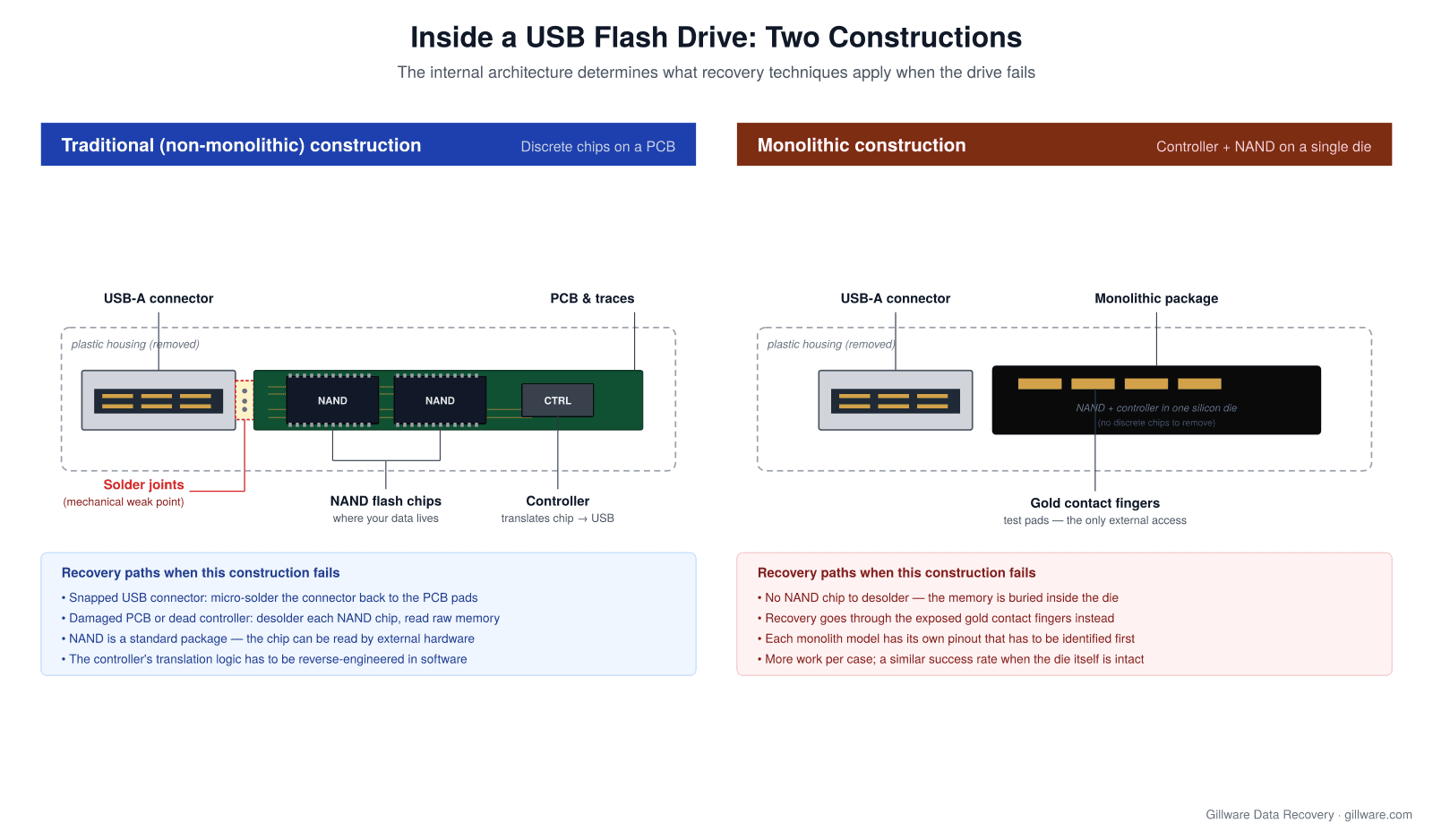
Traditional (non-monolithic) drives have a standard USB-A connector soldered to a small green PCB. On the PCB, one or two NAND flash memory chips hold the actual data, and a smaller controller chip handles the translation between the NAND’s raw storage layer and the USB interface the computer sees. When this construction fails, each component is potentially accessible: the connector can be micro-soldered back to the pads, the NAND chips can be desoldered and read on external hardware, and the controller’s translation logic can be reverse-engineered in software.
Monolithic drives collapse the controller and NAND into a single silicon die packaged as one small black chip with four exposed gold contact fingers on the top surface. There’s no NAND chip to desolder because the memory is buried inside the die. Recovery has to go through the exposed contact fingers — and each monolith model uses its own pinout that has to be identified first. Monoliths are more work per case.
How Gillware recovers USB flash drives
The vast majority of the USB flash drive cases we see fall into three recovery paths. Which path a given drive takes is determined at intake by the failure mode, not by the customer’s description of what happened.
Micro-soldering the connector back to the PCB
This is the highest-success, lowest-turnaround category of USB flash drive recovery, and it’s also the failure mode we see most often: a drive that was plugged in when it got bumped, sat on, or caught in a bag strap, and the USB-A connector snapped away from the PCB. Sometimes the connector is still dangling by one or two traces; sometimes it’s completely detached. In either case, the NAND chips and controller on the PCB are usually undamaged. The data is intact; the drive just can’t get to it because the physical bridge to the computer is broken. (More on our USB micro-soldering process →)
Our engineers work these cases at temperature-controlled micro-soldering stations under stereo microscopes. The USB-A connector is either reattached to the original PCB pads or, when the pads have lifted off, a replacement connector is bridged to the traces further back on the board. The drive is then read on isolated, write-blocked hardware in the cleanroom. When the PCB itself is intact, this path recovers data in the overwhelming majority of cases.
Chip-off recovery with controller emulation
When the PCB is too damaged for a connector repair, the controller has failed electrically, or the traces between components have been broken beyond salvage — a drive that was run over by a chair, dropped in liquid, or subjected to a static discharge event — recovery moves to chip-off. Our engineers desolder the NAND flash chips from the PCB and read them directly on external hardware that speaks the raw NAND protocol. (More on our chip-off recovery process →)
The raw dump from the NAND chips is not the same as the data you saw when the drive was working. Between the raw NAND and a computer’s view of the drive sits the controller’s translation logic: wear leveling, error correction, bad block management, and the flash translation layer that maps logical block addresses to physical NAND pages. Our engineers reverse-engineer that translation in software using our proprietary tools, then reconstruct the file system on top of the assembled logical volume. Chip-off is more labor-intensive per case than connector repair.
Monolith recovery via test pads
Monolithic drives don’t have desolderable NAND chips, so chip-off isn’t an option. Recovery goes through the four gold contact fingers exposed on the top surface of the monolith package. Those fingers are test pads used at the factory during manufacturing, and their pinout — which pad carries which data or control signal — varies from one monolith model to the next.
Our engineers identify the pinout for a given monolith, connect to the exposed pads with fine probes, and pull the raw memory contents through the test-pad interface. From there the recovery follows the same path as chip-off: reverse-engineer the controller’s translation, reconstruct the file system, extract the files. Monolith recovery is the most technically demanding path we run on flash drives, and it’s the reason many labs decline monolith cases entirely.
Connector snapped, controller dead, or a monolith? Our engineers diagnose every flash drive for free.
Failure patterns we recover
Snapped or bent USB connector
The drive was plugged in, something bumped it, and the connector is now dangling by one or two threads of metal — or gone entirely. In some cases the drive still mounts intermittently if you hold the connector at exactly the right angle; in others it’s completely dead. This is the single most common flash drive failure mode we see.
Drive not recognized
The drive plugs in but Windows shows “USB Device Not Recognized,” Device Manager surfaces a Code 43 malfunction, or the drive shows up in Disk Management with no capacity and no file system. Depending on the underlying cause, this can be logical corruption, a partial connector failure, a failing controller, or NAND-level wear-out on an old drive. The distinction between these matters because it determines the recovery path.
Corrupted or RAW file system
The drive shows the correct capacity but Windows offers to format it before use, or macOS shows the volume as unmountable. The FAT32 or exFAT file system that most USB drives use has no journaling, which means an interrupted write — usually from unsafe removal — can leave the file allocation table in a partial state that makes the whole volume unreadable to the OS while the underlying data remains intact.
Water, fire, or physical damage
Drives that went through the washing machine, drives that survived a house fire, drives that were run over in a parking lot. NAND flash is remarkably resilient to environmental damage as long as the silicon die itself hasn’t been physically compromised. We’ve recovered data from drives whose plastic housings were completely gone; the PCB and chips were all that remained.
Counterfeit or re-marked drives
A drive that claims to be 256 GB or 512 GB but is actually much smaller, with the controller firmware modified to report a false capacity. These drives work normally until the underlying NAND fills up, at which point new writes either fail silently or start overwriting older data. Recovery from a counterfeit drive is possible, but the recoverable content is limited to what actually fit within the drive’s true capacity.
Aging drives and NAND wear-out
Consumer USB flash drives typically use lower grades of NAND than SSDs and are not built for long-term storage. Drives kept for a decade with occasional use can exhibit NAND wear where individual cells lose the ability to hold charge reliably. The result is the drive gradually becoming unreadable in patches rather than all at once. Recovery from a worn drive involves imaging at the NAND level with retry and voltage-tuning strategies to pull data out of marginal cells. If the failed device is a solid-state drive rather than a USB stick, see our SSD Data Recovery page, which covers the firmware-level failures specific to SSDs.
Brands we recover
Gillware recovers data from every major USB flash drive manufacturer. The brands and product lines we see most often in the lab include:
- SanDisk — Cruzer, Cruzer Blade, Cruzer Glide, Cruzer Micro, Cruzer Fit, Ultra, Ultra Fit, Ultra Flair, iXpand, Extreme Pro. SanDisk is the highest-volume brand we see across consumer USB drives, and the “edges of the SanDisk USB breaking off” scenario — where the thin Cruzer Blade or Ultra Fit form factor snaps at the connector — is one of our most common single-case types.
- Kingston — DataTraveler (100 G3, 100 G4, SE9, SE9 G2, Kyson, Exodia, Micro Duo, MAX), IronKey (D300, D500S, Locker+ G3), and the older DT101 / DT111 generations that continue to arrive at the lab a decade after purchase.
- Corsair — Flash Voyager (GTX, GT, GO, Slider), Flash Survivor, Padlock 3.
- PNY — Attaché series, Turbo, Elite, Pro Elite.
- Lexar — JumpDrive (S37, S45, S57, S60, S75, S80, V40, V100), JumpDrive Fingerprint F35, JumpDrive Tough.
- Samsung — BAR Plus, FIT Plus, DUO Plus, and older T5 / T7 flash-only models.
- Verbatim — Store ‘n’ Go, PinStripe, Metal Executive.
- Patriot — Supersonic Rage, Supersonic Mega, Xporter.
- ADATA — UV series (UV128, UV150, UV220, UV310), Choice UC, Elite UE.
- Transcend — JetFlash (700, 780, 790, 920), JetDrive.
Beyond the major brands, we handle re-badged manufacturer drives from computer OEMs, promotional drives with custom housings, and unbranded consumer drives sold under private labels. Recovery technique is determined by construction, not by which name is printed on the case.
How a flash drive recovery works at Gillware
- Submit the case. Tell us what happened — what the drive looks like, what symptoms you’re seeing, whether the connector is intact, and what data is on it. We send a prepaid shipping label and ship-safe packaging guidance.
- Receive and inspect. Every drive is logged on arrival, photographed as received, and examined under magnification to determine the failure mode. Housings are opened in the cleanroom; drives are not connected to any recovery hardware during this phase.
- Diagnose the failure path. Based on the physical inspection, our engineers determine whether the case is a connector repair, a chip-off, a monolith recovery, or a logical-only case. This diagnosis drives the quote and the timeline.
- Cleanroom recovery work. Micro-soldering happens at temperature-controlled bench stations. Chip-off is performed on isolated, write-blocked hardware. Monolith work happens under fine-probe stations with model-specific pinout references.
- Logical reconstruction. Once raw memory is extracted, our in-house recovery software (HOMBRE) parses the flash translation layer, applies error correction, and reconstructs the file system — FAT32, exFAT, NTFS, or HFS+ depending on how the drive was formatted. Individual files are extracted and cataloged.
- Data return. Recovered data is returned on new media or transferred securely, depending on size and sensitivity. We do not return data on the original failed drive.
Why Gillware
ISO 5 Class 10 cleanroom. Micro-soldering and chip-off work requires a controlled environment; our cleanroom is certified to ISO 5 Class 10, the same class used in sensitive electronics manufacturing.
More than two decades of flash drive recoveries. Gillware has been recovering USB flash drives since 2004, spanning every major manufacturer, every generation of NAND flash technology, and both traditional and monolithic constructions.
Proprietary flash recovery software. Our in-house software (HOMBRE) handles NAND-level reconstruction, flash translation layer parsing, and file system recovery for drives that off-the-shelf tools can’t touch.
Full-time flash engineers. Micro-soldering, chip-off, and monolith recovery are specialized skills that not every recovery lab maintains full-time expertise in. We do. Every technique referenced on this page is performed in-house by our engineering staff, not contracted out.
U.S.-based recovery. All work happens at our headquarters at 1802 Wright Street in Madison, Wisconsin. Your drive does not leave the country.
Pricing and engagement
The evaluation is always free. After our engineers inspect the drive, diagnose the failure, and confirm what recovery is possible, you receive a firm written quote — not a range, not an estimate that grows as the work progresses — before any recovery work begins. You decide whether to proceed.
Standard USB flash drive recoveries operate under our “no data, no charge” engagement: if the recovery is unsuccessful, you don’t pay for the work. That covers connector repair, most chip-off cases, and standard monolith recoveries. Cases that involve significant additional engineering — heavily damaged monoliths where multiple pinout attempts are required, drives that need extensive PCB reconstruction before recovery can begin, or cases with exceptional media damage — are quoted individually before work starts. More on data recovery pricing →
Start your USB flash drive recovery
If your USB drive has stopped working and the data on it matters, the next step is to stop plugging it in and start a free evaluation. We’ll receive the drive, inspect it in the cleanroom, tell you exactly what path recovery will take, and quote you a firm price before any work begins.
Flash drive stopped working? Let’s get your files back.
Our highly experienced engineers strive for the highest success rates in the industry. Send us the device and we’ll diagnose it for free.
- More than 20 years recovering data from failed drives
- Trusted by 1,500+ IT professionals nationwide
- Whatever failed, we’ve seen it hundreds of times
- Pay only if we meet your recovery goals
Prefer to talk to someone first? Call 1-877-624-7206 or schedule a 15-minute consultation with a client advisor. For deeper detail on the specific recovery techniques discussed above, see our USB micro-soldering and chip-off recovery pages. For brand-specific guidance, see our pages for SanDisk, Kingston, Corsair, PNY, Lexar, and Samsung.