
RAID and Server Data Recovery Cost
The honest answer is that a RAID or server recovery is priced by what the array needs, not by a chart. Two servers that both went down overnight can be completely different jobs: one lost a single drive and a controller, and the other was rebuilt three times by well-meaning people before anyone called a lab. The fastest way to a realistic idea of cost is a short, no-pressure conversation with one of our enterprise storage engineers. Tell us what the system is, what failed and what has been tried since, and they can tell you what your recovery is likely to involve before anything ships.
Array down and need to know what recovery involves?
Talk it through with one of our enterprise storage engineers. The consultation is free, there’s no pressure, and you’ll know what your recovery is likely to involve before anything ships.
This page explains what shapes the cost of recovering a RAID array, NAS or business server, why the steps taken after a failure matter more than almost anything else, and how the conversation about fees works. For how pricing works across every kind of device, see our overview: how much does data recovery cost?
Why RAID and Server Recovery Is Scoped Case by Case
A single failed hard drive is one device with one problem. A failed array is several devices, a controller or software layer that tied them together, a file system on top of that, and very often a hypervisor, a database or a backup repository on top of the file system. Recovering it means getting every member drive to read, working out exactly how the array was laid out, and rebuilding it virtually from images of the drives. All of the reconstruction happens on copies; the original drives are never written to.
That work is done by engineers who spend years learning storage at the level of stripes, parity and metadata. There are far fewer of them in the country than there are lawyers, and even a small project handled by a junior associate at a law firm runs into the thousands. Behind them sits a lab built for this: ISO 5 (Class 100) cleanroom workstations for the member drives that need physical work, imaging hardware that can read many drives at once, and tooling for the RAID controllers, file systems and virtualization formats businesses actually run.
What Shapes the Cost of a RAID or Server Recovery
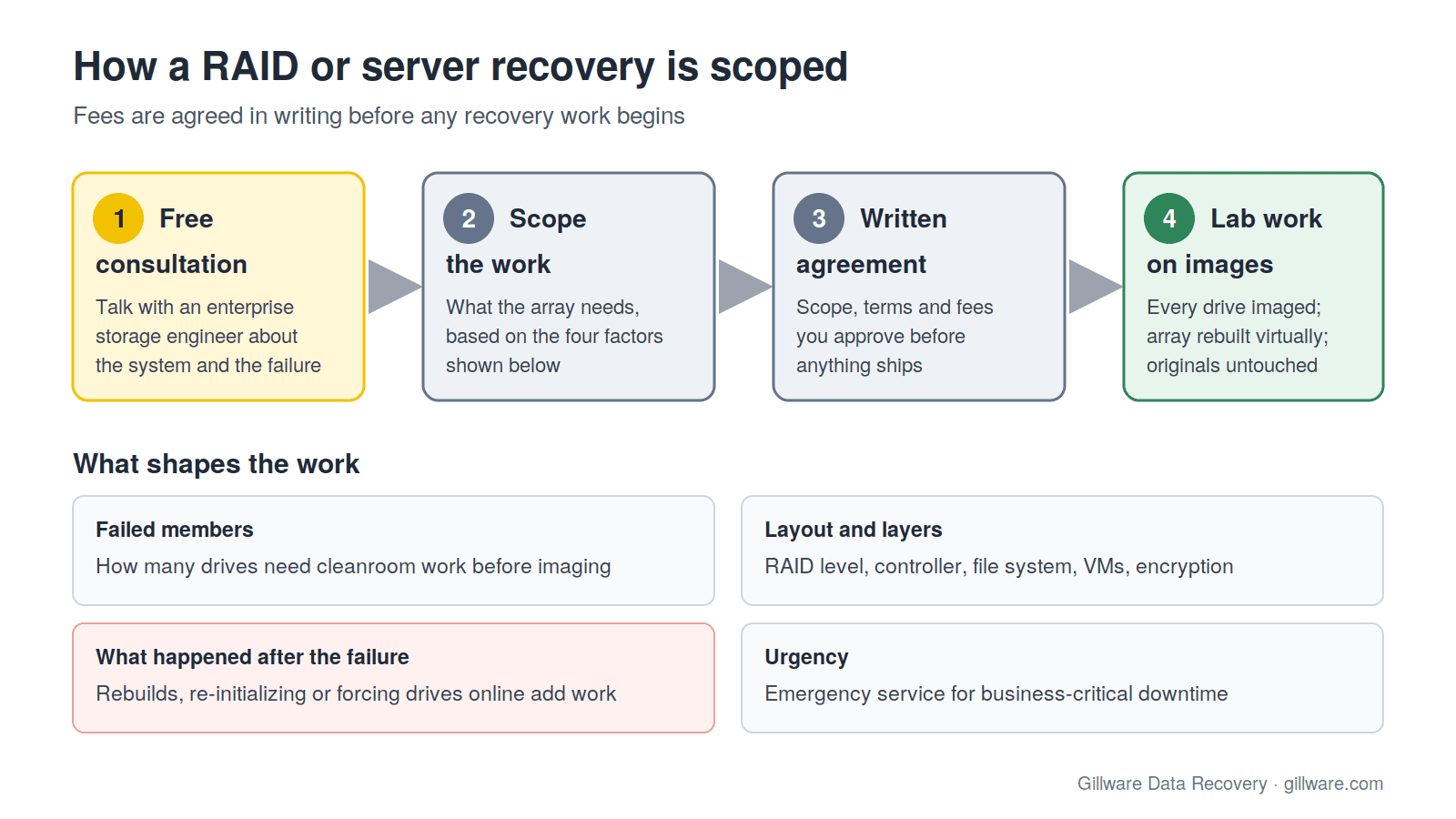
Every case carries a small share of what it takes to run the lab. On top of that, a multi-drive quote comes down to how much engineering the array needs, what parts it needs, and how much risk is involved. On RAID and server cases, four things decide most of that.
How many drives, and how many have failed
Every member drive has to be imaged before anything else happens. A healthy drive is a straightforward read. A member with failed heads or a damaged surface needs cleanroom work and a matching donor before it can be imaged at all, and an array with several physically failed members needs that work several times over. The number of drives matters less than the number of drives that need hands-on recovery.
The RAID level, the controller and the layers on top
Mirrors, parity arrays, nested levels and software-defined pools each store data differently, and every controller family writes its own configuration metadata to the disks. The layers above the array matter too. A virtualized server adds a datastore and virtual disks inside it; a NAS adds its own volume manager and file system; encryption adds a key that must be available. Each layer is one more structure that has to be understood and reassembled correctly before your files are readable.
What happened after the failure
This is the biggest single factor, and the one you still control. An array that was powered down and shipped with its drives in order is a reconstruction job. An array that was rebuilt onto the wrong disk, re-initialized, forced back online with a stale member, or moved to a replacement controller that wrote a new configuration over the old one is often a recovery of a recovery. The data may still be there, but every write since the failure has to be found and worked around, and that takes far more engineering time.
How urgent it is
When a business is down, time matters as much as cost. Emergency service, with engineers assigned to your case as a priority, is available for business-critical outages. It is a different service from standard turnaround, and its terms are agreed with you in writing before anything ships.
Keep the Array Recoverable Until You Talk to Us
The most expensive RAID recoveries usually start out as routine ones. If an array or server has failed, these steps protect the data and keep the work, and the cost, down:
- Power the system down if drives are clicking, the array is degraded and unstable, or the controller is reporting errors you do not recognize.
- Do not start a rebuild, initialize the array or force a drive back online. These operations write to every member and can overwrite exactly the data a lab would use to reconstruct it.
- Do not run file system checks or disk utilities (chkdsk, fsck or a vendor’s fix-it wizard) against a degraded or reassembled volume.
- Label every drive with its bay or port number before removing anything, and keep the controller or NAS chassis.
- After a ransomware attack, do not wipe or reinstall the affected hosts or the backup repository. Encrypted and deleted backups are often still recoverable from the storage underneath. See ransomware data recovery.
System powered down and drives labeled? An enterprise storage engineer will walk you through what comes next.
NAS Units, Virtualized Servers and Backup Repositories
A NAS is a RAID array with its own operating system, and most failures we see involve its volume manager or file system as much as its drives. Our NAS data recovery and Synology data recovery pages cover the common cases. Virtualized servers add datastores and virtual disks that have to be reassembled after the array itself; see VMware data recovery. Backup servers and repositories are frequently the system that matters most after an attack, and they are a common reason businesses call us.
How to Get Your Number
- Book a free technical consultation. Talk with one of our enterprise storage engineers about the system: the make and model, the RAID level if you know it, how many drives, what failed and what has been done since. Sometimes remote diagnostics help narrow it down further.
- Agree the scope in writing. Every case starts with a free consultation, and you approve all recovery fees in writing before any recovery work begins. The recovery agreement sets out the scope and terms before anything ships, so there are no billing surprises.
- Lab work on images, not originals. Our engineers image every member drive, reconstruct the array virtually and verify the data you need before it is returned to you.
We quote each case on its own merits, based on what we find in the lab and the thousands of similar cases we have seen with the same equipment and symptoms. That experience is what lets an engineer give you a realistic picture on the first call.
Emergency Service for Business-Critical Downtime
If the failed system is holding up your business, say so on the first call. Emergency cases are scoped and scheduled as a priority, and the consultation covers what can safely be done to shorten the outage. Our emergency data recovery page explains how that service works.
Why Gillware
Gillware has been recovering data from failed arrays and servers for more than two decades, from our lab in Madison, Wisconsin. More than 1,500 IT professionals nationwide refer their clients to us, and many of them call us before they touch a degraded array. Our highly experienced engineers strive for the highest success rates in the industry. Learn more about our RAID data recovery and server data recovery services.
RAID and Server Recovery Cost FAQ
Can you give me a price over the phone?
An enterprise storage engineer can give you a realistic picture once they know the system, the failure and what has been tried. Fees are then set out in a written agreement that you approve before any recovery work begins.
Is the consultation really free?
Yes. The technical consultation with one of our enterprise storage engineers costs nothing, and you are under no obligation to proceed.
Does a bigger array cost more to recover?
Not simply because it holds more data. What matters is how many members need physical recovery, how the array and the layers on top of it were built, and what was done to it after it failed. Very large arrays take longer to image, which can affect turnaround.
We already tried a rebuild. Is it too late?
Often not. Rebuilds and re-initializations make the work harder, not always impossible. Stop any further attempts, power the system down, and tell the engineer exactly what was done and in what order.
Can you work with our IT provider, insurer or incident response firm?
Yes. We regularly coordinate with in-house IT teams, managed service providers, insurance adjusters and incident response firms. Our role is recovering data from the storage itself; we are not an incident response firm, and we work alongside the one you have.
Array or server down? Talk to an engineer first.
Our highly experienced engineers strive for the highest success rates in the industry. Talk with one of our enterprise storage engineers before anything else is done to the system.
- Free technical consultation with one of our enterprise storage engineers
- A written recovery agreement before work begins
- No billing surprises: you approve all recovery fees in advance
- Emergency service for business-critical downtime