
iPhone Data Recovery: Dead Phones, Liquid Damage and Locked Devices
An iPhone that will not turn on, that went into the water, that sits on the Apple logo or that simply stopped charging usually still holds every photo, message and note it held the day before. The data lives in a flash memory chip soldered to the logic board, and most of the ways an iPhone dies have nothing to do with that chip. Gillware’s phone engineers recover data from physically damaged and non-booting iPhones at the board level: we bring the board back up just far enough to read the memory, or move the memory to a working board, and hand you back your data. This page explains which iPhone problems we can help with, which we cannot, and what to do in the meantime.
iPhone dead, drowned or stuck on the Apple logo?
Stop charging it, stop trying to restore it, and never factory reset it. Send it to our phone engineers and we’ll evaluate it for free.
Which iPhone Problems Are Recovery Cases
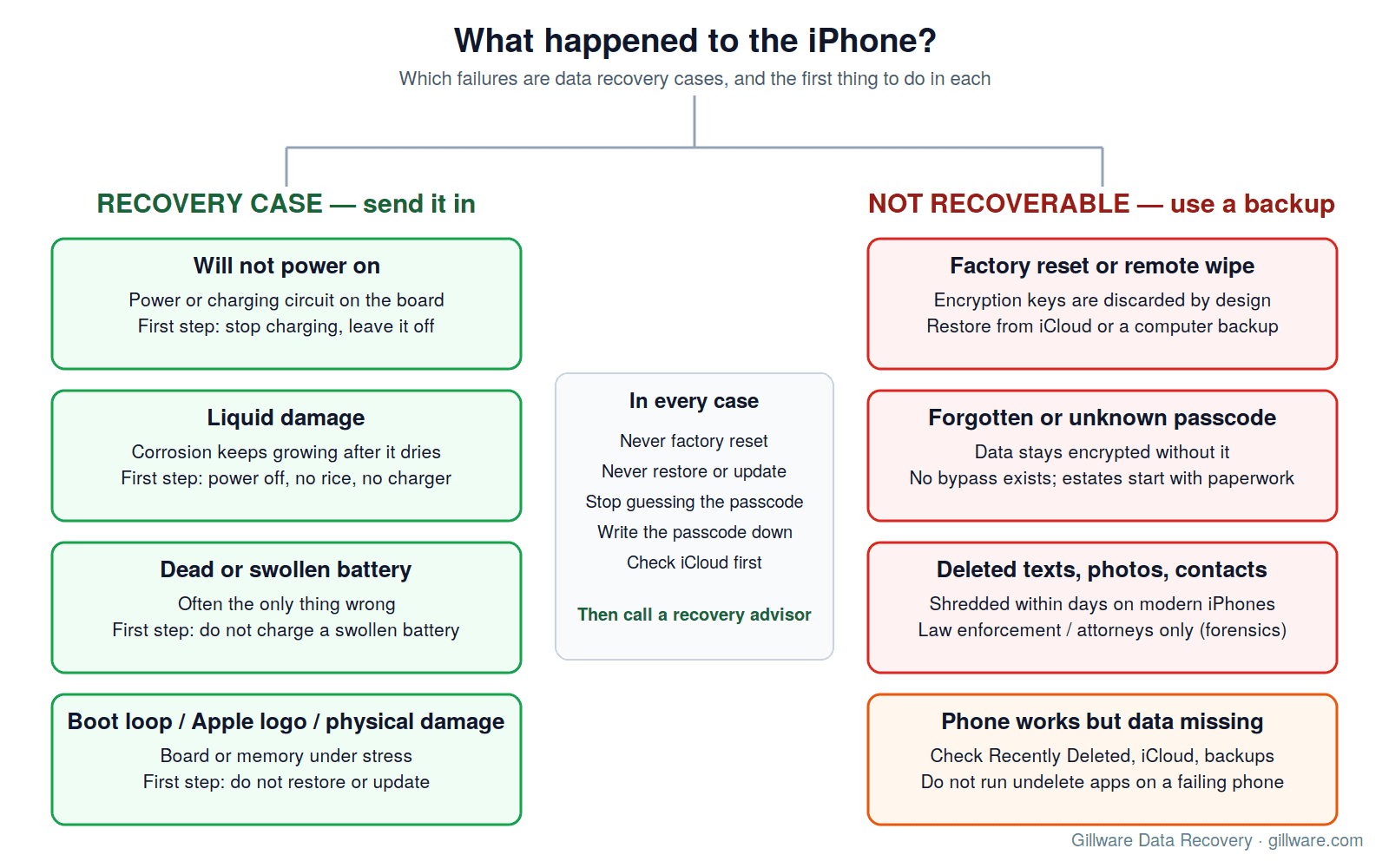
We take on iPhones that have failed physically or electrically. The common ones:
- Phone will not power on. No vibration, no logo, no response to a charger. Usually a power-management or charging-circuit failure on the logic board, sometimes a short that follows a drop or a cheap charger. The memory is almost always untouched.
- Liquid damage. Pool, sink, toilet, washing machine, rain. Corrosion on the board grows for days after the phone dries, which is why a phone that “worked for a while” then died is so common.
- Dead or swollen battery. A battery that no longer holds a charge, or one that has swollen and pushed the screen out. On older phones the battery is often the only thing wrong.
- Boot loop or stuck on the Apple logo. The phone powers on, shows the logo, restarts, and never reaches the lock screen. This can be a failing memory chip, a damaged board, or a software fault, and the right first move is the same: stop restoring it.
- Physical damage. Run over, bent, crushed, burned, smashed screen with a board that may or may not be intact underneath.
- Charging port or charging failure. The phone drained to zero and will not take a charge. This is one of the most routine iPhone recoveries there is.
In every one of these cases the question is the same: is the memory chip intact, and can we get the rest of the phone, or a donor phone, to talk to it? Most of the time the answer is yes.
How iPhone Data Recovery Actually Works
An iPhone is not a small hard drive. Its storage is a NAND flash chip, the data on it is encrypted by hardware, and the encryption key is tied to that specific phone’s processor and secure hardware. That has two consequences for recovery.
First, we cannot simply pull the chip and read it on a bench. The data read from the chip alone is encrypted and meaningless. Recovery means getting the phone’s own hardware, or a precisely matched donor board, to boot far enough to unlock the data with your passcode.
Second, the work is board-level, chip-level engineering, not a software job. Our phone engineers work under microscopes with hot-air rework stations and microsoldering tools. Depending on the failure, that can mean:
- Board-level diagnosis and rework of the failed circuit — finding the shorted power line, the failed charging controller or the broken trace, and bringing the original board back to life just long enough to read the data.
- Corrosion cleanup on liquid-damaged boards: ultrasonic cleaning, replacing corroded components and rebuilding damaged pads under the microscope.
- Memory-chip transplants onto a matching logic board when the original board is beyond saving, along with the handful of paired components the phone needs to recognize its own storage.
- Rebuilding phones that will not power on so they can be unlocked and backed up normally.
Once the phone boots, the recovery is a full backup of the device, delivered to you on an encrypted drive or restored to a replacement phone, exactly as it was. Photos, videos, messages, notes, contacts, app data — everything the phone held.
What to Do Right Now
The things people do in the first hour after an iPhone dies are the things that most often turn a routine case into a hard one.
- Stop charging it. If the phone went into liquid, or if it is behaving strangely, plugging it in pushes current through a board that may be shorted or corroding. Leave it off.
- Do not put it in rice. Rice does not dry the inside of an iPhone. The board keeps corroding, and the starch dust ends up on the connectors.
- Do not restore or update it. If a computer or the phone itself offers to restore, update or “erase and set up as new,” decline. A restore writes a fresh operating system over the storage. The data is often still recoverable afterward, but the odds get worse with every write.
- Never factory reset it. This is the one step that cannot be undone. More on why below.
- Do not keep trying the passcode on a phone that is misbehaving. Too many wrong entries can trigger a data wipe if that option was ever enabled.
- Know your passcode. We need it to unlock the data once the phone boots. Write it down before you ship the phone.
- Check iCloud and your computer first. If the phone was backing up, a recent backup may already have most of what you need. Our iCloud photo recovery article explains where to look.
Not sure whether your iPhone is a recovery case? A quick call with a recovery advisor will tell you — have the model and the symptoms handy.
Liquid-Damaged iPhones
Water is the most common way an iPhone ends up in our lab, and it is also the case where time matters most. The damage is not the water itself; it is the electrochemical corrosion that starts the moment the board is wet and powered, and continues for days after the outside of the phone is dry. The green and white crust that grows on connectors and under chips eats through traces and solder joints. A phone that survived its swim and then died a week later is a textbook example.
What helps: power the phone off if it is still on, do not charge it, and get it to a lab quickly. What we do: disassemble, clean the board ultrasonically, inspect it under the microscope, replace the components corrosion has destroyed, rebuild damaged pads and traces, and bring the board up on a bench supply with current monitoring so a short cannot cook the memory. Saltwater, chlorinated pool water and sugary drinks are harder than tap water because they are more conductive and more corrosive, but they are not hopeless.
The same physics applies to MacBooks that meet a drink; our MacBook data recovery page covers the laptop version of this story, including the soldered SSDs on Apple silicon machines.
iPhones That Will Not Turn On
A dead iPhone is rarely a dead memory chip. The usual culprits are a failed power-management chip, a shorted capacitor, a damaged charging circuit, a failed backlight circuit (the phone is actually on, but the screen is black), or a battery that has dropped below the threshold the phone needs to boot. Each of those is a board-level diagnosis: we measure the power rails, find the component that is pulling the rail down or failing to bring it up, and replace or bypass it.
If the board is too damaged to save, the work moves to a transplant: the NAND memory chip and the small set of components the phone pairs with it are moved to a matching donor logic board. Done correctly, the donor phone boots with your data and your passcode unlocks it. This is slow, exacting microscope work, and it is the reason iPhone recovery belongs with engineers who do it every day.
Boot Loops, the Apple Logo and “Attempting Data Recovery”
An iPhone that reaches the Apple logo and restarts, or shows “Attempting data recovery” after a failed update, is telling you the processor is alive and the storage is answering, but something in between is wrong. Sometimes that is a software fault from an interrupted update. Sometimes it is a NAND chip that is developing bad blocks and failing under load, which is why the phone gets further on a cold boot than a warm one. The temptation is to connect the phone to a computer and let it restore. Resist it. A restore is a full rewrite of the operating system partition, and on a phone whose memory is failing it can push the chip past the point where we can read it. Power the phone off and let us look at it first.
What We Cannot Recover, and Why
We would rather tell you this on a web page than after you have shipped a phone. Some iPhone data loss is permanent by Apple’s design, and no lab, app or technician can honestly promise otherwise.
Factory reset means gone
When an iPhone is erased — through Settings, through a remote wipe, through too many wrong passcodes with that option enabled, or by a repair shop “trying a reset” — the phone does not slowly overwrite your data. It discards the encryption keys that make the data readable. The storage is still full of bits, but without those keys the bits are random noise, and the keys are gone for good. This is deliberate: it is what makes a traded-in or replaced iPhone safe for its next owner. If your iPhone has been reset, stop shopping for a recovery service. The only places your data still exists are an iCloud backup, a backup on a computer, and whatever synced to iCloud Photos, iCloud Drive, Messages in iCloud or a mail server. Restore from those.
No passcode, no data
The same encryption that protects your phone from a thief protects it from us. We need the passcode (or the Apple ID credentials for a phone that will accept them) to unlock the data once the phone boots. We do not bypass passcodes, we do not break Apple’s encryption, and we do not work on phones whose owner cannot show they are the owner. If the passcode belonged to someone who has passed away, talk to us: there are legitimate paths for an estate, but they start with documentation, not with a bypass.
Deleted texts, photos and messages from a working phone
Recovering deleted data from a phone that still works is a different discipline from recovering a dead phone, and on modern iPhones it is mostly a closed door: deleted content is cryptographically shredded within days. Gillware does that kind of work only for law enforcement and for attorneys acting under a court order or other proper legal authority, through our phone forensics lab. We do not take it on for individuals, and we explain the whole picture — what can still be checked, and why the “undelete” apps are a bad bet — on our deleted text messages and contacts page.
Recovery software
You will see software advertised as iPhone data recovery. It can scan a backup file on your computer, and it can sometimes pull data from a phone that already boots and unlocks. It cannot help a phone that will not turn on, and running it against a phone with a failing memory chip works the chip harder. For a dead, drowned or looping phone, software is not the tool.
How Pricing Works
Many phone recovery cases are financially risk free. The best way to estimate recovery costs and if there’s any potential parts fees is to speak with a recovery advisor and have your model phone and symptoms handy. Every case is quoted after a free evaluation, so you know the cost before any recovery work begins, and you only pay if we meet your recovery goals.
How to Send Us Your iPhone
- Start a case online or call 877-624-7206. Tell us the model, what happened, and whether the phone has ever been reset.
- Note your passcode and, if you have it, your Apple ID. We will ask for the passcode when the phone is ready to be unlocked.
- Ship the phone as it is. Do not have it “repaired” first; a shop that replaces a screen or battery and powers the phone up can turn a simple case into a transplant. Leave liquid-damaged phones powered off and unplugged.
- We evaluate the phone for free and tell you exactly what we found and what the recovery involves before you decide.
- When the recovery is complete, your data comes back as a full device backup on an encrypted drive, or restored onto a replacement phone you provide.
If you have an Android phone instead, our Samsung data recovery page covers Galaxy phones and the same board-level approach, and our phone data recovery services page covers everything else we take on.
iPhone Data Recovery FAQ
My iPhone fell in the pool. Should I let it dry out first?
No. Drying the outside does not stop corrosion on the inside, and powering it on to “see if it works” is the single most damaging thing you can do to a wet board. Power it off, leave it off, and send it in.
Can you recover data from an iPhone that will not turn on at all?
Usually, yes. A phone that is completely dead is most often a power or charging failure on the board, not a failed memory chip. We diagnose the board, bring it up, and read the data; if the board cannot be saved, we move the memory to a matching donor board.
My iPhone was factory reset. Can you get the photos back?
No, and neither can anyone else. A reset discards the encryption keys the data depends on. Check iCloud, iCloud Photos and any computer the phone was backed up to; that is where the photos are, if they are anywhere.
I do not know the passcode. Can you still recover the data?
Not without it. Everything on a modern iPhone is encrypted behind the passcode, and we do not bypass Apple’s security. If the phone belonged to a family member who has passed away, contact us; the path runs through documentation of the estate, and we will tell you plainly what is and is not possible.
Should I take it to a phone repair shop first?
If the goal is the data, no. A repair shop’s job is to make the phone work, and the fastest route to that is often a new board or a restore — both of which can destroy the data. Send it to a data recovery lab first; the phone itself can always be fixed up afterward.
Do I get my phone back?
Yes. The phone, and any donor parts we used, are returned with your data. The recovery itself is delivered as a complete backup on an encrypted drive, or restored to a replacement phone if you send one.
Start Your iPhone Recovery
Power the phone off, stop charging it, do not restore or reset it, and write down the passcode. Gillware has been recovering data from failed devices for more than two decades, and our phone engineers handle board-level iPhone work every day.
iPhone won’t come back? Let’s get your photos back.
Our highly experienced engineers strive for the highest success rates in the industry. Send us the device and we’ll diagnose it for free.
- More than 20 years recovering data from failed drives
- Trusted by 1,500+ IT professionals nationwide
- Whatever failed, we’ve seen it hundreds of times
- Pay only if we meet your recovery goals