
Linux Data Recovery: ext4, XFS, Btrfs, ZFS and LVM / mdadm Server Failures
When a Linux server, NAS or virtualization host loses its storage, the symptom on screen rarely tells you where the failure actually is. A volume that will not mount, an mdadm array that will not assemble, a ZFS pool that refuses to import or a logical volume that vanished after an lvremove can all sit on top of perfectly readable data. Gillware recovers data from failed Linux storage of every kind, from single-disk servers to multi-drive arrays, and the work starts with a conversation before anything else is done to the system.
Linux volume down and the data matters?
Stop before running another repair command. Talk with one of our enterprise storage engineers about the safest next step; the consultation is free.
This page is written for system administrators, MSPs and IT generalists who look after Linux systems: production servers on RHEL, Rocky, AlmaLinux, Ubuntu Server, Debian or SUSE; storage appliances and NAS units that run Linux underneath; and Proxmox, KVM and other virtualization hosts. It maps the failures we see to the layer of the storage stack where they usually live, explains what to do (and what to stop doing) in the first hour, and describes how our lab recovers Linux storage. For filesystem-specific detail, each of our filesystem pages goes deeper.
Linux failures we recover, and where they usually live
Most Linux storage failures fall into a handful of patterns. The table below is a starting map: the symptom an administrator sees, the layer that is most often at fault, and the action most likely to make things worse. It is a guide, not a diagnosis. The same error can come from more than one layer, which is why every case starts by imaging the drives and working out the layout before anything is changed.
| What you see | Layer most often at fault | What makes it worse |
|---|---|---|
| ext4 volume will not mount; “bad superblock” or journal errors in the kernel log | Filesystem metadata (superblock, journal, group descriptors) | Repeated fsck runs with automatic “yes” answers; reformatting to “start clean” |
| XFS mount fails on log recovery, or files are missing after xfs_repair -L | XFS log and allocation group metadata | Zeroing the log before the volume has been imaged; running repair again on the result |
| Btrfs goes read-only or reports “parent transid verify failed” | Btrfs metadata trees after an interrupted write | btrfs check –repair on the original devices |
| ZFS pool will not import, shows FAULTED or UNAVAIL members | Pool labels, uberblocks or a missing vdev member | Forced or rewind imports (zpool import -F or -X) without copies; replacing members during a resilver |
| Volume group or logical volume missing after lvremove, vgremove or pvcreate | LVM metadata | Creating a new volume group or logical volume on the same disks |
| mdadm array will not assemble, is inactive, or members show as spare | RAID member superblocks, member order, a stale member | mdadm –create over the existing members; forcing a rebuild onto a weak drive |
| LUKS volume will not unlock with the correct passphrase | LUKS header and key slots | Any write near the start of the device; re-formatting the container |
| NAS reports a crashed volume or storage pool | Any layer of the vendor’s mdadm, LVM and Btrfs / ext4 / ZFS stack | Repair or rebuild wizards started before the drives are imaged |
| Files deleted with rm, or mkfs run on the wrong device | Filesystem allocation data | Keeping the volume mounted and in use; scheduled TRIM on SSDs |
| Virtual machines missing or encrypted on a Linux host | Host filesystem or storage pool, then each guest disk image | Restoring or creating new VMs onto the same datastore |
Why Linux recovery starts below the filesystem
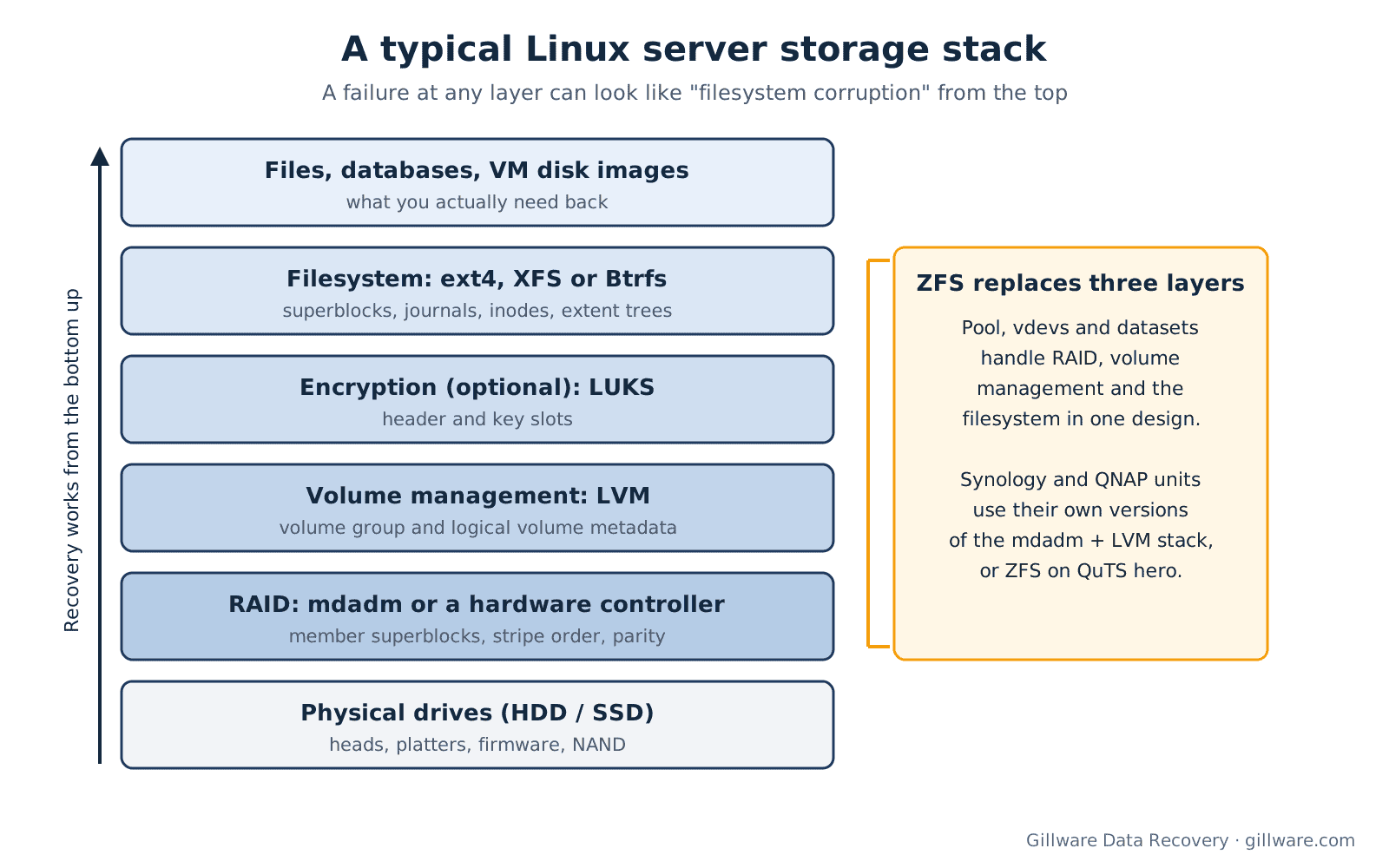
On Windows or a Mac, the filesystem usually sits on a simple partition. On a Linux server it is usually the top layer of a stack. A common layout, from the bottom up, is several physical drives, an mdadm software RAID array built from partitions on those drives, LVM volume management on the array, sometimes a LUKS-encrypted logical volume, and an ext4 or XFS filesystem inside it. Synology and QNAP units use their own versions of the same building blocks, with Btrfs or ext4 on top, and QNAP’s QuTS hero uses ZFS instead. ZFS on Linux, TrueNAS and Proxmox replaces the RAID, volume-management and filesystem layers with one integrated design.
That matters because a failure at any layer reports itself as a filesystem problem. A NAS “volume crashed” message can mean a dropped array member, damaged LVM mapping or Btrfs metadata that will not mount: three different problems with three different recovery paths, all shown the same way in the admin interface. A boot failure that looks like filesystem corruption sometimes turns out to be a RAID member that dropped out at the last shutdown. A logical volume that seems to have disappeared may be fully intact in space the volume group now considers free, where the next allocation will overwrite it.
Each layer also keeps its own records, and those records are often what makes recovery possible. ext4 keeps backup copies of its superblock across the volume. LVM normally keeps older copies of its metadata, both on disk and in its archive files, so a removed logical volume can often be mapped again if nothing has been written since. mdadm writes a superblock to every member describing the array. ZFS keeps several copies of its labels and a history of recent transaction groups. Repair and re-create commands rewrite exactly those records, which is why running them first so often turns a straightforward case into a hard one.
The first hour: what to do, and what to stop
If a Linux system has just failed and the data on it matters, the steps that protect the outcome most are simple ones.
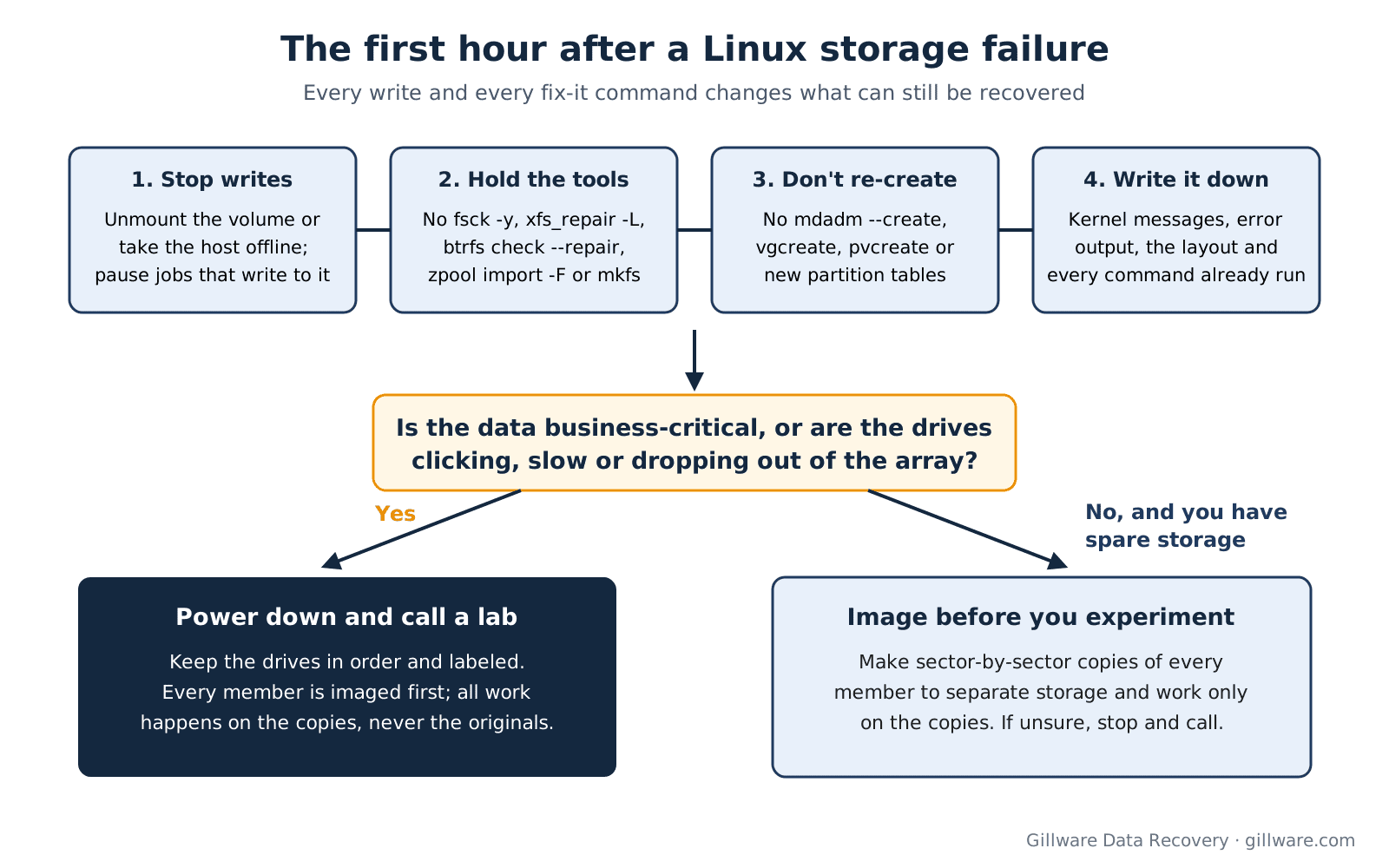
- Stop writing to the affected storage. Unmount the volume if it is data, or take the host offline if it is the system disk. If neither is possible, stop the services and jobs that write to it, including backups, log rotation and scheduled TRIM.
- Hold off on repair commands. No fsck -y, xfs_repair -L, btrfs check –repair, zpool import -F, mkfs or “repair” wizards on the original devices. Most of these tools are designed to write to the source, and what they write is not reversible.
- Do not re-create anything. Running mdadm –create over existing members, vgcreate or pvcreate on the same disks, or writing a new partition table can overwrite the very metadata a recovery would use, even when the command appears to succeed.
- Keep the drives in order. On an array, label each drive with its slot or device name before it comes out of the chassis, and note any drive that dropped out earlier.
- Write down what you see. Save kernel messages, mount and assembly errors, the layout as you understand it (RAID level, volume manager, encryption, filesystem) and every command already run, in order. This shortens the first conversation considerably.
- Image before you experiment. If the drives are healthy and you have the skills and spare storage, make sector-by-sector copies of every member and work only on the copies. If a drive is clicking, slow or dropping out, power it down instead; continuing to read a failing drive can damage it further.
Not sure which layer failed? Book a free consultation and walk through the symptoms with an enterprise storage engineer.
The filesystems we recover
Each Linux filesystem stores its metadata differently, so each one fails and recovers differently. These pages cover the on-disk structures, failure patterns and recovery approach for each.
- ext4 data recovery: still the default on Debian and Ubuntu and on many NAS volumes. Typical cases are unmountable volumes after power loss, damaged superblocks and journals, and deleted files and LUNs, which ext4’s extent design makes difficult to recover after the fact.
- XFS data recovery: the default on RHEL and its rebuilds and common on database and application servers. Typical cases are log recovery failures, allocation group damage and volumes that lost files after xfs_repair -L. Our page on XFS recovery options compares the paths available.
- Btrfs data recovery: the default on modern Synology volumes and on SUSE and openSUSE. Copy-on-write changes what is recoverable; typical cases are transid mismatches after an unclean shutdown and Btrfs layered on mdadm and LVM.
- ZFS data recovery: behind TrueNAS, many Proxmox hosts, QuTS hero and self-built storage servers. Typical cases are pools that will not import, faulted RAIDZ vdevs, stale members that came back online and deleted datasets.
- bcachefs data recovery: the newest of the group, still mostly in early-adopter and lab systems, with an on-disk format that is still evolving.
LVM and mdadm sit underneath most of these and are covered on this page rather than separately: removed or overwritten logical volumes, volume groups lost after a pvcreate or vgcreate, and software RAID arrays that will not assemble or were re-created over themselves. We also work with older and less common formats, including ext2 and ext3, ReiserFS, JFS, F2FS and UFS volumes that reach us through Linux systems. If yours is not listed, the consultation will confirm whether we can help.
Where Linux storage fails in the real world
Linux runs underneath far more storage than most people realize, and the recovery path depends on how it was deployed.
- NAS units and storage appliances. Synology, QNAP, Netgear ReadyNAS, TerraMaster, ASUSTOR, Buffalo, TrueNAS and many vendor-branded units are Linux underneath. Failures cluster around firmware and DSM or QTS updates, rebuilds that hit a second weak drive, aging drives and ransomware. See our NAS data recovery hub, the Synology and QNAP pages, and our guide to a crashed Synology storage pool.
- Production servers. Web, application, mail and database servers and container hosts, on software RAID or behind a hardware RAID controller. Power events, controller failures, unclean shutdowns and mistakes during maintenance are the usual causes. Our server data recovery and RAID data recovery pages cover the hardware side.
- Virtualization hosts. Proxmox VE, KVM and Xen hosts store each guest as a disk image or volume on the host’s storage, so a failure is a recovery inside a recovery: first the host’s pool or filesystem, then each guest. See Proxmox VE data recovery for ZFS, LVM-thin and Ceph cases, and VMware data recovery where Linux guests live on ESXi.
- iSCSI and SAN targets. Linux servers exporting LUNs as files or logical volumes. A deleted or damaged LUN is a Linux filesystem problem with a second filesystem to extract from inside it.
- Workstations and laptops. Developer machines, encrypted home directories and single-drive systems. For accidental deletion on a single drive, see our guide to recovering deleted files on Linux and Ubuntu.
- Ransomware and malicious deletion. Attackers increasingly go after Linux virtualization and storage hosts directly, deleting or encrypting VM images and snapshots. That work overlaps with our ransomware data recovery service.
How we recover Linux systems
Every case starts with imaging. Each physical drive is copied through hardware that cannot write back to it, and every later step runs against those copies, never the originals. A drive that cannot be imaged as-is is dealt with first: mechanical failures are handled in our ISO 5 (Class 100) cleanroom, and electronic and firmware faults are addressed at the component and firmware level until the drive can be read.
From there the work moves up the stack. The RAID layer is reconstructed virtually from the images (member order, chunk size, parity rotation and any stale member), whether it was mdadm, a hardware controller or a ZFS vdev. Then volume management: LVM mappings are rebuilt from the metadata that survives, and LUKS containers are opened with the customer’s passphrase or key file. Only when the underlying storage is assembled correctly do we work on the filesystem itself, and that part is specific to ext4, XFS, Btrfs, ZFS or whatever sits on top.
Much of this work runs on HOMBRE, the recovery software our own engineers have built and maintained over more than two decades. It handles the mainstream Linux filesystems, the common RAID and volume-management layers and the storage layouts of the major NAS platforms. When a case goes beyond what any tool covers, such as badly damaged metadata, unusual layouts or volumes where repair attempts have already rewritten structures, our engineers work through the images by hand. Recovered data is checked before it is returned, and you can tell us which files, databases or virtual machines matter most so they are verified first.
How a Linux case works
Linux recoveries range from a single-disk server to a multi-drive array with encryption and virtual machines inside it, so we start by talking it through.
- Free technical consultation. You speak with one of our enterprise storage engineers about the layout, the symptoms and what has already been tried, and we tell you what we would need and what realistic outcomes look like.
- A written recovery agreement. Every case starts with a free consultation, and you approve all recovery fees in writing before any recovery work begins.
- Emergency service. For business-critical outages, ask about our emergency data recovery service when you call.
- Secure return. Recovered data comes back on an encrypted drive.
Why Gillware
Gillware has recovered data for more than two decades, from more than 100,000 storage devices, and more than 1,500 IT professionals nationwide refer their clients to us. Our engineers work on Linux storage at every layer, from the drive heads in the cleanroom to the filesystem metadata, and they write the tools they use. Our highly experienced engineers strive for the highest success rates in the industry.
Linux data recovery FAQ
fsck or xfs_repair has already run. Is the data gone?
Not necessarily. These tools change metadata, and what they change can remove the path to some files, but the file contents are often still on disk. Stop running the tool again, stop writing to the volume, and keep any output it printed. The less that happens to the volume after the first run, the more there is to work with.
Can you recover a logical volume after lvremove or a vgcreate on the same disks?
Often, yes, provided the space has not been allocated and written to since. LVM normally keeps older versions of its metadata, and the logical volume’s data is not erased when it is removed. The risk comes from what happens next: new logical volumes, new filesystems or restored data written into the same space.
My mdadm array will not assemble. Should I re-create it with the same settings?
Please do not, at least not on the original drives. Re-creating an array writes new member superblocks and, if any parameter differs from the original (member order, chunk size, metadata version or data offset), the array that appears will not match the data on the drives and can start overwriting it. Image the members first, or call us before running anything.
Do you need the whole server or NAS, or just the drives?
Usually just the drives, labeled with their slot order. For hardware RAID, a NAS with an unusual layout or encrypted volumes, we may ask for the controller, the enclosure or other details during the consultation. Encrypted LUKS volumes need the passphrase or key file to open once the underlying storage is rebuilt.
Can you recover virtual machines from a failed Proxmox or KVM host?
Yes. We rebuild the host’s storage first (the ZFS pool, LVM-thin pool, Ceph cluster or filesystem), then recover the guest disk images and, where needed, the files inside each guest. Tell us which machines matter most so they are recovered and checked first.
The drives are SSDs. Does that change anything?
Yes. On SSDs, deleted or trimmed space can be erased by the drive itself, and many Linux distributions run a scheduled TRIM job. If files were deleted or a volume was reformatted, power the system down rather than leaving it running, and do not run recovery tools against it.
Linux array or volume down? Talk to an engineer first.
Our highly experienced engineers strive for the highest success rates in the industry. Talk with one of our enterprise storage engineers before anything else is done to the system.
- Free technical consultation with one of our enterprise storage engineers
- A written recovery agreement before work begins
- No billing surprises: you approve all recovery fees in advance
- Emergency service for business-critical downtime