
Ext4 Data Recovery: Deleted LUNs, Corrupted Superblocks, and the Limits of fsck

The call comes in from an admin who has just discovered something missing. Maybe the host’s VM directory is suddenly half empty — production qcow2 files that were there yesterday simply aren’t there today. Maybe an iSCSI target on a Linux storage server is showing zero connected initiators because the LUN file backing it was removed during a scripted cleanup gone wrong. Maybe the host won’t boot at all: mount: wrong fs type, bad option, bad superblock on the way up, and dmesg is filling with EXT4-fs error and Detected aborted journal messages. Maybe the system event log is showing that root ran rm on a directory tree at 3 in the morning, and the admin is now staring at a near-empty datastore wondering what just happened.
This article is for the admin in any of those situations. It covers what’s actually happening on an Ext4 volume when files disappear, why ext4 specifically is one of the more hostile file systems for after-the-fact recovery, the failure patterns we see most often, and how we approach recovery when standard tools have run out of things to try — including the cases where the superblock itself is gone and there’s nothing left to mount.
A short tour of Ext4
Ext4 is the fourth Extended filesystem, shipped as the Linux default in 2008 and still the default root filesystem on RHEL, Debian, Ubuntu Server, and most of their derivatives. It’s also the most common underlying filesystem we see on Linux storage servers, NAS units configured for ext4 (Synology, QNAP, custom builds), iSCSI target hosts, KVM and Xen hypervisors, and database servers. The on-disk layout is straightforward enough to explain in a couple of paragraphs, and worth understanding because it determines what is and isn’t recoverable when something goes wrong.
The volume is divided into block groups, each typically 128 MB. Every block group carries a chunk of the volume’s allocation bitmaps (which blocks and which inodes are used or free), a slice of the inode table, and the file data blocks themselves. A handful of block groups also carry redundant copies of the volume’s superblock (the master record of the filesystem’s size, layout, and feature flags) and its group descriptor table (the index that locates every block group’s metadata). Those redundant copies are what fsck falls back to when the primary superblock is damaged.
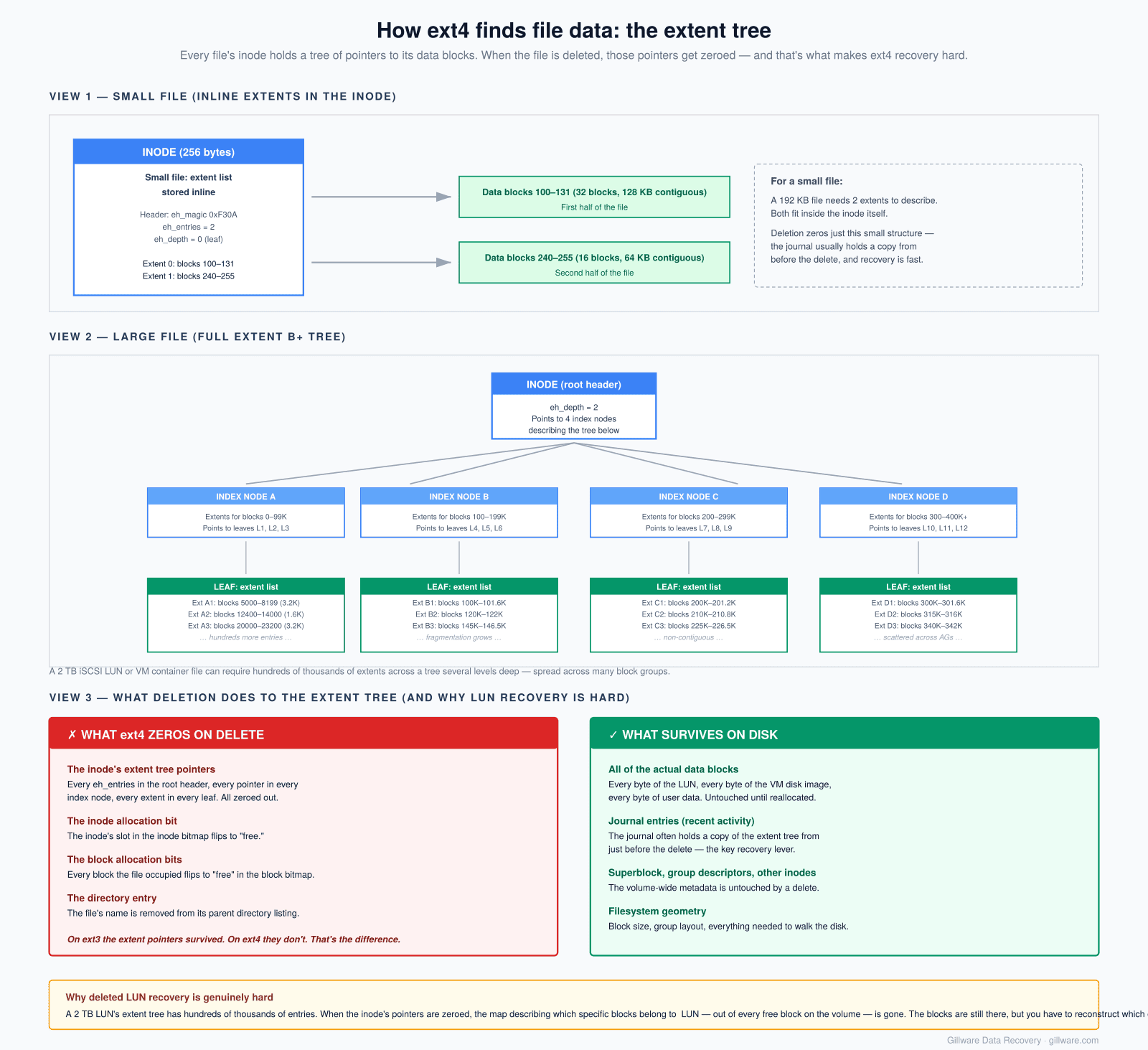
Each file or directory on the volume has an inode — a small record containing its size, permissions, timestamps, and most importantly its extent tree: a set of pointers describing where on disk the file’s actual data blocks live. Ext4 introduced the extent tree as a replacement for ext3’s indirect block pointer scheme; it’s far more efficient for large files, but it also has a consequence that matters enormously for recovery: when a file is deleted on ext4, the extent tree pointers in the inode are zeroed out. The data blocks themselves remain on disk until something else allocates and overwrites them, but the map describing where those blocks live is gone. We’ll come back to that.
Where we see Ext4 fail
The Ext4 cases that come into our lab cluster into a few clear categories:
- Linux server boot drives and host root filesystems — the canonical “server won’t come back after a crash” case. A power loss during heavy I/O leaves the journal in a state the kernel won’t replay, and the system fails to mount root on next boot.
- Virtualization hosts running KVM/QEMU on Linux — qcow2, raw, and vmdk container files for guest VMs live on the host’s ext4 filesystem (typically under
/var/lib/libvirt/images/or a mounted storage pool). When the host’s filesystem goes sideways, every guest goes with it. - iSCSI target hosts — Linux servers running
tgt,LIO, or vendor-specific iSCSI stacks expose LUNs to network clients. The LUNs are usually backed by single large files on an ext4 filesystem, or by LVM logical volumes that contain ext4. Either way, the LUN is one giant file from the host’s perspective and dozens of guest filesystems from the clients’ perspective. - NAS units configured for ext4 — many Synology, QNAP, and self-rolled NAS deployments use ext4 either by user choice (especially on Synology models that don’t support Btrfs) or by default (QNAP standard QTS, the bulk of self-rolled builds).
- Database servers — MySQL, PostgreSQL, and MongoDB data directories on ext4. The database’s own files are often large and fragmented, and the filesystem’s health is everything.
- Linux desktops and workstations — less common in our caseload but still regular, especially when developers have qcow2 images, Docker overlay storage, or LXC container roots on ext4.
The big one — deleted LUNs and container files
The single most common Ext4 case category we see, and the one that does the most damage per incident, is the deletion of a large container file. From the underlying filesystem’s perspective it’s an entirely ordinary operation — one syscall, one inode freed, one set of extent pointers zeroed. From the business’s perspective it’s a multi-terabyte iSCSI LUN gone, or a virtual machine that held the company’s production database is suddenly missing, or an entire VMware datastore disappeared because the underlying .vmdk got removed at the host level.
The triggers we see for this category, in rough order of frequency:
- Malicious deletion as part of a cyber incident — either an attacker who has compromised a host and is destroying data on the way out, an insider with credentials acting in bad faith, or a ransomware family that specifically targets virtualization storage. ESXiArgs is one of the better-documented examples; it encrypts or removes VM container files on ESXi hosts and on Linux hypervisors running similar storage layouts. This is the failure mode that has been growing fastest in our caseload.
- Accidental
rm -rfon the wrong directory — an admin cleaning up what they believe is an obsolete storage path, a cleanup script with an unchecked variable expansion, or a deployment automation that fired against the wrong target. The shell doesn’t ask for confirmation; the kernel doesn’t prompt; the files are simply gone. - Storage migration or consolidation gone wrong — LUNs moved between hosts where someone removed the source copy before verifying the destination was good, or a VM thought to be decommissioned that turned out to still be in production.
- Misconfigured backup retention or cleanup jobs — automation that was supposed to prune old snapshots ending up pruning live data.
In all of these cases, the underlying Ext4 operation is the same and the recovery problem is the same: a single inode has been freed, its extent tree pointers have been zeroed, and the dozens-of-gigabytes-to-multi-terabytes of data blocks the file occupied are still on disk but no longer indexed. Recovering them means rebuilding the extent tree from clues outside of the inode itself.
Why Ext4 deletes are nearly final
Linux does not have a native recycle bin. Some users assume the desktop trash they see in GNOME or KDE constitutes one; it doesn’t. The desktop trash is a user-space convention defined by the freedesktop.org Trash specification — the file manager moves files to ~/.local/share/Trash/ when the user clicks “Move to Trash” in a graphical session. It catches GUI deletes from a logged-in interactive user. It catches nothing else.
Specifically, none of the following ever touches the desktop trash:
- The
rmcommand from any shell. - The
unlinksystem call from any program. - Anything the root user does, whether interactive or scripted.
- Anything any other user does outside their own graphical session.
- Anything cron, systemd, ansible, or any other automation does.
- Anything a remote process does, including over SSH, NFS, or SMB.
- Anything a compromised process or attacker does.
In other words: on a Linux server, the recycle bin doesn’t exist, period. Every delete is a permanent delete from the user’s perspective.
What happens at the filesystem layer when ext4 processes that delete is the next question, and the answer is the reason ext4 is specifically harder to recover from than its predecessor ext3. Four things change on disk:
- The file’s entry is removed from its parent directory.
- The bit corresponding to the file’s inode is flipped to “free” in the inode bitmap.
- The bits corresponding to every data block the file occupied are flipped to “free” in the block bitmap.
- The extent tree pointers inside the inode are zeroed out. This last step is the one that makes ext4 recovery genuinely difficult. On ext3, the inode’s block pointers were preserved after deletion, and tools like
extundeletecould simply read the inode and follow the pointers to recover the file. On ext4, that path is closed.
The data blocks themselves are not overwritten. They remain on disk, byte-for-byte intact, until some future allocation reuses them. But knowing that they exist somewhere is not the same as knowing which blocks belonged to your file. For a small, contiguous file the answer is sometimes inferable from neighboring metadata. For a 2 TB iSCSI LUN that was fragmented across hundreds of thousands of non-contiguous extents over years of writes, it isn’t.
Common tools like extundelete and ext4magic work around this by reading the filesystem’s journal, which can contain copies of inode state from immediately before recent deletions. This works well for files deleted in the last few minutes or hours on a relatively idle filesystem. It works poorly or not at all for files deleted days or weeks earlier on a busy system, where the journal has long since cycled past the relevant transactions.
Common Ext4 error patterns we see
When the call isn’t about a deletion but about a volume that won’t mount, the kernel messages usually fall into a small set of patterns. Most admins recognize their situation in one of these.
mount: wrong fs type, bad option, bad superblock on /dev/sdX — the generic mount failure. The kernel couldn’t make sense of the superblock at the expected location. Could mean the primary superblock is damaged (and recovery can fall back to a backup), or that the partition table is pointing the kernel at the wrong offset, or that the underlying device has had something written over the start of it.
dumpe2fs: Bad magic number in super-block while trying to open /dev/sdX — the more diagnostic version of the same problem. The 0xEF53 magic number that identifies the start of an ext4 superblock isn’t where it should be. fsck will offer to try backup superblocks at standard offsets (32768, 98304, 163840…). If those backups are also damaged or if the volume was non-default-sized at creation, the backups don’t help.
EXT4-fs error (device sdX): ext4_journal_start_sb: Detected aborted journal. Remounting filesystem read-only. — the kernel encountered an error while trying to play back the journal during mount and gave up. The filesystem will mount read-only or fail to mount entirely. The journal aborts on bad metadata, on storage device errors during journal write, or on hitting an extent that references blocks outside the filesystem’s declared size.
EXT4-fs error: dx_probe: Directory index failed checksum — the directory’s internal hash tree (used to accelerate lookups in large directories) is internally inconsistent. The data may all still be there, but the index that locates it doesn’t check out.
EXT4-fs error: ext4_block_to_path: block N > max in inode M — an inode is claiming a data block that lives outside the filesystem’s addressable range. Either the inode is corrupted or the filesystem’s declared size has been damaged.
Structure needs cleaning from fsck — the filesystem state flag says it’s dirty and a check is required before any mount can succeed.
The honest truth about all of these: if the underlying hardware is healthy and no destructive recovery tools have been run against the volume, the situation is usually recoverable. The data blocks are still on disk. The problem is reconstructing the metadata that points to them.
When the superblock itself is gone — our reconstruction approach
There’s a category of Ext4 cases where standard tools simply run out of options. The primary superblock is damaged. The backup superblocks at the standard offsets are damaged or have been overwritten. testdisk can’t find a partition signature it trusts. dumpe2fs reports “Couldn’t find valid filesystem superblock” against every offset it tries. From the standard-tool perspective, there is nothing on the disk to mount.
In our lab, these cases get handled by a different approach entirely. Rather than trying to find the superblock and read the filesystem top-down the way a normal mount does, we read the filesystem bottom-up from the sectors themselves.
The technique works like this. Every sector of the imaged drive is scanned with pattern-matching against the binary signatures of every distinct ext4 artifact: inode structures, extent tree node headers, directory entry blocks, group descriptor records, journal blocks, superblock copies even if they’re in non-standard locations, and so on. Each artifact has a recognizable on-disk format with distinctive magic numbers, field layouts, and consistency constraints (an inode of size N pointing to extents that should themselves be valid extents; a directory entry whose name length and record length should agree; a group descriptor whose pointers should land in plausible locations). The match is selective enough that random data and other file system formats don’t register; the volume of detected ext4 artifacts on an ext4 volume is enormous.
Every match is logged into a relational database: what artifact, what offset, what fields it contains, what other artifacts it references. With that database in hand, the original geometry of the filesystem can be inferred from the cross-references. The spacing between consecutive inode tables tells us the block group size. The cross-references between inodes and the extents they point to tell us the block size. The clustering of group descriptors tells us where the superblock should be even if no surviving copy of it exists. Once enough relational constraints are satisfied, the filesystem’s entire layout can be reconstructed bottom-up, and the file system can be parsed from a synthetic superblock derived from the artifact database.
The cases this approach is designed for are the cases where everything has gone wrong — the kind where standard tools can’t even tell you the partition was once ext4. It doesn’t always succeed; sometimes the disk has had enough written over it that not enough artifacts survive to deduce the geometry. But the success rate on cases where simpler tools have given up is substantial, and it’s the approach that gives us a path forward on cases other labs decline.
What not to do while the volume is offline
If your ext4 volume won’t mount, files are missing, or your filesystem is otherwise misbehaving, several common reactions actively destroy recoverable data.
- Don’t answer “yes” to
fsck’s repair prompts.fsck -ywrites structural changes back to the live device. On a healthy filesystem that just needs a journal replay, this is harmless. On a filesystem with damaged structure, it can convert recoverable corruption into permanent corruption — especially when fsck offers to “clear” inodes it doesn’t understand, or to truncate extent trees that point to blocks it considers out of range. If you’re uncertain about the state of the volume, run fsck’s no-write modes first or don’t run it at all. - Don’t run
mkfs.ext4to “start fresh”, even if you intend to restore from backup afterward. The new filesystem overlays its metadata onto the same blocks, and if the backup turns out to be incomplete or outdated, the original data is now much harder to retrieve. - Don’t run
dd if=/dev/zeroagainst any portion of the device, including to “zero out the partition table before reformatting.” Every byte you write is a byte of recoverable data lost. - Don’t restore from backup directly onto the failed volume. Always image the device first. If the backup is incomplete or the restoration goes wrong, the original is gone.
- Don’t keep retrying mount commands with progressively more aggressive options. Mount-time journal replay can write to the filesystem; repeated attempts in degraded states can compound damage.
- Don’t use undelete tools against the live device. Tools like
extundeleteandphotoreccan read from a live device, but should be run against an image instead. Their write modes can sometimes touch the source unintentionally; their scanning can also miss what’s recoverable in cases where the inode table is damaged. They’re also limited to what the journal still contains. - Don’t reboot the system repeatedly looking for a different outcome. If the volume failed to mount cleanly, additional boot attempts won’t change that and can write recovery state.
What recovery actually looks like
The first step on every ext4 case is imaging the source device through hardware that won’t write back to it. For a single-drive ext4 volume that’s straightforward. For an ext4 volume that lives on top of LVM, software RAID, or a hardware RAID controller, every constituent drive is imaged and the storage layers above are reconstructed offline from those images.
Once the images exist, the recovery path depends on the failure category. A volume with a healthy underlying structure that failed mount because of journal corruption gets its journal replayed in a sandbox and the resulting filesystem extracted. A volume with damaged superblocks but intact group descriptors gets its superblock reconstructed from the GDT and one of the surviving copies. A volume where the metadata has been more substantially destroyed gets handed off to the relational reconstruction process described above.
Deleted container files are their own discipline. The first place we look is the journal, which often contains a copy of the deleted inode’s extent tree from immediately before the delete. If the journal still has it, the recovery is comparatively straightforward: rebuild the inode, read the data blocks, and what we extract is a byte-for-byte copy of the LUN or VM container as it existed at the moment of deletion. From there, the guest filesystem inside the container can be mounted and the user’s actual data accessed normally.
If the journal no longer contains the relevant transactions — common when significant time has passed since the deletion or when the host has been under continued write load — the recovery becomes harder. The extent tree has to be inferred from filesystem allocation patterns around the deleted file, from journal entries describing block allocations that match the deleted file’s known size, and from any surviving copies of the inode in the artifact database. Outcomes in this category vary; sometimes complete LUNs come back cleanly, sometimes we get most of the LUN with gaps in heavily-fragmented regions, sometimes the data has been overwritten by subsequent host activity. The free consultation is where we tell you which category your specific case is likely in.
How the engagement works for complex Ext4 cases
Gillware’s standard engagement for single-drive recoveries is risk-free: free evaluation, flat-rate quote in writing before any work begins, payment only on successful recovery. That model works well when the work is well-bounded — a single failed drive whose recovery can be estimated reliably from the initial diagnosis.
Complex Ext4 cases — large deleted LUNs, multi-drive arrays where the filesystem and the underlying storage have both been damaged, hosts where destructive recovery attempts have already been made, ransomware deletion scenarios with continued host activity — don’t always fit that model. The engineering hours involved in imaging multiple drives, reconstructing the underlying storage stack, parsing potentially terabytes of journal data, and (in some cases) running the relational artifact reconstruction against a damaged filesystem can be substantial and not entirely predictable in advance. For those cases, the engagement looks like this:
- The initial consultation is free. We’ll go through the failure, what you’re seeing, what you’ve already tried, what the storage configuration looks like, and what the realistic outcome ranges are. No charge for the conversation, no obligation afterward.
- The evaluation phase may be free or fixed-price, depending on what’s involved in safely imaging the source drives. We’ll tell you which applies before we start.
- The recovery work itself, on complex cases, may carry engineering charges that apply regardless of the final outcome. When it does, we explain the structure clearly and in writing before any work starts. You decide whether to proceed on those terms.
- Where the case fits our standard risk-free model, we’ll use it. Many ext4 cases — single-drive boot drive failures, straightforward journal-replay recoveries, deletes that happened recently on quiet systems — do qualify. We’ll tell you which category your case is in during the consultation.
The principle is the same as on all of our complex-storage work: terms agreed in writing up front, no surprise billing at the end.
If the data matters, what to do right now
The actions that make the largest positive difference to recovery outcomes are the simplest ones.
- Stop writing to the affected volume. If the volume is a system root, take the host offline. If the volume is a data partition, unmount it. If unmounting isn’t possible without significant operational impact, stop the workloads that write to it.
- Document the symptoms. Exact text of every kernel error, every
fsckoutput, every mount command and what it returned. Screenshots or copy-pastes are fine. If the situation involves a deletion, capture whatever log evidence exists of when and how it happened — shell history, audit logs, automation run logs. - Don’t run repair tools. No
fsck -y, nomkfs, nodd, no aggressive mount retries. If a tool wants to write to the volume, the answer is no until we’ve evaluated. - Image the volume if you have safe means to do so, or wait until we can. Imaging is the foundation of every safe recovery.
- Call us. The consultation is free; we’ll walk through what realistic outcomes look like, what the engagement terms would be for your specific situation, and what to do with the drive in the meantime.
Ext4 is a solid, well-engineered filesystem that does its job reliably for the overwhelming majority of the deployments running on it today. It’s also, as a consequence of design decisions made in 2008, one of the more hostile filesystems for recovering deleted files after the fact — particularly large, fragmented files like LUNs and VM containers. The good news is that “hostile” isn’t “impossible.” On the cases that come into our lab promptly, before destructive recovery attempts have closed off the easier paths, the data is usually still there to be reconstructed.
