
XFS Data Recovery
A RHEL 9 server won’t come back after a power event. The console shows systemd hung at “mounting /home” and dmesg is full of XFS (dm-2): Metadata corruption detected and XFS (dm-2): xlog_recover_process: log replay aborted. Or the recovery boot came up far enough for xfs_repair to be tried, someone answered -L to the prompt about zeroing the log, and now the volume mounts but the database data directory has files that read as zeros and directories that show inconsistent listings. Or an Oracle Linux storage host that’s been solid for three years suddenly refuses to import its XFS volume after a controller firmware update. Or a Rocky Linux backup server’s /backup volume is throwing checksum errors on read from a subset of files that all lived in the same allocation group.
XFS is the workhorse filesystem behind most enterprise Linux running today, and the failure modes we see reflect that: heavy-write production servers where the log has become inconsistent with the data blocks it’s supposed to describe, volumes where destructive repair attempts have already been made, storage stacks where the failure at the RAID or LVM layer beneath XFS has manifested as metadata errors above, and the specific class of case where xfs_repair -L was the last thing tried before the drive was shipped to us. This page covers what’s actually happening on an XFS volume when things go wrong, what the standard tools can and can’t do, and how our lab approaches recovery when the situation has moved past what those tools can address.
A short tour of XFS
XFS was designed by SGI for IRIX in the early 1990s, ported to Linux in 2001, and became the default filesystem on Red Hat Enterprise Linux 7 in 2014. It is now the default on every enterprise Linux distribution derived from RHEL — Rocky Linux, AlmaLinux, Oracle Linux, and CentOS Stream — and remains a common choice on Ubuntu Server and SUSE deployments where XFS’s specific properties are wanted. The installed base is enormous.
The architecture reflects its origin as a filesystem for large SGI workstations with fast storage and heavy parallelism. Where ext4 uses a single global set of metadata structures, XFS divides the volume into allocation groups — typically four to sixteen, each responsible for its own portion of the volume. Every allocation group holds its own copy of the metadata that describes free space, inodes, and file extents within its own range. This is what lets XFS scale to petabyte volumes without contention on metadata locks: a filesystem operation in AG 3 doesn’t need to talk to AG 7’s metadata, so operations across the volume can proceed in parallel.
The consequence for recovery is that XFS has redundancy built into the architecture. Each allocation group has its own superblock (only AG 0’s is authoritative, but the others exist as backups), its own free space B+ trees, its own inode B+ trees, and its own extent tracking. A volume that has lost AG 0’s superblock can rebuild it from AG 1 or 2 or 3’s copies. A volume where a single AG’s metadata is damaged usually keeps the rest of the volume intact.
Two other structural properties matter for recovery. First, free space in XFS is managed by B+ trees, not bitmaps. Two trees per allocation group: one indexed by starting block, one indexed by extent size. This is what makes XFS fast for large-file allocation, but it also means that free-space corruption is a tree-repair problem rather than a bitmap-rebuild problem, and the two trees have to stay consistent with each other. Second, every metadata structure in modern XFS (v5 format, default since Linux 3.10) carries a CRC checksum. This is a substantial recovery advantage: damaged metadata is unambiguously identifiable as damaged, and undamaged metadata can be trusted rather than second-guessed.
File data itself is described by extent B+ trees stored in each file’s inode — a set of pointers describing where on disk the file’s data lives. Small files may have their extent list stored inline in the inode; larger files use a full B+ tree. Very recent XFS versions add a reverse-map B+ tree (rmapbt) that goes the other direction — given a block, what owns it. This is enormously useful for recovery: on a rmapbt-enabled volume, orphaned data blocks can be traced back to the files they belong to even when the forward metadata is damaged.
The journal (sometimes called the log) in XFS is different from ext4’s in an important way. Where ext4’s journal contains full metadata blocks, XFS’s journal contains logical descriptions of the operations to be applied — “add extent E to file F,” “free inode I,” “update free-space tree in AG 3.” This makes the XFS journal smaller and faster in normal operation but means that when the journal is inconsistent with the on-disk state at mount time, replaying it is harder and riskier. This is the origin of the xfs_repair -L dilemma we’ll come back to.
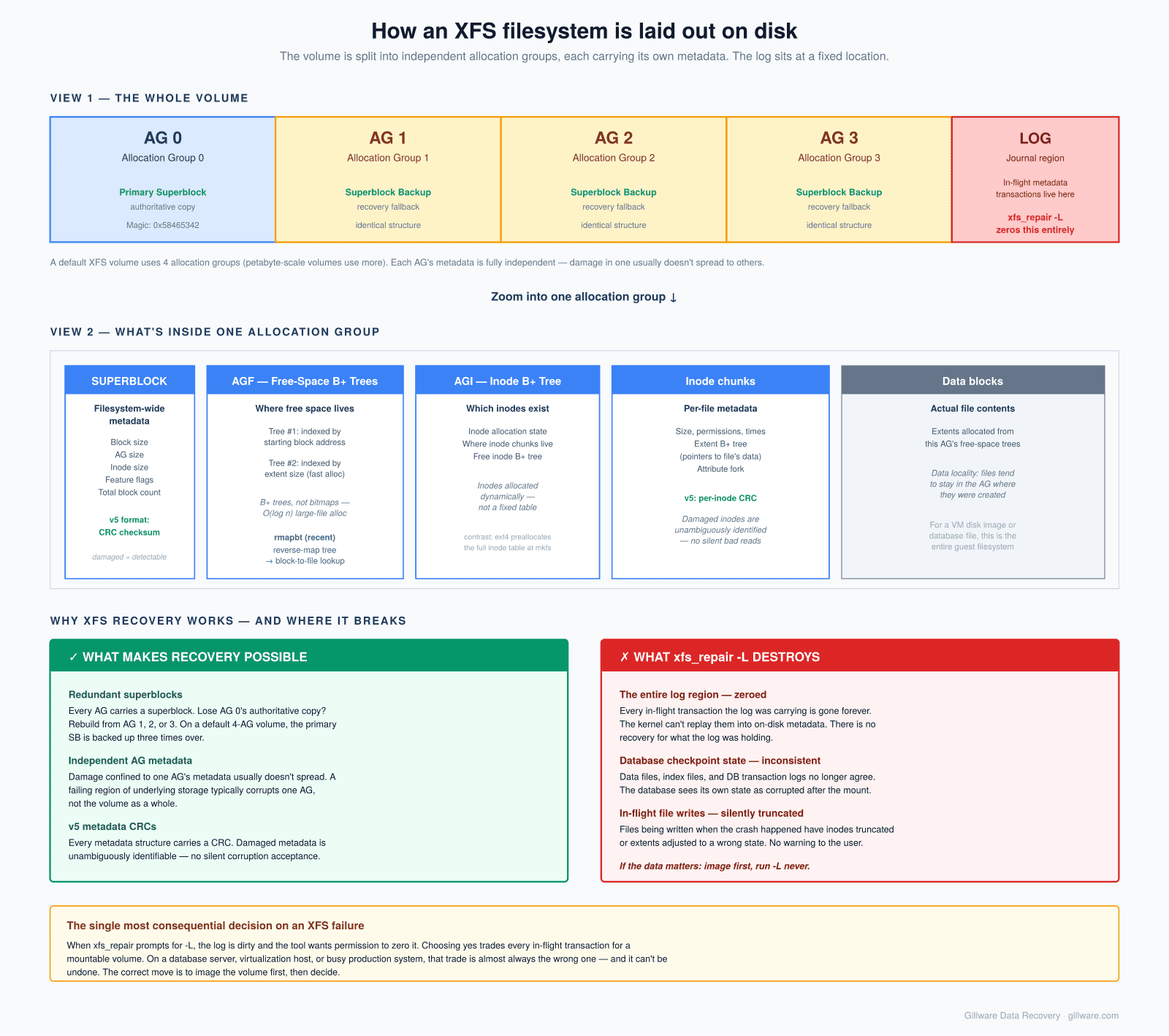
xfs_repair -L zeros is gone.Where we see XFS fail
The XFS cases in our caseload cluster into a few clear categories.
- RHEL, Rocky, AlmaLinux, and Oracle Linux servers — the majority of our XFS caseload. These are production application servers, database hosts, web servers, and infrastructure servers running mission-critical workloads. Failure modes cluster around unclean shutdowns and RAID underneath.
- Database hosts — Oracle Database, PostgreSQL, MySQL, and MariaDB deployments where XFS was chosen specifically for its write scalability on heavy transactional workloads. The database’s own files are typically large, heavily-fragmented, and continuously written to; XFS’s handling of that pattern is why it was chosen, and it’s also what makes recovery time-sensitive when things go wrong.
- Storage servers and NAS builds — Linux storage servers exporting XFS-backed volumes over NFS, SMB, or iSCSI. Unraid specifically uses independent XFS filesystems per disk with parity protection managed above the filesystem layer, which produces its own recovery characteristics.
- Virtualization hosts running on RHEL-family hosts — RHEV, oVirt, and KVM installations where the host’s XFS filesystem holds VM disk image files. When the host’s filesystem fails, every guest disk on it is affected.
- Backup and archive servers — the “set it and forget it” deployments where an XFS volume gets written to continuously by backup software, rarely audited, and eventually fails. These often show up in our lab months after the underlying problem started because nobody noticed until a restore was needed.
- Container hosts — Kubernetes worker nodes, OpenShift installations, and Podman hosts where XFS is under container runtime storage, with overlay filesystems on top. Recovery here is often a filesystem case with a container-storage layer to unpack afterward.
- Legacy IRIX systems — rare, but they do appear. XFS started life on IRIX and there are still SGI workstations and servers in production in industrial and research settings. The on-disk format on IRIX has some differences from modern Linux XFS, but the fundamentals are the same.
The biggest destroyer of XFS recovery outcomes: xfs_repair -L
The most consequential decision an admin makes during an XFS failure is what to do when xfs_repair reports that the log is corrupt and asks for the -L flag. It’s worth a full section, because this single decision determines the recoverability of the majority of cases we see where the answer went the wrong way.
When XFS shuts down uncleanly — power loss, kernel panic, hard reboot during heavy I/O — the journal contains transactions that were in progress but not yet fully applied to the on-disk metadata. On the next mount, the kernel replays those transactions from the journal to bring the filesystem to a consistent state. This is the normal recovery path and it works reliably in the overwhelming majority of cases.
If the journal itself is damaged — because the storage returned bad data during the crash, because a subsequent event corrupted the log region, or because of hardware issues that manifest specifically in the log’s allocation group — the replay can’t complete. The kernel refuses to mount the filesystem and the admin’s next move is usually to run xfs_repair. xfs_repair also refuses to run on a filesystem with a dirty log, because repair operating on inconsistent metadata can compound corruption. It tells the admin to mount the filesystem and let the log replay first — but the kernel already refused to do that. This is the loop that produces the -L question.
What xfs_repair -L does: it zeros out the log. It says, effectively, “forget about anything the log was in the middle of doing.” The filesystem can then be mounted, because there’s no dirty log to replay. This works, and on lightly-loaded systems where the crash happened during a moment of low write activity, the loss from zeroing the log is limited to the last few seconds of transactions.
What xfs_repair -L costs: every transaction the log was carrying is gone. On a database server that was in the middle of a checkpoint, that means the on-disk state is now inconsistent with the database’s expectations — data files, index files, and transaction logs no longer agree with each other. On a server that was in the middle of writing large files, the file’s inode still describes extents whose data blocks may not have made it to disk before the crash. On a busy virtualization host, VM disks that were being written to when the crash happened have inconsistent internal state. The metadata on disk is now “consistent” from XFS’s perspective — the free-space trees agree with the inode allocation trees, the extent lists match the free-space maps — but consistent doesn’t mean correct.
Worse, xfs_repair will now proceed with its normal repair pass against a filesystem that’s been forced into artificial consistency. Structures that would have been repaired correctly with the log intact get repaired to a wrong state. Files that had extent allocations in the log that never made it to disk have their inodes truncated or removed. Directories whose entries were in-flight have entries removed. The end result is a filesystem that mounts and reads, but that has quietly lost the last several seconds to several minutes of pre-crash activity — and where the individual files affected are not obvious until someone tries to use them.
The right answer, in almost every case where the data matters, is not to run xfs_repair -L. The right move is to image the volume, take it out of the destructive-repair path, and either (a) hand-repair the log to a consistent state in a controlled environment, or (b) mount the image read-only under a kernel and mount options that can tolerate the log inconsistency, extract the data, and never mount the damaged filesystem read-write again. This is a substantial part of what we do on XFS cases: unwinding the situations where xfs_repair -L was the last thing tried before the case reached us.
Common XFS error patterns we see
When the call is about a volume that won’t mount, the kernel messages usually fall into a small set of patterns.
XFS (device): Corruption of in-memory data detected. Shutting down filesystem — the kernel found metadata that failed its consistency or CRC checks during operation. The filesystem shuts itself down to prevent further damage. Next boot will refuse to mount cleanly. The v5 metadata CRC feature makes these errors specific and diagnostic — the kernel logs point at exactly which structure failed the check.
XFS (device): xlog_recover_process: log replay aborted or log inconsistent — the classic dirty-log-can’t-replay case that leads to the xfs_repair -L question. Almost always follows an unclean shutdown.
XFS (device): Metadata corruption detected at ..., inode ... — a specific inode’s metadata is inconsistent. Could be the inode itself, its extent B+ tree, or an attribute fork. Often localized to a specific area of the volume and often related to a specific failing region of underlying storage.
XFS (device): agf ... does not have full alignment or agi ... is corrupt — the free-space or inode B+ tree in a specific allocation group is damaged. Because XFS keeps AG metadata independent, this is often confined to one AG’s worth of the volume.
XFS (device): Filesystem is not marked feature-consistent or Unsupported feature bit ... — the on-disk state uses filesystem features the current kernel doesn’t recognize (or vice versa). Usually appears after cross-kernel migrations or unusual upgrades.
Structure needs cleaning or filesystem is dirty from xfs_repair — the filesystem’s clean flag is not set. Requires a mount-and-unmount cycle to clean, but the mount is failing, hence the loop.
The honest truth: if the hardware is healthy, no destructive tools have been run, and the volume comes to us before someone answers “yes” to -L, the recovery outcome on XFS is usually excellent. The metadata CRCs and the AG redundancy give recovery a lot to work with.
When the volume is genuinely broken — our reconstruction approach
Some XFS cases arrive in states standard tools can’t address. xfs_repair refuses to run or crashes during its checks. Multiple allocation groups have damaged metadata. The primary superblock is unreadable and the backup copies have also been damaged or overwritten. The log has been zeroed and the resulting filesystem has been mounted read-write and further written to. The underlying storage stack (mdadm, LVM, LUKS) has been reconstructed but the XFS layer on top of it doesn’t come up.
Our approach on these cases works bottom-up from the imaged device rather than trying to mount top-down. The technique starts by scanning every sector of the image for the distinctive signatures of XFS metadata: superblocks (with their 0x58465342 magic), allocation group free-space trees (AGF blocks), allocation group inode trees (AGI blocks), inode clusters, extent B+ tree nodes, and directory blocks. Every hit is logged into a relational database along with its offset, its declared position within the filesystem’s geometry, and its cross-references to other structures.
With that database in hand, several things become possible. The volume’s geometry can be inferred from the spacing between structures — the position of AG 1’s superblock relative to AG 0’s tells us the AG size, and the size and position of the AGI blocks tell us the inode allocation layout. The allocation group boundaries can be identified even when the primary superblock is unreadable. Damaged structures can be cross-checked against their expected content (a directory block that should list N entries but only presents M, an inode that claims extents that fall outside the AG’s declared range, an extent B+ tree node whose child pointers land on locations that aren’t valid B+ tree nodes).
Once the filesystem’s geometry is reconstructed and the damaged regions are identified, the recovery walks the filesystem structure the way a working kernel would — but from the reconstructed metadata rather than the damaged on-disk state. Files are extracted from their inodes and extent trees, directories are walked to preserve the naming structure, and the specific files whose metadata is beyond recovery are surfaced explicitly to the customer rather than silently omitted.
This is the approach that gives us a path forward on cases where the standard tools have given up. It doesn’t always succeed — there are volumes where enough of the metadata has been overwritten by subsequent activity that not enough signatures remain to deduce the geometry — but the success rate on cases where simpler tools have failed is substantial.
What not to do while the volume is offline
If your XFS volume won’t mount, is throwing metadata corruption errors, or has files that aren’t reading correctly, several common reactions actively destroy recoverable data.
- Do not run
xfs_repair -Lunless you fully understand that you’re making a trade — getting the volume mountable now, in exchange for permanent loss of whatever the log was carrying. On a database server or busy production host, this trade is almost always the wrong one. Image the volume first and give us the option of hand-repairing the log rather than zeroing it. - Do not run
xfs_repairagainst the live device. Even without-L,xfs_repairwrites to the device by design. If the underlying storage is intermittent, if the corruption pattern is onexfs_repairdoesn’t handle correctly, or if you want the option of a different repair approach later, runningxfs_repairforecloses those options. - Do not run
mkfs.xfsto “start fresh,” even with the intent to restore from backup afterward. The new superblock and AG structures overlay the old ones and make recovery of the original volume significantly harder. - Do not force-mount with
-o norecovery,-o ro,norecovery, or similar options if the volume then gets remounted read-write, however briefly. Read-only inspection is fine and often useful; read-write mount of a damaged XFS volume adds new writes that overwrite the state you’d want to recover from. - Do not run
xfs_metadumporxfs_mdrestoreto “save a copy” without understanding what those tools do.xfs_metadumpextracts metadata only, not data blocks; a metadata-only image is useful for diagnosis but is not a recovery image. - Do not
ddto zero anything. This applies to every filesystem, but it’s worth repeating: nodd if=/dev/zeroagainst the partition table, the superblock, or any part of the device. - Do not restore from backup directly onto the failed volume. Image first. If the backup turns out to be incomplete, the original is gone.
What recovery actually looks like
The first step on every XFS case is imaging. For a single-drive XFS volume that’s straightforward. For XFS on top of mdadm, LVM, or hardware RAID, every constituent drive is imaged and the storage layers below are reconstructed against the images before the filesystem work begins.
From there, the path depends on the failure category. A volume with a genuinely dirty log but otherwise healthy metadata gets the log examined and, where possible, replayed against the image to bring the filesystem to a consistent state without the losses that xfs_repair -L would produce. A volume with damaged metadata but intact allocation groups gets the AGs verified individually, the damaged structures repaired against known-good copies from neighboring AGs, and the volume brought up cleanly. A volume where the primary superblock is damaged gets it rebuilt from one of the AG-backup copies, of which there are typically several. A volume where multiple AGs are damaged gets the relational reconstruction described above.
Cases involving underlying storage failure — failing disks in a RAID array, controller failures, LVM metadata damage — get the underlying stack repaired first. Only once the block-level storage is stable does the XFS layer get touched. Trying to repair XFS on top of a storage stack that’s returning bad data during the repair is a way to compound damage.
The metadata CRCs in v5 XFS make a specific class of case much cleaner than the equivalent on ext4: silent corruption from failing storage is not silent. Every read of a damaged metadata structure produces a CRC failure the kernel logs explicitly, so the extent of the damage is knowable rather than something that has to be inferred. The recovery work can focus on the specific regions the CRCs identify rather than performing a full-volume audit.
How the engagement works for complex XFS cases
Straightforward single-drive XFS recoveries fit our standard risk-free engagement: free evaluation, flat-rate quote in writing before any work begins, payment only on successful recovery. Log-replay failures on healthy hardware, single-file recovery cases, and clean cases where the damage is limited to a specific area of the volume typically qualify.
Complex XFS cases — multi-drive arrays where the underlying storage and the filesystem have both been damaged, volumes where xfs_repair -L or other destructive tools have already been run and the recovery has to unwind that damage, ransomware cases with continued host activity, migrations gone wrong across major RHEL/OS upgrade transitions, and reconstructions on volumes where standard tools have given up — involve engineering hours that aren’t always predictable in advance.
For those cases, the engagement structure is the one we use for all complex Linux work: free initial consultation, evaluation phase that may be free or fixed-price depending on what’s needed to safely image the source, and (on the recoveries where it applies) engineering charges that are explained clearly and in writing before any work begins. You decide whether to proceed on those terms. No surprise billing.
For related work, see our ext4 recovery page (the other mature journaled Linux filesystem), our Linux data recovery hub for the broader picture, and our RAID recovery and server data recovery pages for the hardware storage stack that XFS typically sits on top of.
XFS Volume Won’t Mount? Let’s Talk Before You Run xfs_repair.
Free initial consultation. On XFS cases specifically, the single most valuable move is often the conversation you have before running -L. We’ll walk through your specific situation and what realistic recovery looks like.
Or call us: 877-624-7206