
Your WD or SanDisk SSD was fine until it wasn’t. The laptop with a WD Blue SN550 or SN570 inside says no bootable device. A WD_BLACK SN850 shows up in BIOS as a controller name with a capacity of 0 bytes, or not at all. A Blue SA510 is there in Disk Management but Windows wants to initialize it and every file is gone. A SanDisk Extreme Portable SSD or WD My Passport SSD disconnects every few minutes and then stops mounting altogether. This page is for the owner of one of those drives who needs to know, honestly, what can still be done.
Western Digital and SanDisk have been one company since 2016, and their consumer SSDs share engineering: the same NAND, closely related firmware, and, on most of the internal NVMe drives, controllers designed in-house. That matters for recovery because the failure that takes most of these drives down is not a worn-out memory chip. It is the drive’s own firmware losing track of where your data is. The positioning here follows our SSD data recovery hub; this page adds the WD and SanDisk detail.
Which WD or SanDisk SSD do you have?
The lineup falls into four groups, and the group tells us a lot about the likely failure and the recovery path before the drive arrives.
- M.2 NVMe, WD controller — WD Blue SN550, SN570, SN580, SN770 and SN5000; WD_BLACK SN750, SN770, SN850, SN850X and SN8100; WD Green SN350. The majority of what we see. Most use a controller WD designed itself with SanDisk NAND, and many are DRAM-less, which makes the mapping table even more dependent on firmware behaving.
- 2.5-inch and M.2 SATA — WD Blue SA510 and the older WD Blue 3D, WD Green, SanDisk Ultra 3D and SanDisk SSD Plus. Found in desktops, older laptops and upgrade kits. Third-party controllers are common here, so two drives with the same label can have different internals.
- Portable USB-C — SanDisk Extreme Portable SSD and Extreme PRO Portable SSD, WD My Passport SSD, WD_BLACK P40 and P50. An internal SSD behind a USB bridge in a rugged shell. The bridge fails more often than the SSD does, and a software password layer may sit on top.
- OEM drives in laptops — WD and SanDisk SSDs sold to laptop makers under part numbers such as SN530, SN730, SN740 and PC SN810. Same engineering, different label, often soldered or in a 2230 form factor that is awkward to handle.
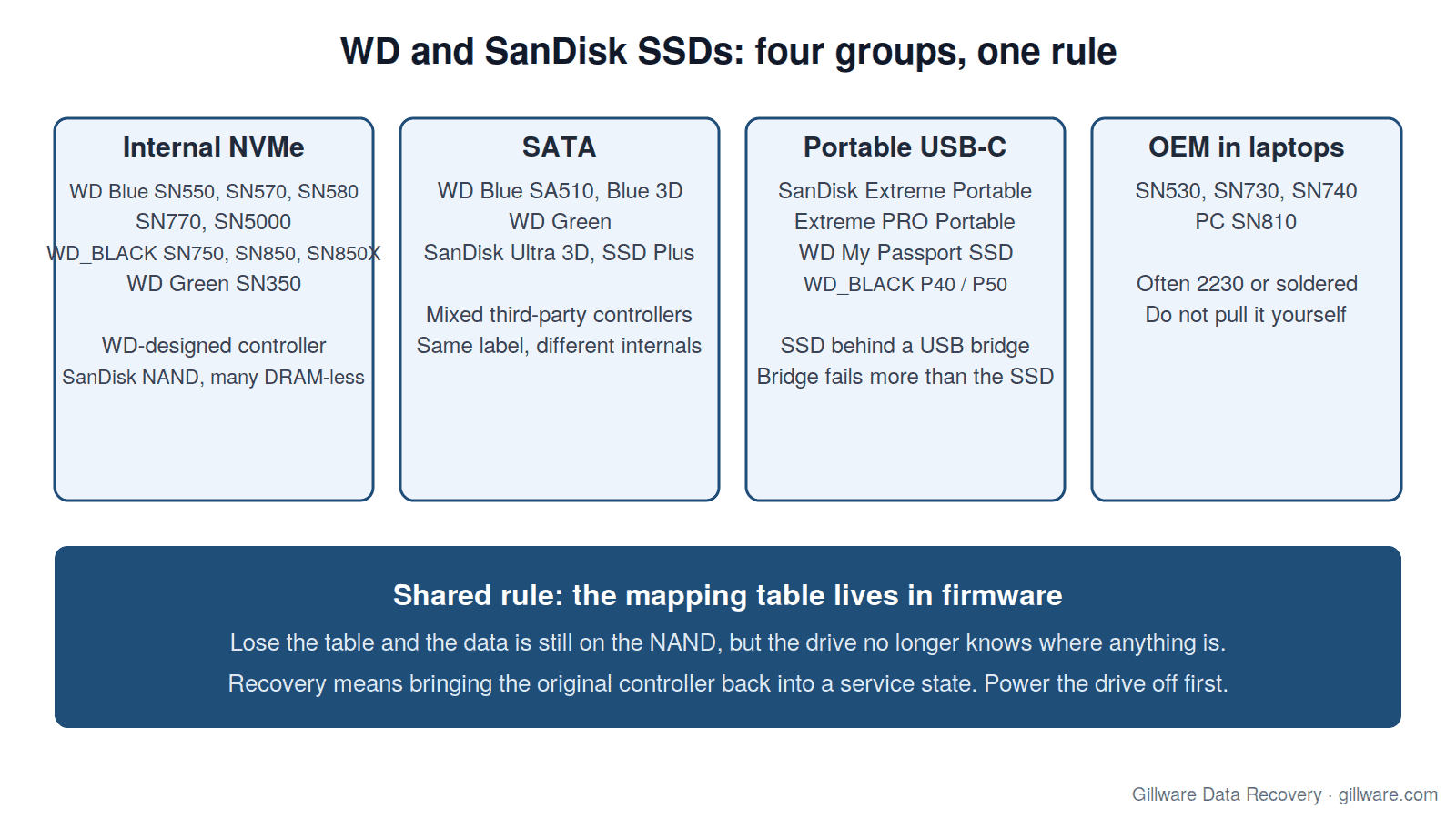
If you are not sure which one you have, do not open the laptop or enclosure to find out. The model is on the label, but opening a sealed portable drive can tear the ribbon cable to the bridge, and pulling an M.2 drive with the system still holding charge is a good way to turn a firmware problem into an electrical one. Tell us what the computer or enclosure is and we will work it out at evaluation.
How WD and SanDisk SSDs fail
Firmware and mapping-table corruption
Every SSD keeps a translation table that maps the addresses your operating system asks for to the physical pages in NAND where the data actually lives. The firmware rewrites that table constantly as it wear-levels, garbage-collects and absorbs new writes. When the table is damaged, by a bad shutdown mid-update, by a firmware bug, by a worn block the controller could not read back, the data is still on the flash but the drive no longer knows where anything is. From the outside that looks like a drive that has vanished, a drive that reports 0 bytes or a generic name, or a drive that is suddenly “not initialized.” On WD’s in-house NVMe controllers this is the single most common failure we evaluate, and it is the reason recovery on these drives is firmware-level or nothing: the fix is to bring the controller back into a service state where it can rebuild or re-read its own table, not to pull chips.
Portable SSD firmware and bridge failures
The SanDisk Extreme Portable SSD and WD My Passport SSD families had a widely reported firmware problem in 2023 in which some units disconnected, became read-only or lost data, and Western Digital issued a firmware update for affected models. We still see drives from that period. Separately, the USB-C bridge board in every portable model is a point of failure in its own right: a dropped drive, a bent connector or a bridge that has lost its own firmware will make a healthy SSD look dead. At evaluation we separate the two before anything else, because a bridge case and a controller case have very different outcomes.
Sudden power loss and mid-write shutdowns
Consumer WD and SanDisk SSDs do not carry the capacitors that let enterprise drives finish writing their tables when the power drops. A laptop battery dying at the wrong moment, a desktop power cut or a USB cable pulled during a copy leaves the table half-written. Sometimes the firmware corrects it on the next boot. Sometimes the drive comes back read-only, which is the controller protecting what it has. Sometimes it does not come back. If a drive is read-only, that is the moment to copy everything off, not the moment to try a format.
Wear and worn blocks
Genuine NAND wear-out is rarer than people fear, but it happens on drives used as scratch disks, in surveillance systems or in machines that hibernate heavily. The symptom is usually slow reads that get slower, then uncorrectable errors, then the controller taking the drive offline. A drive that has become slow and throws read errors is telling you it is near the end; image it now rather than running a health check that writes to it.
Encryption, BitLocker and the honest limit
Many of these drives are self-encrypting: the controller scrambles the NAND with a key held inside the drive. In the common case where the controller can be brought back into service, that is invisible, because the drive decrypts its own data as it is read. In the case where the controller is dead and cannot be revived, the raw NAND is ciphertext, and no amount of chip-level work changes that. We say so plainly after evaluation. If the drive was also BitLocker-protected by Windows, you will need your recovery key from your Microsoft account or your organization to unlock the recovered volume; we recover the hardware, the key opens the data. Portable drives with a SanDisk or WD software password work the same way.
Reformatted, reinstalled or deleted: the TRIM race
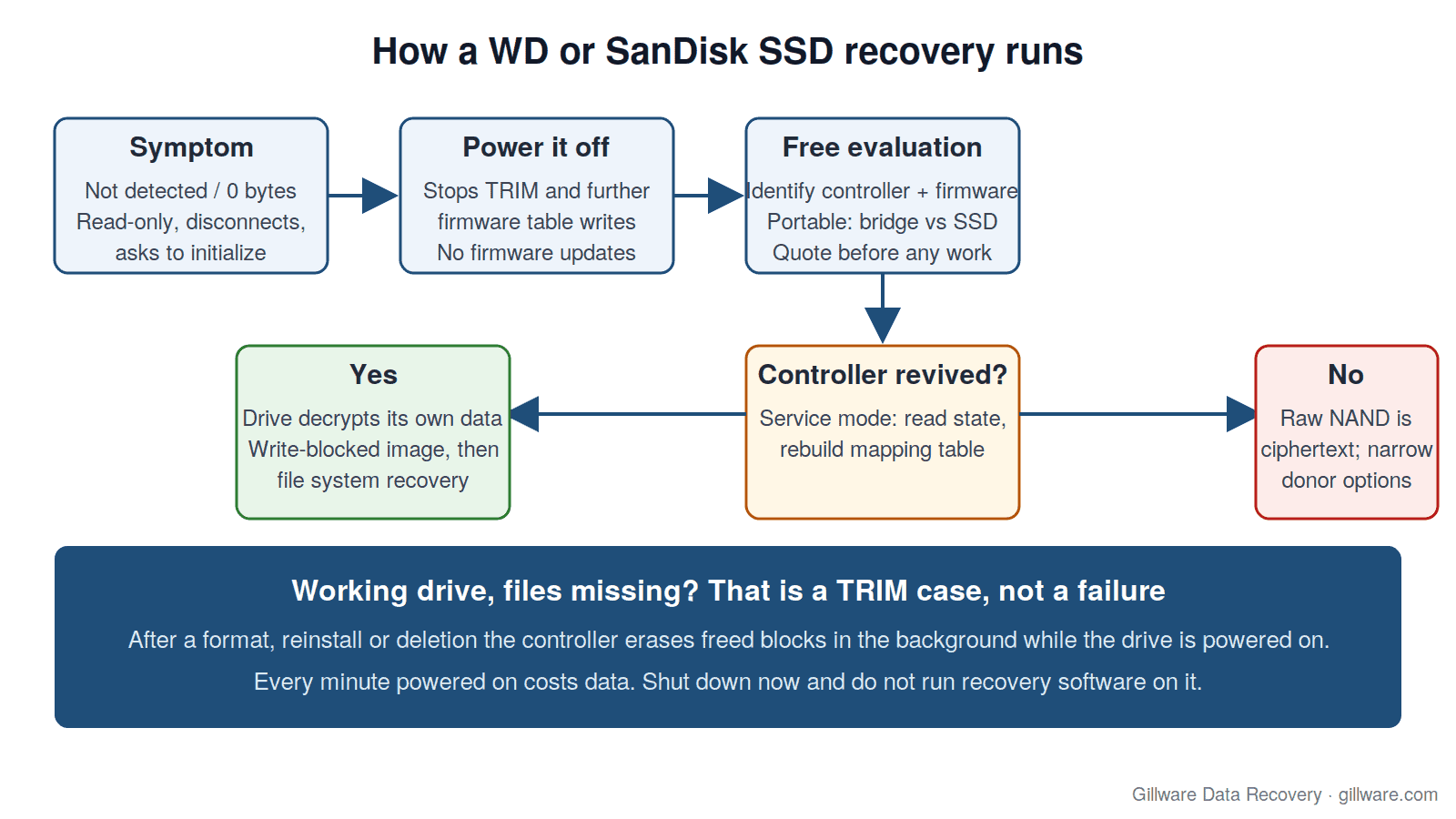
The second most common WD and SanDisk SSD case is not a failed drive at all. It is a working drive whose files are gone: a quick format, a Windows reinstall that chose the wrong disk, a partition deleted in the wrong window. On a hard drive that data would sit there for months. On an SSD, the operating system sends TRIM commands that tell the controller which blocks are free, and the controller erases them in the background to keep writes fast. Every minute the drive is powered on, more of what you want is being wiped for good. Power it off now. Do not run recovery software on it, do not let Windows “repair” the volume, and do not reinstall anything. The chance of getting files back is decided in the first minutes after the mistake, and it is decided by whether the drive is still on.
What to do right now
- Power it off. If the drive is in a laptop, shut the laptop down fully, not sleep. If it is a portable drive, eject it and unplug it. This stops TRIM, stops the firmware from making further changes to a damaged table, and stops a failing drive from writing more errors.
- Do not update the firmware. WD’s Dashboard software offers firmware updates for most of these drives. On a drive that is already misbehaving, a firmware flash can finish the job. The update is for healthy drives.
- Do not initialize, format or “repair.” When Windows or macOS asks whether to initialize or erase the disk, say no. Each of those writes a new structure over the one we need.
- Do not open it. Portable drives are glued and clipped; M.2 drives are static-sensitive. Leave the drive in whatever it is in and send the whole thing if you are unsure.
- Write down the symptom. What the computer said, whether the drive ever appeared, whether it ran hot or disconnected. That history shortens the evaluation.
How Gillware evaluates a WD or SanDisk SSD
The evaluation is free and the drive never leaves our lab. Our engineers start by identifying the exact controller and firmware build, because two drives with the same retail name can have different internals and need different tooling. For a portable drive we separate the bridge from the SSD first. Then we put the controller into a service mode where it can be talked to without mounting the volume, read its internal state and attempt to rebuild or recover the mapping table. If that works, the drive is imaged with write-blocking so nothing we do changes it further, and the file system is recovered from the image. If the controller cannot be revived, we tell you that, and what the narrow remaining options are, before any work is quoted.
Every case is quoted after a free evaluation, so you know the cost before any recovery work begins. We do not sugarcoat the odds on encrypted NAND or signed firmware: some of these cases are expensive and some are not recoverable, and you will hear which before you decide. The lab in Madison, Wisconsin has worked on solid-state drives since the first consumer models shipped, and on hard drives for more than two decades before that.
WD and SanDisk recovery guides and related pages
- SanDisk SSD recovery: a firmware case — an earlier SanDisk drive whose firmware had to be brought back before the data could be read.
- SanDisk Extreme Portable SSD recovery — the bridge-versus-drive question on a portable unit.
- Western Digital hard drive data recovery — if your WD drive is a spinning hard drive (My Passport, My Book, Elements, Blue or Black HDD), start there instead.
- How to fix a corrupted SSD — what corruption means on an SSD and why the usual fixes make it worse.
- Laptop data recovery — for a WD or SanDisk SSD that is soldered or buried inside a laptop you do not want to open.
- SSD data recovery — the hub page: firmware, encrypted NAND, TRIM, and the brands we see most, including the Samsung SSD spoke.
Start a WD or SanDisk SSD recovery
Call 877-624-7206 to talk through the symptoms with a client advisor, or submit a case and we will send you a prepaid shipping label for the free evaluation. Power the drive off first.