
Your Samsung SSD was fine yesterday. Today the laptop says no bootable device, or the drive shows up as a strange controller name with a capacity of 0 bytes, or it is there in Disk Management but Windows wants to initialize it and every file is gone. Sometimes it still works but has quietly gone read-only. This page is for the owner of a Samsung 860, 870 or 850 EVO, a 970 EVO Plus, a 980 or 990 PRO, or a T5, T7 or T9 portable who needs to know, honestly, what can still be done.
The short version: Samsung SSD recovery is firmware-level or nothing. Samsung designs its own controllers, its own V-NAND and its own firmware, and every one of these drives encrypts the data on its flash with a key that lives only inside that drive’s controller. When our engineers can bring the original controller back into a service state, results are often very good, because the drive decrypts its own data as it is read. When they cannot, the raw NAND is ciphertext. That is why the first thing to do is stop powering it on, and why we say plainly after evaluation which situation you are in. The positioning here follows our SSD data recovery hub; this page adds the Samsung-specific detail.
Which Samsung SSD do you have?
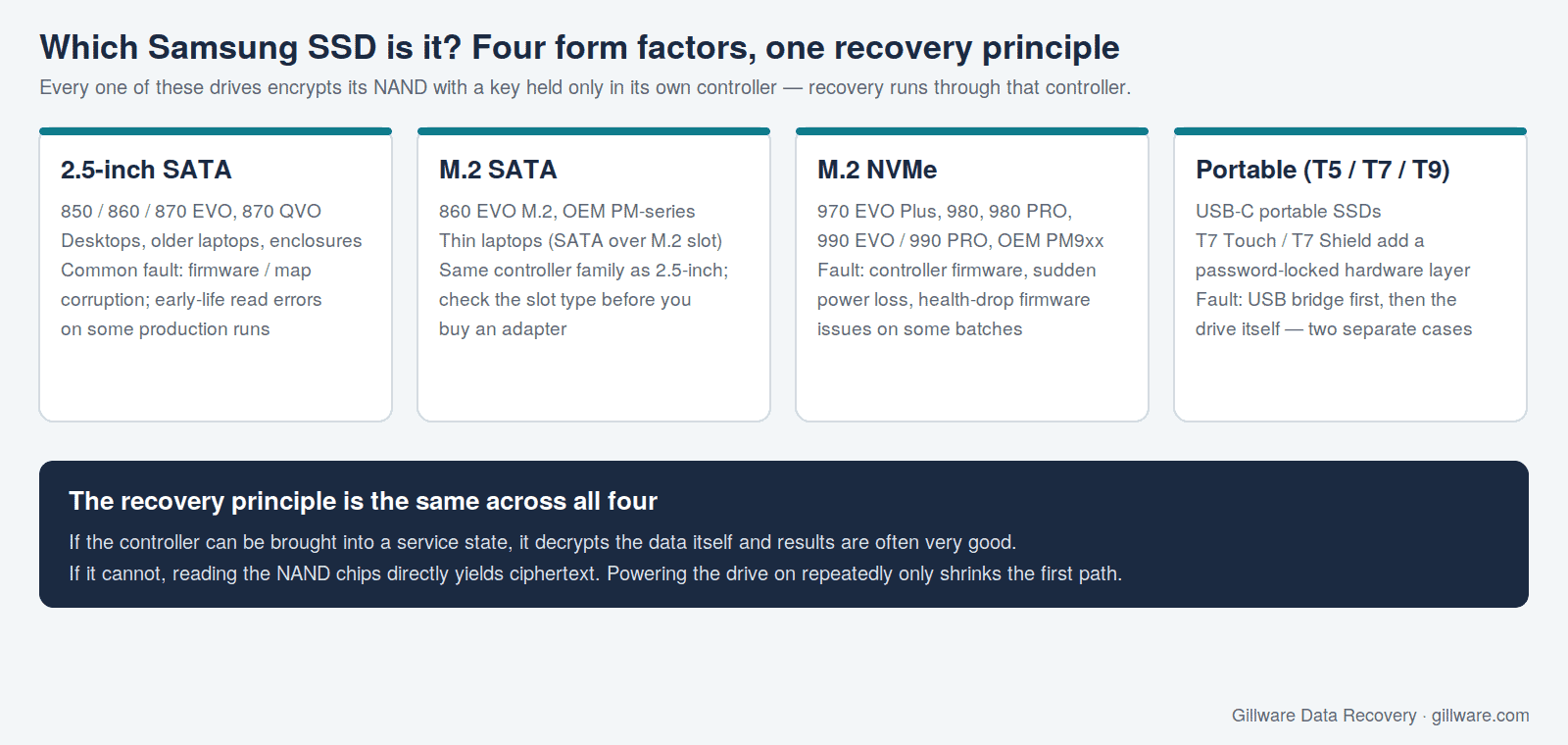
Samsung’s consumer and small-business drives fall into four groups, and the group tells us a lot about the likely failure and the recovery path before the drive arrives.
- 2.5-inch SATA — 850 EVO, 860 EVO, 870 EVO and 870 QVO. Found in desktops, older laptops and USB enclosures. The most common Samsung drive in our intake.
- M.2 SATA — 860 EVO M.2 and the OEM PM-series that shipped inside thin laptops. Electrically the same as the 2.5-inch drives, just a different shape; the M.2 slot does not make it NVMe.
- M.2 NVMe — 970 EVO Plus, 980, 980 PRO, 990 EVO and 990 PRO, plus OEM PM9xx drives in laptops and desktops. Faster controllers, more heat, and a different set of firmware behaviors.
- Portable USB-C — T5, T7, T7 Touch, T7 Shield and T9. A Samsung SSD behind a USB bridge; the T7 Touch and some T7 Shield configurations add a password-locked hardware layer on top.
If you are not sure which one you have, do not open the laptop or enclosure to find out. The model is printed on the label, but the recovery path is decided in the lab from the controller and firmware revision on the board, and there is nothing you need to know before sending it in.
How Samsung SSDs fail
Firmware and mapping-table corruption
Like every SSD, a Samsung drive keeps a translation map between the addresses your computer asks for and the physical pages in the V-NAND where the data actually lives, along with wear-leveling tables, bad-block lists and the controller’s own firmware, all in reserved regions of the same flash. A power cut at the wrong instant, a firmware defect, or a physical fault in the NAND that holds those structures leaves the controller unable to start normally. The drive vanishes from the system, reports a generic controller name instead of its model, shows 0 bytes or a tiny capacity, or stays busy indefinitely. The user data is usually still physically present; the drive simply no longer knows where anything is. This is the failure we see most across the whole Samsung line.
Early-life read errors on some 870 EVO production runs
Some production runs of the 870 EVO were widely reported to develop uncorrectable read errors and rising bad-block counts early in life, and Samsung released updated firmware for the model. The drives we receive from that population typically arrive with files that will not copy, a system that freezes when a particular folder is opened, or a drive that has dropped into read-only mode to protect what is left. The right response is not to run the firmware update on a drive that already has data at risk; it is to image what can still be read before the reserved-block pool is exhausted.
Firmware health problems on some 980 PRO and 990 PRO batches
Some 980 PRO and early 990 PRO drives were widely reported to show rapidly falling health percentages and rising error counts under certain firmware revisions, which Samsung addressed with firmware updates. A drive from that population that has already failed is a firmware case, and the same rule applies: the update is prevention for a working drive, not a recovery step for a failed one.
Sudden power loss and mid-write shutdowns
NVMe drives in particular are sensitive to losing power while the controller is updating its mapping tables. Laptop battery deaths, a desktop power supply failing, and hot-unplugging a portable T7 mid-copy all produce the same result: a controller that boots into a safe mode or not at all. We describe the general mechanism on the how to fix a corrupted SSD post; the point for a Samsung owner is that the second power-on attempt is a second chance to damage the region that is already hurt.
Portable T5, T7 and T9: the bridge or the drive?
A portable Samsung SSD is two devices in one shell: a USB-to-NVMe (or USB-to-SATA on the T5) bridge and the SSD behind it. When the drive is not recognized, the bridge is often the part that failed, and that is a much simpler case than a failed drive inside. The T7 Touch and password-enabled T7 Shield add a hardware lock layer: without the password or fingerprint enrollment, the bridge will not unlock the drive, and that is by design. We do not bypass it. Bring the password.
Why it is firmware-level or nothing
Samsung has shipped always-on hardware encryption across its consumer SSD line for years. The controller generates a key, keeps it in protected hardware, and encrypts every page before it is written to V-NAND, whether or not you ever set a password. That is what makes instant secure-erase and TCG Opal support possible, and it is what shapes recovery.
If the controller can be brought up into a service state, our engineers read out the surviving mapping structures, reconstruct what was lost, and read the user area through the drive’s own translation layer, with the drive decrypting as it goes. If the controller cannot be revived, reading the V-NAND chips directly returns ciphertext, and the key that would decrypt it exists nowhere except inside that failed controller. Samsung also signs its controller firmware, so the older technique of loading a diagnostic firmware into a stuck drive is closed off on any generation that verifies signatures unless a vendor-specific service pathway exists. The depth of what is possible therefore depends heavily on the controller generation in your specific drive.
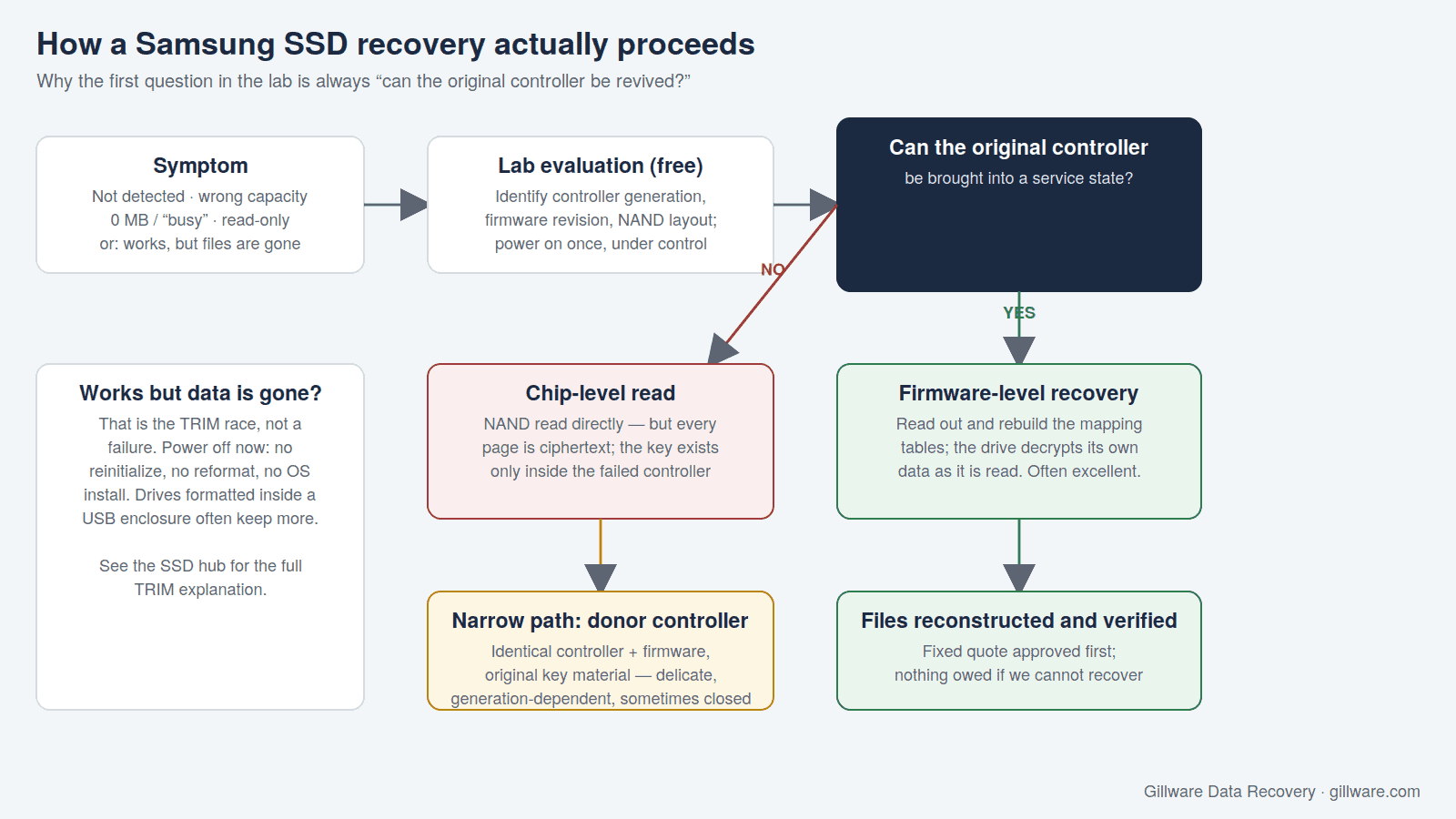
We will not sugarcoat this. Some Samsung SSD failures that would have been routine in 2014 are today either expensive, because they require research and tooling specific to one controller family, or not recoverable at any price, because the key is gone with the controller. We tell you which after a real evaluation of the drive, not from a phone description.
Reformatted, reinstalled or deleted: the TRIM race
The second most common Samsung case is a drive that works perfectly. Windows was reinstalled onto the wrong volume, a partition was deleted, or the drive was formatted to move it to a new machine. On an SSD the clock starts immediately: the operating system tells the drive which blocks no longer hold live data and the controller erases them in the background. Power the drive down now, do not let the OS initialize or “fix” it, and do not install anything on it. A drive formatted inside a USB enclosure often keeps far more, because many bridges do not pass TRIM through. The full explanation is on the SSD hub; the Samsung-specific note is that Samsung drives execute TRIM promptly, so time matters more than brand.
What to do right now
- Power it off and leave it off. Every boot attempt is a write opportunity in the region that is already damaged.
- Do not run a firmware update, secure erase, or any drive utility against a drive that already has data at risk. Those tools are for healthy drives.
- Do not reformat, reinitialize or reinstall if the drive still appears but the data is missing.
- If the drive is inside a laptop, you can send the whole machine or just the drive; see the laptop data recovery page for how to decide. Samsung drives are removable modules, not soldered storage.
- For a T7 Touch or password-locked T7 Shield, have the password ready. Recovery does not proceed without it.
- If the volume was BitLocker-protected, locate the recovery key in your Microsoft account or Active Directory before you ship; the BitLocker data recovery post explains why the key, not the drive, is the limiting factor.
- Write down when it was last known good and what happened in between. Timing tells us a lot about what is likely still there.
How Gillware evaluates a Samsung SSD
Every Samsung SSD case starts with a free evaluation in our lab in Madison, Wisconsin. Engineers identify the exact controller generation and firmware revision, determine whether the failure is firmware, NAND, controller hardware, a failed USB bridge, or a TRIM race that has already been lost, and tell you what is recoverable and what it will cost as a fixed quote. You approve or decline before any billable work begins, and if we do not recover your data, you pay nothing. Controller-level work on a current-generation Samsung drive can require research and tooling specific to that silicon, and where that is the case, the quote reflects it and we say so up front.
Gillware has recovered data from solid-state drives for as long as SSDs have been in laptops and servers, and from Samsung drives across every generation since the 830 and 840 series. More than two decades in this business has taught us that the most useful thing we can offer a Samsung owner is a straight answer.
Samsung SSD recovery guides and related pages
- Samsung 850 EVO data recovery case study — a 2.5-inch SATA EVO whose controller had to be coaxed back into a service state.
- Samsung SSD recovery case study: form factor fricassee — an OEM M.2 Samsung drive from a laptop.
- How to fix a corrupted SSD — what corruption means on an SSD and why the usual fixes make it worse.
- SSD data recovery — the hub page: firmware, encrypted NAND, TRIM, and the five brands we see most.
- Looking for a Samsung phone? That is a different service: Samsung phone data recovery.
Start a Samsung SSD recovery
Call 877-624-7206 to talk through the symptoms with a client advisor, or submit a case and we will send you a prepaid shipping label for the free evaluation. Power the drive off first.