
A wholesaler that still runs a Visual FoxPro 9 dispatch system — built in 2001, migrated to a new Windows Server 2019 host in 2020, otherwise untouched — came back from a RAID controller failure with the .DBC container file throwing “Not a table” and every attempt to open the database from a FoxPro executable failing. A specialty medical practice’s billing system, written in Visual FoxPro 6 and still handling its patient ledger, corrupted its .CDX compound index during a Windows update reboot and now every SEEK operation crashes the runtime. A retired FoxPro 2.6 for DOS application that a small business ran on the same 486 PC for twenty years finally lost its hard drive, and the .DBF files, .FPT memo files, and .IDX index files are all needed to recover thirty years of vendor records.
We recover FoxPro and Visual FoxPro databases when the storage under them fails. FoxPro sits between dBASE simplicity and modern relational databases: it uses the same base .DBF format as dBASE, adds compound indexes (.CDX) and memo blob storage (.FPT), and in Visual FoxPro adds true database containers (.DBC) with referential integrity. Recovery targets the file set as a whole, because a working FoxPro table usually needs all three files present and mutually consistent.
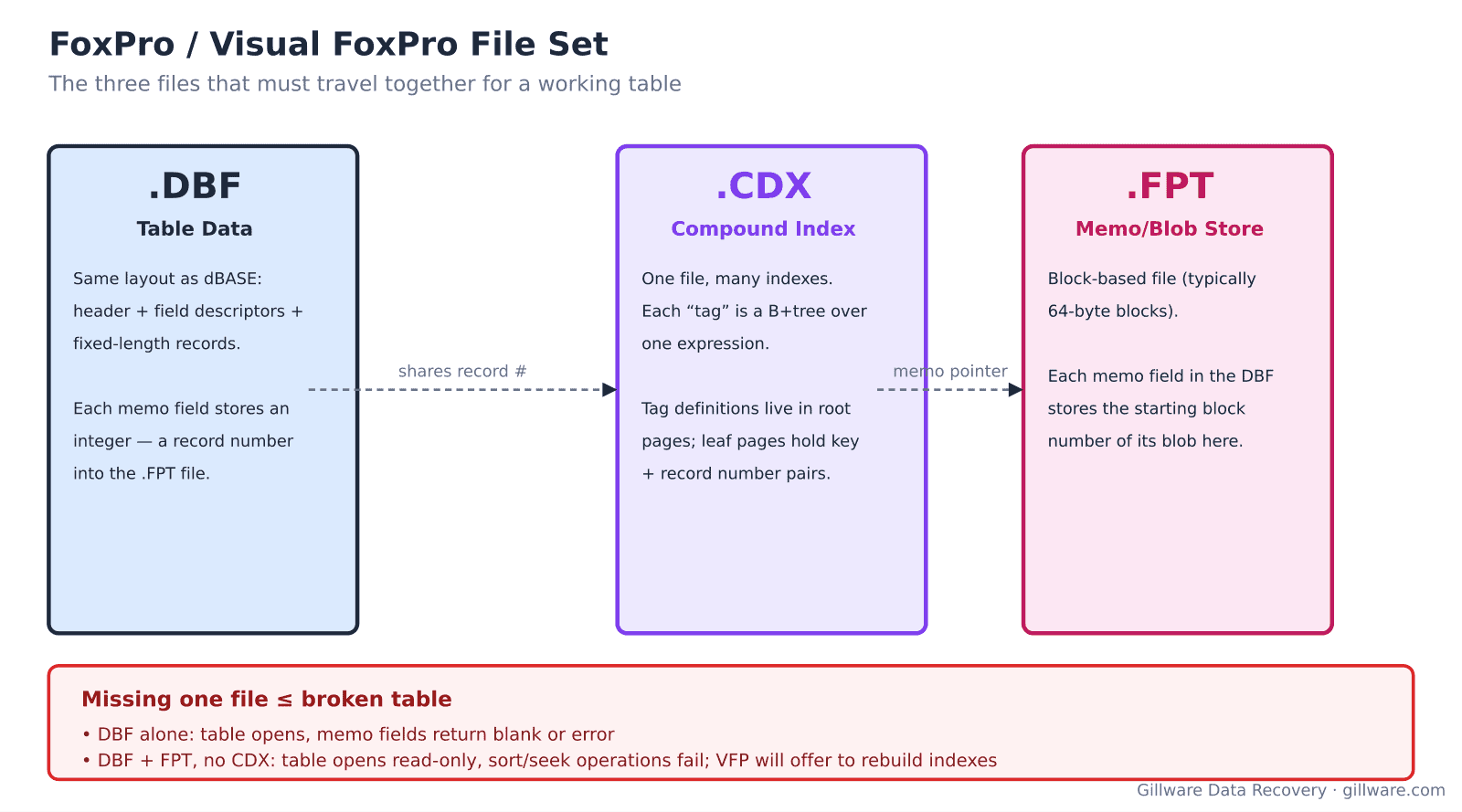
The FoxPro file set and why all three matter
A FoxPro or Visual FoxPro table lives across three files that must travel together. The .DBF holds the table data itself — the same layout as dBASE, with a 32-byte header, 32-byte field descriptors per column, a 0x0D terminator, and fixed-length records. Memo fields in the .DBF store integer block numbers that point into the .FPT memo file, where blob data (long text, images, embedded documents) actually lives. The .CDX compound index file contains one B+tree per index tag; the .CDX shares the base filename with the .DBF (customers.dbf pairs with customers.cdx) and FoxPro opens both together automatically.
Missing one file breaks specific operations. A .DBF alone will open, but memo fields return blank or throw errors. A .DBF plus .FPT with no .CDX will open, but sort and seek operations fail; Visual FoxPro offers to rebuild the indexes at open time when it detects a missing .CDX, which is normal. A .DBF plus .CDX with no .FPT opens with memo fields broken. When storage fails, we usually see two or three of the files damaged together — they lived on the same directory and shared the same fate.
Visual FoxPro adds an outer layer: the .DBC database container file plus its associated .DCT and .DCX index. The .DBC binds together multiple tables into a database with defined referential integrity, stored procedures, triggers, and named connections. A damaged .DBC produces different failure modes than damaged individual tables — the tables themselves may be fine but the container that references them cannot be opened.
Formats we handle
- FoxPro 2.0-2.6 for DOS — .DBF version byte 0x03 (no memo) or 0x83 (with .FPT memo). Still runs many small business systems.
- FoxPro 2.5-2.6 for Windows — same format as DOS FoxPro, different runtime.
- Visual FoxPro 3.0-5.0 — introduced .DBC containers, .FPT format changed, .IDX indexes replaced by .CDX compound indexes.
- Visual FoxPro 6.0-9.0 — the mature era. Version 6 is still widely deployed; version 9 was the last release before Microsoft discontinued the product in 2007. Both use identical on-disk formats for tables.
Error messages and failure signatures
- “Not a table/DBF” — the .DBF header is damaged. Sector-level corruption at the start of the file. Same recovery approach as dBASE.
- “Structural CDX file is not found” — the .CDX exists but its structure is invalid, or the .CDX is missing entirely. Often cosmetic; can be rebuilt from the .DBF.
- “File is in use” when no user has it open — the lock byte in the .DBF header is stuck (typically because a client crashed while holding the lock). Damaged storage can also produce this if the lock byte was written but the surrounding header state was not.
- “Corrupt table/index” or “Index does not match the table” — the .CDX and .DBF disagree about record positions. Almost always caused by a torn write during a batch update. The .CDX rebuild is straightforward; the underlying .DBF damage requires per-record recovery.
- Memo field displays garbage or FoxPro crashes on memo read — the .FPT block pointer in the .DBF record points at a damaged region of the memo file. Fixable when the memo file’s surviving blocks are intact.
- “Invalid path or filename” against a .DBC-managed table — the .DBC container has lost track of where its member tables live. Common when the .DBC was moved to a new directory and its stored paths went stale, but also happens after storage corruption of the .DBC itself.
- Record count reported in Header is inconsistent with file size — the .DBF was truncated mid-write, or the header counter was updated without the corresponding record write actually completing.
How we recover a FoxPro database
The drive, RAID, or NAS the FoxPro files live on gets imaged first. This matters more for FoxPro than for many modern databases because FoxPro deployments often run on older, single-drive workstations where the storage itself may be dying. Once the image is stable, we extract every .DBF, .FPT, .CDX, .IDX, .DBC, .DCT, and .DCX file from the imaged filesystem.
Each table is recovered as a triplet. For the .DBF, we validate the header, walk the records, and preserve every intact record. For the .FPT, we walk memo blocks, verify block headers, and cross-reference to the .DBF to preserve memo-to-record linkage. For the .CDX, we usually discard it — index rebuilds from a recovered .DBF are deterministic and faster than repairing the compound index directly — but when the .DBF is severely damaged, we can sometimes use surviving .CDX leaf pages to recover row locations that would otherwise be gone.
Visual FoxPro .DBC containers get special treatment. When the .DBC is intact, we extract its schema (member tables, relationships, stored procedures, triggers, indexes) and use it to guide the reconstruction of individual tables in a way that preserves referential integrity. When the .DBC is damaged, we recover it from its .DCT companion (which stores an alternate representation of the same metadata) or, if both are lost, reconstruct the container by re-linking the surviving tables into a fresh .DBC.
Deliverables are working table triplets that open in Visual FoxPro (or in any FoxPro-compatible runtime such as Harbour, xHarbour, or via ODBC), plus regenerated indexes and, for Visual FoxPro deployments, a rebuilt .DBC that maintains the original database structure.
Legacy FoxPro deployments
Visual FoxPro reached end-of-life in 2015 and was never replaced by Microsoft. Many businesses still run VFP applications because there is no straight migration path. When those applications’ underlying storage fails, we recover the file set exactly as it is; we do not rewrite the application. Customers typically use our recovered files to continue running their existing VFP application, or use the recovery as leverage to plan a proper migration to a modern platform.
What we don’t do
We do not modify FoxPro application code, port applications to a new platform, or provide runtime support. We do not undo cleanly-committed DELETE FROM operations against healthy storage. We do not extract passwords from encrypted .DBC databases.
Related recovery services
See our database data recovery hub, dBASE data recovery for the related format that FoxPro shares its .DBF base with, Paradox recovery for another mid-era business database platform, and our hard drive recovery services for the underlying storage failures.
Talk to a FoxPro recovery engineer
Free consultation, free evaluation, free inbound shipping. If we can’t recover your data, you don’t pay.
877-624-7206