
A field services company runs a job-dispatch application built in Paradox 7 for Windows in 1998. The application has changed hands twice, the original developer retired a decade ago, and the .DB, .PX, .MB, and .X01 files sit on a Windows 2000 Server VM that has been kept alive on VMware ESXi ever since. Yesterday the underlying datastore lost a drive and came back with the .PX primary index throwing “Corrupt file – other than header” on every open. A small municipal utility’s billing system, written in Paradox 5 and still running under a WINE compatibility layer on Linux, corrupted its .MB blob file during a network share disconnect and now every customer record with an attached document throws “Blob record not found.” A dental supply distributor’s Corel Paradox 9 database corrupted after a controller-cache battery failure caused torn writes across every table in the directory.
We recover Paradox databases when the storage under them fails. Paradox files travel as a set — the .DB table itself plus .PX primary index plus .Xnn secondary indexes plus .MB blob storage plus .VAL referential integrity metadata — and recovery targets the whole set together because the DBMS opens them as an integrated unit.
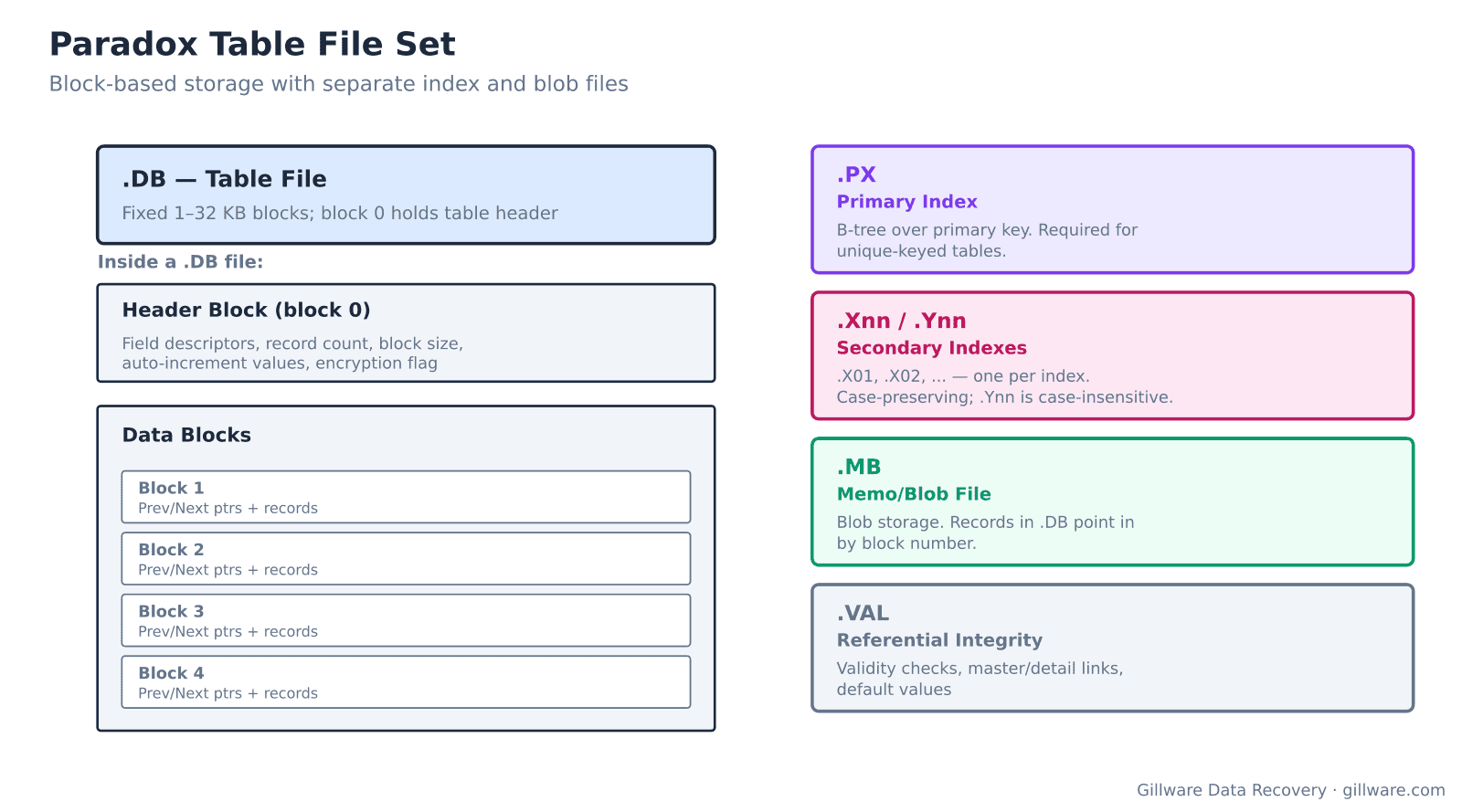
Inside the Paradox file set
The .DB file is the table itself. Unlike dBASE’s fixed-length flat file, Paradox uses a block-based structure. The first block (block 0) holds the table header: field descriptors, record count, block size (configurable from 1 KB to 32 KB), auto-increment values, encryption flag, and pointers into the block chain. Data blocks are linked with previous/next pointers and each carries a small header followed by records. Records are variable-length in Paradox — a departure from dBASE — and can span across block boundaries when they contain BLOB or memo references.
The .PX file is the primary index — a required companion for any table that has a unique primary key defined. It carries a B-tree over the primary-key expression, with leaf pages pointing back to record locations in the .DB. Missing or damaged .PX makes the table unusable to the Paradox DBMS even if the .DB is fully intact.
Secondary indexes live in .Xnn files (.X01, .X02, .X03, etc.) — case-preserving indexes — and .Ynn files — case-insensitive companions. Blobs and memos live in the .MB file, referenced from the .DB records by block numbers. Referential integrity constraints, default values, and validity checks live in the .VAL file. Application-level metadata (form definitions, report layouts, script bindings) lives in the .FAM family file that groups the whole set under a table name.
Where storage failures produce Paradox corruption
- “Corrupt table/index header” — block 0 of the .DB or .PX is unreadable. Sector-level damage at the start of the file.
- “Corrupt file – other than header” — a data block in the middle of the .DB has failed validation. Specific records are damaged; everything else is usually intact.
- “Not initialized” or “File is not a valid Paradox table” — the Paradox signature in the .DB header has been overwritten. Sector damage or an incomplete restore from backup.
- “Blob record not found” or “Invalid blob offset” — the .MB blob file is damaged or out of sync with the .DB. Blob-referencing records will not display or export correctly.
- “Cannot open file” with error code 8961 or 15873 — BDE (Borland Database Engine) cannot access the file. Often a permissions issue on modern Windows, but also a storage-level read failure.
- “Index is out of date” — the .PX or .Xnn no longer matches the .DB record layout. Common after an interrupted write. Fixed by rebuilding indexes from the .DB.
- Auto-increment field values reset to lower numbers — the block 0 header’s stored auto-increment counter was damaged. New records may be assigned duplicate IDs until the counter is restored.
How we recover a Paradox database
The storage the Paradox files live on gets imaged first. For old Paradox deployments this often means imaging aging server hardware, VMware datastores, or file shares that have not been maintained in years. Once the image is stable, we extract every .DB, .PX, .Xnn, .Ynn, .MB, .VAL, and .FAM file from the imaged filesystem.
For each .DB: if block 0 is intact, we parse the table header, validate every block in the chain, and preserve intact records. If block 0 is damaged, we reconstruct it by scanning the file for the block-header signature that Paradox writes at the start of every data block, inferring block size from the spacing, and rebuilding the field descriptor list by analyzing record patterns across surviving blocks. When individual data blocks are damaged but block 0 survives, we skip the damaged blocks and continue — Paradox’s block-chain design means damage is naturally localized.
The .PX and .Xnn indexes we usually regenerate from the recovered .DB because rebuilding is faster and more reliable than repairing corrupt B-tree pages. When the .DB itself is severely damaged and index leaves survived, we can use the surviving index pages to identify what record locations existed, which sometimes lets us recover records the .DB scan alone would miss.
The .MB blob file gets handled separately. When intact, we cross-reference blob block numbers between the .DB and .MB to preserve blob-to-record linkage. When damaged, we recover the .MB block by block and re-link surviving blobs to the surviving .DB records; blobs whose containing blocks are destroyed are flagged in the report.
Deliverables are working Paradox tables that open in Corel Paradox, BDE, or any modern ODBC driver that speaks Paradox format, plus regenerated indexes and, when needed, a rebuilt .VAL referential integrity file.
Paradox versions we handle
- Paradox 3.5-4.x for DOS — the 1990-era format. Fixed-size 1 KB blocks; simpler on-disk layout.
- Paradox 5.0-8.0 for Windows (Borland era) — variable block size, .PX/.Xnn/.Ynn split, .MB blob format. Most common in field deployments today.
- Paradox 9.0-11.0 (Corel era) — same on-disk format as later Borland versions with minor extensions. Corel discontinued Paradox in 2019 but the format is unchanged.
Modern access to legacy Paradox data
Even when the customer’s original Paradox application is no longer runnable — too old, missing runtime, no license, no compatible OS — the recovered .DB files can be accessed via BDE drivers, the modern DBExpress connectors, ODBC Paradox drivers, or by importing into more modern databases through those connectors. We deliver the recovered files in their native Paradox format; conversion to modern platforms is an application-level project the customer can pursue separately.
What we don’t do
We do not migrate Paradox applications to a new platform. We do not extract passwords from password-protected Paradox tables. We do not reconstruct the original application forms or reports — only the underlying table data.
Related recovery services
See our database data recovery hub, dBASE recovery for the related legacy business database format, FoxPro recovery for its contemporary competitor, and InterBase and Firebird recovery for the Borland era database that eventually succeeded Paradox in the mid-tier.
Talk to a Paradox recovery engineer
Start with a free consultation with one of our engineers. You approve all recovery fees in writing before any recovery work begins.
877-624-7206