
Proxmox VE has become the hypervisor of choice for a lot of businesses that left VMware, and for the MSPs and IT teams that run their hosts. When a Proxmox host or cluster fails, it rarely fails cleanly. A ZFS pool refuses to import after a power event. A thin pool runs out of metadata space and the virtual machines will not start. A Ceph cluster loses one node too many. Someone reinstalls Proxmox to get the host back and only then realizes the VM disks were on the same drives. This page explains where Proxmox actually keeps your virtual machine data, what goes wrong at each layer, what to do in the first hour, and how our engineers recover VM disks when the host cannot.
Proxmox host down or VMs missing?
Stop writes to the storage before anyone rebuilds, reinstalls or re-imports. Talk with one of our enterprise storage engineers first; the consultation is free.
Underneath the web interface, Proxmox VE is Debian Linux running KVM virtual machines and LXC containers. That matters for recovery: every Proxmox case is a Linux data recovery case with a virtualization layer on top, and the right approach depends entirely on which storage type held the VM disks and which layer of the stack actually failed.
Where Proxmox keeps your virtual machine disks
A Proxmox host can use several storage types at once, and each one stores a virtual disk differently. Before anyone can recover a VM, they have to know which of these it lived on:
- ZFS. Each VM disk is a zvol, a block device carved out of a ZFS pool; containers get their own datasets. The pool sits on vdevs, usually mirrors or RAIDZ groups, built directly on the drives. ZFS keeps checksums and multiple copies of its own metadata, which helps a great deal in recovery, but its pool and vdev labels also have to agree with each other before anything can be read. Our ZFS data recovery page covers the filesystem in more depth.
- LVM-thin. On many installs the default VM storage (often labeled local-lvm) is a thin pool inside an LVM volume group, and each VM disk is a thin logical volume. Thin volumes only claim space as data is written, so the pool keeps a separate metadata area that maps every block of every virtual disk. Underneath, the volume group may sit on a single drive, an mdadm software array or a hardware RAID volume.
- Directory storage. VM disks are ordinary files, qcow2 or raw images, in a folder on an ext4 or XFS filesystem. Recovery means getting that filesystem back first, then the image files inside it, then the guest filesystems inside those.
- Ceph RBD. In a hyperconverged cluster, each VM disk is an RBD image that Ceph splits into many small objects and spreads across OSDs (one per drive) on several nodes, with replicas on different hosts. No single drive holds a whole virtual disk.
- Shared storage. NFS, SMB or iSCSI from a NAS or SAN. Here the failure is often in the storage system itself, and the case looks more like a RAID or NAS recovery than a Proxmox one.
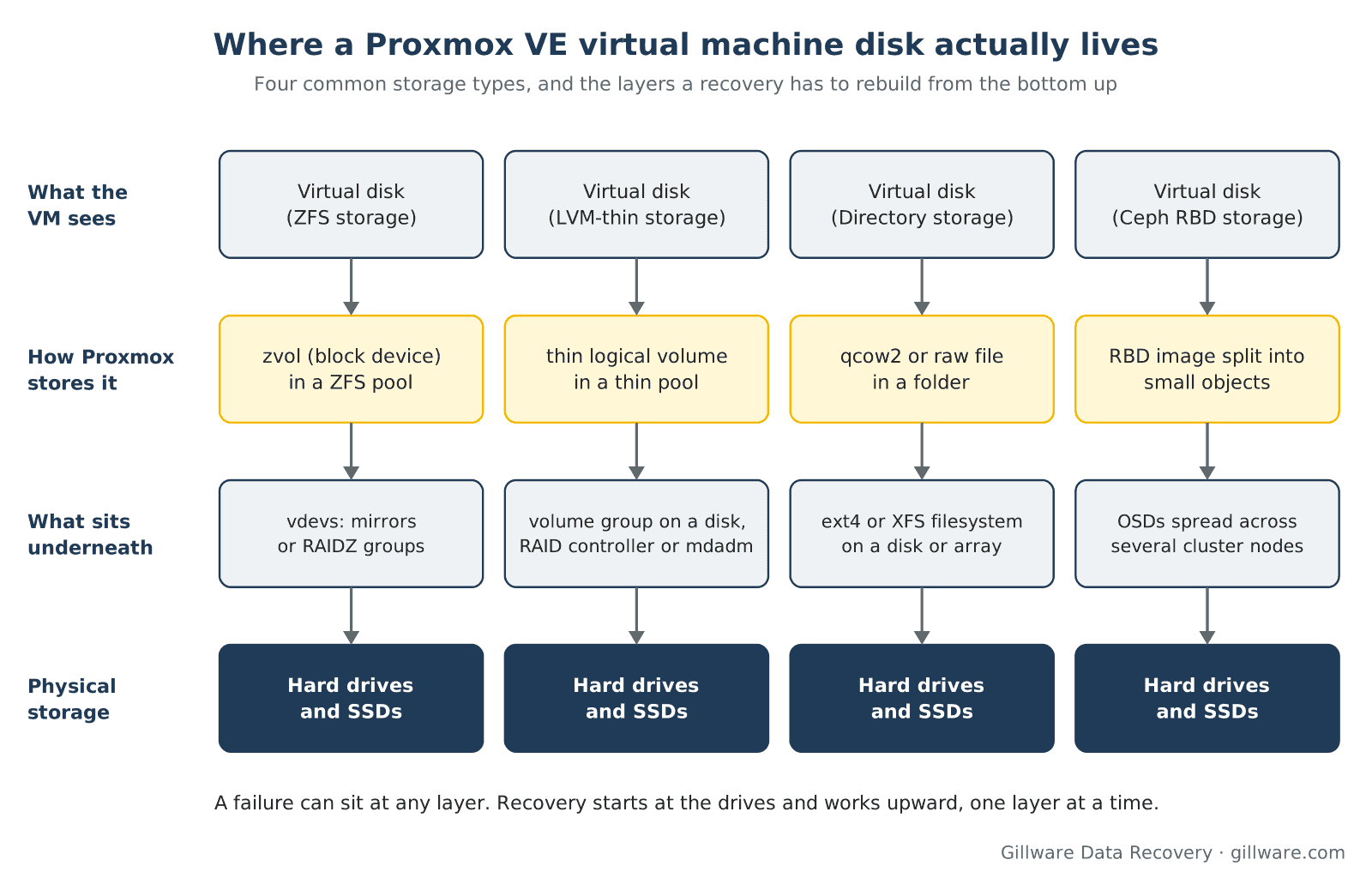
The VM configuration files themselves live in the Proxmox cluster filesystem, not next to the disks. A VM whose configuration is gone can still have every block of its disk intact, and the reverse is also true. Both are worth knowing about before anyone starts deleting and re-creating things to get a host running again.
The Proxmox failures we see most often
A ZFS pool that will not import, or shows FAULTED or DEGRADED
The most common Proxmox case starts with a ZFS pool that will not come back after a power loss, a controller fault or a drive replacement. Sometimes a second drive fails during a resilver. Sometimes a drive that dropped out earlier comes back online with stale data, or ZFS was built on top of a hardware RAID controller that hid what the drives were really doing. When the pool refuses to import, the natural next step is to force it, and the options that force an import can roll the pool back and permanently discard the most recent transactions. If the pool holds VM disks that matter, stop at the refusal and let an engineer look at the labels and the drives first.
LVM-thin pool out of metadata or data space
Thin provisioning lets a host promise more space than it physically has. When the thin pool fills, writes start failing inside the running VMs, and the guests can corrupt their own filesystems on the way down. When the much smaller metadata area fills or is damaged, the pool may not activate at all, and every VM disk in it disappears at once. LVM includes tools that rebuild thin-pool metadata, and run against the only copy of a damaged pool they can make the mapping worse. The data blocks are usually still on disk; what has to be rebuilt carefully is the map that says which blocks belong to which virtual disk.
A Ceph cluster that lost too many OSDs
Ceph is designed to survive the loss of a drive or a node. It does not survive losing more copies than the pool keeps, and small three-node clusters have very little room for error. After a multi-node outage, a failed upgrade or several drives replaced in a hurry, placement groups can go inactive or incomplete, and the RBD images built from them stop being readable. Recovery here means imaging every remaining OSD, including the ones that were pulled, and reassembling the objects that make up each image from whatever copies survived.
Deleted VMs, removed disks and reinstalls
Removing a VM in Proxmox normally deletes its disks from storage too. Destroying a storage entry, wiping a disk from the web interface or running the installer against the wrong drive does the same to everything on it. On ZFS and LVM-thin, freed space is often not overwritten right away, so deleted VM disks can frequently be located and rebuilt, but every new write to that pool or volume group reduces the odds. Stop using the affected storage as soon as you notice.
Migrations from VMware that went wrong
Many Proxmox hosts are new, built to replace ESXi. Migration is a common moment for data loss: disks converted onto storage that was too small, a source datastore reformatted before the copy was verified, or an import that failed partway through. If the original VMware storage still exists, it may be the best source. Our VMware data recovery page covers VMFS datastores and VMDK files, and the same lab handles Hyper-V hosts.
Ransomware on the host
Attackers who reach a hypervisor can encrypt or delete virtual disks for every guest at once, and some ransomware families now target Linux-based hypervisors directly. Proxmox hosts are not exempt. We do not break modern encryption; we recover what the attack did not fully destroy, which on a hypervisor can include deleted disk images, unencrypted regions and backup files. See ransomware data recovery for how those cases work alongside incident response firms and insurers.
Hardware failing underneath the hypervisor
Plenty of Proxmox cases have nothing to do with Proxmox. A RAID controller fails and takes its configuration with it, consumer SSDs wear out under constant VM writes, or a drive starts reading slowly and drags the whole pool down with timeouts. Those cases begin with the physical drives, exactly like any server data recovery, before the Proxmox layers are touched at all.
Pool won’t import or VM disks missing? Talk with an enterprise storage engineer before anything is rebuilt.
The first hour: what to do and what not to do
Most of the permanent damage we see in Proxmox cases happens after the original failure, while someone is trying to get the host running again. The safest first hour is a quiet one.
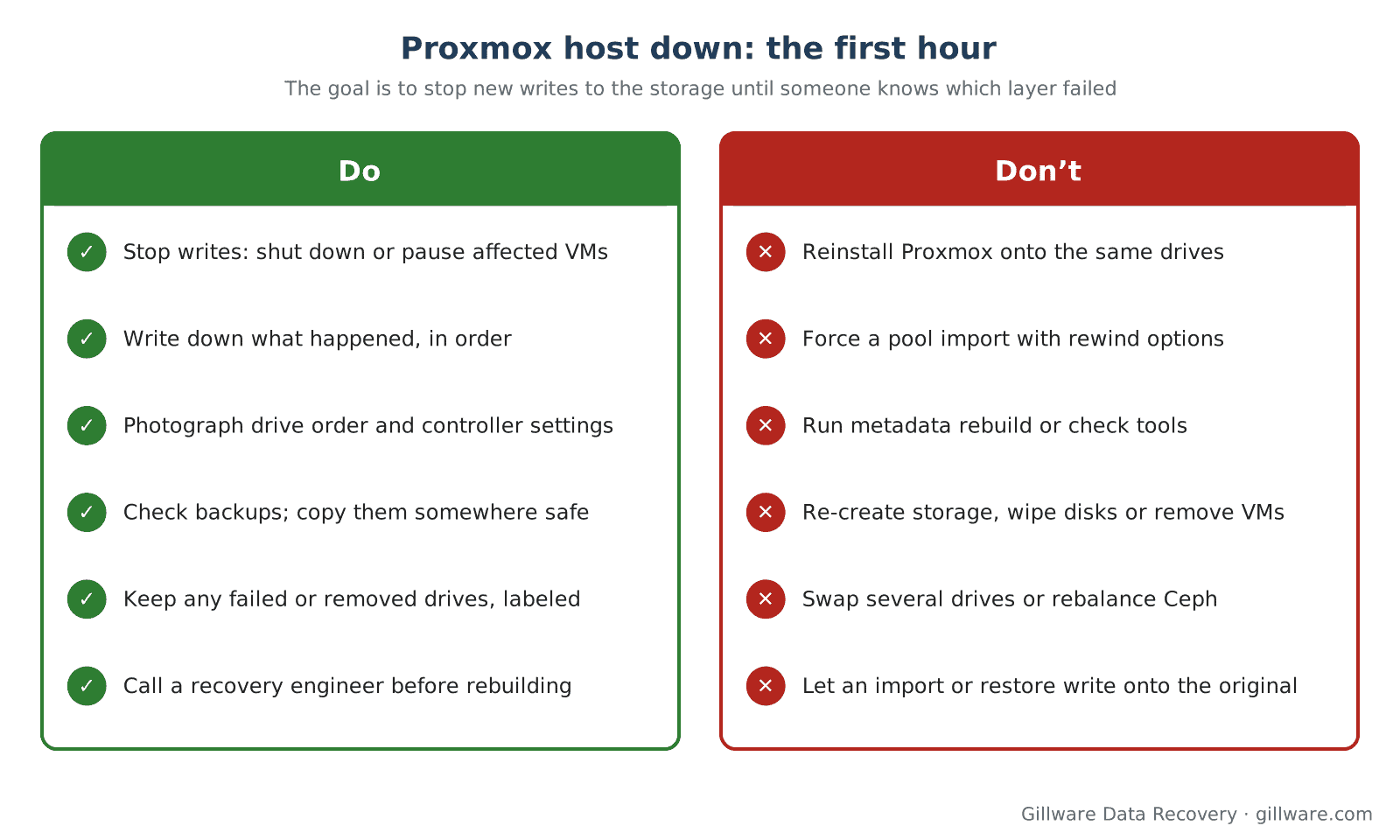
Do:
- Stop writes to the affected storage. Shut down or pause the VMs that use it, and keep other hosts from migrating onto it.
- Write down what happened and in what order: power events, drive swaps, upgrades, commands run, error messages seen.
- Photograph drive positions, cabling and any RAID controller settings before anything is moved.
- Check your backups and copy any that are intact somewhere safe, away from the failed storage.
- Keep every drive that was removed or replaced, labeled with the slot it came from. An old drive can hold the only good copy of something.
Don’t:
- Reinstall Proxmox onto the drives that held the VM storage, even to “just get the host back.”
- Force a ZFS pool import with rewind or recovery options, or import it read-write on a different system to experiment.
- Run metadata rebuild or filesystem check tools against the only copy of a damaged pool, volume group or filesystem.
- Re-create storage entries, wipe disks from the web interface, or remove and re-add VMs to clear errors.
- Replace several drives at once, or let a degraded Ceph cluster rebalance onto failing hardware.
- Restore backups onto the original storage before you know whether the data still on it is needed.
If the VMs are business-critical and every hour counts, tell us at the start; our emergency data recovery service exists for exactly that.
How we recover Proxmox VM storage
The first step is a conversation with one of our enterprise storage engineers, who will ask what failed, which storage types the host used and what has been tried so far. If the hardware is healthy and the environment allows a secure connection, our engineers can sometimes work remotely. If drives have failed or the storage needs physical work, the drives come to our lab in Madison, Wisconsin.
In the lab, the work follows the storage stack from the bottom up:
- Image every drive. Each drive, including pulled and replaced ones, is copied sector by sector to lab storage. Drives with physical faults are handled in our cleanroom first. All further work happens on the copies; your originals are not written to.
- Rebuild the storage layer. We reassemble ZFS vdevs and pools, LVM volume groups and thin-pool mappings, mdadm or hardware RAID volumes, or Ceph objects into complete RBD images, virtually, from the images.
- Extract the virtual disks. zvols, thin volumes, qcow2 and raw files are pulled out as complete disk images, including VM disks that were deleted or are no longer listed anywhere.
- Recover the guest data. We mount and check the filesystems inside each virtual disk (Windows, Linux or anything else the guests ran) and verify the files, databases and applications you need most.
- Return the data as virtual disk images ready to import into a new host, as files, or both, depending on what gets you running fastest.
Gillware has been recovering data for more than two decades and has recovered data from more than 100,000 storage devices since 2004. Our engineers work on hypervisors, RAID arrays and enterprise storage every day, and that experience is what makes multi-layer cases like these manageable. Every case starts with a free consultation, and you approve all recovery fees in writing before any recovery work begins. For how enterprise and server cases are scoped, see what RAID and server recovery costs, and for virtualization platforms in general, our virtual machine data recovery page.
Proxmox Data Recovery FAQ
Can you recover VMs from a ZFS pool that will not import?
Often, yes. A pool that refuses to import usually still has most of its data and metadata on the drives. We image the drives and assemble the pool from the copies, which lets us work with older pool states and damaged labels without risking the originals.
We reinstalled Proxmox on the same drives. Is the old VM data gone?
Not necessarily. An installer typically rewrites the start of the disk and creates new storage, but much of the old data can remain until it is overwritten by new use. Stop using the host right away; how much can be recovered depends on how much has been written since.
Our LVM-thin pool will not activate. Is the data still there?
Usually the data blocks are still on disk and what is damaged is the thin-pool metadata that maps them to each virtual disk. That mapping can often be rebuilt from the disk images, provided nobody has overwritten the metadata area with repeated rebuild attempts.
Can you recover a Ceph RBD image after losing several OSDs?
It depends on which copies of each object still exist across the surviving and removed OSDs. We image every OSD drive we can get, including failed and pulled ones, and reassemble images from the objects that remain. Send every drive, even the ones you believe are dead.
We deleted a VM by mistake. Can it be recovered?
Frequently, if the storage has not been heavily used since. Shut down the VMs on that storage, or move them off it, and contact us before anything new is created there.
Do you work with our MSP, incident response firm or insurer?
Yes. We regularly work alongside MSPs, in-house IT teams, incident response firms and cyber-insurance adjusters. Our role is recovering the data from the storage; we do not do incident response.
Proxmox storage failed? Let’s get your VMs back.
Our highly experienced engineers strive for the highest success rates in the industry. Talk with one of our enterprise storage engineers before anything else is done to the system.
- Free technical consultation with one of our enterprise storage engineers
- A written recovery agreement before work begins
- No billing surprises: you approve all recovery fees in advance
- Emergency service for business-critical downtime