
How Much Does Hard Drive Data Recovery Cost?
The honest answer is that it depends on what failed inside the drive, and on what has happened to it since. A hard drive whose circuit board died in a power surge and a hard drive that kept spinning for an hour after its heads crashed can look identical on your desk, but they are very different jobs in the lab. That is why the best first step is a short, no-pressure call with one of our tech advisors: describe the drive and what it is doing, and they can give you a realistic idea of what your recovery is likely to involve before anything ships.
What will your hard drive recovery cost?
Call a tech advisor for a friendly, no-pressure conversation. Tell us the drive and the symptoms and we’ll give you a realistic idea before you send anything.
This page explains what drives the cost of a hard drive recovery, why some cases take far more engineering than others, what you can do right now to keep a routine case routine, and how to get a firm number you can plan around. For how pricing works across every kind of device, see our overview: how much does data recovery cost?
Why Hard Drive Recovery Costs More Than a New Drive
People often compare the cost of a recovery to the price of a replacement drive. It is an understandable instinct, but the drive is not what you are paying for. You are paying for the only thing that can get its contents back: a scarce specialist who may spend several days of engineering work on your drive, backed by an ISO 5 (Class 100) cleanroom, imaging hardware, firmware tools and a library of donor parts that took decades to build.
There are far fewer data recovery engineers in the country than there are lawyers, and even a small project handled by a junior associate at a law firm runs into the thousands. Recovery engineers spend years learning to work inside a drive whose heads fly a few nanometers above the platters, and the lab that supports them has to be ready whether the drive that arrives today is easy or hard.
What Determines the Cost of a Hard Drive Recovery
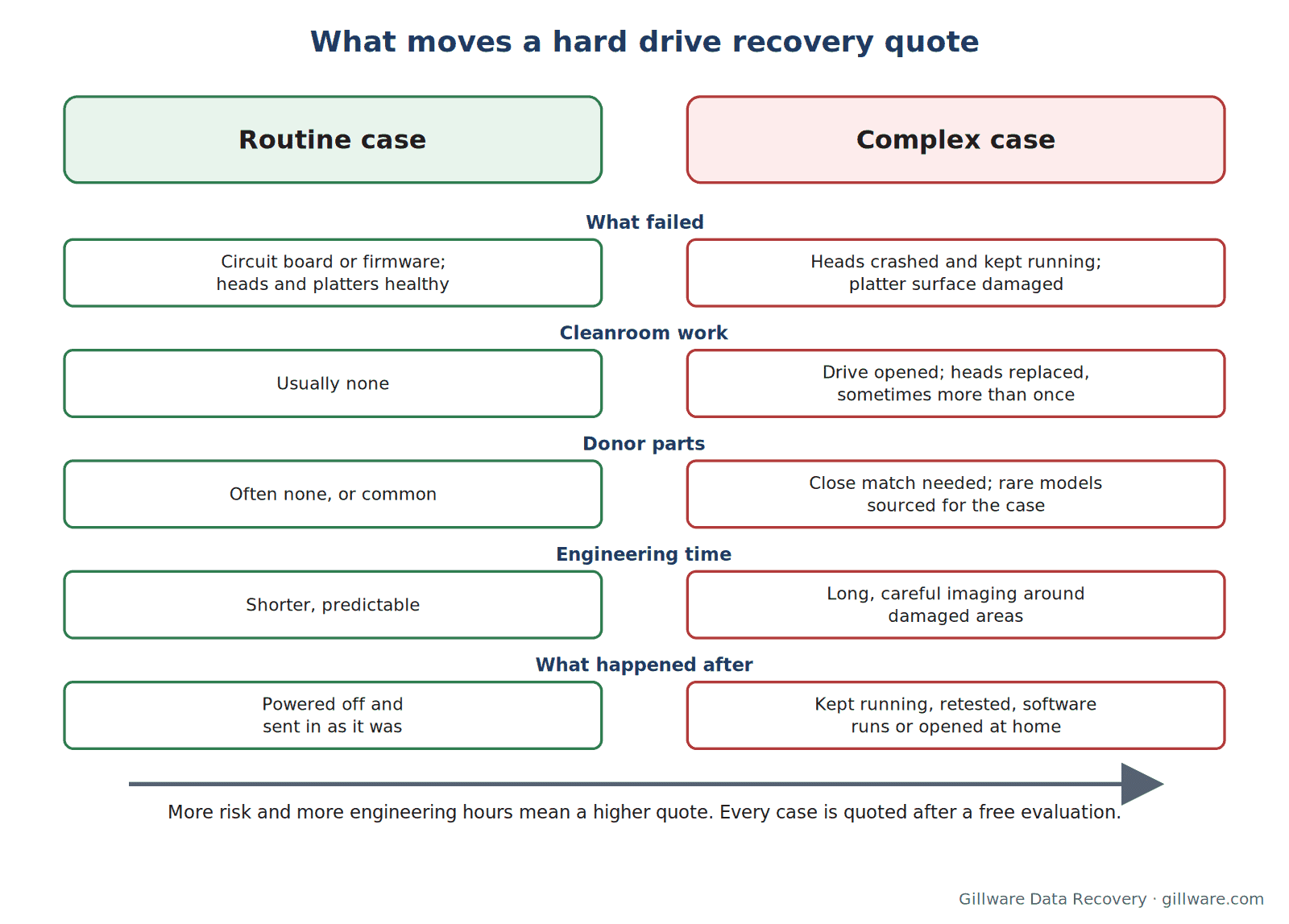
Every case carries a small share of what it takes to run the lab. On top of that, a hard drive quote comes down to how much engineering time the recovery needs, whether it needs donor parts, and how much risk is involved. On hard drives, those three things are decided mostly by which part of the drive failed.
Electronics and firmware
When a drive’s circuit board fails, often after a power surge, a bad adapter or a failed USB enclosure, or when the firmware that runs the drive becomes corrupted, the platters and heads may be perfectly healthy. These cases still need specialized tools and real expertise, since modern drives store unique calibration data that has to be carried over to any replacement board, but they usually do not need the cleanroom. They tend to sit at the routine end.
Read/write heads
A drive that clicks, beeps or is not detected after a drop almost always has failed heads. The drive has to be opened in the cleanroom, a matching donor head stack has to be found and transplanted, and the drive then has to be imaged slowly and carefully while it runs on borrowed parts. Head replacements are among the most common mechanical recoveries, and the work involved depends heavily on how quickly the drive was powered off. Our pages on hard drive clicking and beeping hard drives explain what those sounds mean.
Platter damage
If damaged heads kept running against the platters, they can scratch the magnetic surface where the data lives. Grinding or scraping sounds are the warning sign. A drive with platter damage needs much more engineering time, more careful handling and sometimes several sets of donor heads, and these cases are quoted higher than routine ones because they genuinely take more of the lab. See hard drive grinding or making noise.
Donor parts
Head and motor recoveries need a donor drive that matches yours closely: same model, compatible firmware, often the same manufacturing window. Some models are plentiful; others are rare and have to be sourced specifically for your case. Availability can affect both time and cost.
What Can Turn a Routine Case Into a Complex One
Some of the most involved hard drive recoveries start out routine. The drive did not change on its own; something was done to it after it failed. The most common culprits:
- Keeping a clicking or grinding drive powered on to see if it would come back. Every minute a drive runs on damaged heads risks scratching the platters.
- Running recovery software or disk utilities on a physically failing drive. These tools read the whole drive, sometimes repeatedly, and some write to it. They cannot fix a mechanical problem and can make one worse.
- Opening the drive outside a cleanroom. A single particle of dust is larger than the gap between the heads and the platter surface.
- Freezing it, tapping it or swapping in a board from another drive. These internet remedies rarely help and often add damage. Our article on the hard drive freezer myth explains why.
The single best thing you can do to keep the cost of a hard drive recovery down is to power the drive off at the first sign of trouble and leave it off. Do not open it, do not test it again, and send it in as it is.
Powered your drive off? Good. Call a tech advisor and we’ll tell you what your case is likely to involve.
External and Laptop Hard Drives
An external drive is an ordinary hard drive inside an enclosure with a small bridge board that converts its connection to USB. Sometimes only the bridge has failed and the drive inside is fine. On some external models the bridge board also handles hardware encryption, so the original board is needed to read the data; please send the drive in its enclosure, with its cable, rather than taking it apart. Our external hard drive data recovery page covers this in detail.
Laptop drives fail in many of the same ways as desktop drives, but they are smaller, they are often dropped while running, and in newer laptops the storage may be an SSD or soldered to the board. See laptop data recovery.
Does a Bigger Drive Cost More to Recover?
Not in the way most people expect. The hard part of a recovery is getting the drive to read and the file system to make sense again, not copying files. A drive with a failed head stack is a similar job whether it holds a little data or a lot. Very large drives can take longer to image, and some high-capacity models have more heads and platters, which can affect donor parts and engineering time. That is why we quote each case on its own merits rather than per gigabyte.
How to Get Your Number
- Call a tech advisor. Tell us the drive model if you know it, what it is doing (clicking, silent, not detected, freezing the computer), what happened just before, and whether anything has been tried. Our advisors can usually tell you right away whether your case sounds routine or involved, and what that tends to mean for cost.
- Send the drive in for a free evaluation. Our engineers diagnose exactly what failed and confirm what can be recovered. The evaluation is real engineering work, and it is free.
- Approve a firm quote, or don’t. Every case is quoted after a free evaluation, so you know the cost before any recovery work begins. You decide. On single-drive cases, you only pay if we meet your recovery goals, agreed with you in writing before the work starts.
We quote each case on its own merits, based on what we find in the lab and the thousands of similar cases we have seen with the same drive models and symptoms. If you decide not to go ahead, your drive is returned to you (return shipping applies) or securely recycled at no charge.
Why Gillware
Gillware has been recovering data from failed hard drives for more than two decades, from our lab in Madison, Wisconsin. More than 1,500 IT professionals nationwide refer their clients to us. Our highly experienced engineers strive for the highest success rates in the industry, and our hard drive data recovery process is built around one goal: getting your files back safely, and being straight with you about what it will take.
Hard Drive Recovery Cost FAQ
Can you tell me the cost over the phone?
A tech advisor can give you a realistic idea once they know the drive and the symptoms, and that is usually enough to decide whether to send it in. The firm quote comes after the free evaluation, because that is when we know exactly what failed.
Is the evaluation really free?
Yes. There is no charge to evaluate a single hard drive, and you are under no obligation to proceed.
What if you can’t recover my files?
On single-drive cases, you only pay if we meet the recovery goals agreed with you in writing. If we cannot, you owe nothing for the recovery attempt.
Will it cost more if I already tried software or opened the drive?
It can. Software runs and home attempts sometimes add damage, which can turn a routine case into a more involved one. Tell the tech advisor exactly what was tried; it helps our engineers plan the safest approach.
My drive is in a RAID array or a NAS. Is that priced the same way?
Multi-drive systems are handled as business cases and start with a free technical consultation with one of our enterprise storage engineers. See RAID data recovery.
Need a real number for your hard drive? Let’s talk.
Our highly experienced engineers strive for the highest success rates in the industry. Send us the device and we’ll diagnose it for free.
- More than 20 years recovering data from failed drives
- Trusted by 1,500+ IT professionals nationwide
- Whatever failed, we’ve seen it hundreds of times
- Pay only if we meet your recovery goals