
Intel RAID Controller RS3DC080 and RS3DC040 Data Recovery: Ctrl+R Prompts, Frn-Ba Drives, and End-of-Life Replacement Traps
RS3DC080 showing “Foreign Configuration found”?
Don’t import, clear or make drives unconfigured good yet. Book a free consultation with one of our enterprise recovery experts first.
The Intel RAID Controller RS3DC080 and its four-port twin, the RS3DC040, are Intel’s own versions of the LSI MegaRAID SAS 9361-8i and 9361-4i: the same LSI SAS3108 RAID-on-chip, 1 GB of cache, the same on-disk array format and the same 24.21 firmware line, sold under Intel part numbers with Intel’s Ctrl+R setup utility, Intel’s AXXRMFBU4 flash backup unit and Intel RAID Web Console 3. Intel launched the RS3DC080 in the third quarter of 2013 under the code name Dark Canyon, announced its end of life in October 2021, took the last orders in September 2022 and, in February 2024, stopped providing updates of any kind for the card’s firmware packages. The cards themselves are still in service by the thousand, mostly in Intel server boards and chassis, and most of them are still attached to the arrays they were built with.
When one fails today, the LSI playbook on our SAS3108 page applies, but the prompts have Intel names and the support path has closed. This page covers what is specific to the RS3DC080 and RS3DC040: the Ctrl+R prompts and the Frn-Ba drive state, Intel’s own import procedure and where it goes wrong, what a discontinued card means when you need a replacement, and how the external RS3SC008 and the board-mounted RMS3CC080 fit in. The full catalog of SAS3108 messages, each rated by risk to the data, is on our LSI MegaRAID SAS3108 recovery page.
RS3DC080, RS3DC040 and Their Siblings at a Glance
| RS3DC080 | RS3DC040 | RS3SC008 | RMS3CC080 / RMS3CC040 | |
|---|---|---|---|---|
| LSI equivalent | MegaRAID SAS 9361-8i | MegaRAID SAS 9361-4i | MegaRAID SAS 9380-8e | SAS3108 module, no retail twin |
| Ports | 8 internal (2 × SFF-8643) | 4 internal (1 × SFF-8643) | 8 external (2 × SFF-8644), 0 internal | 8 / 4 internal on an Intel server board |
| Devices through expanders | 128 | 128 | 240 | — |
| Cache | 1 GB DDR3 with ONFI flash offload (SAS3108 standard) | |||
| Flash backup unit | Intel AXXRMFBU4 (optional) | Intel AXXRMFBU4-class (optional) | AXXRMFBU5 | |
| JBOD mode | Yes | Yes | Yes | No |
| Form factor / host | MD2 low profile, PCIe 3.0 x8; standard and low-profile brackets in the box | SIOM mezzanine module | ||
| Lifecycle | Launched Q3 2013 (Dark Canyon); EOL announced 2021-10-25; last order 2022-09-16 | Launched Q3 2014 (Sunset Canyon); EOL announced 2021-04-06; last order 2022-04-06 | Discontinued | |
| Final standard firmware | Package 24.21.0-0132 (March 2021) for the whole RS3 / RMS3CC group | |||
Everything on the family page about how a SAS3108 stores its configuration in both NVSRAM and on the drives, how members go Foreign, and which prompts destroy data applies to every card in this table without change. Intel’s own PCI subsystem IDs (8086:9360, 9362, 9380, 351e, 351f) are how an operating system tells an RS3DC080 from a retail 9361-8i; the array on the drives cannot tell the difference.
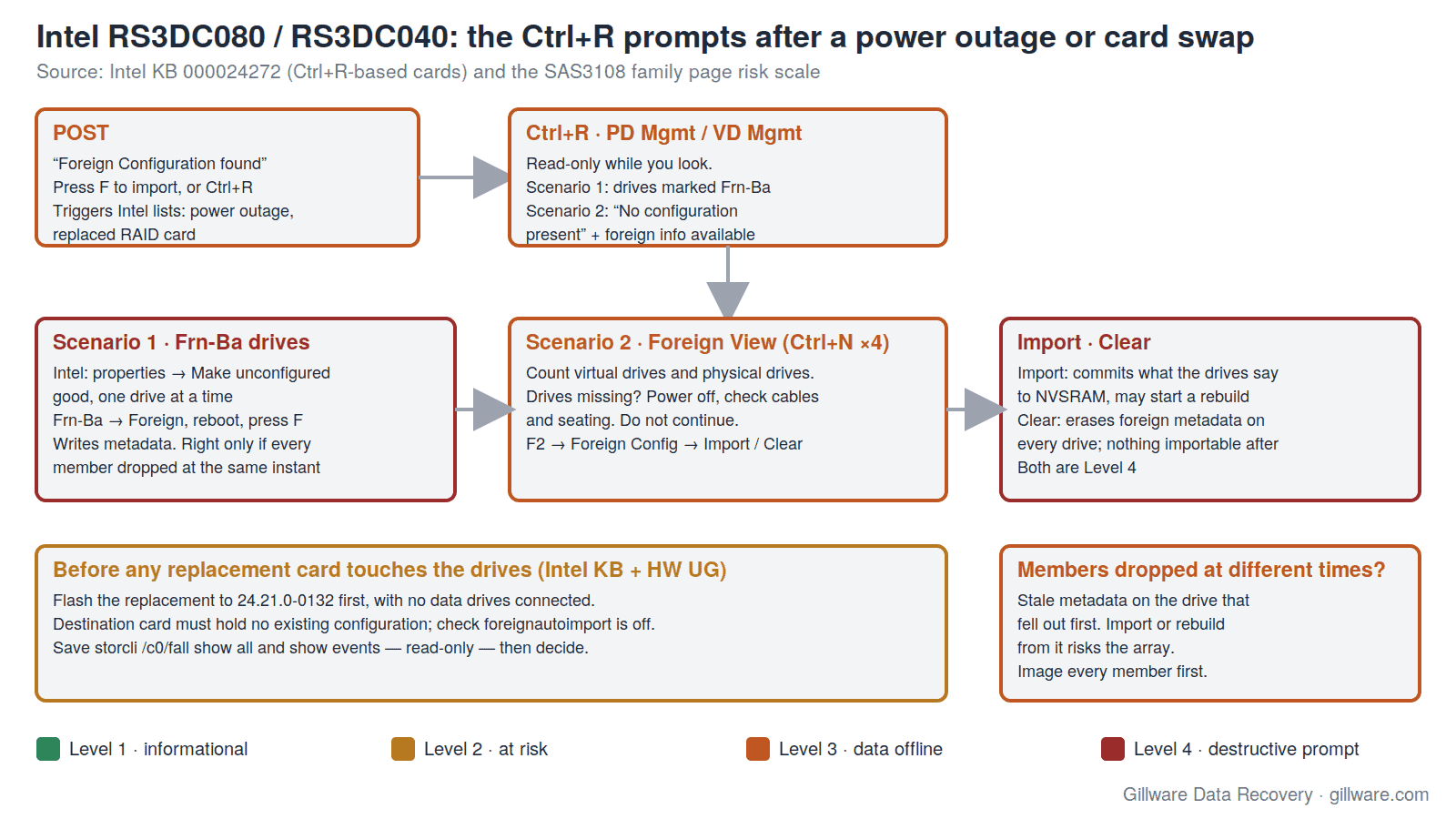
Ctrl+R, “Foreign Configuration found” and the Two Scenarios Intel Describes
Intel’s RS3-series cards do not use WebBIOS. On a legacy-BIOS boot the card prompts for Ctrl+R (and offers F to import on the spot); on UEFI systems the same utility appears inside the server’s setup screens. Intel’s knowledge base article for Ctrl+R cards, which names the RS3DC080, RS3DC040, RMS3CC080 and RMS3CC040 as the products it applies to, opens with the two everyday triggers for the Foreign Configuration found POST message: a power outage, and a replaced RAID card. Both are Level 3 on our scale — the data is almost always still on the drives, and the next keystroke decides whether it stays that way.
Intel then describes two scenarios, and both deserve a closer look than the article gives them.
Scenario 1: drives marked Frn-Ba
Some or all of the members show as Frn-Ba (Foreign Bad) in the PD Mgmt screen. Intel’s instruction is to open each drive’s properties, choose Make unconfigured good one at a time — which moves the drive from Frn-Bad to Foreign — then exit, let the system restart, and press F to import if the POST message returns. That is the correct procedure for the one case Intel has in mind: every member dropped out at the same instant, because the power failed or the card was swapped, and every drive is healthy. The array definition on the drives is complete and consistent; the controller simply does not have it in NVSRAM yet.
It is the wrong procedure when the drives did not drop together. A member that fell out of the array a week ago and sat there while the array ran degraded carries an older generation of metadata than its neighbours. Make it Unconfigured Good and import, and the controller can accept a configuration built from stale members and start a rebuild — or, if the firmware spots the mismatch, refuse the import with a partial-import warning and leave the volume offline. Either way the one-at-a-time instruction has now written to the drive’s metadata, and the evidence of what dropped when has started to disappear. The family page’s Unconfigured Bad entry explains how to tell the two cases apart from the event log before anything is changed.
Scenario 2: “No configuration present” and the Foreign View tab
If the controller holds no configuration at all — a replacement card, or a card whose NVSRAM was cleared — the Ctrl+R utility opens on an empty VD Mgmt screen with a note on the right that foreign configuration information is available. Intel’s procedure is to press Ctrl+N four times to reach the Foreign View tab, confirm that every expected virtual drive is listed and every physical drive is present, then select the controller, press F2, open Foreign Config and choose Import rather than Clear. The article adds a sentence that is easy to skim past: if drives are missing, switch the system off and recheck cables and seating before doing anything else.
That sentence is the whole point. Import is Level 4 because it commits whatever the drives say to NVSRAM, and Clear is Level 4 because it erases the foreign metadata from every drive so that nothing can be imported later. Foreign View is read-only; use it to count members, and if the count is wrong or any member shows a different array generation, stop there. Intel’s own precondition for a replacement card — update the firmware before connecting the drives — exists because an older firmware importing a newer configuration can upgrade or reject it, and the family page’s backward-incompatible upgrade warning is what that looks like in the log.
Intel support has closed, but the array on your drives isn’t Intel’s. Start with a free consultation with one of our enterprise recovery experts.
Discontinued, Then Unsupported: What the 2024 Notice Means for a Failed Array
Intel’s product pages still host the drivers and firmware, but the text above the download links changed in 2024. The notice reads: “As of 17 February 2024, no functional, security, or other updates will be provided for Intel® RAID Controller RS3DC080, RS3SC008 Firmware Packages,” the packages “will no longer be available after 29 September 2031,” and “Intel recommends that users … discontinue use as soon as possible.” The last standard firmware package for the RS3DC080, RS3DC040, RS3SC008, RS3MC044, RMS3CC080 and RMS3CC040 is 24.21.0-0132, dated March 2021 — the same MR 6.14 / 24.21 line that Dell distributes for the retail 9361-8i. The last Windows driver is 6.714.18.00 (2019); the last Linux driver is 07.720.04.00 (2022); Intel’s StorCLI standalone build was still refreshed in August 2024 and remains the right tool for reading the card’s state.
For an administrator with a down array this changes three things.
- There is no Intel support case to open. Intel RAID Web Console 3 reached end of life in March 2024 and Intel recommends uninstalling it; the RS3 product pages are self-service. The community threads that remain are the only Intel-side help, and they are dated.
- Replacement cards are secondhand. An RS3DC080 bought today comes with whatever firmware and NVSRAM contents its last owner left on it. Intel’s rule — flash the replacement to the current package before a single data drive is connected — matters more, not less, now that “current” is frozen at 24.21.0-0132 and the card in the box may be on anything from the 2013 release onward. A used card can also arrive with
foreignautoimportenabled, which turns the first boot with your drives attached into an automatic Level 4 import. Our StorCLI section shows how to read that property before the drives go in. - The array format is not Intel’s. A retail 9361-8i, a Supermicro or Lenovo SAS3108 board, or a later Broadcom card will recognise the DDF metadata on the drives; so will our lab without any controller at all. The card being discontinued is a procurement problem, not a recovery problem — unless someone tries to solve it by moving the drives to a card that is not a SAS3108 and importing there.
Owners have asked in forums whether an RS3DC080 can be cross-flashed into a retail 9361-8i; the one archived thread we found went unanswered. Flashing a card that holds an array’s only copy of the configuration is a Level 4 action that the family page lists among the commands that can damage the controller.
The RAID 5 That Slowed to a Crawl, and the Initialization Nobody Noticed
One report on Intel’s community forum describes an RS3DC080 with eight 8 TB enterprise drives in RAID 5 that wrote at about 250 MB/s for two days, then fell to about 75 MB/s after roughly 16 TB had been copied onto it. The reply that followed pointed at background initialization: a freshly created RAID 5 or RAID 6 virtual drive computes parity across its whole span after creation, and on a 56 TB array at full priority that takes days, with every host write competing against it. RAID Web Console 3 (or storcli /cx/vx show init, which only reports) shows the percentage complete.
The reason this belongs on a recovery page is what people do about it. A card that is still initializing has not yet written valid parity to the whole array; pull a drive during that window, or reboot into Ctrl+R and start a “fast” initialization to make the slowness stop, and the parity that would have protected the data is not there. An integrator reported the same pattern on the board-mounted RMS3CC040 with SATA SSDs in RAID 5. Slow writes on an SAS3108 card are a reason to read the log, not to re-create the volume.
RS3SC008: Eight External Ports and the Whole-Shelf Failure
The RS3SC008 is Intel’s external-port SAS3108 card, the equivalent of the LSI MegaRAID 9380-8e: eight ports on two SFF-8644 connectors, no internal ports, 1 GB of cache, JBOD mode, 240 devices through expanders, launched in 2014 as Sunset Canyon and discontinued on the same 2021–2022 timetable as the RS3DC080. Its arrays live in external JBOD shelves, which adds the failure the internal cards never see: the shelf loses power, or a cable is pulled, and every member of every array on that shelf goes missing at once. The hardware guide for the LSI twin says external drives must be powered on before or with the host or they may not be recognised; the family page’s drives-missing-at-boot entries describe what the log shows when they are not.
A whole shelf dropping together is the one case where Intel’s one-at-a-time Frn-Ba procedure and a foreign import are genuinely the right answer, because every member carries the same generation of metadata. Confirm it first: storcli /cx/fall show all lists every foreign drive with its array and generation, and a shelf that lost power shows all of its members foreign and consistent, while a shelf whose drives dropped one by one over weeks does not. Our SAS3108 recovery section covers the second case; the external-shelf pattern is also written up for the previous generation on our LSI 9280 page.
RMS3CC080 and RMS3CC040: the Same Chip on a Module
The RMS3CC080 and RMS3CC040 are SIOM mezzanine modules that mount directly on Intel server boards: SAS3108, 1 GB of cache, the AXXRMFBU5 flash backup unit rather than the AXXRMFBU4, and — the detail that catches people — no JBOD mode. They share the RS3DC080’s firmware package, Ctrl+R utility, drivers and knowledge base, and their arrays use the same on-disk format. When a server board with an RMS3CC080 dies, the drives can be read by an RS3DC080 or any other SAS3108 card as a foreign configuration; when an RS3DC080 is replaced by a board with an RMS3CC080, the same import rules apply, and the drives that were passed through as JBOD on the card have nowhere to go on the module.
Cables, Backplanes and the Drive That Is Not Where the Log Says
The RS3DC080 shipped alongside Intel’s AXXCBL730HDMS cable kit: two 730 mm Mini-SAS HD (SFF-8643) to Mini-SAS (SFF-8087) cables, launched with the card in 2013 and discontinued in 2020. Most RS3DC080 installations therefore connect a 12 Gb/s card to an older 6 Gb/s SFF-8087 backplane, and the card’s two connectors each carry four lanes. Before any drive is moved, label it with its bay and its connector-and-lane position: the SAS3108 records configuration on every member and can reassemble an array in any order (the hardware guide calls this drive roaming), but the event log reports failures by enclosure and slot, and a cable swapped between the two connectors during troubleshooting makes the log describe the wrong drive. Drives behind an expander backplane do not light the card’s per-PHY fault LED, so on an expander chassis the LEDs tell you nothing about which member the controller rejected.
RS3DC080 Messages: Quick Index
The messages RS3DC080 and RS3DC040 owners most often search for, with links to the full explanation and risk rating on the SAS3108 page:
- “Foreign Configuration found” at POST (press F or Ctrl+R)
- Drives shown as Frn-Ba (Foreign Bad) in PD Mgmt
- Make unconfigured good and Place Drive Online
- “Drives missing from configuration at boot” (0x00ee) and “Previous configuration completely missing at boot” (0x00f1)
- “VD is now OFFLINE” (0x00fc) and “VD is now DEGRADED” (0x00fb)
- “Rebuild failed on … due to source drive error” (0x0065)
- “Controller cache pinned for missing or offline VD” (0x0143) and cache discarded (0x0128)
- “Foreign import shall result in a backward incompatible upgrade of configuration metadata” (0x011f)
- “Controller needs replacement, IOP is faulty” (0x0113)
- StorCLI commands that change or destroy data
- Linux: “Reset failed, killing adapter” and ESXi: datastore All-Paths-Down with no RAID event
- The family page’s Intel section
If Your RS3DC080 Array Is Down Right Now
- If the volume is still reachable, copy the most important data off it before any rebuild, reseat, import or firmware work.
- Capture the card’s state with read-only commands and save the output somewhere else:
storcli /c0 show all,storcli /c0/eall/sall show all,storcli /c0/fall show all,storcli /c0 show preservedcacheandstorcli /c0 show events file=events.txt. Intel’s own support staff ask forstorcli /call show AliLog logfile=raidlog.txt, which captures the full controller log in one file. These are the safe commands; anything withset,import,del,delete,init,startordownloadin it is not. - In Ctrl+R, look but do not touch: Foreign View and PD Mgmt report; Make unconfigured good, Import, Clear, Force Online and Initialize write.
- Label every drive with its bay and its SFF-8643 connector and lane before anything is unplugged. Note which drives, if any, show Frn-Ba and which show Foreign.
- Do not follow the Frn-Ba one-at-a-time procedure unless the event log shows every member dropping at the same moment. Do not import or clear a foreign configuration, do not place or force a drive online, and do not delete preserved cache.
- Do not replace the card and connect the drives to it with
foreignautoimporton, and do not flash firmware — Intel’s frozen 24.21.0-0132 or anything else — with data drives attached. - Power the system down. If an AXXRMFBU4 is fitted, leave it connected; the flash backup unit is what preserves any dirty cache the card was holding.
- Send every member drive, the controller with its flash backup unit, and any drives that were passed through as JBOD. We do not need the server.
How We Recover RS3DC080 and RS3DC040 Arrays
We image every member drive on write-blocked hardware in our ISO 5 Class 100 cleanroom, working around physical damage with donor parts first so that a drive the controller marked Frn-Ba or failed still gives up most of its surface. Our HOMBRE reconstruction software reads the DDF metadata from each image, establishes member order, strip size and parity rotation, and determines which members dropped out and in what sequence — the question Intel’s import procedure cannot ask. The array is assembled virtually, with no RS3DC080, no replacement card and no firmware involved, and the file systems are recovered from the assembled volume. That is also why a discontinued controller never blocks a recovery. The full approach is described on our SAS3108 family page and our RAID data recovery page; the previous generation of Intel cards, the Ctrl+G-based RS2BL080 and RS2BL040, has its own RS2BL080 page, and the rest of Intel’s RAID line is on our Intel RAID controller recovery page.
RS3DC080 and RS3DC040 Documentation
- Intel KB 000024272 — Importing Foreign RAID Arrays on Ctrl+R-based Intel RAID Controllers — the Frn-Ba and Foreign View procedures, and the firmware-before-drives rule
- Intel support page for the RS3DC080 — final firmware 24.21.0-0132, drivers, StorCLI standalone, and the 2024 end-of-updates notice
- Intel ARK: RS3DC080 specifications and RS3SC008 specifications — lifecycle dates, cache, port and device counts
- Intel KB 000098160 — RAID Web Console 3 end of life
- 12Gb/s MegaRAID SAS RAID Controllers User Guide (pub-005183) — the LSI hardware guide for the 9361-8i / 9361-4i twins: connectors, drive roaming and migration, LED behaviour
- StorCLI Reference Manual — every StorCLI command, including the read-only foreign, preserved-cache and event commands above
RS3DC080 and RS3DC040 Frequently Asked Questions
The card says “Foreign Configuration found” and shows my drives as Frn-Ba. Should I follow Intel’s procedure?
Only if every member dropped at the same instant — a power outage, a replaced card, a pulled cable — and the event log agrees. Intel’s one-at-a-time Make unconfigured good is written for that case. If any member had already fallen out of the array before the outage, the procedure writes to stale metadata and can lead to an import or rebuild from the wrong drive. Read the log first; the family page explains what to look for.
Intel says the card is end of life and recommends I stop using it. Does that affect recovery?
No. The end-of-updates notice closes Intel’s support path and freezes the firmware at 24.21.0-0132; it does not change the on-disk format. We recover these arrays from drive images without the controller, so whether Intel still supports the card never enters into it. It does mean that any replacement you buy is secondhand and must be flashed and checked before your drives go anywhere near it.
Can I replace a dead RS3DC080 with an LSI 9361-8i, or with another SAS3108 card?
The on-disk format is the same, and the family page’s drive-migration rules apply: the destination card must hold no existing configuration, the firmware should be current before the drives are connected, and the drives must stay in order. The card will present the array as a foreign configuration. Whether to import is the same question as above, and if the array was already degraded when the old card died, the answer is to image the drives first.
My RAID 5 write speed collapsed after a few days. Is a drive failing?
Possibly, but on a new RS3DC080 array the usual cause is background initialization still computing parity across a large volume. Check the initialization progress before suspecting a drive, and never pull a member or re-create the volume to make the slowness stop — the parity that protects the data is not finished yet.
What should I send you?
Every member drive, the controller with its AXXRMFBU4 if one is fitted, any drives that were in JBOD mode, and the saved StorCLI output or Ctrl+R notes if you have them. Label the drives by bay and connector. We do not need the server or the backplane.
Start Your RS3DC080 Recovery
Power the system down, label the drives, and do not import, clear, force, initialize, flash or migrate anything. Our engineers will image every member, reconstruct the array without the controller, and walk you through the findings. Every case starts with a free technical consultation with one of our enterprise storage engineers, and you approve all recovery fees in writing before any recovery work begins. Gillware has been recovering RAID arrays for more than two decades.
RS3DC080 array down? Let’s get your data back.
Our highly experienced engineers strive for the highest success rates in the industry. Talk with one of our enterprise storage engineers before anything else is done to the system.
- Free technical consultation with one of our enterprise storage engineers
- A written recovery agreement before work begins
- No billing surprises: you approve all recovery fees in advance
- Emergency service for business-critical downtime