
MegaRAID 9280 array offline or degraded?
Don’t import, clear or force anything on the card. Book a free consultation with one of our enterprise recovery experts before anyone touches the array.
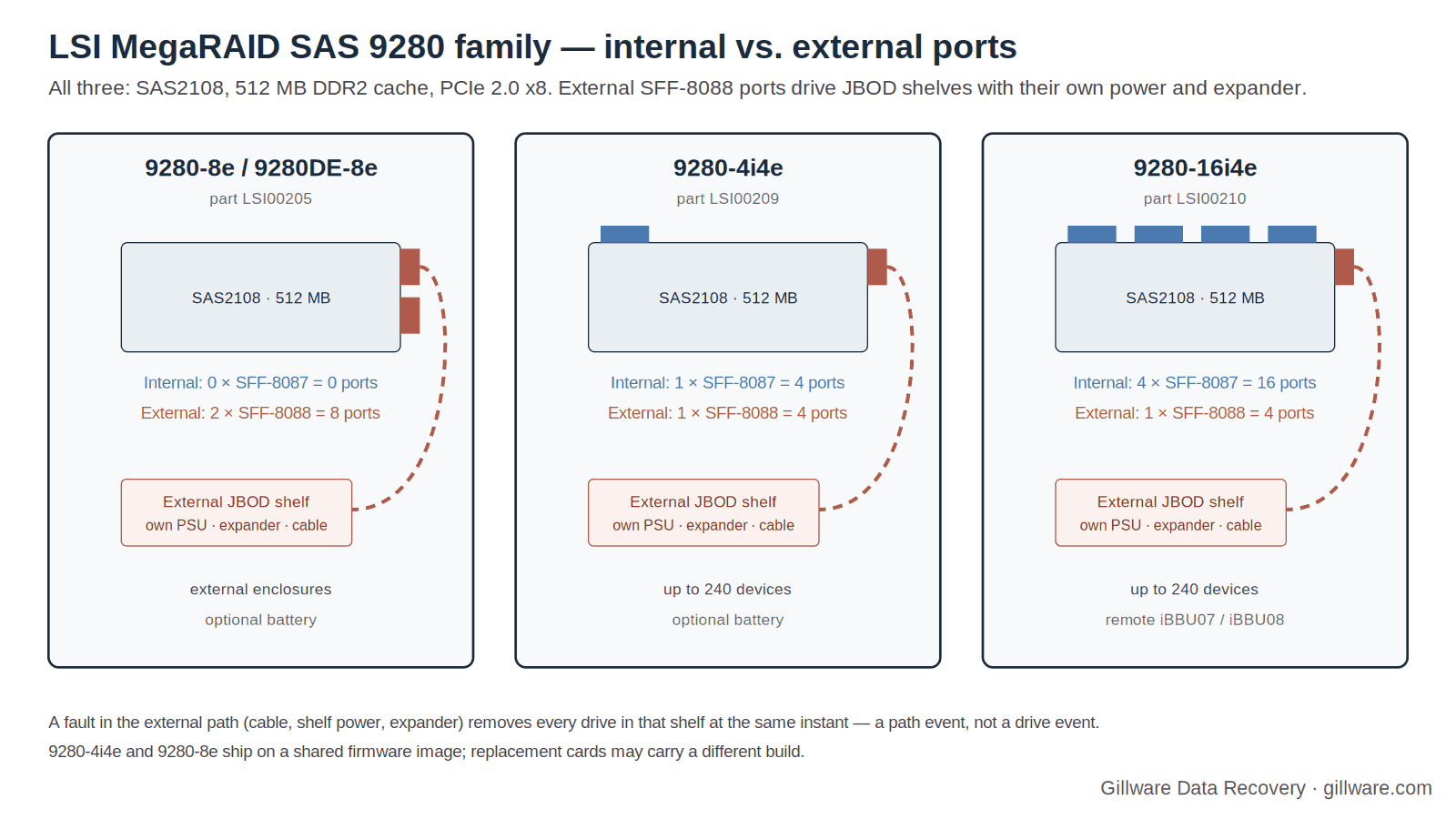
The MegaRAID SAS 9280 series is the SAS2108 generation’s answer to storage that does not fit inside the server. The 9280-8e puts all eight ports on the back of the card for external JBOD shelves; the 9280-4i4e and 9280-16i4e mix internal ports with one external connector so a server can hold its own drives and still chain enclosures behind it, up to 240 devices. That reach is exactly what makes a 9280 failure different from a 9260 or 9261 failure: the drives live in a separate box with its own power supply, its own expander and a cable between it and the controller, and any one of those can take every member of an array away at the same instant.
This page covers what is specific to the 9280 cards — whole-shelf drops, the discovery error at POST, the shared firmware image and the replacement-card questions that follow from it, and the remote battery. The complete catalog of SAS2108 messages, each rated by risk to your data, is on our LSI MegaRAID SAS2108 recovery page.
The 9280 Family
| 9280-8e / 9280DE-8e | 9280-4i4e | 9280-16i4e | |
|---|---|---|---|
| Part number | LSI00205 | LSI00209 | LSI00210 |
| Internal ports | none | 4 (1 × SFF-8087) | 16 (4 × SFF-8087) |
| External ports | 8 (2 × SFF-8088) | 4 (1 × SFF-8088) | 4 (1 × SFF-8088) |
| Devices | external enclosures | up to 240 | up to 240 |
| Cache | 512 MB DDR2 | 512 MB DDR2 | 512 MB DDR2 |
| Cache protection | Optional battery | Optional battery | Remote LSIiBBU07 or LSIiBBU08 |
| Form factor | Low profile MD2 | MD2 low profile, 6.6 × 2.536 in | — |
| Chip / host | LSI SAS2108 (800 MHz PowerPC), PCIe 2.0 x8; RAID 0, 1, 5, 6, 10, 50, 60; identifies to Linux as “MegaRAID SAS 2108 [Liberator]” | ||
The 6 Gb/s MegaRAID user guide lists one external connector on the 9280-4i4e, 9280-16i4e and 9280-24i4e and two on the 9280-8e and 9280DE-8e; the 4i4e arrived in the guide’s November 2009 revision, the 8e models in a later one. The 9280-16i4e’s quick installation guide carries a note that SATA II is the only SATA type it supports, and connects its battery remotely rather than on the card. LSI positioned the 8e for external SAS, SATA or SSD enclosures and listed FastPath, CacheCade and SafeStore as options for it. All of the 9280 cards share the SAS2108’s 32 KB configuration NVRAM and write the same MegaRAID metadata to every member drive — which is why, when the controller or the shelf fails, the array is still recoverable from the drives alone.
When the Whole Shelf Disappears
On an internal controller, a cable fault takes out the four drives on one connector. On a 9280, a fault in the external path takes out every drive in the enclosure — and if the array spans two shelves on a 9280-8e, half of it or all of it. The causes are ordinary: an enclosure power supply that drops out, a mini-SAS SFF-8088 cable that was never fully latched, an expander inside the shelf that resets, or someone powering the enclosure down before the server. The controller experiences it as many members leaving at the same instant.
What the controller does next is the family behavior. At the next scan every returned member is marked (Foreign) Unconfigured Bad and the virtual drive is offline; POST may report Foreign configuration(s) found on adapter or, if the shelf is still dark, All of the disks from your previous configuration are gone. Oracle documents the vendor path back for its rebadged SAS2108 HBA: make each drive Unconfigured Good, scan for devices, preview the foreign configuration, then import. That procedure exists for exactly this event — every member dropped together and none has actually failed — and in that case it is usually safe once.
The danger on a 9280 is that shelf drops repeat. A marginal cable or a tired enclosure power supply will do it again, and a second or third import trusts every member equally even if one of them quietly failed between events. Owners of the 9260-8i and its IBM twin documented that cycle on internal expanders and breakout cables; the 9280 simply moves the weak link outside the chassis. If your 9280 array has come back from a shelf drop before, copy the data off it before the next one and replace the cable, the enclosure power supply or the shelf before touching the import again.
“A discovery error has occurred” at POST
One 9280-8e owner documented a POST message that stopped the boot: A discovery error has occurred, please powercycle the system and all the enclosures attached to this system. With the drives detached the server booted; with any single drive reattached the error returned. He replaced the backplane with a known-good one and the cable with a new one, and the error persisted. The advice he received was to inspect the mini-SAS socket on the card for bent pins and clean it, and failing that to swap the adapter — with the note that a replacement adapter should recognize the array’s parameters from the drives.
The message names its own cause: the controller could not complete SAS discovery of the topology behind its external ports. On a 9280 that topology includes the enclosure’s expander, so the fault can sit in the card’s connector, the cable, the shelf’s expander or the shelf’s firmware. The family’s Invalid SAS Topology Detected message, documented by Oracle for its SAS2108 HBA, belongs to the same category. Neither message says anything about the drives, and neither is a reason to clear a configuration. Power-cycling the system and the enclosures, in that order, is what the message asks for; if it does not clear, the safe path is the replacement procedure below rather than repeated attempts with the array attached.
One Firmware Image, Several Cards
A detail that matters when a 9280 fails: LSI shipped the 9280-4i4e and the 9280-8e on a shared firmware image. One owner whose 9280-8e died and who bought a used replacement found the packages named in the form 12.9.0-0038_SAS_FW_Image_APP-2.90.03-0933_9280-4i4e-8e.zip, and found that the replacement’s newer firmware had dropped a feature his old card supported — MegaCLI’s -LDSetPowerPolicy now answered Adapter does not support Power savings on logical drives. He also found that the older packages he wanted were no longer on the vendor’s FTP site.
For recovery, two things follow. First, a replacement 9280 may run a different firmware build than the card it replaces, and, as a 9260-8i owner documented, the import behavior of a MegaRAID card changes between builds — Foreign drives cannot be imported as they don’t form a complete configuration is the message when it goes wrong. Second, “matching the original firmware” may no longer be possible if the build has been withdrawn. The safe order on a 9280 replacement:
- Install the replacement with the enclosure cables disconnected and read its firmware package version.
- If the original build is known and available, match it before connecting anything.
- Connect one shelf at a time and read the foreign-configuration preview before importing.
- If the import is refused, stop. Do not clear the configuration and do not recreate the virtual drive — MegaRAID has a specific fatal event for cache discarded due to firmware version incompatibility, and clearing or recreating a configuration is rated as a destructive action on the family page.
External Expanders Under a Hypervisor
Because the 9280 is the card people reach for when a virtualization host needs more drives than it has bays, it turns up under hypervisors with an external SAS expander behind it. One administrator running a 9280-8e with an external expander under an early ESXi release reported a reboot problem after configuring the array at the card’s BIOS. A hypervisor host that reboots or hangs while the controller is presenting a large external array is not itself a data-loss event, but it is often the moment when someone starts changing things — pulling the cable, reseating drives, flashing the card — and those changes are.
The rule is the same as for the shelf drop: stabilize the path first, change nothing on the array, and if the host will not stay up with the shelf attached, take the shelf offline cleanly and come to the drives without the controller.
The Remote Battery and Cache Loss
On the 9280-16i4e the battery does not sit on the card; it connects remotely, as an LSIiBBU07 or LSIiBBU08. A remote battery is one more cable to fail and one more component to forget when a chassis is serviced. On any SAS2108 card running write-back with a dead or disconnected battery, a power loss discards cached writes, and the next boot may show Memory/battery problems were detected. The adapter has recovered, but cached data was lost, with event 0x000a, Controller cache discarded due to memory/battery problems, in the log. A camera-NVR vendor documents that event firing whenever write-back is set with no battery present. On a 9280 driving a shelf, add the enclosure’s own power to the list of things that can go away at the wrong moment.
If the array was in write-back mode when the shelf or the server lost power, treat the file systems as suspect: image the members, then check. The preserved-cache message — There are offline or missing virtual drives with preserved cache — is the controller offering to hold dirty cache for members that have not returned; discarding it is a destructive action and is rated as such on the family page.
9280 Messages: Quick Index
Every message below is rated and explained on the SAS2108 family page.
- “Foreign configuration(s) found on adapter… ‘F’ to import”
- “All of the disks from your previous configuration are gone”
- “The following VDs have missing disks”
- “There are offline or missing virtual drives with preserved cache”
- “Invalid SAS Topology Detected”
- “Memory/battery problems were detected…”
- “(FOREIGN) Unconfigured Bad”
- Make Unconfigured Good → Scan → Import
- “Foreign drives cannot be imported as they don’t form a complete configuration.”
- “Controller cache discarded due to memory/battery problems”
- “Controller cache discarded due to firmware version incompatibility”
- MegaCLI commands that write to your drives
If Your 9280 Array Is Down Right Now
- If the volume still mounts, copy the most important data off it now — before any import, rebuild, firmware change or cable work.
- Photograph the POST and WebBIOS screens, or save
MegaCli -CfgDsply -aALL,MegaCli -PDList -aALLand the event log to another machine. - Label every drive with its enclosure, its slot, and which external connector the enclosure hangs off; record serial numbers. If arrays span two shelves on a 9280-8e, record which shelf is on which port.
- Note the card’s firmware package version if it still posts.
- Power down in order — server first, then enclosures — and do not import, clear, make good, force online, flash or rebuild. Do not attach the drives to a PC.
- Ship every drive together. We do not need the server, the enclosure or, in most cases, the card.
How We Recover 9280 Arrays
We image every member drive on write-blocked hardware in our ISO 5 (Class 100) cleanroom, bringing physically failed drives back to readable condition with donor parts first. Our HOMBRE software reads the MegaRAID metadata from each image, establishes member order, stripe size and parity layout across every shelf, and works out which members dropped and when — the decisive question after a shelf that has dropped more than once. The array is assembled virtually, with no controller, no expander and no firmware build involved, and the file systems are recovered from the assembled volume. The full method is on our SAS2108 page; our RAID data recovery and server data recovery pages describe the lab.
9280 Documentation
- MegaRAID SAS 9280-8e / 9280DE-8e Product Brief
- MegaRAID SAS 9280-4i4e Product Brief — connectors, device limits, form factor
- MegaRAID SAS 9280-16i4e Quick Installation Guide — remote battery, SATA note
- 6Gb/s MegaRAID SAS RAID Controllers User Guide (41450-04 Rev. D) — external connector layout per model
- MegaRAID SAS Software User Guide (Rev. I) — WebBIOS, MegaCLI, MSM and event messages
9280 Frequently Asked Questions
My whole enclosure dropped and every drive is “Unconfigured Bad.” Did I lose the array?
Not necessarily. Every member leaving at the same instant is a path event — cable, enclosure power or expander — not a drive event. If it is the first time and no member had failed earlier, the documented make-good-and-import procedure usually works. If it has happened before, copy the data off and fix the path first.
What does “A discovery error has occurred” mean?
The controller could not finish discovering the SAS topology behind its ports. On a 9280 that includes the enclosure’s expander. Check the card’s connector pins and the cable; if it persists, replace the card with the drives disconnected rather than repeating attempts with the array attached.
Can I replace a 9280-8e with a 9280-4i4e, or with a 9260?
They are the same chip and the 4i4e and 8e even share a firmware image, so the metadata is readable. Whether the ports fit your cabling is the practical question, and whether the firmware builds match is the import question. Match firmware with the shelves disconnected, then connect one shelf at a time.
The replacement card’s firmware is newer and I cannot find the old build. What now?
Connect the shelf and read the foreign-configuration preview. If the import is refused, stop there; the drives can be imaged and the array rebuilt without any controller.
Is it safe to power the enclosure off before the server?
Not while the array is online. The controller sees every member leave at once. Shut the server down first, then the shelves, so the controller never sees members leave while the array is online.
What should I send you?
Every drive from every shelf in the array, labeled by enclosure, slot and port. We do not need the server, the enclosure or, usually, the card.
Start Your 9280 Recovery
Power the system down in order, label the drives, and do not import, clear, force, flash or rebuild. Our engineers will image every member, reconstruct the array without the controller. Gillware has been recovering RAID arrays for more than two decades.
9280 array down? Let’s get your data back.
Our highly experienced engineers strive for the highest success rates in the industry. Talk with one of our enterprise storage engineers before anything else is done to the system.
- Free technical consultation with one of our enterprise storage engineers
- A written recovery agreement before work begins
- No billing surprises: you approve all recovery fees in advance
- Emergency service for business-critical downtime