
IBM / Lenovo ServeRAID M5210 Data Recovery: iMR vs MR Mode, Features on Demand Traps, and Error Messages
Replacement M5210 refusing your array?
Don’t clear or recreate the configuration; the drives are usually fine. Book a free consultation with one of our enterprise recovery experts.
The ServeRAID M5210 is IBM’s — later Lenovo’s — SAS3108 card for the System x line: part number 46C9110 as a low-profile adapter, or the M5210e as a chip soldered onto the system board of servers such as the x3750 M4 and x3650 M4 HD. What makes it different from the retail LSI 9361-8i it shares a chip with is that what the card can do depends on what is plugged into it and licensed to the server. A bare M5210 is a RAID 0/1/10 controller with no cache. Add a transportable memory module and it becomes a full MegaRAID card. Add a Features on Demand licence and it gains RAID 5, 6, 50 or 60. Take any of those away — which is exactly what happens when a card is replaced, a server is swapped, or a used card is bought — and an array that is physically fine can be refused by the controller that is supposed to run it.
This page covers what is specific to the M5210 and M5210e, and to the M5225 external-port sibling where it shares the same upgrades. The complete catalog of SAS3108 messages — HII and WebBIOS prompts, StorCLI commands, MegaRAID event codes, Linux and VMware log lines, each rated by risk — is on our LSI MegaRAID SAS3108 recovery page; the previous IBM generation is covered on the ServeRAID M5015 and M5014 page.
M5210, M5210e and the Upgrade Matrix
| ServeRAID M5210 | ServeRAID M5210e | |
|---|---|---|
| RAID-on-chip | LSI SAS3108, 12 Gb/s | |
| Form | PCIe 3.0 x8 low-profile MD2 adapter, part 46C9110 | Onboard chip in servers such as the x3750 M4 and x3650 M4 HD |
| Ports | Eight internal 12 Gb/s SAS/SATA lanes on two SFF-8643 connectors; up to 32 internal drives depending on the server | |
| Standard RAID levels | 0, 1, 10 (iMR mode, no cache, fixed 64 KB strip) | |
| RAID 5 / 50 | Zero Cache/RAID 5 FoD 47C8708 (still iMR, no cache), or any cache module (MR mode) | |
| RAID 6 / 60 | A cache module plus the RAID 6 FoD 47C8706 | |
| Cache modules | 1 GB Cache/RAID 5 Upgrade 47C8656 (no flash backup); 1, 2 or 4 GB Flash/RAID 5 Upgrades 47C8660 / 47C8664 / 47C8668 (NAND flash plus a cabled offload power module); DDR3-1866 | |
| Other FoD | Performance Accelerator 47C8710; SSD Caching Enabler (CacheCade) 47C8712 | |
| Licence scope | One FoD part number enables the feature on every M5210, M5210e, M5215 and M5225 in the server (and M5100-series cards); the Zero Cache/RAID 5 FoD also activates the M1100/M1200 equivalents | |
| Status | All adapters and upgrades withdrawn from marketing | |
Lenovo’s product guide describes the two operating modes directly. With no cache module the card runs in integrated MegaRAID (iMR) mode: RAID 0, 1 and 10 as standard, RAID 5 and 50 only with the Zero Cache/RAID 5 licence, and a fixed 64 KB strip. With a 1, 2 or 4 GB module it runs in MegaRAID (MR) mode: configurable strips, and RAID 6 and 60 with the further licence. Lenovo’s upgrade guide for the modules puts it in one sentence — the controller can run in iMR mode without a module, and MR mode requires one.
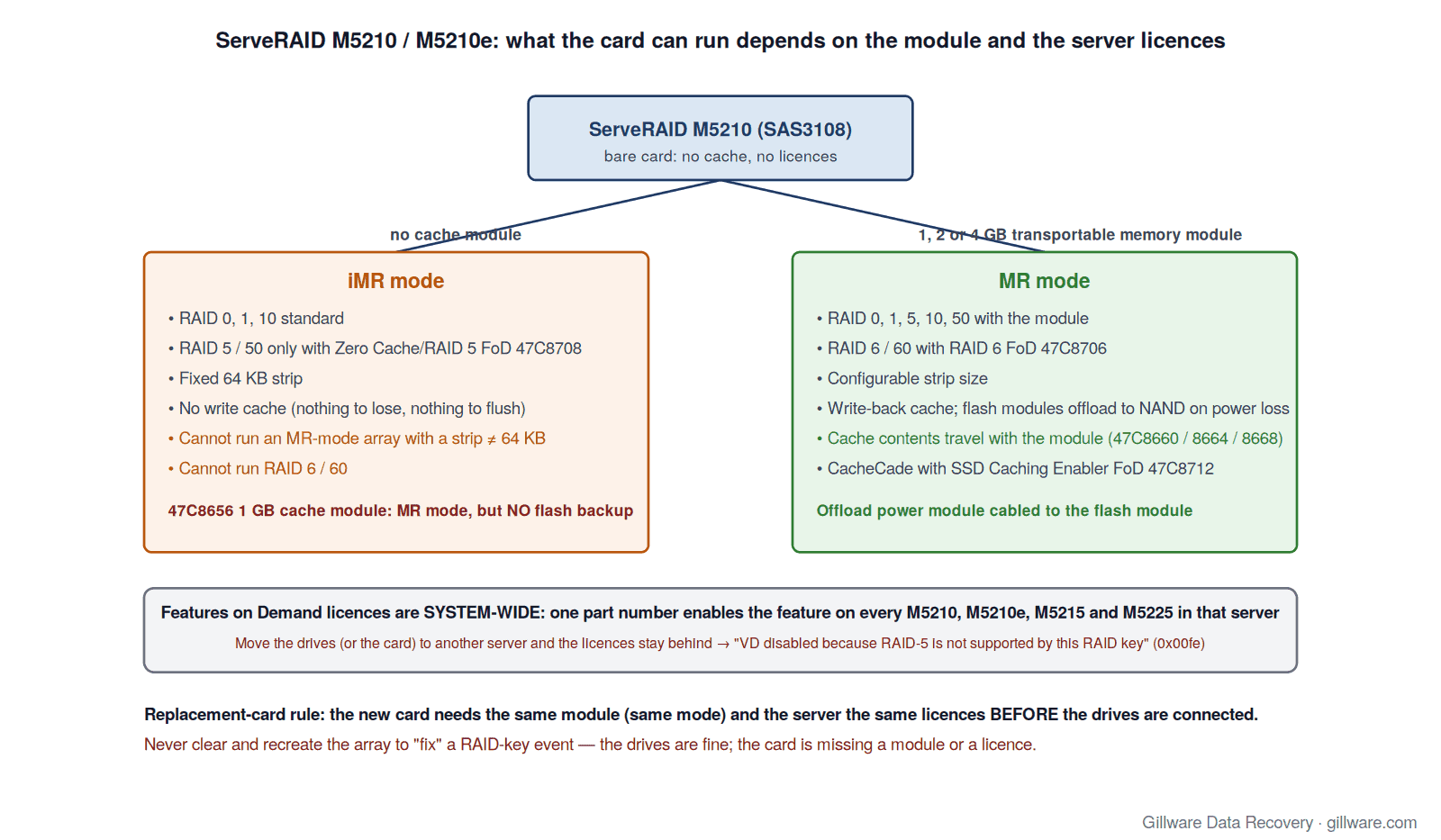
The Replacement-Card Trap
This is the M5210 failure we see most, and it has nothing to do with the drives. An M5210 is replaced — under warranty, from spares, or by moving the drives into another System x server — and the new card comes up without the cache module, without the licences, or both. The array’s DDF metadata on the drives says “RAID 6, 256 KB strip”; the card in front of it is an iMR controller that cannot run RAID 6 and only knows a 64 KB strip. The MegaRAID firmware has an event for exactly this situation, and it is one of the few that names a licence rather than a drive:
- “VD disabled because RAID-5 is not supported by this RAID key” (0x00fe)
- “VD disabled because RAID-6 is not supported by this controller” (0x00ff)
Three things follow from the product guide’s rules.
- The licence belongs to the server, not the card. Features on Demand upgrades are system-wide: one part number enables the feature on every M5200-series card installed in that server. Move the drives and the card to a different server and the licence does not come with them. Move only the drives, and the destination server’s licences decide what the array is allowed to be.
- The strip belongs to the mode. An array created in MR mode with any strip other than 64 KB cannot be run by a card in iMR mode. Fitting a cache module to the replacement card changes its mode; a replacement that was never given a module stays iMR no matter what the DDF says.
- The cache belongs to the module. Lenovo calls the 1, 2 and 4 GB flash upgrades “transportable memory modules” for a reason: on power loss, the DRAM contents are offloaded to the module’s NAND and restored at the next power-on, then flushed to disk. If the module that held the last writes is left in the old card, those writes go with it.
The temptation on a replacement card that refuses the array is to clear the configuration and recreate it “the same way.” On this card that is Level 4 twice over: clearing erases the only record of the array’s geometry, and recreating it on an iMR card forces a 64 KB strip over data laid down at a different one. Nothing is wrong with the drives at this point. Stop, and either restore the original module and licences or send the drives for reconstruction.
A missing cache module or licence can make a healthy M5210 array look lost. Start with a free consultation with one of our enterprise recovery experts.
The 1 GB Cache Module With No Flash
Among the M5210’s cache options, one is different from the rest. Lenovo’s upgrade guide states that the 1 GB Cache/RAID 5 Upgrade (47C8656) “has no flash backup capability and is not a transportable memory module,” because it cannot back up its cache in a power loss. A server with that module runs in MR mode with full write-back caching and no way to preserve a dirty cache through an outage. After an unclean shutdown, the drives can be internally inconsistent with no event to say so; the controller simply never had the data to flush. The flash-backed modules (47C8660, 47C8664, 47C8668) ship with an offload power module and two cables, and that cabled power module is what makes the difference. If you are reading this after a power event on an M5210 with the 1 GB cache-only module, treat any file-system error on the volume as a RAID-level problem, not a file-system one.
With a flash module fitted, the usual SAS3108 cache events apply: pinned cache for a missing virtual drive, cache discarded for a missing virtual drive, and cache discarded due to memory or battery problems. On an M5210 the “battery” in that last message is the cabled offload power module.
iMR Mode: What You Give Up Without a Module
Plenty of M5210 cards run deliberately without a cache module. One administrator documented a Ceph cluster on Lenovo x3650 M5 servers whose M5210 cards ran in JBOD mode with the cache module removed; he also reported that the Ubuntu installers of the day black-screened with the card present while CentOS installed normally, and that an M1215 in the same server was unaffected. That is a reminder that the M5210’s driver behaviour follows the generic megaraid_sas path described on the SAS3108 page, and that a boot or installer problem is not evidence of a drive problem.
For arrays, iMR mode means no write cache and a fixed 64 KB strip, and RAID 5 only with the Zero Cache licence. Those arrays are simpler to reconstruct, because there is no cache to account for — but they are also the arrays most likely to be moved to a card in a different mode, which is the trap above in reverse.
Imports, Migrations and the M1215 Path
Lenovo documents one supported migration into the M5210: arrays built on the entry-level M1215 can be recognized and imported into an M5210 without reconfiguration. Every other import is the generic SAS3108 foreign-configuration path — “Foreign configuration found”, drives shown as (Foreign) Unconfigured Bad after an unclean removal, and the Make Unconfigured Good step that precedes an import or a clear. On the M5210 the import question has an extra clause: the destination card must be in a mode, and the server in a licence state, that can run what the metadata describes. An import that “succeeds” and then logs a RAID-key event has not brought the array back; it has told you what is missing.
The product guide also lists what the M5210 will not do online: RAID 10, 50 and 60 drive groups do not support online capacity expansion or online RAID level migration, nor do RAID 0, 1, 5 and 6 groups that carry two or more virtual drives. An administrator who tries to “migrate” such an array to fit the replacement card’s capabilities is not going to be offered the option — which is the firmware’s way of protecting the data.
CacheCade on the M5210
SSD caching on this card is a licence (the SSD Caching Enabler FoD, 47C8712), and Lenovo notes that not every SSD supports it. The recovery consequence is the same as on the retail card: a replacement without the licence, or a server whose licence did not travel, cannot run the CacheCade pool, and the SSDs in that pool may hold data in write-back mode that never reached the hard drives. Send the SSDs with the array.
M5210 Messages: Quick Index
The messages M5210 owners most often search for, with links to the full explanation and risk rating on the SAS3108 page:
- “VD disabled because RAID-5 is not supported by this RAID key” / “… RAID-6 is not supported by this controller”
- “Foreign configuration found”
- Drives shown as (Foreign) Unconfigured Bad
- “VD is now OFFLINE” (0x00fc)
- “Rebuild failed on … due to source drive error” (0x0065)
- “Controller cache pinned for missing or offline VD” (0x0143)
- “Controller cache discarded due to memory/battery problems” (0x000a)
- “Drives missing from configuration at boot” (0x00ee)
- Initialize, Erase, Delete Virtual Drive, Clear Configuration
- StorCLI commands that change or destroy data
- OEM notes: IBM / Lenovo ServeRAID M5210 and M5210e
If Your M5210 Array Is Down Right Now
- If the volume is still accessible, copy the most important data off it before any rebuild, replacement or licence work.
- Save the read-only StorCLI output to another machine:
storcli /c0 show all,storcli /c0/eall/sall show all,storcli /c0 show preservedcacheandstorcli /c0 show events file=events.txt. These are the safe commands. - Write down which cache module (if any) is fitted and which FoD licences the server holds. If the card is being replaced, the new card needs the same module and the server the same licences before the drives are connected.
- Label every drive with its bay before anything is unplugged.
- Do not import or clear a foreign configuration, do not Make Unconfigured Good a drive that held data, do not place or force a drive online, do not delete preserved cache, and do not recreate the array on a card that cannot run its RAID level or strip.
- Power the server down. Leave the cache module on the card it was in.
- Send every member drive, any CacheCade SSDs, and the controller with its module. We do not need the server.
How We Recover M5210 Arrays
We image every member drive — hard drives and any CacheCade SSDs — on write-blocked hardware in our ISO 5 Class 100 cleanroom, working around physical damage with donor parts first. Our HOMBRE reconstruction software reads the DDF metadata from each image, establishes member order, strip size and parity rotation, and determines which members dropped out and when. The array is assembled virtually — no M5210, no licence, no cache module, no firmware involved — so the mode and licence state of whatever card is left in the server does not matter. The full approach is on our SAS3108 family page, our IBM ServeRAID page and our RAID data recovery page.
ServeRAID M5210 Documentation
- Lenovo Press TIPS1069: ServeRAID M5210 and M5210e SAS/SATA Controllers Product Guide — part numbers, the iMR/MR modes, the upgrade matrix and the system-wide licence rule
- ServeRAID M5200 Series Flash/RAID 5 Upgrade User’s Guide (00FH366) — installing the transportable memory modules and the offload power module; the no-flash note on the 1 GB cache module
- Lenovo Press TIPS1174: ServeRAID M1215 — the documented import path from the M1215 into the M5210
- StorCLI Reference Manual — every StorCLI command, including the foreign, preserved-cache and drive-state commands
- 12Gb/s MegaRAID SAS Software User Guide (pub-005110) — HII, WebBIOS, MegaRAID Storage Manager and the event message appendix
ServeRAID M5210 Frequently Asked Questions
Is the M5210 just a rebadged LSI 9361-8i?
Same SAS3108 chip, same two SFF-8643 connectors, same PCIe 3.0 x8 interface — but the retail card ships with 1 GB of cache and enables its advanced features with a hardware key, while the M5210 ships with no cache and enables everything through modules and server-wide Features on Demand licences. That difference is the source of nearly every M5210-specific failure.
The replacement card says my virtual drive is disabled because of the RAID key. Are the drives bad?
Almost certainly not. The event means the card in the server does not have the licence (or the mode) the array was built with. Restore the original module and licences, or send the drives for reconstruction. Do not clear and recreate.
Can I move the drives to another System x server?
Only if that server has an M5200-series card in the same mode and the same licences. Licences are per server, not per card, and an iMR card cannot run an MR-mode array with a strip other than 64 KB.
My M5210 has the 1 GB cache module without flash and the building lost power. What now?
That module cannot preserve its cache through an outage, so whatever was in write-back cache at the moment of the power loss is gone from the controller. If the volume mounts, copy data off and check it; if it does not, do not run a file-system check or a consistency check before the array has been imaged.
Does the M5225 behave the same way?
The M5225 is the external-port sibling in the same M5200 family and shares the same system-wide Features on Demand upgrades, so the licence rules on this page apply to it. Its own hardware details are covered as a section on the SAS3108 family page rather than here.
What should I send you?
Every drive that was attached to the card, labeled by bay — including any CacheCade SSDs — plus the controller with its cache module still fitted. We do not need the server, and we do not need the licences.
Start Your ServeRAID M5210 Recovery
Power the server down, label the drives, and do not import, clear, force, initialize, migrate or recreate anything. Our engineers image every member and reconstruct the array without the controller. Gillware has been recovering RAID arrays for more than two decades.
M5210 array down? Let’s get your data back.
Our highly experienced engineers strive for the highest success rates in the industry. Talk with one of our enterprise storage engineers before anything else is done to the system.
- Free technical consultation with one of our enterprise storage engineers
- A written recovery agreement before work begins
- No billing surprises: you approve all recovery fees in advance
- Emergency service for business-critical downtime