
IBM ServeRAID M5015 and M5014 Data Recovery: System x RAID Failures, Error Messages, and Feature Key Traps
ServeRAID M5015 array offline or degraded?
Don’t import, clear or force anything on the card or its feature key. Book a free consultation with one of our enterprise recovery experts before anyone touches the array.
The IBM ServeRAID M5015 and its smaller sibling, the M5014, were the standard 6 Gb/s RAID cards in a whole generation of System x servers — the x3650 M3, x3550 M3, x3500 M3, x3690 X5, x3850 X5 and their relatives. Under the IBM label is the same LSI SAS2108 controller as the MegaRAID SAS 9260-8i, running IBM firmware with IBM part numbers, IBM batteries and an IBM feature key that unlocks RAID 6. Those IBM-specific pieces are exactly where recoveries on these cards get complicated: a replacement card without the key, a battery the firmware refuses to see, a firmware level that reports every disk as gone, or a secondhand card someone cross-flashed to LSI firmware years ago.
This page covers what is specific to the M5015 and M5014. The full catalog of SAS2108 messages — POST screens, WebBIOS states, MegaRAID Storage Manager events, MegaCLI commands and Linux driver messages, each rated by risk to the data — is on our LSI MegaRAID SAS2108 recovery page.
M5015 and M5014 at a Glance
| ServeRAID M5015 | ServeRAID M5014 | |
|---|---|---|
| Option part number | 46M0829 (CRU 46M0851) | 46M0916 (CRU 46M0918) |
| Cache | 512 MB DDR2 | 256 MB DDR2 |
| Battery | M5000 battery standard with the retail option (up to 48 h retention); not included with factory feature code 0093 | Optional |
| Internal ports | 8 (2 × SFF-8087 mini-SAS), up to 32 devices through expanders | |
| RAID levels | 0, 1, 5, 10, 50 — RAID 6 and 60 only with the M5000 Advanced Feature Key 46M0930 (or the Performance Accelerator Key) | |
| Drive mixing | SAS and SATA supported, never mixed in one array | |
| Chip / host | LSI SAS2108 (800 MHz PowerPC), PCIe 2.0 x8 | |
| Servers | System x M3 generation (x3200 M3 through x3755 M3), x3690 X5, x3850/x3950 X5, iDataPlex dx360 M3, some M4 models | |
The M5015 is electrically a MegaRAID SAS 9260-8i; the M5014 is the same card with half the cache and no bundled battery. Everything on the family page about how a SAS2108 stores its configuration, how drives go Foreign, and which prompts destroy data applies to both.
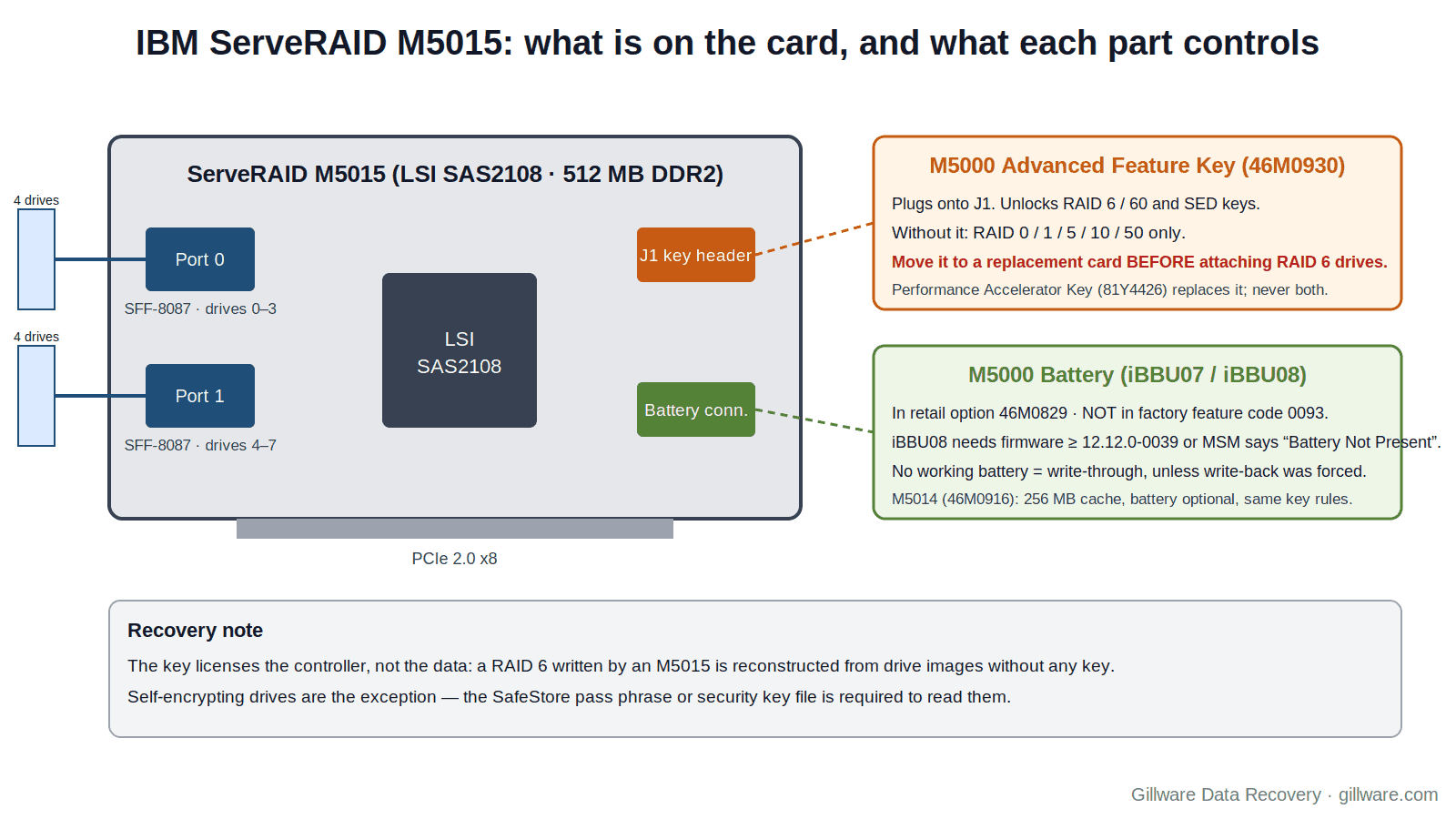
The Feature Key Trap: RAID 6 Needs a Piece of Plastic
On an LSI-branded 9260-8i, RAID 6 and RAID 60 are part of the firmware. On the M5015 and M5014, IBM sells them separately: the ServeRAID M5000 Series Advanced Feature Key, part 46M0930, is a small module that mounts directly on the controller’s J1 two-pin header and enables RAID 6, RAID 60 and self-encrypting-drive (SED) key management. The later M5000 Performance Accelerator Key (81Y4426) adds FastPath, CacheCade and MegaRAID Recovery and also carries the RAID 6/60 and SED functions; IBM’s product guide states the two keys cannot be installed at the same time and the Advanced key must be removed before the Performance key goes on.
Why this matters in a recovery: when an M5015 fails and the replacement arrives — from IBM stock, from a spares bin, or from eBay — it very often arrives without a key. A keyless M5015 connected to a RAID 6 drive set sees a configuration it is not licensed to run. What the administrator sees depends on firmware, but the common pattern is a foreign configuration that will not import cleanly, or a virtual drive that stays offline. Pressing through those prompts is how a recoverable RAID 6 becomes a lab case.
The safe order is the same one we give for every SAS2108 replacement, with one extra step at the front:
- Move the feature key from the failed card to the replacement before anything else. It is a plug-in module; it does not have to die with the card. If the old key is unavailable, source one before connecting RAID 6 or RAID 60 drives.
- Install the replacement with no drives attached, check its firmware level, and bring it to the original’s level if you know it.
- Connect the drives and let the card show the foreign configuration. Read it; do not clear it.
- If the import prompt appears and every member is present, importing is usually safe. If anything is missing, or the card reports that the drives do not form a complete configuration, stop. That message is explained on the family page under “Foreign drives cannot be imported”.
SED key management is the other half of the same trap. If the array used self-encrypting drives under the Advanced Feature Key’s LSI SafeStore services, the pass phrase and security key file set on the original controller are needed to unlock them. A replacement card without those credentials sees locked drives, and no amount of importing will change that. Find the security key file before the swap.
Ctrl+H Does Nothing: Reaching the Configuration Utility on a UEFI System x
Every MegaRAID guide says to press Ctrl+H for WebBIOS. On a System x server in UEFI boot mode, the M5015’s BIOS banner never appears, and Ctrl+H does nothing. IBM’s own quick-install guide for the M5014/M5015 says so: under uEFI, no BIOS message is displayed, and the way in is F1 for System Setup. From there the path is System Settings → Storage (or Adapters and UEFI Drivers on earlier UEFI levels) → LSI MegaRAID Configuration Utility. Lenovo’s forum answer for an x3650 with a ServeRAID adapter walks the same route.
In legacy mode, the banner reads LSI MEGARAID BIOS VERSION xxxx … HA-1 (Bus x Dev y) ServeRAID M5015 PCI-Express RAID Controller Standard FW xxxx DRAM=xxx MB(SDRAM), followed by the Ctrl+H prompt. If you see that banner, the server is in legacy or hybrid mode; if you do not, use F1.
This is more than an annoyance. Administrators who cannot find the utility sometimes change the server’s boot mode to make the Ctrl+H prompt appear, and a boot-mode change alters how the server finds its boot device. Others reach for the IBM ServerGuide or a bootable MegaCLI image to “see” the array. The UEFI configuration utility shows the same foreign-configuration view as WebBIOS; use it, read the state of every drive, and do not change anything from either interface until you know why the array is down.
“All of the disks from your previous configuration are gone” After an IBM Firmware Update
This message is in the SAS2108 catalog as a risk-level-3 POST message, and on the M5015 it has a documented IBM-specific trigger. IBM’s RETAIN tip records that upgrading an M5014, M5015 or M5025 to firmware 12.12.0-0098 or 12.12.0-0111 from 12.0.1-0097 or earlier can produce exactly this message at POST — All of the disks from your previous configuration are gone. If this is an unexpected message, then please power off your system and check your cables to ensure all disks are present. Please press any key to continue, or ‘C’ to load the configuration utility — and that every disk then shows as Unconfigured Good in the configuration utility. The tip lists the x3650 M3, x3690 X5, x3850 X5, dx360 M3 and other System x models.
The disks are not gone and the configuration is not gone; it is still written on every member drive. What has happened is that the new firmware is not reading it. The destructive move is the obvious one: create a “new” virtual drive on those Unconfigured Good disks to get the server booting. Initialization follows, and the old array’s metadata and data start being overwritten.
If you see this message on an M5015 right after a firmware update: power off, do not create anything, and do not initialize anything. Note the firmware level you came from and went to. Rolling the firmware back to the previous level, with the drives disconnected, has let administrators see the configuration again; if it does not, the drives still hold everything a lab needs. The general version of this message is on the family page under “All of the disks from your previous configuration are gone”.
The M5000 Battery: Not Present, Degraded, or Silently Write-Through
The M5015’s battery story has three IBM-specific chapters, and all three end with the same quiet result: an array running write-through when the administrator believes it is protected, or write-back when it is not.
The battery that shipped — or did not. IBM’s product guide notes that the retail M5015 option 46M0829 includes the M5000 battery, but factory-configured servers ordered with feature code 0093 did not; the battery was a separate feature code (5744). A factory-built x3650 M3 with an M5015 may never have had a battery. On such a card, write-back caching is either off (the default without a battery) or was forced on by an administrator years ago. IBM’s own FAQ says write-back can be forced regardless of battery state, and that without a UPS there is no data-protection warranty. If the server has been losing power with forced write-back and no battery, the array has been losing cached writes each time.
“Battery Not Present” after fitting a new one. IBM’s newer iBBU08 battery has a different charging circuit from the original iBBU07. Installed on an M5000-series card running firmware 12.7.0-0020 or earlier, MegaRAID Storage Manager reports Battery Not Present and BBU disabled; changing WB logical drives to WT. IBM’s fix is firmware 12.12.0-0039 or later for a locally mounted battery, 12.12.0-0047 or later for remote mounting on the x3550 M2, x3650 M2 and x3690 X5. A replacement battery on old firmware therefore drops the array to write-through and tells you so once, in MSM.
“Degraded” that is not. On firmware 12.13.0-0153 with an iBBU08, IBM documents that virtual drives stay in write-through after a relearn completes, MSM reports the battery degraded, and MegaCLI shows Remaining Capacity Low — because the Limited Band Charging feature introduced in that release used a threshold that marked batteries bad prematurely. The fix is firmware 12.13.0-0179-1; the iBBU07 is not affected. MSM shows which battery you have under the Physical tab: a type of iBBU means iBBU07, iBBU08 means iBBU08.
Also in the catalog: write cache is disabled for the duration of every automatic learn cycle (which IBM’s firmware starts 30 days after the battery enters service), and the controller returns to write-back on its own once the battery is fully charged. The message that matters for recovery is the one on the family page under “Memory/battery problems were detected” — cached data was lost, and the file system on the array may already be inconsistent.
The Hot Spare That Was Not There
A small IBM RETAIN tip has large consequences for older M5015 arrays. On M5000-series firmware 12.12.0-0085 and below, a hot spare drive could become Unconfigured Good after a reboot — still physically present, no longer assigned as a spare. IBM’s workaround was to create the hot spare before creating the array. Any M5015 that ran that firmware for years and was rebooted for patches may have carried an unassigned “spare” through every drive failure since. The practical effect is that a RAID 5 the administrator believed would rebuild automatically ran degraded until the second drive failed.
If your M5015 array is degraded and you are about to assign the “spare” and start a rebuild: check first whether the degraded array has any punctured stripes or a second drive with medium errors in the event log. A rebuild on a RAID 5 with a marginal second drive is the single most common way a degraded, recoverable array becomes a failed one. The family page covers puncture events and the IBM support guidance that goes with them.
Cross-Flashed Cards: Is Your M5015 Still an M5015?
Because the M5015 is a 9260-8i underneath, and because IBM-branded cards flooded the secondhand market when System x servers were retired, cross-flashing an M5015 or M5014 to LSI 9260 firmware is a common homelab practice. Owners do it to use the card with Unraid and other platforms that expect LSI firmware, and the questions that follow — what happens to RAID 6 after a cross-flash, whether the feature key still matters — fill forum threads.
For recovery, a cross-flashed card raises three questions. First, which firmware wrote the array? An array created under IBM firmware and later presented to LSI firmware, or the reverse, is a firmware-version mismatch in the SAS2108 sense: the family page’s “Controller cache discarded due to firmware version incompatibility” message is one possible result. Second, a replacement card bought as an “M5015” may arrive with LSI firmware, or an “LSI 9260-8i” may be a cross-flashed M5014 with 256 MB of cache. Check what the POST banner actually says before trusting the label. Third, cross-flashing with arrays attached is a risk-level-4 action in the catalog, and someone may already have done it to this card.
One documented case on the family page involves an M5014 on SFF-8087-to-SATA breakout cables whose RAID 10 kept dropping every member to Foreign every couple of weeks; the owner recovered it each time with the make-good-and-import routine. Group drops like that point at cabling, backplane or power, not at the IBM firmware, and the rule is the same as on any 9260: fix the path before the next event, and back up before you touch the drives.
M5015 Messages: Quick Index
- “Foreign configuration(s) found on adapter…”
- “All of the disks from your previous configuration are gone” — see the IBM firmware-update trigger above
- “The following VDs have missing disks”
- “There are offline or missing virtual drives with preserved cache”
- “Memory/battery problems were detected…”
- “(FOREIGN) Unconfigured Bad”
- “Make UnconfGood” / “Make Online”
- “Foreign drives cannot be imported as they don’t form a complete configuration.”
- “Controller cache discarded due to memory/battery problems”
- “Controller cache discarded due to firmware version incompatibility”
- “Puncturing bad block on PD” and the IBM “Slow Initialization” advice
- MegaCLI commands that write to your drives
If Your M5015 Array Is Down Right Now
- If the volume is still accessible, copy the most important data off it before any rebuild, import, firmware change or battery work.
- Record what the server shows: photograph the POST screen (legacy mode) or the F1 → System Settings → Storage view (UEFI mode), or save
MegaCli -CfgDsply -aALL,MegaCli -PDList -aALL,MegaCli -AdpBbuCmd -aALLand the event log to another machine. - Note the firmware level and whether the card is on IBM or LSI firmware; note whether a feature key is fitted and whether the drives are SEDs.
- Label every drive with its bay and which of the two connectors it hangs off; note serial numbers. Keep the feature key and, if the array used SEDs, the security key file with the drives.
- Do not import, clear, make good, force online, create, initialize, flash, cross-flash or rebuild — and do not move the drives to a PC or to a card with a different firmware level.
- Ship every drive together. We do not need the server, and in most cases not the card.
How We Recover M5015 and M5014 Arrays
We image every member drive on write-blocked hardware in our ISO 5 (Class 100) cleanroom, restoring physically failed drives with donor parts first. Our HOMBRE software reads the MegaRAID metadata from each image — the same on-disk configuration whether IBM or LSI firmware wrote it — establishes member order, stripe size and parity layout, and works out which drives dropped out and when. RAID 6 arrays are reconstructed from the images regardless of any feature key; the key licenses the controller, not the data. The array is assembled virtually, with no controller involved, and the file systems are recovered from the assembled volume. The full approach is described on our SAS2108 page and our RAID data recovery hub.
Self-encrypting drives are the exception to “the controller does not matter”: without the SafeStore pass phrase or security key file, SED data cannot be read by anyone. Tell us up front if the array used SEDs.
M5015 and M5014 Documentation
- IBM ServeRAID M5015 and M5014 Product Guide (Lenovo Press TIPS0738) — part numbers, feature codes, battery and key options, supported servers
- ServeRAID M5014/M5015 SAS/SATA Controllers User’s Guide (May 2012) — connectors, J1 feature-key header, battery installation
- ServeRAID M5014/M5015 Quick Install Guide — the uEFI / F1 note and the legacy POST banner
- ServeRAID M5000 Series Performance Accelerator Key Product Guide (TIPS0799)
- IBM RETAIN: firmware 12.12.0-0098 / -0111 “disks from your previous configuration are gone”
- IBM RETAIN: M5000 battery not detected (iBBU08 firmware requirements)
- IBM RETAIN: firmware 12.13.0-0153 stays write-through after relearn
- IBM RETAIN: hot spare becomes Unconfigured Good after reboot
- IBM: ServeRAID-M battery charge cycle behaviour and cache modes
- MegaRAID SAS Software User Guide (Rev. I) — WebBIOS, MegaCLI, MSM and event messages
M5015 and M5014 Frequently Asked Questions
My replacement M5015 came without the feature key. Can I import my RAID 6?
Not safely. Move the key from the old card or source a 46M0930 (or Performance Accelerator Key) first, then connect the drives. Importing a RAID 6 on an unlicensed card is how these arrays end up in a lab.
Ctrl+H never appears on my x3650 M3. Is the card dead?
Probably not. In UEFI boot mode the M5015 shows no BIOS banner; press F1 and go to System Settings → Storage (or Adapters and UEFI Drivers) → LSI MegaRAID Configuration Utility. Do not change the boot mode to make Ctrl+H appear.
After a firmware update the card says all my disks are gone. Are they?
No. IBM documents this exact message after upgrading to 12.12.0-0098 or -0111 from older firmware; the configuration is still on the drives. Do not create a new virtual drive or initialize anything.
Can I use an LSI 9260-8i to replace a failed M5015?
It is the same chip and arrays often move between them, but the firmware differs, RAID 6/60 behave differently, and a cross-flash with drives attached is a risk-level-4 action. On a degraded or foreign array, do not experiment — image first.
MSM says my battery is degraded and the array is write-through. Is the battery bad?
On firmware 12.13.0-0153 with an iBBU08, IBM says it may not be; the fix is firmware, not a battery. On older firmware with a new iBBU08, “Battery Not Present” is also a firmware-level issue. Either way the array is running write-through until it is resolved, which is the safe state.
What should I send you?
Every drive that was attached, labeled by bay and connector. If the array used self-encrypting drives, the SafeStore pass phrase or security key file. We do not need the server, and in most cases not the card or the key.
Start Your M5015 Recovery
Power the system down, label the drives, and do not import, clear, force, flash or rebuild. Our engineers will image every member, reconstruct the array without the controller or its feature key. Gillware has been recovering RAID arrays for more than two decades.
ServeRAID array down? Let’s get your data back.
Our highly experienced engineers strive for the highest success rates in the industry. Talk with one of our enterprise storage engineers before anything else is done to the system.
- Free technical consultation with one of our enterprise storage engineers
- A written recovery agreement before work begins
- No billing surprises: you approve all recovery fees in advance
- Emergency service for business-critical downtime