
WD Elements & Easystore Data Recovery
WD Elements or Easystore stopped working?
Unplug it and stop troubleshooting. Our engineers will diagnose your drive for free, and you only pay if we meet your recovery goals.
If your WD Elements or WD Easystore external drive has stopped working (it isn’t showing up, it’s clicking, it spins briefly and then disconnects, or it shows up with zero capacity), you’re in the right place. Elements and Easystore are Western Digital’s budget external drive lines, and they’re among the most common external drives we see at the Gillware lab simply because Western Digital sells so many of them. Elements is the no-frills line sold at most major retailers; Easystore is the Best Buy version and is built much the same way. Both come in two form factors that fail in different ways. This page covers what we see, what the differences mean for recovery, what to avoid, and how recovery works.
About the WD Elements and Easystore Lines
Elements and Easystore are Western Digital’s straightforward USB drives, without the bundled backup software and branding of the My Book and My Passport lines. They come in two form factors:
Portable Elements and Easystore (2.5-inch, USB-powered): small drives that draw their power from the USB port, with a 2.5-inch laptop-class drive inside, connected through a USB bridge. Some newer portable models use hardware encryption similar to the WD My Passport; older portables typically don’t.
Desktop Elements and Easystore (3.5-inch, wall-powered): larger drives that need a power adapter, with a full 3.5-inch desktop drive inside and a USB bridge handling the connection. Desktop Easystore units in particular became famous for “shucking”: buying the drive on sale and taking the bare drive out of the case for use in a NAS or a home-built server, because the drive inside was often a higher-grade WD model than the price suggested.
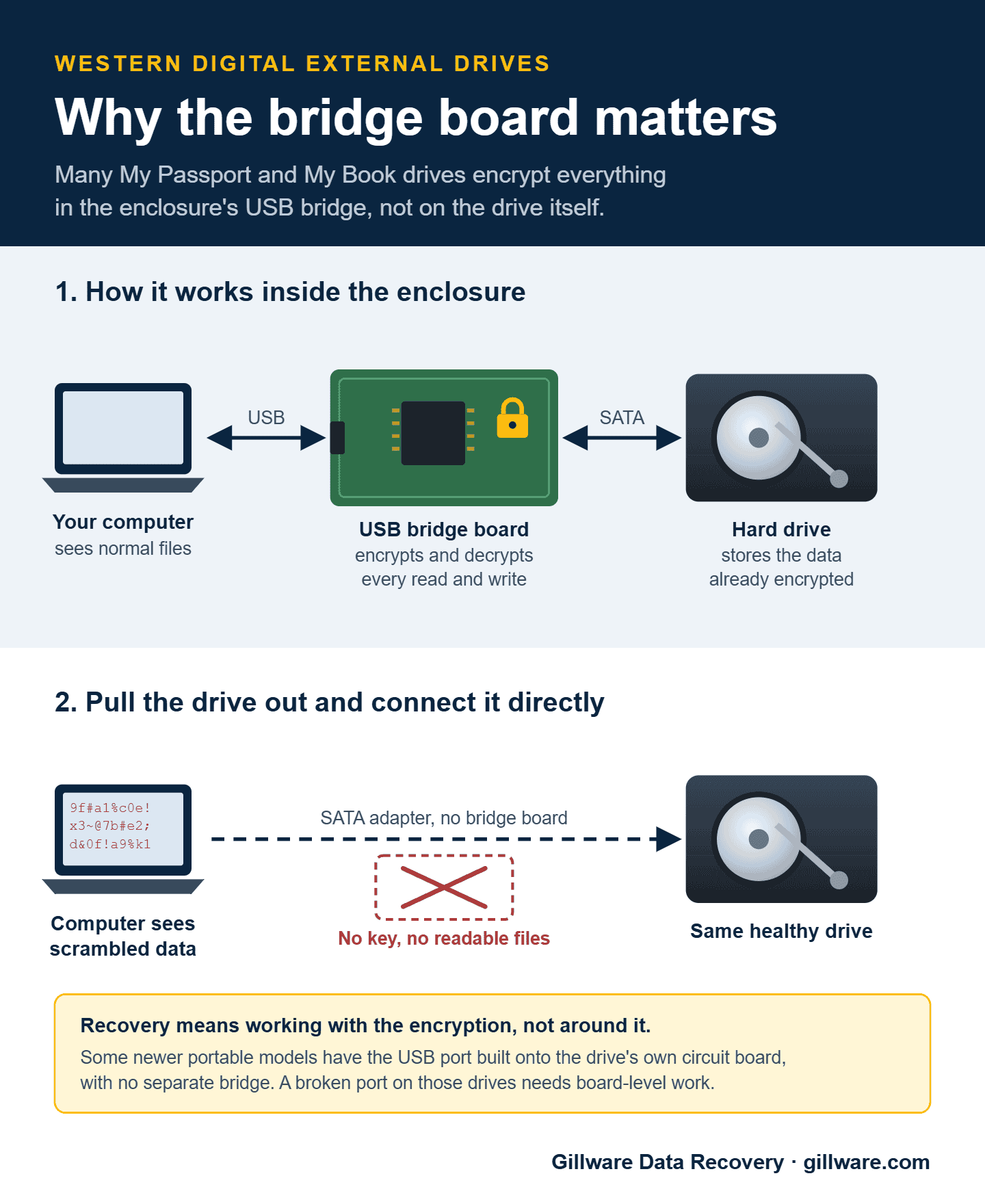
The encryption question
Many portable Elements and Easystore units encrypt their data in the USB bridge, the same way a My Passport does. Many desktop units don’t; their bridge is a simple USB-to-SATA converter. Whether your unit is encrypted depends on the model, the capacity and the generation, and it changes how recovery works. On an encrypted unit, a bare drive taken out of the case reads as scrambled data. On an unencrypted unit, the bare drive can in principle be read directly, but if the drive itself is the part that’s failing, opening the case doesn’t get you any closer to your data, and it voids the warranty. Either way, we work through the original enclosure whenever we can. If you set a password on an encrypted unit, we’ll need it to decrypt your data, and your client advisor will ask for it by phone after the evaluation.
Common WD Elements and Easystore Failure Patterns
If your drive simply isn’t showing up, start with our guide to a WD Easystore, My Passport or Elements drive that isn’t showing up. It covers the safe checks to try first and the fixes that make things worse. The failures below are what we see once those checks don’t bring the drive back.
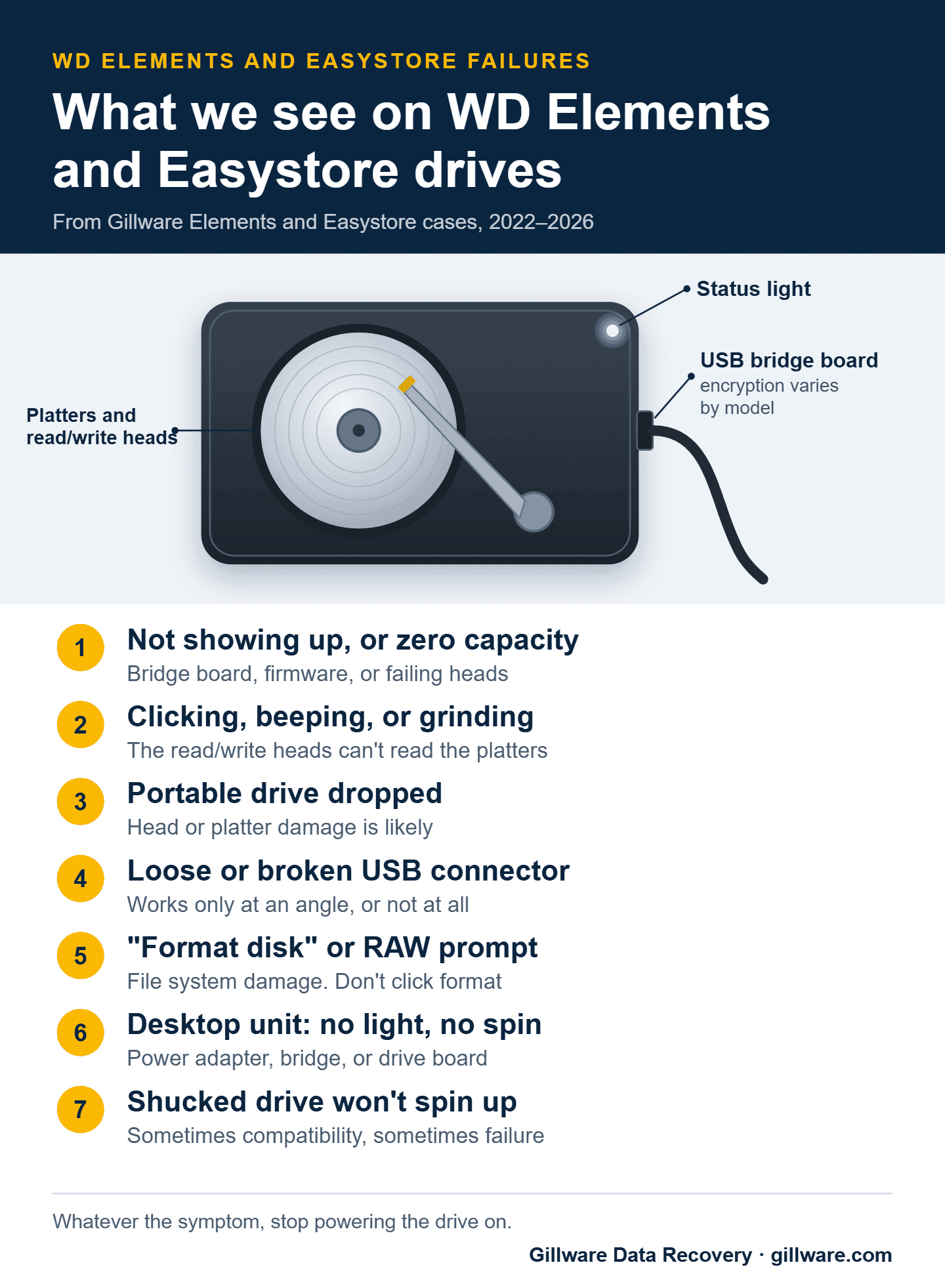
Drops and physical damage (portable models)
Portable Elements and Easystore drives spend their lives being carried in backpacks and jacket pockets and knocked off desks. A 2.5-inch drive falling onto a hard floor while it’s running can drive a read/write head into the platter at full speed, damaging the heads, the platters, or both. The symptoms range from clicking to a drive that spins up silently and never becomes ready. Recovery takes cleanroom work with donor parts matched to the exact drive inside the enclosure, sometimes with extra work for platter damage.
USB cable and connector damage (portable models)
The busiest failure point on a portable drive is its USB connector. Years of plugging and unplugging and sideways strain on the cable add up. The symptoms: the drive isn’t recognized, it only works when you hold the cable at a certain angle, or it’s recognized but you can’t reach the data. Sometimes the cable is the problem. Sometimes the connector on the bridge board itself has failed and needs precise board-level work, so don’t force it or keep wiggling it.
USB bridge failure (both form factors)
Bridges fail on portable and desktop units alike. The symptoms include recognition problems, a capacity of zero or some other wrong number, prompts to format the drive, or a drive that’s invisible to the computer. On encrypted units, a donor bridge from another drive can’t decrypt data written by yours, so recovery takes specialized work that handles the encryption correctly.
Power adapter failure (desktop models)
On desktop units, the power adapter is a common failure point. The symptoms are immediate and complete: no light, no spin, no sign of life. Check that the adapter’s own light is on and that it’s the original adapter, or one with exactly the same voltage and polarity; the wrong adapter can damage the unit. If the adapter checks out and the drive is still dead, the failure is inside.
A shucked drive that won’t spin up
If you took the drive out of a desktop Easystore or Elements case and it doesn’t spin up in your computer or NAS, the drive hasn’t necessarily failed. Some of these drives use a power-disable feature on the power connector that certain computers and power supplies trigger, so the drive looks dead when it’s really a compatibility issue. A drive that clicks, makes grinding sounds, or isn’t detected in any system is a different story, and that’s a real failure. If it held data you need, stop there and have it evaluated rather than trying it in more systems.
Internal drive failure (both form factors)
The drives inside Elements and Easystore enclosures fail the way any hard drive does: failed heads, a seized motor, bad sectors, firmware corruption, or board damage. The symptoms include clicking or beeping, spinning up and then powering down, being recognized but never mounting, or getting steadily slower. Recovery means cleanroom work on the drive itself, then reading the data through the right path for the unit’s encryption.
Logical failures and file system corruption
Plenty of Elements and Easystore cases involve no hardware failure at all. The drive is mechanically and electrically healthy, but the data is out of reach: a partition that suddenly reads as RAW, an accidental format, a Windows install that went to the wrong drive, ransomware, or files deleted by accident. These cases need logical reconstruction rather than physical work, and the rule is the same: stop using the drive.
Clicking, dropped, or showing zero capacity? Send your Elements or Easystore in for a free diagnosis.
What Not to Do With a Failing Elements or Easystore
- Don’t keep plugging it in and pulling it out. Every power cycle on a drive with symptoms gives a weak head or bridge another chance to fail completely.
- Don’t handle a clicking drive more than you need to. Additional bumps and drops make things worse.
- Don’t open the case and connect the bare drive if there’s any chance the unit is encrypted. The drive will look scrambled, and Windows may offer to format it.
- Don’t run chkdsk or other repair tools on a drive with hardware symptoms. They can write into damaged areas and make recovery harder.
- Don’t use the wrong power adapter on a desktop unit. The wrong voltage or polarity can damage the bridge or the drive’s circuit board.
- Don’t open the drive itself. Any work inside the drive needs a cleanroom.
- Don’t reformat or initialize it to “fix” a recognition problem. If the underlying problem is hardware or file system damage, it won’t help, and it writes over the structures that point to your files.
How Elements and Easystore Recovery Works at Gillware
Every Elements and Easystore drive starts with a free evaluation. Our engineers identify what’s inside (the drive varies by capacity, generation and sometimes production batch), determine whether the unit uses encryption, and diagnose where the failure is: the drive, the bridge, the power adapter, or a combination. Then we write a short recovery agreement with you covering the data you need and a firm price if we meet those goals. You approve the price before any recovery work begins, and you only pay when we meet your recovery goals.
For drive failures, we work on the drive itself in our cleanroom, using donor parts matched to the WD model inside the enclosure. For bridge failures, we handle the bridge and, where it applies, the encryption. When more than one thing has failed, both kinds of work happen in sequence. Once we have a stable image of the drive, we work through whatever file system or encryption layer needs to be handled to get your files back.
What Elements and Easystore Recovery Costs
Every case is quoted individually. The price reflects what failed, the time and parts the recovery takes, and how risky the work is. A quick call with a client advisor gives you a realistic idea up front, and you get a firm price after the in-lab evaluation. Our data recovery cost overview explains how quotes are built.
Related Recovery Information
For the broader Western Digital picture, see our Western Digital data recovery page. If your drive is a WD My Book or WD My Passport, those pages cover their specific encryption considerations. For how hard drives fail in general, see our hard drive data recovery page.
Elements or Easystore failed? Let’s get your files back.
Our highly experienced engineers strive for the highest success rates in the industry. Send us the device and we’ll diagnose it for free.
- More than 20 years recovering data from failed drives
- Trusted by 1,500+ IT professionals nationwide
- Whatever failed, we’ve seen it hundreds of times
- Pay only if we meet your recovery goals