
RAID Levels Explained: RAID 0, 1, 5, 6 and 10, and What Each Means When Drives Fail

RAID combines several drives so they behave like one. Depending on the level, that buys speed, protection against a failed drive, or both. The level also decides what happens on the bad day: how many drives the array can lose, what “degraded” really means, and which well-meant fixes turn a recoverable array into a much harder case. This guide explains the standard levels in plain English, then walks through what actually happens to each one when drives fail.
RAID array degraded or offline right now?
Stop before a rebuild or re-initialize. Book a free consultation with one of our enterprise storage engineers and talk it through first.
What RAID is, in one paragraph
RAID stands for Redundant Array of Independent (originally “Inexpensive”) Disks. A RAID controller, a NAS operating system, or the server’s own operating system spreads data across the member drives using three basic techniques: striping (splitting data into blocks and writing them across drives in turn, for speed), mirroring (writing identical copies to two drives), and parity (storing calculated recovery information so a missing block can be rebuilt from the others). Each RAID level is a different mix of those three. Two-digit levels such as RAID 10 are nested: one level built on top of another.
The standard RAID levels at a glance
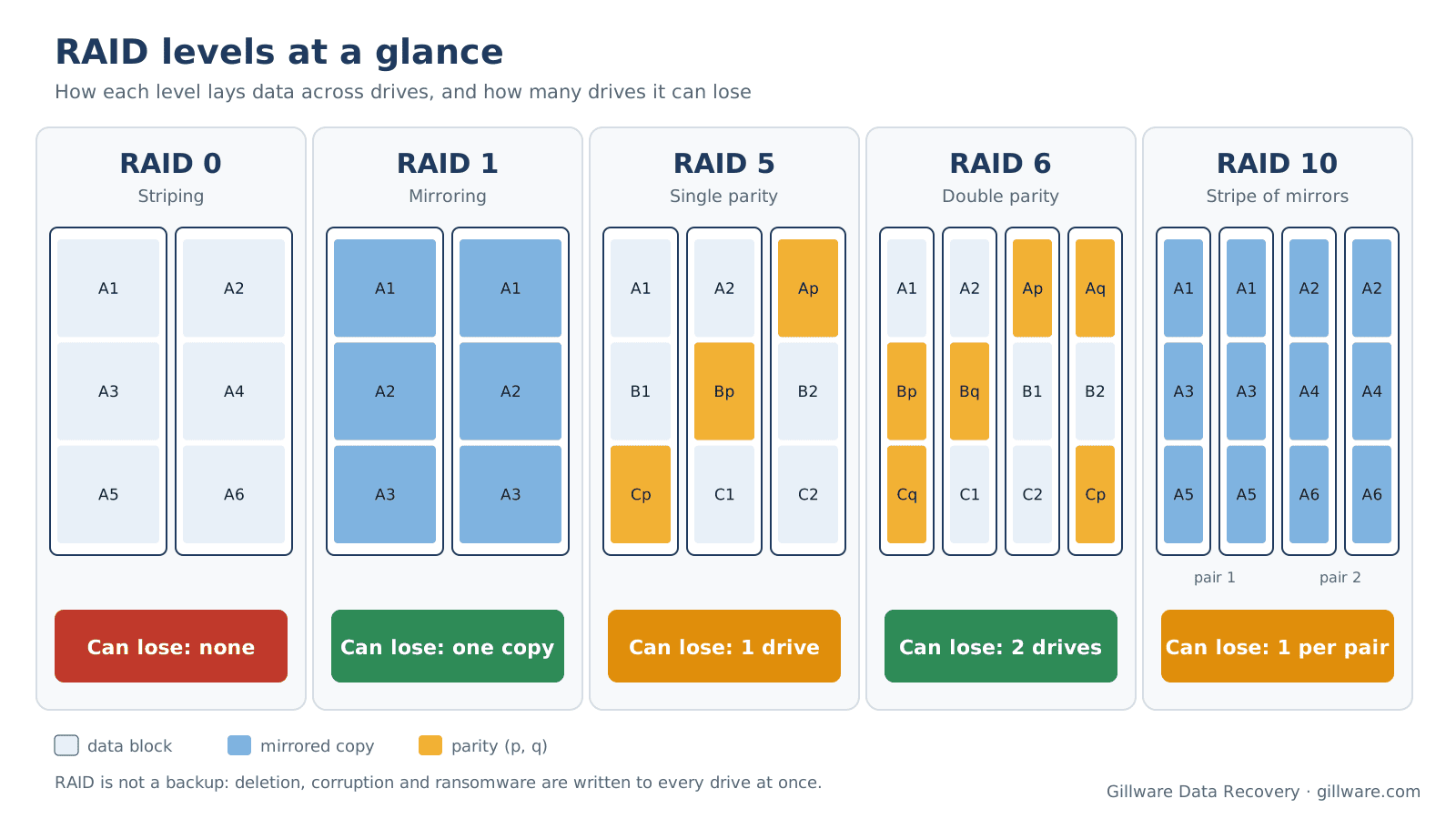
The table below covers the levels you will meet in almost every small-business server, NAS and workstation. “Usable capacity” assumes identical drives.
| Level | How it works | Minimum drives | Usable capacity | Drives it can lose |
|---|---|---|---|---|
| RAID 0 | Striping only, no redundancy | 2 | All drives | None |
| RAID 1 | Mirroring (identical copies) | 2 | One drive’s worth | All but one copy |
| RAID 5 | Striping with single distributed parity | 3 | All drives minus one | One |
| RAID 6 | Striping with double distributed parity | 4 | All drives minus two | Two |
| RAID 10 | A stripe across mirrored pairs | 4 | Half the drives | One per mirrored pair |
RAID 0: striping for speed
RAID 0 splits every file into blocks and writes them across all the drives in turn. Reads and writes are fast and you get the full capacity of every drive, but there is no redundancy at all. Every drive holds a slice of nearly every file, so if one drive fails, the array is gone as far as the computer is concerned. RAID 0 is common in video-editing workstations and some external dual-drive units. Our RAID 0 explainer goes deeper on how striping works.
RAID 1: mirroring
RAID 1 writes the same data to two drives (occasionally more). If one drive fails, the other keeps working with a complete copy. You give up half your raw capacity for that protection. RAID 1 is simple and forgiving, which is why it is popular in two-bay NAS units and boot volumes. Its weakness is that a mirror copies everything immediately, including accidental deletions, corruption and ransomware encryption.
RAID 5: striping with parity
RAID 5 stripes data across three or more drives and adds a parity block to every stripe, rotating which drive holds it. If any one drive fails, the controller can recalculate its contents from the data and parity on the rest. That makes RAID 5 an efficient compromise, and for years it was the default for small-business servers. It is also the level we see in the most trouble, for reasons explained below.
RAID 6: double parity
RAID 6 works like RAID 5 with a second, independently calculated parity block in every stripe. It needs at least four drives and can lose any two of them without losing data. The extra protection matters most on large arrays of big drives, where rebuilding a single failed drive can take a long time.
RAID 10: a stripe of mirrors
RAID 10 (also written RAID 1+0) pairs drives into mirrors, then stripes data across the pairs. It is fast, rebuilds quickly because only one partner drive has to be copied, and can survive several failures as long as no mirrored pair loses both of its drives. Lose both drives in one pair, and the stripe has a hole in it.
Other levels you may see
RAID 50 and RAID 60 stripe across several RAID 5 or RAID 6 groups. JBOD (“just a bunch of disks”) simply joins drives end to end with no redundancy. Many NAS units use their own flexible schemes, such as Synology Hybrid RAID, and many servers run software RAID through the operating system instead of a hardware controller. RAID 2, 3 and 4 exist on paper but are rare in practice. The failure logic below still applies: know how many drives the layout can lose, and stop before that number is reached.
What actually happens when drives fail
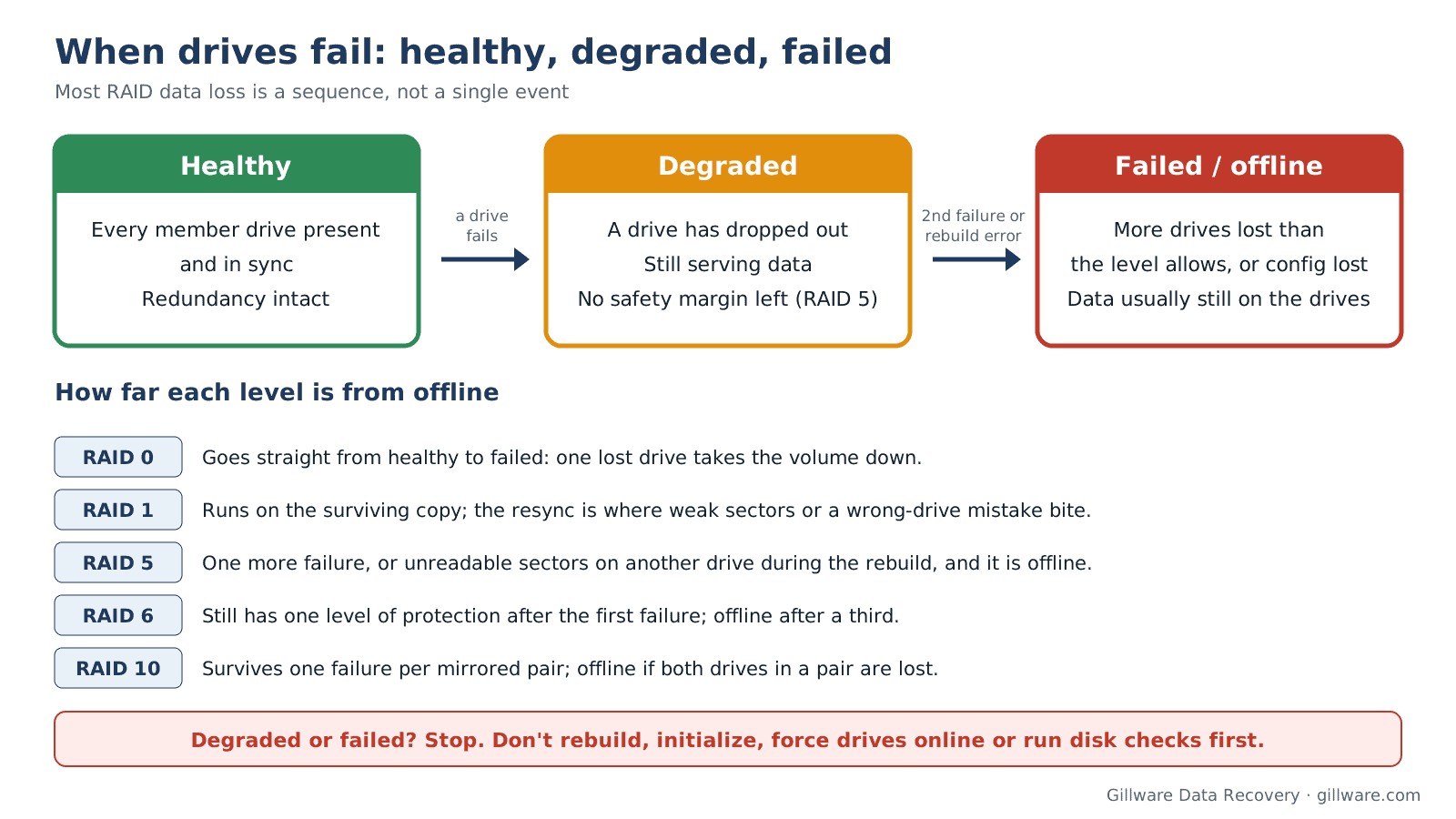
Most RAID data loss is not one dramatic event. It is a sequence: a drive drops out, the array keeps running without its safety margin, and then something else goes wrong while someone is trying to put it right. Three states matter.
- Optimal / healthy: every member drive is present and in sync.
- Degraded: the array has lost one or more drives but is still serving data by recalculating the missing pieces. It is working without a net. On RAID 5 one more failure takes the volume down; on RAID 6 you are one failure further from that point.
- Failed / offline: the array has lost more drives than its level allows, or the controller no longer recognizes the configuration (often reported as a “foreign” or missing configuration). The data is usually still on the drives. The structure that ties it together is what is broken.
RAID 0 when a drive fails
There is no degraded state. One failed member takes the whole volume offline. The good news is that the remaining drives still hold their stripes, so recovery is a matter of getting a readable image of the failed drive and putting the stripes back in the right order with the right block size. Re-creating the array, or formatting the “new” volume a controller offers you, overwrites the very structures that recovery depends on.
RAID 1 when a drive fails
A mirror usually keeps running on the surviving drive, which is exactly why people miss the warning. The risk comes during the resync: if the drive that is left has weak areas, copying it onto a replacement can stall or fail partway, and a mistake about which drive is the good one can copy the stale or blank drive over the current one.
RAID 5 when a drive fails, and why rebuilds fail
When one RAID 5 member fails, the array goes degraded and keeps working. Replacing the drive starts a rebuild, which has to read every block on every remaining drive to recalculate the missing one. That is the most demanding thing the surviving drives will ever do, and they are usually the same model, the same age and from the same batch as the drive that just failed. If a second drive has a patch of unreadable sectors, or is close to failing itself, the rebuild can stop partway, and the controller may drop that drive too. Now the array has lost two members, and the volume is offline.
This is the most common way a one-drive problem becomes a full RAID data recovery case. The data is still there; it now has to be rebuilt carefully from drive images rather than from the live drives.
RAID 6 when drives fail
RAID 6 can lose two drives, so a single failure still leaves one level of protection during the rebuild. The trap is complacency: arrays can sit degraded for weeks because nobody noticed the first failure, and then a second drive and a rebuild error arrive together.
RAID 10 when drives fail
RAID 10 survives a failure in each mirrored pair, but not two failures in the same pair. When both drives of one pair are gone, recovery depends on getting at least one of them readable again, then reassembling the stripe from the other pairs.
Array degraded or failed? Talk with an enterprise storage engineer before anyone rebuilds or re-initializes it.
RAID is not a backup
Redundancy protects against a drive failing. It does nothing against deletion, overwriting, file-system corruption, a failed controller that scrambles its configuration, fire, theft or ransomware, because every one of those is faithfully written to all the member drives at once. Keep separate, versioned backups of anything that matters, including at least one copy that the server cannot reach and change. If an array holds the only copy of business data, treat it as at risk whatever its RAID level.
What not to do when an array fails
Each of the steps below is offered by controller utilities, NAS dashboards or forum advice, and each can make a recoverable array much harder to recover:
- Don’t start or force a rebuild while any other member drive is showing errors, warnings or slow responses.
- Don’t initialize, re-create or “clear” the array or its configuration. Re-creating an array with different settings can overwrite metadata and parity.
- Don’t force a dropped drive back online without knowing why it dropped and how far it fell out of sync.
- Don’t run file-system checks or disk utilities that offer to fix errors on a degraded or newly reassembled volume. They “fix” what they find by rewriting it.
- Don’t change the drive order or move drives between bays or controllers unless you have recorded where each one came from.
- Don’t keep power-cycling. Each restart works failing drives harder and can trigger another automatic rebuild attempt.
The first hour: safe steps
- Stop writing to the volume. If you can, shut down the services that use it, then shut the system down cleanly.
- Write down what you see: the controller or NAS status messages, which drives show as failed, missing or foreign, and any recent changes. Photos of the screen are fine.
- Label every drive with its bay or port number before anything is removed.
- Don’t swap in new drives or accept any prompt to rebuild, initialize or import until you know what state the other members are in.
- If the data matters, call us before anything else is done to the system. If downtime is costing the business, ask about our emergency data recovery service.
How we recover failed RAID arrays
We never work on the original drives in place. Each member is assessed and imaged first, with failing drives stabilized in our ISO 5 (Class 100) cleanroom when needed. Our engineers then determine the array parameters (member order, block size, parity rotation, offsets) from the images and rebuild the volume virtually, so nothing is ever written to your drives. That approach works for servers, NAS devices and hardware or software RAID alike, and it is the same whether the trigger was a failed rebuild, a controller failure or ransomware. Since 2004, Gillware has recovered data from more than 100,000 storage devices, and we have been recovering failed arrays for more than two decades. See our RAID data recovery services for the full picture.
Every case starts with a free consultation, and you approve all recovery fees in writing before any recovery work begins. If you want to understand what drives the cost of a multi-drive case, see RAID and server data recovery cost.
RAID levels: frequently asked questions
Which RAID level is the safest?
Among the standard levels, RAID 6 and RAID 10 tolerate the most drive failures, and RAID 1 is the simplest to recover. None of them replaces a backup, and the safest array is the one whose warnings someone actually sees and acts on.
How many drives can fail in RAID 5?
One. A second failure, or an unreadable area on another drive during the rebuild, takes a RAID 5 volume offline. The data usually remains on the drives and can often be recovered from images.
Is RAID 10 better than RAID 5?
RAID 10 rebuilds faster and handles heavy write workloads better; RAID 5 gives you more usable capacity from the same drives. For important data on large drives, many administrators now choose RAID 6 or RAID 10 over RAID 5.
Can I recover data from a RAID 0 array if one drive fails?
Often, yes, if the failed drive can be read in a lab and nothing has been written to the other members since. Don’t re-create the array or format the volume while you wait.
What does a degraded array mean?
The array has lost at least one member but is still running on its redundancy. Back up anything critical that you can still read, avoid heavy use, and get advice before starting a rebuild.
Is a NAS or software RAID different?
The levels work the same way. What differs is where the configuration lives and how it reports problems, which affects how the array is reassembled during recovery.
Array degraded or failed? Let’s protect what’s on it.
Our highly experienced engineers strive for the highest success rates in the industry. Talk with one of our enterprise storage engineers before anything else is done to the system.
- Free technical consultation with one of our enterprise storage engineers
- A written recovery agreement before work begins
- No billing surprises: you approve all recovery fees in advance
- Emergency service for business-critical downtime