
Hard Drive Repair
When a hard drive fails, the real question isn’t how to repair the drive — it’s how to get your data off a drive that has already stopped working. That’s what hard drive data recovery is, and it’s what we’ve been doing at Gillware since 2004. Our engineers recover data from clicking drives, dropped drives, dead PCBs, corrupted firmware, fire and water damage, and scratched platters in our ISO 5 Class 100 cleanroom in Madison, Wisconsin. Every case starts with a free evaluation, and you only pay when we meet your recovery goals and the price makes sense.
Need data off a failed hard drive?
Power the drive down and leave it off. Our engineers will evaluate it for free and tell you exactly what recovery takes.
What “Hard Drive Repair” Actually Means
When most people search for hard drive repair, they’re not trying to keep using a broken drive — they’re trying to get the files off it. The distinction matters. A failed hard drive almost never returns to reliable everyday use, even when worked on by the manufacturer. What can be done is a controlled, temporary repair inside a cleanroom: replace the failed component just long enough to image the platters and pull the data off safely. Once we have your data, the drive is retired. The deliverable isn’t a working drive — it’s your files, returned on new media.
If your drive is making unusual noises, won’t mount, or stopped showing up entirely, the safest thing you can do is power it down and have it evaluated. Continuing to run a failing drive in the hope that it comes back is the single most common way a recoverable case turns into an unrecoverable one.
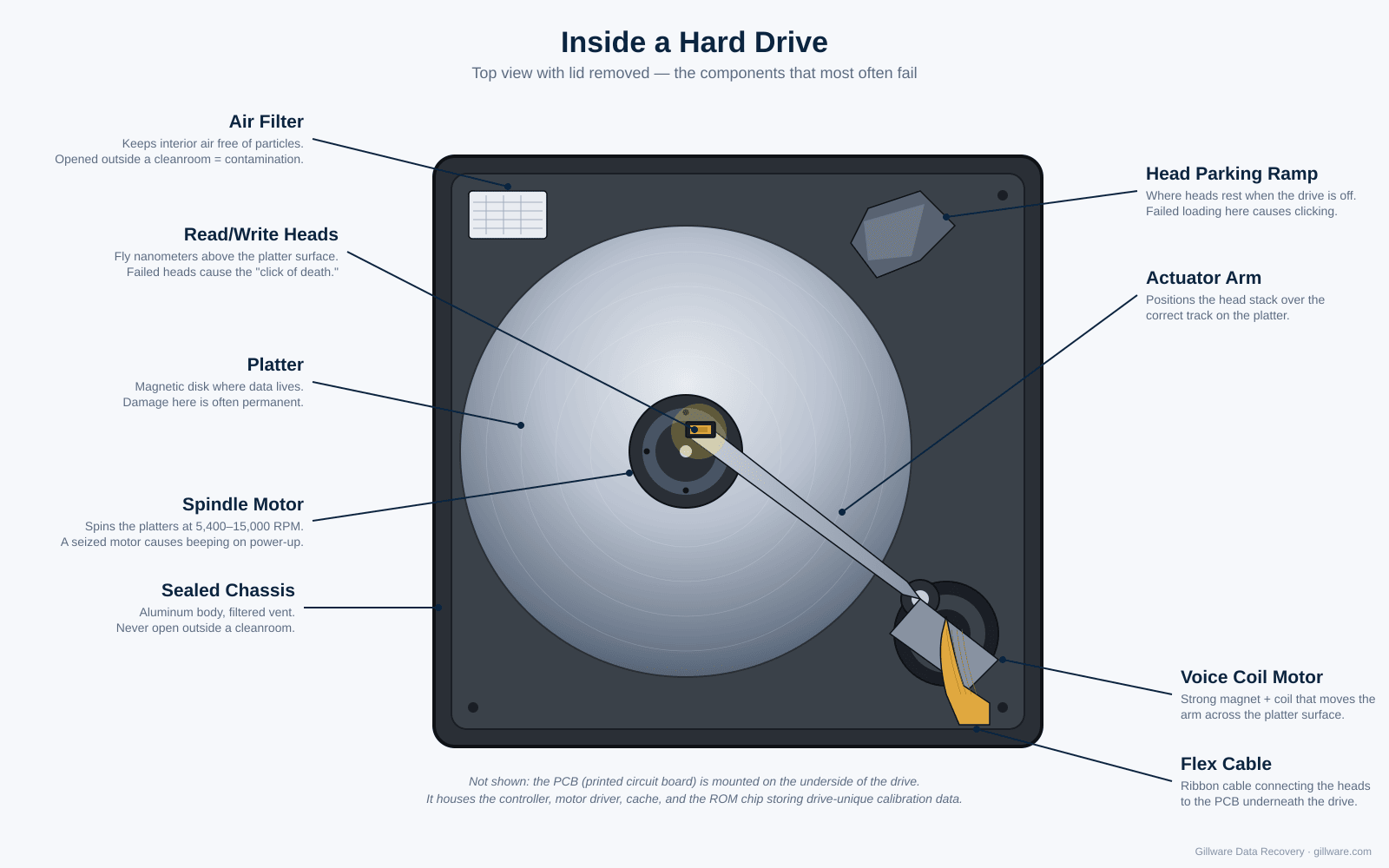
Common Hard Drive Failures We Recover
Most of the drives we see fall into one of a handful of failure patterns. Each has a different repair path inside the cleanroom, and most have a dedicated page on this site with deeper detail.
Clicking, beeping, or grinding drives
Repetitive clicking, beeping, or grinding almost always means the read/write heads have failed or the drive is struggling to find its service area. Continuing to power the drive on causes the failing heads to scrape the platters and destroy data. Our engineers replace the head stack inside the cleanroom using a matched donor drive from our parts library. More on read/write head failures →
Drive won’t spin up
A drive that’s completely silent when powered on usually has a failed PCB, a seized spindle motor, or a stiction problem keeping the heads stuck to the platters. PCB swaps require careful work, because modern drives store unique calibration data on the board itself — a generic donor board will not work. More on hard drive failure modes →
Drive not showing up
A drive that powers on and spins normally but isn’t detected by the computer usually has a firmware problem, a corrupted service area, or a damaged head causing read errors during initialization. These cases are often recoverable, but they require professional tools to access the drive’s firmware partition. More on drives that don’t show up →
Dropped or impact-damaged drives
A dropped drive almost always means head damage, even if it appears to still work briefly afterward. The longer it runs after the drop, the more damage accumulates on the platters. Power it down immediately and have it evaluated before any further data is overwritten.
Fire and water damage
Fire and water damage look catastrophic, but the platters themselves are usually salvageable if the drive is handled properly afterward. Don’t try to dry a water-damaged drive yourself — deposits left on the platters during home drying can make recovery impossible. We’ve returned data from drives pulled out of house fires, floods, and storm damage many times.
Scratched platters
Severe platter damage used to be a death sentence for a drive. Our in-house platter burnishing process now lets us recover data from many drives with surface damage that would have been written off a decade ago. Not every scratched drive is recoverable, but more are than most labs will tell you. How platter burnishing works →
Deleted files, formatted partitions, and logical failures
Not every failed drive is physically broken. Accidental deletion, reformatting, and file system corruption are common, and the data is often still present on the platters even when the operating system can no longer see it. Our in-house software handles every major file system, including NTFS, exFAT, APFS, HFS+, ext2/3/4, XFS, Btrfs, ZFS, ReFS, ReiserFS, and VMFS.
What Repair Actually Looks Like Inside the Cleanroom
Real hard drive repair happens inside a controlled environment, because the internals of a modern drive work at tolerances measured in nanometers and a single dust particle on a platter can end a recovery. Depending on the failure, the work can include:
- Read/write head stack replacement. The most common physical repair. We take a compatible head stack from a donor drive in our parts library and transplant it into the failed drive in the cleanroom. Badly damaged drives sometimes need more than one head swap during a single recovery, with each set of heads reading part of the platters while we prioritize your most important files.
- PCB repair and adaptives transfer. Modern drives store unique calibration values (adaptives) in a ROM chip or NVRAM on the control board. We move the original chip onto a compatible donor board so the drive can read its own platters again.
- Firmware repair. When the service area of the platters is damaged (the section that holds the drive’s boot code and calibration tables), the drive can’t initialize. Specialized tools give us direct access to firmware modules so we can rebuild or bypass the damaged sections.
- Seized motor recovery. For a seized spindle motor, we transplant the entire platter stack into a donor drive with a healthy motor, without letting the platters shift relative to each other.
Once the drive is running in the lab, even briefly, our in-house imaging platform, HOMBRE, reads it in a fault-tolerant way, working around unstable areas and pulling your most important files first. That matters, because a repaired drive is often only good for a few hours of reading before it fails again.
How a Gillware Recovery Works
- Submit your case. Fill out a short form online or call our client advisors. For standard single-device cases in the continental U.S., we’ll send you a free prepaid shipping label.
- Free evaluation. When your drive arrives, our engineers diagnose the failure and determine exactly what work is needed. This costs you nothing.
- Recovery agreement. After the evaluation, we write a short recovery agreement with you: the data you need back, and a firm price if we meet those goals.
- You decide. Approve the quote and we begin the recovery work. Decline it and there’s no charge for the evaluation. If you’d like your drive back, we just ask that you cover return shipping, or we can securely recycle it for you at no cost.
- Recovery and return. We image the drive in our cleanroom, extract your data, and return it on new media. If we can’t recover the data that matters to you, you don’t pay for the recovery work.
How hard drive recovery pricing works →
What Makes Gillware Different
ISO 5 Class 100 cleanroom. Opening a hard drive outside a certified cleanroom contaminates the platters within seconds. Our cleanroom workstations meet ISO 5 standards — the same class used for sensitive electronics manufacturing.
More than two decades of recoveries. Gillware has recovered data from over 100,000 failed hard drives since 2004. Every major drive manufacturer, every common failure mode, and most of the uncommon ones have come through our lab.
You only pay when we meet your recovery goals. After the evaluation, we agree with you on the data that matters and a firm price for recovering it. If we don’t meet those goals, you don’t pay for the recovery work, and single-device cases carry no up-front fees. See how our pricing works.
Trusted by manufacturers and IT providers. Dell and VMware both refer customers to Gillware, and more than 1,500 IT professionals and repair shops refer their clients to us when they need data recovered.
Wisconsin lab, U.S.-based engineers. Your drive doesn’t leave the country. All recovery work is performed at our headquarters at 1802 Wright Street in Madison, Wisconsin.
Brands We Recover
Our engineers work on every major hard drive manufacturer and most of the discontinued ones. Common requests include Seagate, Western Digital (including WD-owned HGST and Hitachi drives), Toshiba, Samsung, and Hitachi. If your drive isn’t from one of those, send it in anyway — the failure modes are similar across manufacturers, and our donor parts library covers nearly every model produced in the last 20 years.
What Not to Do With a Failed Hard Drive
A few things to avoid when a drive has failed, in rough order of how often they cause permanent data loss:
- Don’t keep powering it on. Repeatedly cycling a failing drive is the most common way a recoverable case turns unrecoverable. If the drive is making unusual noises or behaving abnormally, power it down and leave it down.
- Don’t put it in the freezer. The freezer myth circulates online every few years. It doesn’t work, condensation damages the platters during thaw, and it makes professional recovery harder afterward.
- Don’t run recovery software on a physically failed drive. Recovery software is built for logical failures — deleted files, corrupted partitions. On a physically failed drive, the additional read attempts cause further damage.
- Don’t open the drive. Opening a hard drive in normal room air contaminates the platters in seconds. It’s the fastest way to make recovery impossible.
- Don’t swap the PCB with a board from an identical drive. The “identical” board has different calibration data, and the swap can cause additional firmware damage.
- Don’t ship it loose. If you’re sending the drive in, put it in an anti-static bag and pad it well on all sides. A padded envelope isn’t enough.
For more on what doesn’t work, see our writeup on four common data recovery myths.
Start Your Hard Drive Recovery
If you have a failed hard drive and the data on it matters, the next step is a free evaluation. Send the drive in and we’ll diagnose the failure, agree on your recovery goals and a firm price, and recover the data once you give us the go-ahead. You only pay when we meet your recovery goals.
Hard drive failed? Let’s get your files back.
Our highly experienced engineers strive for the highest success rates in the industry. Send us the device and we’ll diagnose it for free.
- More than 20 years recovering data from failed drives
- Trusted by 1,500+ IT professionals nationwide
- Whatever failed, we’ve seen it hundreds of times
- Pay only if we meet your recovery goals
Prefer to talk to someone first? Call 1-877-624-7206 or schedule a 15-minute consultation with a client advisor.