
NVR RAID & Surveillance Server Data Recovery

A small business runs its cameras to a recorder with one drive in it. An enterprise doesn’t. Once you’re past a handful of cameras — a campus, a warehouse, a hospital, a chain of stores — the footage lands on a video management server writing to a RAID array of many drives, and that changes everything about recovery when it fails. The array is supposed to be the thing that protects you, which is exactly why a failure is such a shock: the system was “redundant,” and now the footage you need for an incident, a claim, or an investigation won’t come up. The footage is almost always still there. Getting it back is a two-layer job, and the first wrong move on the array is what most often turns a recoverable case into a lost one.
This is the enterprise companion to our security DVR and CCTV recovery guide and part of our broader video recovery practice. It combines two specialties: RAID recovery and surveillance footage extraction.
How enterprise surveillance actually stores footage
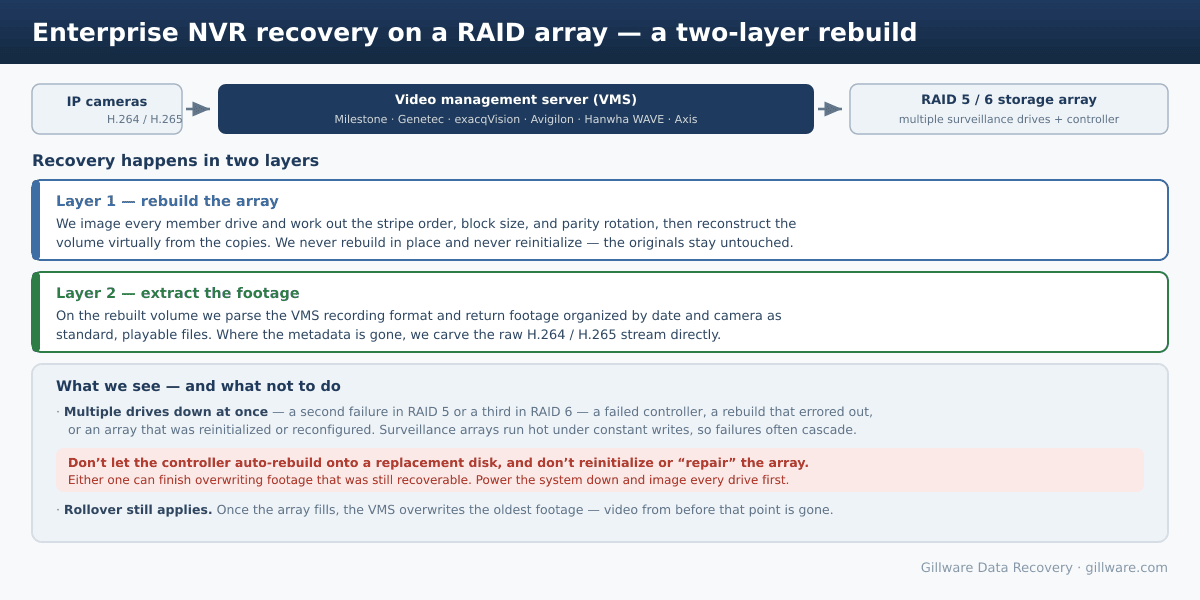
Larger deployments run a video management system — Milestone XProtect, Genetec Security Center, exacqVision, Avigilon, Hanwha WAVE, Axis Camera Station, and others — on a Windows or Linux server. The operating system usually lives on a small mirrored (RAID 1) pair, and the actual video is recorded to a separate, much larger volume built as RAID 5 or RAID 6 (sometimes RAID 10) across many enterprise or surveillance-grade drives, behind a hardware RAID controller. The VMS writes each camera’s H.264/H.265 stream into its own recording database and media files on that volume.
Two consequences follow. First, you can’t pull a single drive and read it on a PC the way you might with a small recorder — the footage is striped across every disk in the set, and it only makes sense when the whole array is reconstructed. Second, these arrays work harder than almost any other storage: they take a continuous, write-heavy load from dozens or hundreds of cameras, around the clock, often in a hot rack. Drives bought in the same batch wear at the same rate, so when one fails, others are frequently close behind — which is how a “redundant” array ends up with two or three dead drives at once.
How these arrays fail
- Multiple drives down at once. RAID 5 survives one failed drive; a second one before the rebuild finishes takes the volume offline. RAID 6 tolerates two, but a third does the same. Because surveillance drives wear together, multi-drive failures are common.
- A rebuild that fails or stalls. Replacing a drive triggers a rebuild, but the array is unprotected and under full load while it runs — and a hiccup or another marginal drive mid-rebuild can drop the whole volume. Some arrays “rebuild themselves” repeatedly and degrade further each time.
- Controller failure. The hardware RAID controller dies or loses its configuration, and the array no longer assembles even though the drives are fine.
- Reinitialized or reconfigured array. Someone clears the foreign config, recreates the array, or reinitializes it trying to bring it back — one of the most damaging things that can happen to recoverable data.
- Power events and file-system corruption. A surge or abrupt shutdown while the VMS is writing can corrupt the volume even when every drive is healthy.
Why the first move matters so much
The instinct when a redundant array goes down is to make it redundant again — drop in a replacement drive and let the controller rebuild, or recreate the array so the system boots. On a healthy array those are routine. On a failed one, they are how footage gets destroyed. A rebuild writes new parity across the disks; a reinitialize rewrites the array’s metadata; either can overwrite the very data we’d use to reconstruct your footage, and a rebuild that starts from a wrong assumption can finish the job. Once an enterprise NVR array has failed, the safest thing you can do is power it down and stop. Don’t swap drives to “test,” don’t let the controller auto-rebuild, and don’t reinitialize or recreate the array.
How we recover an NVR RAID array
Recovery happens in two layers. First we rebuild the array. We image every member drive individually and work only from those copies, then determine the array’s geometry — drive order, block size, parity rotation, and offset — and reconstruct the volume virtually. Nothing is rebuilt in place and nothing is written back to your disks, so the originals stay exactly as they arrived. If a drive is physically failed, its platters are rebuilt in our cleanroom before imaging.
Then we extract the footage. On the reconstructed volume we parse the VMS recording format and pull the footage out organized by date and camera, converted into standard, playable files. Where the recording metadata is missing or partly overwritten, we carve the raw H.264/H.265 stream directly. For legal, insurance, and law-enforcement matters we produce write-blocked forensic images with MD5/SHA hashing and a documented chain of custody, and our engineers can work directly with your counsel or investigators.
One honest limit carries over from every surveillance system: rollover. A VMS records in a loop, and once the array fills it overwrites the oldest footage. Anything from before that overwrite point is physically gone, array or not — we’ll tell you on the phone if that’s likely your situation before you commit to anything.
The storage underneath
An NVR array is still made of individual drives, and recovering it often starts with recovering one of those. The drives are usually purpose-built surveillance models — if yours are WD Purple or Seagate SkyHawk, those failure patterns are covered on their own pages. When the footage lives on a network appliance rather than a server, it’s a NAS recovery; when it’s on a rackmount server, it overlaps our server data recovery work. And if the only problem is a locked recorder no one can sign into, see recovering a lost DVR/CCTV password.
What to do right now
- Power the system down. If the footage matters, stop the array before a rebuild or rollover does more damage.
- Don’t rebuild, reinitialize, or recreate the array, and don’t swap drives in and out to test. Leave the controller configuration alone.
- Label the drives in order as you remove them, and keep the whole set together — we need every member, including any that already failed.
- Note what happened. Which drives failed, in what order, and whether a rebuild or reconfigure was attempted — all of it helps us reconstruct the array faster.
- Preserve chain of custody. For anything evidentiary, handle the drives minimally and have your attorney or investigator coordinate with us directly.
What it costs
Every case begins with a free phone consultation and a free evaluation, and we’ll give you a clear read on the situation before you ship anything. Multi-drive array recoveries are not our single-drive, risk-free service: rebuilding an array and extracting footage from it is hands-on engineering work, so these cases involve an engineering charge and are quoted individually. We evaluate the drives, tell you honestly what’s recoverable, and give you a firm price before any recovery work begins — so you always decide with the facts in hand.
NVR Array Down? Power It Off Before You Rebuild
Don’t reinitialize or let the controller rebuild a failed array. Talk to us first — free, confidential consultation and evaluation for enterprise NVR and surveillance servers.
Talk to an NVR RAID Recovery Expert →
Or call us: 877-624-7206
