
9261-8i array offline or not importing?
Don’t import, clear or force anything on the card. Book a free consultation with one of our enterprise recovery experts before anyone touches the array.
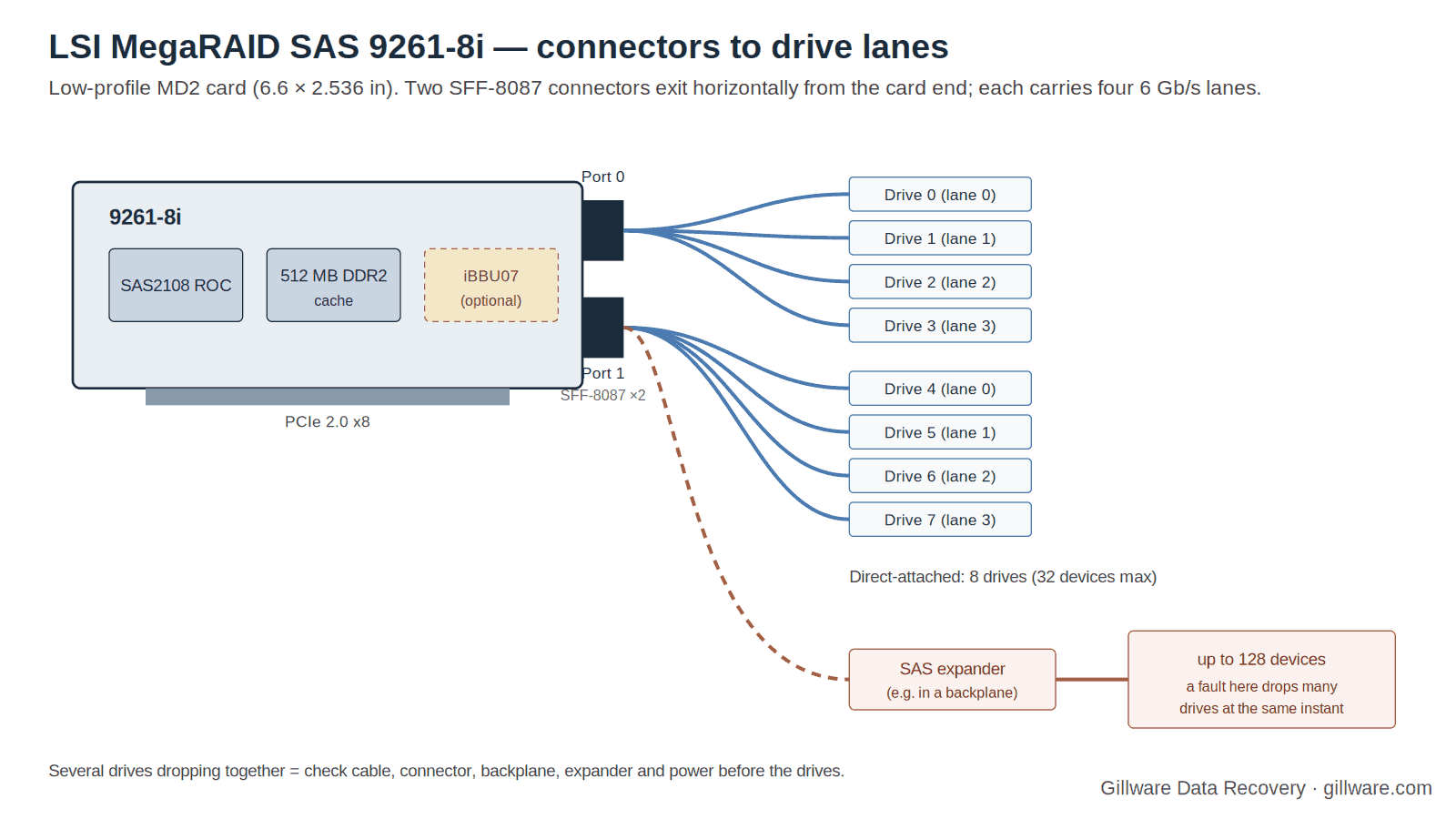
The LSI MegaRAID SAS 9261-8i is the low-profile sibling of the 9260-8i: the same SAS2108 RAID-on-Chip, the same 512 MB of cache and the same optional battery, laid out so that its two mini-SAS connectors exit from the end of the card instead of the top. That made it the pick for high-density servers and workstations with tight clearance, and it shipped under other names inside OEM systems — Cisco UCS C-Series servers list it as the “LSI 9261-8i MegaRAID SAS HBA”. Most 9261-8i cards still in service went in between 2010 and 2013, and the drives behind them are about as old.
The failures we see on this card are specific and repeatable: groups of drives vanishing at once behind a SAS expander, command timeouts under BSD-based storage systems, a replacement card that refuses to import the old array, and a card that simply stops appearing on the PCI bus. This page covers what is particular to the 9261-8i. The full catalog of SAS2108 messages — POST screens, WebBIOS states, MegaRAID Storage Manager events, MegaCLI commands and Linux megaraid_sas driver lines, each rated by risk to your data — is on our LSI MegaRAID SAS2108 recovery page.
The 9261-8i and Its Closest Relatives
| 9261-8i | 9260-8i | IBM ServeRAID M5015 / M5014 | |
|---|---|---|---|
| Internal ports | 8 (2 × SFF-8087, horizontal, exiting the card end) | 8 (2 × SFF-8087, vertical) | 8 |
| Cache | 512 MB DDR2-800 | 512 MB DDR2-800 | 512 MB / 256 MB |
| Cache protection | Optional iBBU07 battery, direct-connect | Optional iBBU07 | M5000 battery standard / optional |
| RAID levels | 0, 1, 5, 6; spans 10, 50, 60 | 0, 1, 5, 6; spans 10, 50, 60 | 0, 1, 5, 10, 50; 6/60 with feature key |
| Devices | 32 direct; up to 128 through expanders | 32 direct | — |
| Form factor | MD2 low profile, 6.6 × 2.536 in | Low profile | IBM System x form |
| Chip / host | LSI SAS2108 (800 MHz PowerPC), PCIe 2.0 x8; Linux PCI ID 0x0079 | ||
LSI’s product brief lists the 9261-8i (part number LSI00212) with Online Capacity Expansion, Online RAID Level Migration, auto-resume of a rebuild after power loss, and SafeStore encryption for self-encrypting drives. The 6 Gb/s MegaRAID user guide added the card in its November 2009 revision alongside the 9240 series and the 9280-4i4e. Like every SAS2108 card, it keeps its RAID configuration in 32 KB of NVRAM and its firmware in flash. Owners describe it plainly as “the 9260-8i with the ports on the end instead of the top,” and for recovery purposes that is accurate: the metadata on the drives is the same MegaRAID format, and the messages you will see are the same family.
Drives That Vanish in Groups Behind an Expander
Because the 9261-8i has only eight direct ports, owners who want more drives put a SAS expander behind it — the HP SAS Expander card is the common one in home-built and small-business storage boxes. That is where the card’s most common failure story comes from.
One owner documented a twelve-drive RAID 6 of 2 TB drives in a Norco chassis, connected to a 9261-8i through an HP expander, in which four or eight drives would disappear or show as failed at the same time — and never the same drives twice. After he cleared the configuration the controller looked healthy. In the same thread, another 9261-8i owner found that SATA drives behind the expander negotiated only 1.5 Gb/s while SAS drives negotiated normally and drives cabled straight to the card ran at full speed. Those are two symptoms of one underlying situation: a signal path — expander, cable, backplane or power — that is marginal.
The recovery implication is important. When several drives drop at the same instant, the drives are almost never the problem; the path is. The controller marks each member (Foreign) Unconfigured Bad and takes the virtual drive offline, and the documented vendor path back is to make each drive Unconfigured Good, rescan, and import the foreign configuration. That procedure is usually safe once, when every member dropped together and none has failed on its own. It becomes dangerous on the second and third repetition, because each cycle is another chance for a genuine drive failure to happen in between — and then the import trusts a member whose data is stale. If your 9261-8i has done this more than once, copy the data off before anything else and fix the path before the next event.
Command Timeouts Under FreeBSD and Slow Writes Under Linux
The 9261-8i is popular in storage appliances built on FreeBSD-derived systems, where the mfi driver handles it. One owner running an early FreeNAS release with write-back caching enabled saw the console fill with mfi0: COMMAND 0x... TIMEOUT AFTER 123 SECONDS, the counter climbing while every service on the volume crashed; running mfiutil show adapter reset the counter for about twenty seconds before it started again. A kernel mfi.c patch was reported to help on that release. Forum members also pointed out that he had built his RAID 0 volumes on the controller and layered ZFS on top, a combination that gives the file system no redundancy of its own.
On Linux, a Proxmox administrator running a 9261-8i RAID 6 reported write throughput in the single-digit megabytes per second on firmware package 12.7.0-0007 (BIOS 3.13.00, firmware 2.70.03-0862). Other owners in the expander thread were on package 12.12.0-0124 (firmware 2.130.363.1846, BIOS 3.25.00) with MegaRAID Storage Manager 12.08.03.03. Those builds matter when a replacement card enters the picture, as the next section explains.
Timeouts and stalls are not data loss by themselves. They become data loss when someone reacts to them by pulling drives, power-cycling mid-write with a dead battery, or running a file-system check-and-fix tool against a volume the controller is still struggling to present. On Linux, the equivalent symptoms are the megasas: RESET lines and, in the worst case, FW detected to be in faultstate, restarting it… in dmesg; the SAS2108 page rates each of those.
The Replacement Card and Its Firmware
When a 9261-8i dies, the array is still intact on the drives — the configuration lives in the MegaRAID metadata on each member as well as in the card’s NVRAM. Another SAS2108 card can normally read it. The trap is firmware. A 9260-8i owner documented swapping a failed card for the identical model and being told by MegaRAID Storage Manager that Foreign drives cannot be imported as they don’t form a complete configuration; the first advice he received was to flash the replacement to the same firmware as the original, and the January 2013 release notes for package 12.12.0-0111 show how much POST and import behavior changes between builds. He eventually cleared the configuration and recreated his RAID 1 without initialization, which happened to work; on RAID 5, 6, 50 or 60 that gamble usually does not.
The safe order on a 9261-8i replacement:
- Install the replacement with no drives attached and read its firmware package version at POST or in WebBIOS.
- If you know the original card’s build (the owner reports above show how widely they vary), match it before connecting anything.
- Connect the drives, and read the foreign-configuration preview before pressing anything that imports.
- If the import is refused, stop. A refused import is exactly the case where the drives should be imaged and the array rebuilt off the controller.
A 9260-8i is a legitimate replacement for a 9261-8i in every respect except its connector orientation; whether its vertical connectors physically fit your chassis is the only new question. The IBM M5015 and M5014 are the same chip with IBM firmware; arrays often move between them, but a cross-flashed card may not read an array the other firmware wrote, and MegaRAID has a specific fatal event for cache discarded due to firmware version incompatibility. Do not flash a card with array members attached.
When the Whole Array Goes Unconfigured Good and the Card Is Innocent
A Cisco UCS C210 administrator swapped one failed drive in a server running the OEM 9261-8i, rebooted, and everything looked fine — until the next day, when every drive showed as Unconfigured Good. Others in the same thread reported the same thing. The accepted resolution was not a RAID controller fault at all: it was a documented bug in the option ROM of the server’s Broadcom network adapter, worked around through the NIC’s own Ctrl+S setup screen. The RAID card and the drives were healthy throughout.
The lesson for anyone facing a 9261-8i array that has lost its configuration wholesale is that “every drive Unconfigured Good” is not evidence about the drives, and it is not a reason to clear or recreate anything. The MegaRAID metadata on each member is untouched by that state. Read the platform’s own logs, check option ROMs and firmware on other cards in the box, and leave the drives alone until the cause is known.
A Card That Disappears From the Bus
SAS2108 cards do die outright. One owner testing a batch of used controllers found that his 9261-8i did not appear in lspci or dmesg in two different Supermicro X8 boards or under a second operating system, while the 9280-8e cards from the same lot worked; he concluded the card was dead. A card in that state presents no messages at all — the boot simply proceeds with no option ROM and no volumes.
That is one of the least dangerous failures a RAID array can have, provided nobody “fixes” it aggressively. The drives hold the configuration. What turns it into a recovery case is the response: a replacement card with different firmware that refuses or mis-imports the configuration, or an attempt to read the individual drives on a PC. If your 9261-8i has vanished, the correct sequence is the replacement procedure above, and if the import is refused, the drives come to us intact.
The iBBU07 Battery on a Low-Profile Card
The 9261-8i’s optional iBBU07 connects directly to the card and, on this generation, is rated to hold cache contents for up to 72 hours. Cards still in service today are running batteries many years past their design life, so the family’s cache messages are common here: Memory/battery problems were detected. The adapter has recovered, but cached data was lost at POST, and event 0x000a, Controller cache discarded due to memory/battery problems, in the log. A camera-NVR vendor documents that event firing whenever write-back is set with no working battery. If a 9261-8i has been running write-back without a functioning battery, a power loss discards the writes in flight; the file systems on the volume may need careful checking — image first, run file-system checks second.
Firmware 12.12.0-0111’s release notes also list a fix for the controller quiescing I/O when a battery learn cycle began even in “write-back always” mode — a busy array stalling on a calendar schedule. If you see periodic stalls on a 9261-8i with an aging battery, the learn cycle is a candidate before the drives are.
9261-8i Messages: Quick Index
Every message below is rated and explained on the SAS2108 family page.
- “Foreign configuration(s) found on adapter… ‘F’ to import”
- “All of the disks from your previous configuration are gone”
- “The following VDs have missing disks”
- “There are offline or missing virtual drives with preserved cache”
- “Memory/battery problems were detected…”
- “(FOREIGN) Unconfigured Bad”
- Make Unconfigured Good → Scan → Import
- “Foreign drives cannot be imported as they don’t form a complete configuration.”
- “Controller cache discarded due to memory/battery problems”
- “Controller cache discarded due to firmware version incompatibility”
- Linux: “megasas: RESET”
- Linux: “FW detected to be in faultstate, restarting it…”
If Your 9261-8i Array Is Down Right Now
- If the volume still mounts, copy the most important data off it now — before any import, rebuild, firmware change or cabling work.
- Photograph the POST and WebBIOS screens, or save the output of
MegaCli -CfgDsply -aALL,MegaCli -PDList -aALLand the event log to another machine. On FreeBSD, savemfiutil show configandmfiutil show events. - Label every drive with its bay, which of the two connectors it hangs off, and its position behind any expander; record serial numbers.
- Note the card’s firmware package version if it still posts.
- Do not import, clear, make good, force online, flash or rebuild — and do not attach the drives to a PC.
- Ship every drive together. We do not need the server, the expander or, in most cases, the card.
How We Recover 9261-8i Arrays
We image every member drive on write-blocked hardware in our ISO 5 (Class 100) cleanroom, bringing physically failed drives back to readable condition with donor parts first. Our HOMBRE software reads the MegaRAID metadata from each image, establishes member order, stripe size and parity layout, and works out which members dropped out and when — the decisive question on a card with a history of group drops behind an expander. The array is assembled virtually, with no controller and no firmware version involved, and the file systems are recovered from the assembled volume. The full method is on our SAS2108 page, and our RAID data recovery page describes the lab.
9261-8i Documentation
- MegaRAID SAS 9261-8i Product Brief — connectors, cache, battery option, device limits
- 6Gb/s MegaRAID SAS RAID Controllers User Guide (41450-04 Rev. D) — card layout and iBBU07 mounting
- MegaRAID SAS Software User Guide (Rev. I) — WebBIOS, MegaCLI, MSM and event messages
- Firmware package 12.12.0-0111 release notes — import and learn-cycle fixes
9261-8i Frequently Asked Questions
Half my drives dropped at once behind an HP SAS expander. Are they dead?
Almost certainly not. Simultaneous drops on a 9261-8i point to the expander, cable, backplane or power. If every member dropped together and none had failed earlier, the documented make-good-and-import path usually works once. If it has happened before, back up first and fix the path.
Can I replace a 9261-8i with a 9260-8i?
Electrically and in firmware, yes — same chip, same metadata. The connectors point up instead of out, so check the chassis clearance. Match the firmware package with no drives attached before connecting the array.
My 9261-8i does not show up in lspci at all. Is the data gone?
No. The configuration is on the drives. Follow the replacement procedure; if the replacement refuses the import, send the drives without clearing anything.
Every drive shows Unconfigured Good after a reboot. Should I recreate the array?
No. That state can be caused by something other than the RAID card — a Cisco UCS case traced it to another card’s option ROM. Recreating an array over intact metadata is a destructive action. Find the cause first.
Is it safe to run the 9261-8i without a battery?
Only in write-through mode. With write-back forced on and no working battery, a power loss discards cached writes and the next boot may report cached data lost.
What should I send you?
Every drive that was attached, labeled by bay, connector and expander position. We do not need the server, and in most cases not the card.
Start Your 9261-8i Recovery
Power the system down, label the drives, and do not import, clear, force, flash or rebuild. Our engineers will image every member, reconstruct the array without the controller. Gillware has been recovering RAID arrays for more than two decades.
9261-8i array down? Let’s get your data back.
Our highly experienced engineers strive for the highest success rates in the industry. Talk with one of our enterprise storage engineers before anything else is done to the system.
- Free technical consultation with one of our enterprise storage engineers
- A written recovery agreement before work begins
- No billing surprises: you approve all recovery fees in advance
- Emergency service for business-critical downtime