
Adaptec ASR-72405 Data Recovery: 24-Port Array Failures, Error Messages, and Windows Sleep-State Hangs
The Adaptec ASR-72405 is the largest card in the Series 7 family: twenty-four native 6 Gb/s SAS/SATA ports on six mini-SAS HD connectors, a gigabyte of DDR3 cache, and a full-height, half-length board built around the same PMC-Sierra PM8015 RAID-on-chip as the rest of the line. When it shipped it was the only PCIe 3.0 controller with twenty-four ports and no expander, and that is exactly where it ended up: twenty-four-bay storage servers, surveillance and media systems, and — in its second life — large home-lab arrays consolidated onto one card. A 72405 failure is therefore rarely a small failure. The arrays behind it are big, the RAID 6 and RAID 60 sets are wide, and the operating-system-level problems that are specific to this card affect all of them at once.
This page covers what is specific to the 72405. The complete catalog of Series 7 messages — POST screens, arcconf states, maxView events, Linux aacraid and Windows arcsas log entries, each rated by risk to the data — is on our Adaptec Series 7 recovery page.
Start a free ASR-72405 recovery evaluation → or call 1-877-624-7206
72405: What Is on the Card
| ASR-72405 | |
|---|---|
| Internal ports | 24 (6 × SFF-8643), no expander required |
| Cache | 1 GB DDR3 |
| Flash cache protection | AFM-700 optional |
| RAID levels | 0, 1, 1E, 5, 6, 10, 50, 60; HBA and Simple Volume modes; up to 256 devices through expanders |
| Form factor | Full height, half length, 107 × 167 mm; PCIe 3.0 x8; PMC-Sierra PM8015 RAID-on-chip |
| Power and thermal | 1.8 A at 12 V plus 0.1 A at 3.3 V (datasheet) — the highest draw of the internal Series 7 cards; 0–55 °C, or 0–50 °C with the AFM-700, with 200 linear feet per minute of airflow measured one inch from the RAID processor |
| Part number | 2274900-R; 700,000-hour MTBF at 40 °C |
There is no Q variant of the 72405 and no E variant; the alarm connector and board layout are shared with the 71685 and 78165. Unlike the low-profile 7805 and 71605, the 72405 needs a full-height slot, which is one reason it stays in the rack chassis it was built for rather than migrating into small cases — and one reason the failures that reach us are often in production servers with a lot of data behind them.
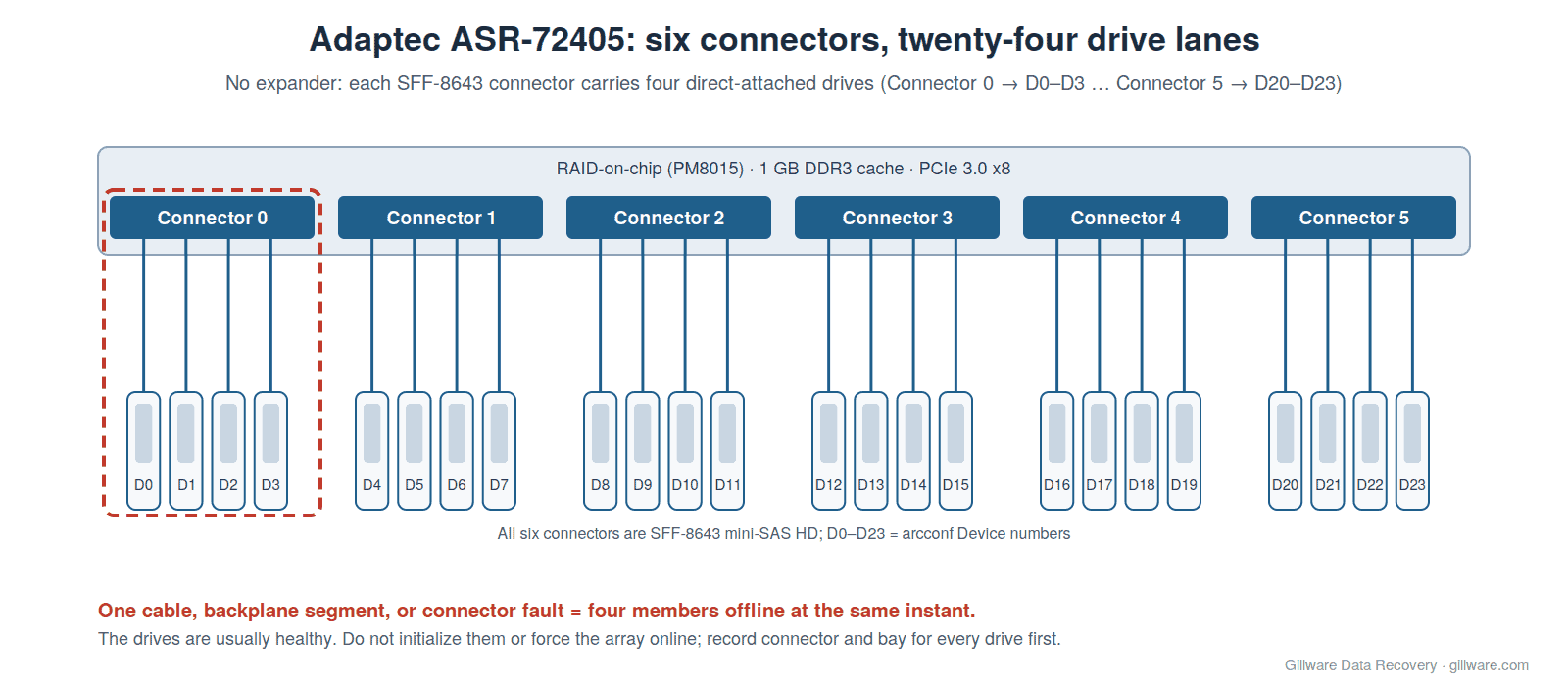
Six Connectors, Twenty-Four Drives: The Four-Drive Drop
The 72405’s twenty-four ports are grouped into six mini-SAS HD connectors, each carrying four drive lanes when direct-attached to a backplane. arcconf reports members by that grouping — Connector:0, Device:0 through Connector:5, Device:23 — and it is the first thing to look at when an array goes down. If exactly four drives dropped at the same moment and all four share a connector, the cause is almost never four drive failures. It is a cable, a backplane segment, or the connector.
On a twenty-four-bay chassis this matters more than on a smaller card. A RAID 6 spanning twelve bays across three connectors loses four members from one cable fault and is instantly offline. A RAID 60 with two parity groups can lose two members from each group if the administrator striped the groups across connectors for performance. In every one of those cases the drives are healthy and the array is recoverable — unless someone initializes the dropped drives, forces the array online after members returned at different times, or lets the operating system see the raw members. Before touching anything, record which connector and bay every drive occupies. Series 7 arrays identify members by metadata rather than by port, but the physical map establishes the sequence of events.
Because the 72405 is usually direct-attached, the expander discovery problem Adaptec documents for other configurations (a logical device marked failed after a reboot because the expander had not finished enumerating drives) is less common here — but a 72405 driving external JBOD shelves through expanders can still meet it, and the fix is a scan-duration setting, not a data operation.
Moving Existing Data Drives onto a 72405
The 72405’s twenty-four ports make it the natural card for consolidating several smaller controllers into one slot, and that is the scenario in which owners most often lose data to it. Two independent reports from the same community describe the pattern.
In the first, an owner moved fifteen drives from two eight-port controllers onto a newly purchased 72405. After the first boot, eleven of the fifteen showed Unmountable: Unsupported partition layout. The explanation offered in the thread was that a RAID controller that “initializes” disks as it takes them over can truncate their partitions. In the second, an owner found that the controller had renamed his drives — re-identifying them under its own device names — and that his array would no longer start; he could not work out the original drive order, and HBA mode in his configuration still did not pass the drives through to the host. The same reply warned that replacing the 72405 with a different controller later would produce the same problem again.
Both are recoverable situations if they are stopped early. The Series 7 modes that matter are RAID: Expose RAW (the default, which passes metadata-less drives to the OS), HBA (raw pass-through, to be selected only when no drives with Adaptec metadata are attached), Auto Volume (which writes Adaptec metadata onto any drive that has no Adaptec metadata and no OS partitions) and Simple Volume. A card in the wrong mode when data drives are connected can alter them on the first boot. The checklist below is the same one we give for every Series 7 card, and it matters most on the one with twenty-four ports.
Consolidating onto a used 72405 without risking data
- Install the card with no drives attached. Boot into the Ctrl-A utility or UEFI setup and confirm the controller mode.
- Clear any previous owner’s arrays only while no data drives are attached — and never if the “previous owner” was you and the array is the one you need back.
- Check the firmware build (
ARCCONF GETVERSION). See firmware below. - Connect one expendable drive first and confirm how the card presents it to the operating system.
- Connect data drives one connector at a time, and stop at the first drive the OS does not recognize exactly as before.
Windows 11 and Server 2022: Volumes Hang After Sleep
The 72405 has one operating-system problem that is documented against it by name. In July 2022 a Windows-focused technical blog reported, from a reader running five 72405 controllers, that the Windows driver for the ASR-71605 and related models including the 72405 has a bug on Windows 11 22H2 and Windows Server 2022: after the system wakes from hibernation or standby, the RAID volumes show 100 % load while doing nothing, every access attempt times out, occasionally the volumes run at extremely reduced speed instead, and sometimes the driver triggers a blue screen. The reader had tried every driver version since release, including the drivers Windows itself supplies, and found the fault in all of them. A comment in 2023 reported the same behaviour on Windows 11 build 22621.1105 with inbox driver 7.5.0.32048, and other commenters described workarounds involving legacy/CSM boot settings rather than a fix.
From a data-safety point of view, the risk is not the hang itself but what people do about it. A volume that reports 100 % load and times out looks like a failing array. Administrators reboot, and when the volume returns they run a file-system check; or they assume a drive has failed and pull one; or they force the array online. None of that is warranted by a driver fault. On any 72405 host running Windows 11 or Server 2022, disable sleep and hibernation entirely. If a volume has already gone into this state, a clean shutdown and cold boot is the recovery; a file-system check on a volume that has been timing out mid-write should wait until the drives have been imaged.
Slots, Boards, and Management Tools
The 72405 draws about 1.8 A on the 12 V rail — more than any other internal Series 7 card — through a PCIe 3.0 x8 edge connector, and it was designed for server boards. Owners installing it in other hosts report a family of symptoms that look like controller failure and are not:
aacraid: aac_fib_send: adapter blinkLED 0xfffollowed by Usually a result of a serious unrecoverable hardware problem in the Linux log, on a 72405 whose drives were all visible and healthy in the card’s own BIOS. After a controller BIOS update the card disappeared from Linux entirely. Moving it to a different PCIe slot resolved it. The message is real and it is rated high-risk on our Series 7 page — but on this card it can be the slot, not the silicon.- Controller invisible to maxView and arcconf even as root, while
lspcishows the card and the driver loaded, on a consumer AM4 desktop board. Replies pointed to the maxView version (2.05.22932 for Linux was recommended) and to seating. Taping the card’s SMBus pins to stop consumer boards from misbehaving is a common modification on secondhand Series 7 cards, and a card that is not visible in the system BIOS at all is either not seated or dead. - SAS drives not recognized while SATA drives on the same card are fine, reported by one 72405 owner and not resolved in the thread.
- Drives from external enclosures showing as two of twelve until the SATA 3.3 V power-disable pin is blocked — a power issue, reported across Series 7 cards, that looks like mass drive failure at POST.
Heat in a Twenty-Four-Bay Chassis
Adaptec’s thermal specification for the 72405 is 0–55 °C (0–50 °C with the AFM-700) with 200 linear feet per minute of airflow measured an inch from the RAID processor, and the datasheet says the card should be installed only in a chassis that provides it. Twenty-four-bay servers generally do; the risk arises when fans fail, when the chassis is repurposed with quieter fans, or when the card is moved to a tower. Home-lab owners describe Series 7 cards sounding their over-temperature alarm within minutes of boot in cases without forced airflow, describe the stock thermal compound on secondhand cards as dried out, and note that Adaptec changed the Series 7 heatsink during production from a threaded-hole design to a clip-mounted silver one shared with Series 8 — so two coolers exist on 72405s in circulation and neither ships with a fan.
The early signs of an overheating 72405 are the same as for the rest of the family: intermittent aacraid: Host adapter abort request and Host bus reset request. SCSI hang ? lines on Linux, Event ID 129 resets from arcsas on Windows, members dropping and returning so that arrays go degraded with every drive healthy, “Write-through (temporary disabled)” when a fitted AFM-700’s supercapacitor protection trips, and finally a card that hangs at “Booting the Controller Kernel.” With twenty-four drives behind it, the sensible order is copy first, cool second.
Firmware on the 72405
The 72405 runs the shared Series 7 firmware line (7.5.0). The builds that matter to owners:
| Build | What 72405 owners should know |
|---|---|
| 32033 (August 2014) | Introduced Simple Volume mode. A storage integrator advised customers off this build, citing several drives reported degraded at once when none were defective, and volumes disappearing from the operating system. |
| 32084 | The build integrators recommended at the time. |
| 32106 (2016) | Reported on Series 7 cards to leave write cache stuck at “Write-through (temporary disabled)” regardless of the flash module’s condition; the reported workaround was a rollback to 32084. |
| 32114 (2017) | Fixed RAID 5 and RAID 6 logical drives that would not rebuild, a firmware stack overflow triggered by a faulty drive, write cache that could not be enabled without a flash module, and “Error: Controller Kernel Stopped Running” at POST. |
| 32118 (2018) | The last public Series 7 build. |
| 7.6-0 (32136) | Found on secondhand Series 7 cards and not a public Adaptec release; owners report abort errors on it and report rolling back to 32118 without bricking the card. |
A firmware change on a 72405 that holds a degraded or failed array should wait until the data is safe. One 72405 owner’s BIOS update, made while troubleshooting, turned a card Linux could partly see into one it could not see at all; the fix turned out to be the slot, and the update had only added a variable.
Replacing a Dead 72405
A failed 72405 leaves an administrator with twenty-four drives and no obvious replacement: Series 8 cards will not read Series 7 arrays. Microchip’s support position, quoted by a user who asked, is that arrays cannot be imported from previous-generation Adaptec SAS RAID adapters to the newer SmartRAID adapters. An administrator who made the equivalent move from a 71605 to an 81605ZQ documented the result: every drive shown as Ready rather than Foreign, nothing under Manage Arrays, no logical drives in Windows or maxView, no import or foreign-configuration option anywhere. arcconf has no command to mark a drive foreign, and maxView cannot see an array the firmware does not detect.
The drives are intact at that point. What destroys them is creating a new array on the new card to “recreate” the layout, initializing the Ready drives, or letting an operating system initialize the raw members that Expose RAW passes straight through. A working Series 7 card with compatible firmware will normally read the arrays — a 72405 is the only Series 7 card with enough internal ports to take all twenty-four drives at once, but a 71605 plus a 7805, or a 78165 with an external shelf, can present the same members if the original slot order is preserved and no configuration-change prompt is accepted at POST until every member is present. If that is not possible, or if the 72405 failed mid-rebuild or after members had already dropped, the arrays should be reconstructed offline from drive images. The AFM-700 does not migrate between Series 7 and Series 8 either.
Linux Notes for 72405 Hosts
- SCSI timeout. Adaptec’s Series 7 readme recommends raising the SCSI command timeout from 30 to 90 seconds; otherwise the system may hang with an EXT4 error when a good drive is removed from a rebuilding array. On a wide RAID 6 rebuild, that hang is easy to mistake for a second failure.
- Device 0. The boot record is always written to Device 0. Deleting or reordering arrays so that Device 0 changes makes Linux fail to boot; restoring the original array sequence brings it back. A twenty-four-bay host with several arrays is exactly where this happens.
- Driver identity. Series 7 cards appear to the Linux aacraid driver under PCI ID 9005:028c, “Adaptec PMC Series 7 (Denali)”, and share initialization code with Series 8.
72405 Messages: Quick Index
The messages 72405 owners most often search for, each linked to its full explanation and risk rating on our Series 7 page:
- “Controller detected configuration change” / “The following arrays have missing members and cannot be configured”
- “Booting the Controller Kernel” hang
- Controller modes: Expose RAW, Hide RAW, HBA, Auto Volume, Simple Volume
- “During initialization, all data is deleted from the disk”
- arcconf “Status of logical device”: Degraded, Suboptimal, Impacted, Failed
- “Segment N : Missing” with Connector and Device numbers
- “Failed stripes : Yes”
- Force online (Ctrl+F, maxView, arcconf setstate optimal)
- “aacraid: Host adapter abort request”
- “adapter kernel panic’d” / “IOP reset failed” / “adapter blinkLED”
- “Device offlined – array failed”
- Windows Event ID 129, 11, 9 from arcsas
If Your 72405 Array Is Down Right Now
- If the volume is still accessible, copy the most important data off it before any rebuild, cooling work, driver change, or firmware change.
- Capture
ARCCONF GETCONFIG 1 ALandARCCONF GETLOGSoutput, or photograph the POST and Ctrl-A screens, before changing anything. - Label every drive with its bay and its connector (0 through 5), and note serial numbers. With twenty-four drives, do this before a single one leaves its bay.
- Do not change the controller mode, initialize or un-initialize drives, flash firmware, or move the drives to a Series 8 or SmartRAID card.
- Do not connect member drives to a Windows or Linux computer.
- If Windows volumes are hanging after wake from sleep, shut down cleanly and cold-boot; do not run a file-system check first.
How We Recover 72405 Arrays
We image every member on write-blocked hardware in our ISO 5 Class 100 cleanroom, replacing failed components in physically damaged drives with donor parts first. Our HOMBRE reconstruction software reads the Series 7 metadata from each image, establishes member order, stripe size, and parity layout across all twenty-four positions, and determines which members dropped out and when. The array is assembled virtually — no 72405, no replacement controller, no firmware involved — and the file systems are recovered from the assembled volume. The full Series 7 approach is described on our Adaptec Series 7 page; the sixteen-port sibling has its own ASR-71605 page, and other Adaptec generations are covered on our Adaptec RAID controller recovery page and RAID data recovery hub.
ASR-72405 Documentation
- Serial Attached SCSI RAID Controllers Installation and User’s Guide — 72405 specifications, connector layout, AFM-700 installation, and the Ctrl-A utility
- Adaptec RAID Controller Command Line Utility (arcconf) User’s Guide
- Series 7 / Series 8 Readme — controller modes, Linux timeout and Device 0 notes
- Adaptec KB: RAID, Auto Volume, HBA, and Simple Volume modes
- Adaptec KB: Series 7 heat sink revisions
- Report: Windows 11 / Server 2022 driver bug on the ASR-72405 (July 2022)
ASR-72405 Frequently Asked Questions
Four drives disappeared from my array at once. Are they all dead?
Almost certainly not. Four drives share each of the 72405’s six connectors, so four simultaneous drops point to a cable, backplane, or connector fault. Do not initialize the drives or force the array online; record the layout and power down.
I moved my drives onto a 72405 and now they say “Unmountable: Unsupported partition layout.”
Stop. Two owners have reported this or a close variant after consolidating drives onto a 72405; the controller’s initialization can alter partition tables. Do not let anything else write to the drives, do not reformat, and do not run a file-system check. The original data is generally still there beneath the altered partition information.
My Windows Server 2022 volumes on a 72405 hang at 100 % after the server wakes up. Is the array failing?
Probably not. This behaviour was reported against the 72405’s Windows driver in 2022 and again in 2023, across every driver version. Disable sleep and hibernation, shut down cleanly, and cold-boot. If the volume was mid-write when it hung, have the drives imaged before any file-system check.
Linux says “adapter blinkLED 0xff” and “serious unrecoverable hardware problem.” Is the card dead?
Not necessarily. One 72405 owner saw exactly that with every drive healthy in the card’s BIOS, and the fix was a different PCIe slot. Treat the message seriously — it is high-risk on our Series 7 page — but do not initialize or recreate anything on the strength of it.
Will an Adaptec Series 8 or SmartRAID card read my 72405 arrays?
No. The drives appear as Ready with no import option, and Microchip’s support position is that arrays from earlier Adaptec generations cannot be imported to SmartRAID adapters. Use another Series 7 card with the original slot order, or have the arrays reconstructed from images.
What should I send you?
Every drive that was attached to the card, labelled by bay and connector. With twenty-four drives, label before you pull. We do not need the server, and in most cases we do not need the controller.
Start Your ASR-72405 Recovery
Power the system down, label the drives, and do not initialize, force, recreate, or migrate anything. Our engineers will image every member, reconstruct the array without the controller, and give you a firm quote before any recovery work begins. Gillware has been recovering RAID arrays for more than two decades.
Start a free ASR-72405 recovery evaluation →
Or call 1-877-624-7206 during business hours (M–F 8 am–7 pm, Sat 10 am–3 pm Central), or schedule a 15-minute consultation.