
Cheap Data Recovery: What You’re Actually Paying For
If you are searching for cheap data recovery, you are probably looking at a drive that holds something you can’t replace and a budget that didn’t plan for this. That is a completely reasonable place to be. The most helpful thing we can tell you is what actually goes into getting data back, which shortcuts tend to cost people their files, and how to find out what your recovery really involves without spending anything. A short, friendly call with one of our tech advisors is the easiest way to start.
Worried about what recovery will cost?
Call a tech advisor for a no-pressure conversation. Tell us what happened and we’ll give you a realistic idea of what your recovery involves before you send anything.
This page is part of our guide to how much data recovery costs. It covers what separates real recovery work from a quick attempt, why some low-cost attempts make a drive unrecoverable, and how a free evaluation lets you decide with real information.
Why Expert Data Recovery Isn’t Cheap
When a drive fails, it is natural to compare the cost of recovery to the price of a new drive. But the new drive isn’t what you are paying for. You are paying for a scarce specialist who may spend several days of engineering work on your device, backed by a cleanroom, specialized imaging equipment and a library of donor parts.
There are far fewer data recovery engineers in the country than there are lawyers, and even a small project from a junior associate at a law firm runs into the thousands. Recovery engineers spend years learning to work inside drives whose read heads fly a few nanometers above the platters, or inside SSD controllers that hide your data behind their own firmware. That expertise is what turns a dead drive back into your files.
What You’re Actually Paying For
Whoever you trust with your drive, these are the things that decide whether your data comes back. They are worth asking about.
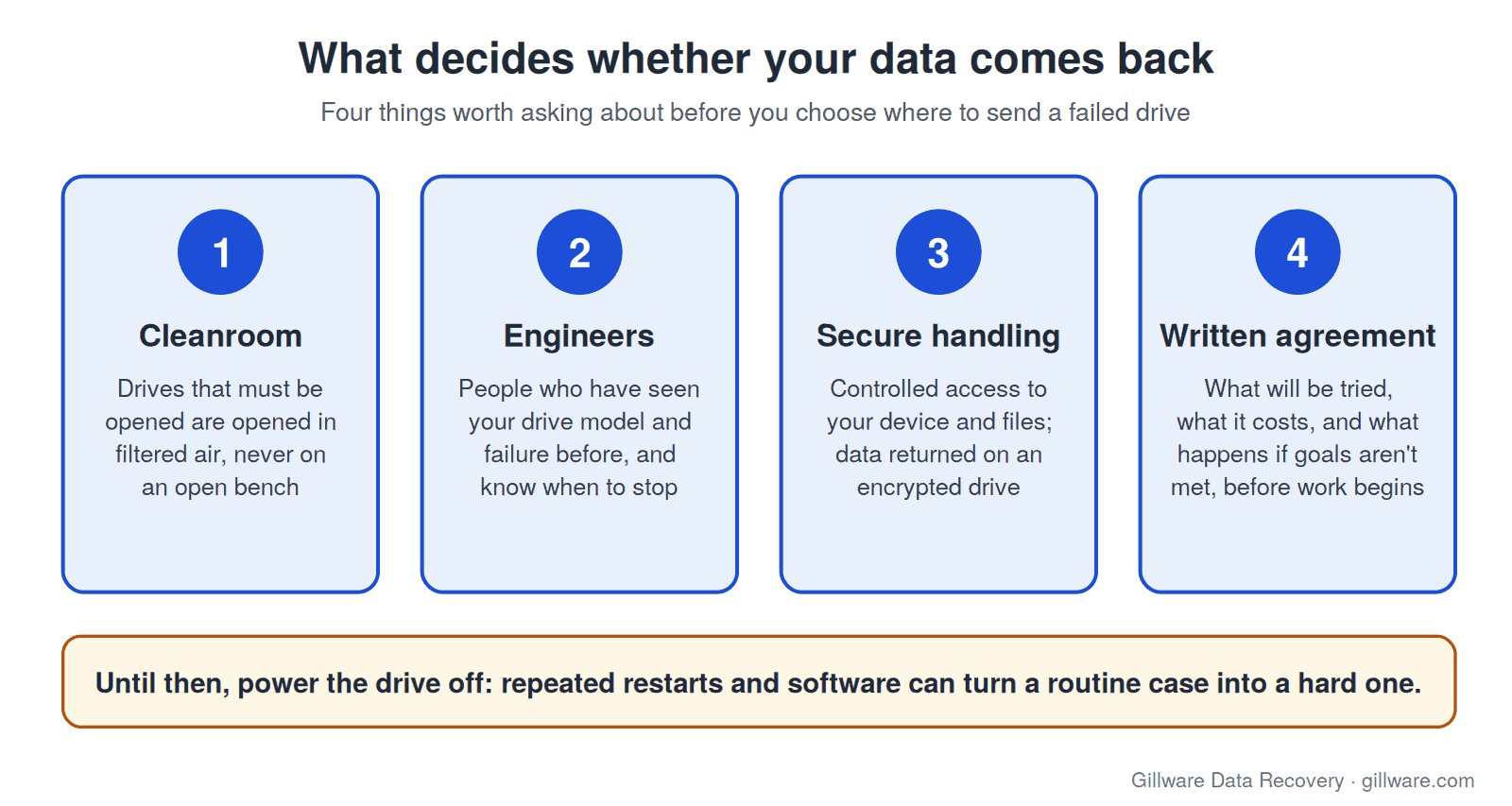
A cleanroom for anything that has to be opened
A hard drive with failed heads or a seized motor has to be opened to be recovered. Opening one in ordinary room air lets dust settle on platters that the heads skim at a microscopic height, and a single particle can cause scratches that destroy data permanently. Our engineers do that work in an ISO 5 (Class 100) cleanroom.
Engineers who have seen your failure before
Every drive model has its own firmware, its own weak points and its own traps. Knowing which donor parts will work, which firmware modules need attention and when to stop and image is what makes a recovery succeed. Our team has more than two decades of experience, and more than 1,500 IT professionals nationwide refer their clients to us.
Secure handling of your data
Your drive may hold family photos, tax records, client files or business systems. A real lab controls who can access the device and the recovered data, and ships your files back on an encrypted drive.
A written recovery agreement
Before any recovery work begins, you should know what is being attempted, what it will cost and what happens if the goals aren’t met. With us, that is in writing, and you approve it before we start.
How “Cheap” Attempts Can Make a Drive Unrecoverable
The most expensive recovery is often the one that starts after a low-cost attempt went wrong. A drive that would have been a routine case can become a difficult one, or a lost cause, after any of these:
- Running a clicking or grinding drive over and over. Recovery software and repeated restarts keep a drive with damaged heads spinning, and the damaged heads can scrape the platters. If you hear a clicking hard drive, power it off.
- Opening the drive outside a cleanroom. Once a platter is contaminated or scratched, the data in those areas is gone for good.
- Swapping a circuit board without the right matching parts. Modern drives keep calibration data unique to that drive, and the wrong swap can corrupt it.
- Freezing the drive, tapping it or other online tricks. These can add condensation and physical damage to a drive that is already failing.
- Formatting, initializing or running software on an SSD. On many SSDs, a format or deletion lets the drive erase the data in the background within minutes.
None of this means you did something wrong if you already tried. Many people do. Just stop now, and tell your tech advisor exactly what was tried so the engineers know what they are working with.
What Goes Into a Quote
Each case covers a small share of what it takes to run the lab, including cleanrooms, equipment, experienced engineers and staff, and then a blend of time, materials and feasibility. Cases with more risk or more engineering hours, such as damaged platters, are quoted higher than routine ones. We quote each case on its own merits, based on what we find in the lab and the thousands of similar cases we’ve seen with the same equipment and symptoms. For device-specific detail, see what shapes the cost of hard drive recovery, SSD recovery, phone recovery and RAID and server recovery.
How to Find Out What Your Recovery Will Cost
- Call a tech advisor. Tell us the device, what happened and what has been tried. It is a friendly conversation, and it gives you a realistic idea of what your case is likely to involve.
- Send the device for a free evaluation. Our engineers diagnose what failed and what can be recovered. Every case is quoted after a free evaluation, so you know the cost before any recovery work begins.
- Decide. You get a firm quote and you choose whether to go ahead. You only pay if we meet your recovery goals.
A free evaluation costs nothing to find out. If the answer is that your files can’t be recovered, you’ll know that too, from people who looked inside the drive rather than guessed.
Cheap Data Recovery FAQ
Can you tell me the cost over the phone?
A tech advisor can give you a realistic idea of what your case is likely to involve. The firm quote comes after our engineers evaluate the device, because what failed inside it decides the work.
Is the evaluation really free?
Yes, for single-device cases such as hard drives, SSDs, flash media and phones. You see the quote and decide before any recovery work begins. RAID, server and other business systems start with a free consultation with one of our enterprise storage engineers.
What if you can’t recover my files?
On single-device cases, you only pay if we meet your recovery goals.
Should I try recovery software first to save money?
If the drive is clicking, grinding, not detected or has been dropped, no. Software can’t fix a physical fault and can make it worse by keeping the drive running. If the drive is healthy and you simply deleted files from a hard drive, software exists, but on an SSD a deletion is time-critical, so power it off and call.
Does it cost more if someone already tried to recover it?
It can, because earlier attempts can add damage that takes more engineering to work around. That is why telling your tech advisor what was tried matters, and why stopping now is the best thing you can do.
Need your files back without guesswork? Let’s talk.
Our highly experienced engineers strive for the highest success rates in the industry. Send us the device and we’ll diagnose it for free.
- More than 20 years recovering data from failed drives
- Trusted by 1,500+ IT professionals nationwide
- Whatever failed, we’ve seen it hundreds of times
- Pay only if we meet your recovery goals