
LSI MegaRAID SAS 9380-8e Data Recovery: External JBOD Shelf Failures, 9380-4i4e, and Error Messages
JBOD shelf dropped and every drive shows Foreign?
Don’t import or clear anything until you know how the drives left. Book a free consultation with one of our enterprise recovery experts.
The MegaRAID SAS 9380-8e is the SAS3108 generation’s card for storage that does not fit inside the server. All eight of its 12 Gb/s ports sit on the back of the bracket as two SFF-8644 external connectors, and through the expanders in external JBOD shelves it addresses up to 240 drives; its sibling, the 9380-4i4e, splits the same chip between one internal SFF-8643 connector and one external SFF-8644 so a server can hold its own drives and still chain a shelf behind it. Both run the same 1 GB of DDR3 cache, the same CacheVault CVM02 kit and the same firmware and on-disk format as the 9361-8i; Intel sold the 9380-8e’s twin as the RS3SC008, and Lenovo offered it as a ThinkServer option under a firmware package it shares with the 9340-8i, 9364-8i and the RAID 720i/720ix.
That reach is what makes a 9380 failure different from a 9361 failure. The drives live in a separate box with its own power supply, its own expander and a cable between it and the controller, and any one of those can take every member of every array on the shelf away at the same instant — the one failure that the family page’s foreign-import procedures are actually designed for, and the one that looks identical, from the controller’s side, to a failure they are not designed for. This page covers what is specific to the 9380-8e and 9380-4i4e: whole-shelf drops and how to tell them from members that left one at a time, the shelf power-on order, SAS topology and discovery errors, the CacheVault on an external card, and the 9380-8i8e that looks like a sibling but is not. The full catalog of SAS3108 messages, each rated by risk to the data, is on our LSI MegaRAID SAS3108 recovery page.
9380-8e and 9380-4i4e at a Glance
| 9380-8e | 9380-4i4e | 9380-8i8e (lookalike) | |
|---|---|---|---|
| RAID-on-chip | LSI SAS3108 (PCI device 1000:005D, “Invader”) | SAS3316 dual-core — a different chip | |
| Ports | 8 external: two SFF-8644 (J1A12) | 4 internal (one SFF-8643) + 4 external (one SFF-8644) | 8 internal + 8 external |
| Devices through expanders | 240 | 240 | 240 |
| Cache | 1 GB DDR3-1866 with ONFI flash offload; 16 MB flash ROM; 32 KB NVSRAM for the configuration | 2 GB, flash on the board | |
| Cache protection | Optional CacheVault CVM02 kit (CVFM04 flash module + CVPM02 supercapacitor) | CVPM02 only; local NAND | |
| Power with a depleted CVPM02 | 21.266 W (hardware guide, Table 18) | — | — |
| Airflow / temperature | 200 LFPM minimum; 10–55 °C operating | — | |
| RAID levels | 0, 1, 5, 6, 10, 50, 60; up to 64 virtual drives; strip 64 KB–1 MB | ||
| OEM versions | Intel RS3SC008; Lenovo ThinkServer option | — | — |
| Form factor / host | MD2 low profile, PCIe 3.0 x8 | ||
Everything on the family page about how a SAS3108 stores its configuration in both NVSRAM and on the drives, how members go Foreign, and which prompts destroy data applies to both 9380 cards without change. What changes is where the drives are.
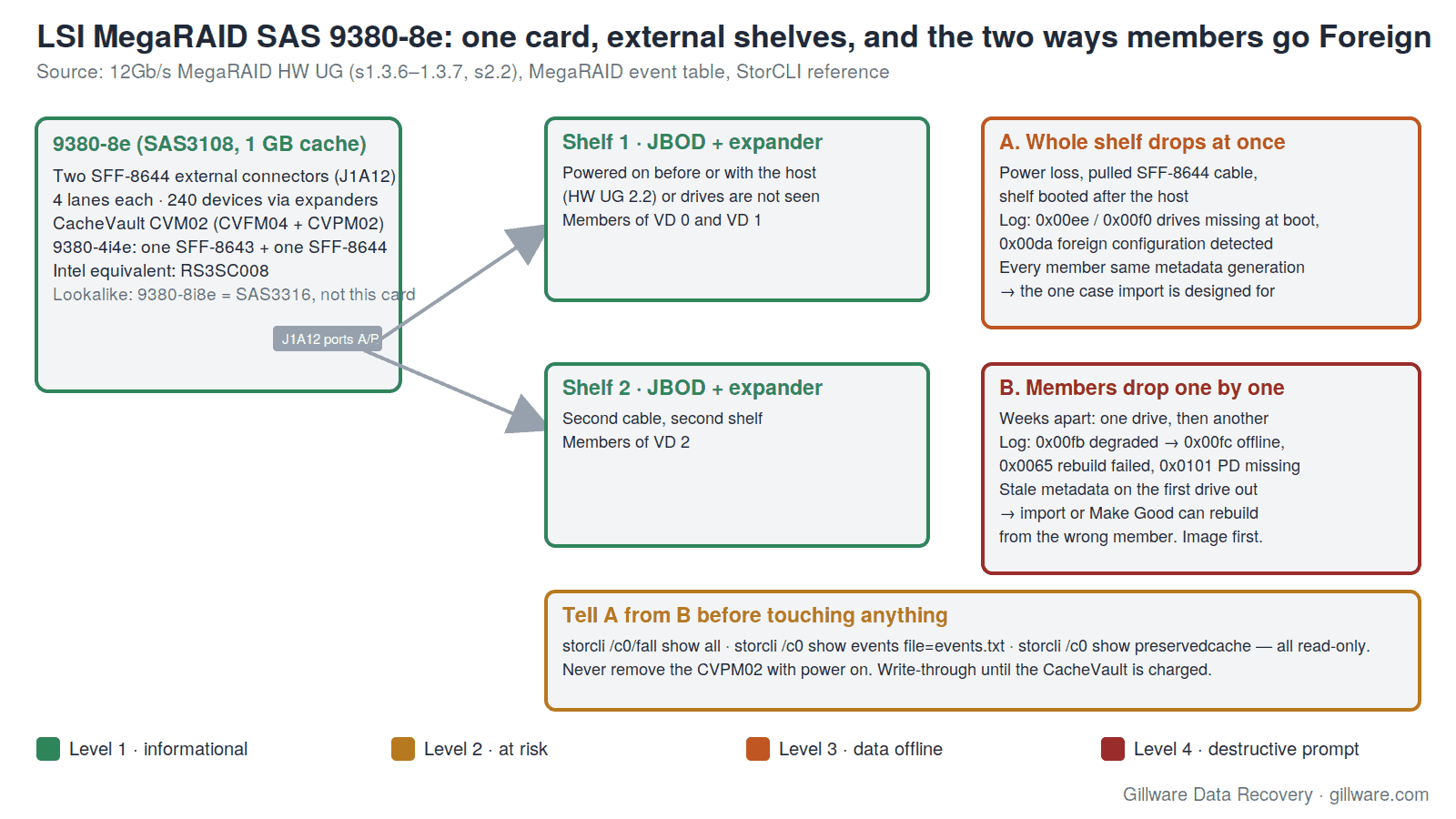
When the Whole Shelf Disappears
An internal card loses one drive at a time: a bad sector, a dying motor, a backplane slot. An external card can lose twelve, twenty-four or sixty at once, because a JBOD shelf is a single point of failure with four ways to fail — its power supply, its expander, the SFF-8644 cable, and the order in which it and the host were switched on. The hardware guide is explicit about the last one: external drives must be powered on before or with the host, or the controller may not recognise them. A shelf that boots thirty seconds after the server presents the controller with a configuration whose members are all absent.
What the controller does next is written in the event log, and the codes are the same ones the family page catalogs. If the shelf is missing when the controller initialises, the log records 0x00ee Drives missing from configuration at boot, then 0x00ef or 0x00f0 naming the virtual drives that will go offline, and — if nothing on the shelf was found at all — 0x00f1 Previous configuration completely missing at boot. If the shelf comes back while the controller is running, the members return carrying metadata the controller still holds in NVSRAM but has already marked missing, and the log records 0x00da Foreign Configuration detected. From that point every drive on the shelf shows as Foreign, or as (Foreign) Unconfigured Bad, and the Ctrl+H, HII or StorCLI screens offer to import or clear.
This is the one case where importing is the right answer: every member left at the same instant, every member carries the same configuration generation, and nothing was written to the array while they were gone. The family page’s foreign-configuration entry says as much. The problem is that the same screens, the same codes and the same Foreign state appear in a case that is nothing like it.
Members That Left One at a Time, Behind the Same Screens
A RAID 6 on a 9380-8e shelf runs for two years. One drive develops medium errors and the controller marks it failed — 0x00fb VD is now DEGRADED. Nobody notices, because the volume still mounts. Six weeks later a second drive fails during the rebuild of a hot spare, 0x0065 Rebuild failed on … due to source drive error, and the array is now at the edge of its parity. A month after that, the shelf’s power supply fails, and everything on it goes missing at once. The power supply is replaced, the shelf comes back, and the controller reports a foreign configuration on every drive.
The administrator has just seen the whole-shelf failure described above and has read — on this page, or on Intel’s knowledge base for the RS3SC008, or on the family page — that the right answer is to make the Unconfigured Bad members good and import. But two of these drives carry metadata from weeks or months ago. One left the array when the data on it was two months stale; one left mid-rebuild with a half-written copy. The controller’s import logic compares generations and may refuse (0x0108 Partial foreign configuration imported, with the stale members left out and the volume offline), or may accept the configuration and begin rebuilding onto a drive that was never a full member. The Make Unconfigured Good step that precedes the import has already written to the stale drives’ metadata either way, and the one piece of evidence that would have told the story — which member dropped when — has started to disappear.
The difference between the two cases is invisible in the POST message and visible in two read-only commands. storcli /c0/fall show all lists every foreign drive with the array it belongs to; a shelf that lost power shows every member foreign and consistent, while a shelf whose members had been leaving one at a time shows a mix of states and generations. storcli /c0 show events file=events.txt gives the sequence: a single burst of missing-at-boot or foreign-detected entries with no earlier degraded or rebuild-failed events means the shelf; a trail of 0x00fb, 0x0065 and 0x0101 PD missing entries over weeks means the drives. Read both before anyone touches Import, Clear or Make Good. If the trail is there, the members need to be imaged, not imported.
Cables, Expanders and “Invalid SAS Topology”
Between a 9380-8e and its drives sit an SFF-8644 cable and at least one expander, and both can fail in ways the controller reports as drive problems. A cable with a marginal lane, or an expander that resets under load, produces the family page’s command-timeout and PD-reset events (0x010b, 0x010c) against drives that are perfectly healthy; a cable pulled and reseated during troubleshooting, or two cables swapped between the J1A12 connectors, moves every drive on the shelf to a different path at once. The 9380-8e records configuration on the drives themselves — the hardware guide calls this drive roaming — so the array survives the swap, but the event log and the management console now describe drives by enclosure and slot numbers that no longer match the labels on the trays. Label every drive with its shelf, its slot and the connector its shelf hangs from before a single cable is touched.
Two external shelves daisy-chained through their expanders, or one shelf cabled to both of the card’s connectors, create a SAS topology the firmware has to walk at every boot. When it cannot — a loop, a duplicate address, an expander that enumerates after the controller has given up — the SAS3108 firmware raises the topology-error events the family page catalogs, and the virtual drives on that shelf are simply absent until the next boot. The fix is almost always at the cable or the shelf; the risk is that someone treats the absent drives as failed drives and starts clearing or re-creating.
The 9380 cards also allow SAS and SATA drives in one virtual drive, which the hardware guide permits but strongly discourages; in a shelf that outlived its original drives the mix is common, and a mixed array’s event log needs reading with that in mind.
A shelf that dropped all at once and one whose drives left over weeks look the same on screen. Start with a free consultation with one of our enterprise recovery experts.
The CacheVault on a Card Whose Drives Are Somewhere Else
The 9380-8e takes the CVM02 kit: a CVFM04 flash module on the card and a CVPM02 supercapacitor pack on a cable, which together preserve the write cache through a power loss. On an external card the cache is protecting writes to drives in a different enclosure, which produces one failure the internal cards rarely see: the server stays up, the shelf loses power, and the controller is left holding dirty cache for virtual drives that no longer exist. The family page’s pinned-cache entry (0x0143) describes the state; storcli /c0 show preservedcache reports it. That preserved cache is the last writes the array was supposed to receive, and storcli /cx/vx delete preservedcache throws it away — a Level 4 command that some management guides recommend as a way to get a new virtual drive created.
Three CacheVault rules from the hardware guide and the CacheVault user guide apply with extra force on the 9380-8e. The CVPM02 cannot be hot-plugged: removing or inserting it with power applied damages the board and the supercapacitor. Write policy should be write-through until the module is charged, so an array created or imported in a hurry on a card with a depleted pack is running unprotected. And a 9380-8e powering up with a deeply depleted CVPM02 draws 21.266 W, the highest figure in the hardware guide’s power tables — a detail that matters when the card is in a slot that was marginal to begin with.
The 9380-8i8e Is Not a 9380-8e With More Ports
The model numbers suggest a range: 9380-4i4e, 9380-8e, 9380-8i8e. The first two are SAS3108 cards; the third is built on the dual-core SAS3316 with 2 GB of cache and its cache-backup flash on the board rather than on a CVFM04 module, and it belongs to a different family. The firmware packages reflect this: the 24.22.0-0061 release notes list the 9361-16i, 9380-8i8e and 9361-24i as their supported controllers and not the 9380-8e. A 9380-8i8e bought as a replacement for a failed 9380-8e will read the DDF metadata on the drives and present the array as foreign, and the family page’s lookalikes section explains why the import rules still apply; but the two cards do not share firmware, and the hardware guide’s power, airflow and connector details for the 9380-8e do not describe it.
The same caution applies in the other direction. Intel’s RS3SC008 is the 9380-8e’s exact twin and its arrays move between the two without a format change; the Lenovo ThinkServer firmware package that covers the 9380-8e also covers the SAS3008-based 9340-8i, which has no cache and a fixed strip size and cannot host a 9380-8e’s RAID 6. Match the chip, not the model number.
A Shelf Under a Hypervisor
A 9380-8e in an ESXi host adds the family page’s two hypervisor failure modes to the shelf’s own. Under the older megaraid_sas driver, a virtual drive going offline — because its shelf went away — is reported to the host only as a path failure, so the datastore enters All-Paths-Down and the host goes not-responding with no RAID event in the vSphere log; Broadcom’s knowledge base recommends the lsi_mr3 driver, which at least logs the controller fault. Under lsi_mr3, medium errors on a member can escalate to FW in FAULT state, Reset failed, stopping adapter and Adapter in critical state in vmkernel.log, after which every datastore on the card is gone until the host is rebooted. On an external card, a shelf that drops and returns during that reset sequence can come back as foreign to a controller that is itself in a fault state; the family page’s VMware section covers what the host log shows and what not to do about it.
9380-8e Messages: Quick Index
The messages 9380-8e and 9380-4i4e owners most often search for, with links to the full explanation and risk rating on the SAS3108 page:
- “Drives missing from configuration at boot” (0x00ee) and “Previous configuration completely missing at boot” (0x00f1)
- “Foreign configuration found” / “Foreign Configuration detected” (0x00da)
- Drives shown as (Foreign) Unconfigured Bad and Make Unconfigured Good
- “Partial foreign configuration imported, PDs not imported” (0x0108)
- “VD is now OFFLINE” (0x00fc) and “VD is now DEGRADED” (0x00fb)
- “Rebuild failed on … due to source drive error” (0x0065)
- “Command timeout on PD” (0x010b) and “PD reset” (0x010c)
- “Controller cache pinned for missing or offline VD” (0x0143) and cache discarded (0x0128)
- “Controller cache discarded due to memory/battery problems” (0x000a)
- StorCLI commands that change or destroy data and the ones that only report
- ESXi: datastore All-Paths-Down with no RAID event and “FW in FAULT state”
- 9380-8i8e, 9361-16i and 9361-24i: the lookalikes
If Your 9380-8e Array Is Down Right Now
- If the volume is still reachable, copy the most important data off it before any rebuild, reseat, cable or import work.
- Do not power-cycle the shelf to “see if it comes back.” If it is already off, leave it off until you have read the log.
- Save the read-only StorCLI output to another machine:
storcli /c0 show all,storcli /c0/eall/sall show all,storcli /c0/fall show all,storcli /c0 show preservedcache,storcli /c0/cv show allandstorcli /c0 show events file=events.txt. These are the safe commands; nothing withset,import,del,delete,initorstartin it is. - Read the events file for the weeks before the failure. A clean burst of missing-at-boot entries is a shelf; a trail of degraded, rebuild-failed and PD-missing entries is drives, and the import procedures do not apply.
- Label every drive with its shelf, its slot, and the J1A12 connector its shelf is cabled to, before anything is unplugged. Note which drives show Foreign and which show Unconfigured Bad.
- Do not import or clear a foreign configuration, do not Make Unconfigured Good a drive that held data, do not place or force a drive online, and do not delete preserved cache.
- Do not replace the controller — with another 9380-8e, an RS3SC008 or a 9380-8i8e — and connect the shelf to it with
foreignautoimporton. Do not flash firmware with the shelf connected. - Power the host down, then the shelf. If a CacheVault is fitted, leave the CVPM02 on the card; never remove it with power applied.
- Send every member drive from every shelf, any CacheCade SSDs, and the controller with its CVFM04 and CVPM02. We do not need the shelves, the expanders or the server.
How We Recover 9380-8e Arrays
We image every member drive — hard drives and any CacheCade SSDs — on write-blocked hardware in our ISO 5 Class 100 cleanroom, working around physical damage with donor parts first so that a drive the controller marked failed still gives up most of its surface. Our HOMBRE reconstruction software reads the DDF metadata from each image, establishes member order, strip size and parity rotation, and determines which members dropped out and in what sequence — the question that separates the shelf failure from the one-by-one failure, and that the controller’s import screen cannot ask. The array is assembled virtually, with no 9380-8e, no shelf, no expander and no firmware involved, and the file systems are recovered from the assembled volume. The full approach is described on our SAS3108 family page and our RAID data recovery page; the previous generation of external LSI cards is covered on our MegaRAID 9280 page, and the rest of the LSI line on our LSI MegaRAID recovery page.
MegaRAID SAS 9380-8e Documentation
- 12Gb/s MegaRAID SAS RAID Controllers User Guide (pub-005183, v1.3) — 9380-8e and 9380-4i4e connectors (s1.3.6–1.3.7), the external power-on rule (s2.2), airflow, power states, drive roaming and migration
- MegaRAID SAS 9380-8e Product Brief — 240 devices, external JBOD expansion, RAID levels, CacheVault option
- CacheVault CVPM02 / CVFM04 User Guide — which cards take which module, charging, write-through until charged, no hot-plug
- StorCLI Reference Manual — every StorCLI command, including the read-only foreign, preserved-cache and event commands above
- MegaRAID SAS 9380-8i8e Product Brief — the SAS3316 lookalike, for telling the two apart
- Lenovo ThinkServer firmware for the Avago 9340-8i / 9364-8i / 9380-8e and RAID 720i/720ix — the OEM firmware package
- Intel ARK: RS3SC008 — the Intel twin’s specifications and lifecycle
MegaRAID 9380-8e Frequently Asked Questions
My JBOD shelf lost power and now every drive is Foreign. Can I just import?
If the shelf was the only thing that failed — every member dropped at the same instant and the event log shows no degraded, rebuild-failed or PD-missing entries in the weeks before — then yes, this is the case the import procedure exists for. Read storcli /c0/fall show all and the events file first. If the log shows members leaving one at a time before the shelf failed, do not import; image the drives.
The shelf was on, but the controller says drives are missing at boot.
The hardware guide requires external drives to be powered on before or with the host. A shelf that finishes spinning up after the controller has initialised is missing as far as the controller is concerned, and the virtual drives on it go offline. Power everything down, bring the shelf up first, then the host, and read the log before doing anything in the configuration utility.
Is the 9380-4i4e the same card?
Same chip, cache, firmware and on-disk format, with one internal SFF-8643 and one external SFF-8644 connector. An array spanning both means a shelf failure takes down only the external members — a mixed case the event log will describe.
Can I replace a failed 9380-8e with a 9380-8i8e?
It will read the drives and present the array as foreign, because the DDF format is shared, but it is a SAS3316 card with its own firmware line, not a 9380-8e with more ports. The import decision is the same as for any replacement card: current firmware before the drives are connected, no existing configuration on the destination, and no import if the log shows members dropped at different times. An RS3SC008 is an exact twin.
The controller says cache is pinned for a missing virtual drive. Should I discard it?
Not yet. Pinned cache is the last writes the array was supposed to receive before the shelf disappeared; discarding it is permanent. If the shelf can be brought back cleanly and the log supports an import, the cache is flushed to the array afterwards. If it cannot, the pinned cache is part of what we recover from the controller.
What should I send you?
Every member drive from every shelf attached to the card, labelled by shelf and slot, plus any CacheCade SSDs and the controller with its CVFM04 flash module and CVPM02 pack. The saved StorCLI output and events file help us establish the drop sequence faster. We do not need the shelves, cables, expanders or server.
Start Your 9380-8e Recovery
Power the host and the shelf down, label the drives by shelf and slot, and do not import, clear, force, initialize or migrate anything. Our engineers will image every member, reconstruct the array without the controller or the shelf, and walk you through the findings. Every case starts with a free technical consultation with one of our enterprise storage engineers, and you approve all recovery fees in writing before any recovery work begins. Gillware has been recovering RAID arrays for more than two decades.
9380-8e shelf down? Let’s get your data back.
Our highly experienced engineers strive for the highest success rates in the industry. Talk with one of our enterprise storage engineers before anything else is done to the system.
- Free technical consultation with one of our enterprise storage engineers
- A written recovery agreement before work begins
- No billing surprises: you approve all recovery fees in advance
- Emergency service for business-critical downtime