
Your Crucial SSD was working yesterday. Today the laptop with a Crucial P3 or P5 inside says there is no boot device. An MX500 that has been the system drive in a desktop for years is suddenly missing from the BIOS, or shows up with a blank capacity. A BX500 is in Disk Management but Windows wants to initialize it and every file is gone. An X8 or X9 portable SSD disconnects a few seconds after it is plugged in and never mounts again. This page is for the owner of one of those drives who needs an honest account of what can still be done.
Crucial is the consumer brand of Micron, one of the few companies in the world that manufactures its own NAND flash. That shows in the drives: the memory itself is rarely the part that fails. What fails, on almost every Crucial SSD we evaluate, is the firmware’s record of where your data is. The positioning here follows our SSD data recovery hub; this page adds the Crucial-specific detail, because the controller inside a Crucial drive varies more from model to model, and sometimes from production run to production run, than most owners realize.
Which Crucial SSD do you have?
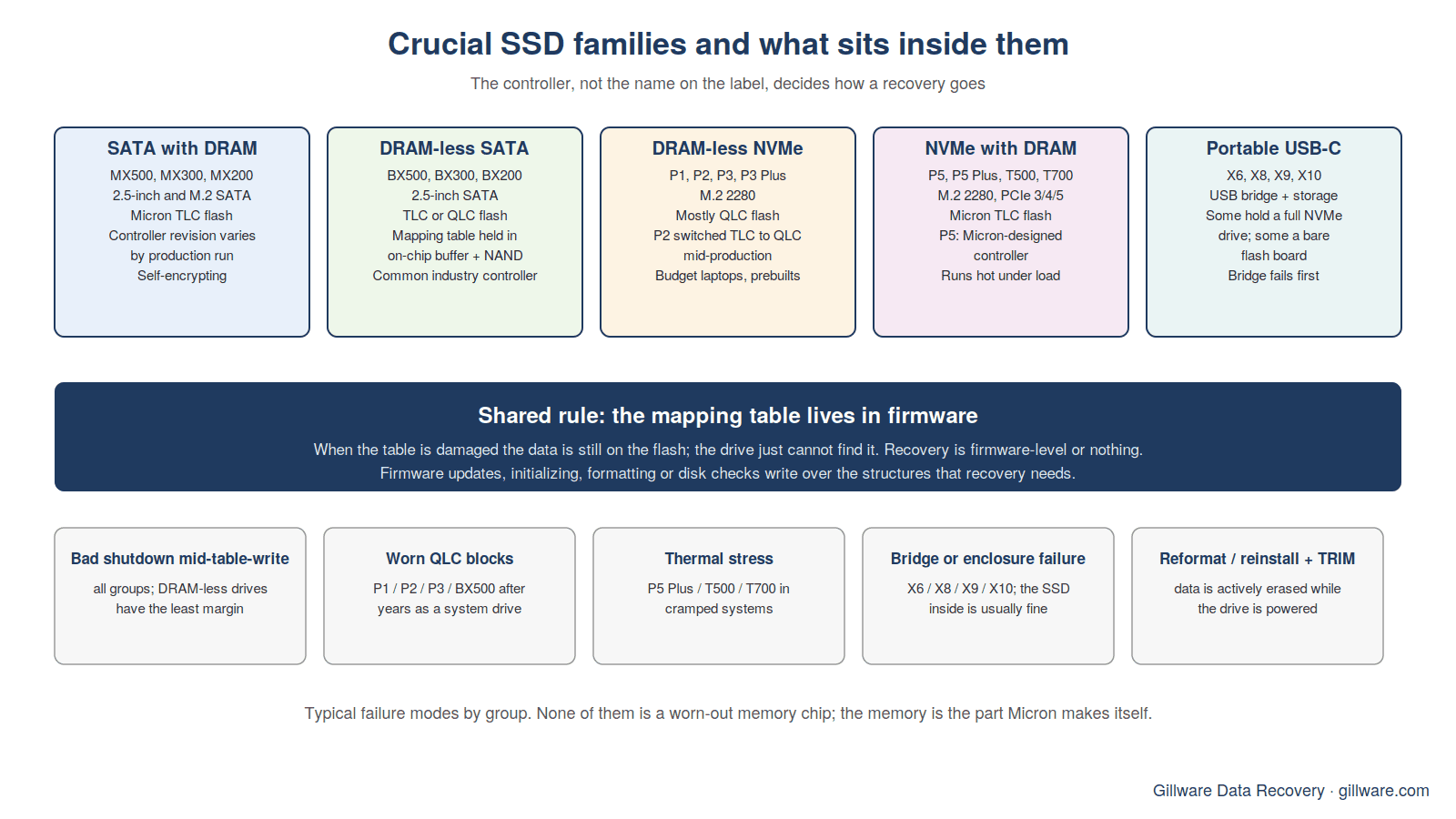
Crucial has used controllers from three different designers across its lineup, and the controller, not the name on the label, decides how a recovery goes. The lineup falls into five groups.
- 2.5-inch and M.2 SATA with a DRAM cache — the MX500 (and the older MX300, MX200 and M550). The MX500 has been sold since 2017 and its internals changed several times over that run: different NAND generations and more than one controller revision from the same family. Two MX500s bought a few years apart can need different tooling.
- DRAM-less SATA — the BX500 and the earlier BX300 and BX200. Budget drives with a controller that keeps its mapping table in a small on-chip buffer and on the NAND itself. When that table is damaged, there is no cache copy to fall back on. Many BX500s use the controller covered in our Silicon Motion SM2259XT2 recovery guide.
- DRAM-less NVMe — the P1, P2, P3 and P3 Plus. Most of these use QLC flash, and the P2 is known for having changed from TLC to QLC flash during its production life without a model-number change. These are the drives inside a great many budget laptops and prebuilt desktops.
- NVMe with a DRAM cache — the P5, P5 Plus, T500 and T700. The P5 and P5 Plus use a controller Micron designed in-house; the T500 and T700 use a third-party controller with Micron’s newest TLC flash. These are the fast drives in gaming and workstation machines, and the ones most likely to be running hot.
- Portable USB-C — the X6, X8, X9 and X10. A solid-state drive behind a USB bridge in a small enclosure. On some models the inside is a full NVMe drive; on others the flash talks to a native USB controller with no separate SSD at all. The difference matters at evaluation and is invisible from the outside.
If you are not certain which drive you have, do not open the laptop or enclosure to check. The model is on the label, but pulling an M.2 drive from a system that is still holding a charge can turn a firmware problem into an electrical one, and portable enclosures are clipped and glued in ways that tear the bridge cable when forced. Tell us what the computer or enclosure is and we will identify the drive at evaluation.
How Crucial SSDs fail
Firmware and mapping-table corruption
Every SSD keeps a translation table that maps the addresses your operating system asks for to the physical pages of NAND where the data actually sits. The controller rewrites that table constantly as it wear-levels, garbage-collects and absorbs new writes. When the table is damaged, by a power cut mid-update, by a firmware bug, by a worn block the controller could not read back cleanly, the data is still on the flash but the drive no longer knows where anything is. From the outside that looks like a drive that has vanished from the BIOS, a drive that reports a generic controller name with a capacity of zero, or a drive Windows suddenly wants to initialize. This is the most common failure we see on Crucial drives, and it is the reason recovery on them is firmware-level or nothing: the work is to bring the controller back into a service state where it can rebuild or re-read its own table, not to pull chips off the board.
DRAM-less drives: the same failure with less margin
The BX500, P1, P2 and P3 keep their mapping table without a dedicated DRAM chip. That saves cost and power, and it works well until something interrupts the controller at the wrong moment. With no cached copy of the table, a bad shutdown is more likely to leave the drive unable to start, and once it is in that state the owner’s usual tools, a different cable, a different port, a USB adapter, change nothing. The good news is that the controllers Crucial uses in these drives are common across the industry, which means the service-mode tooling for them is mature. The drive is not the exotic case it feels like.
Firmware bugs and the update that comes too late
Crucial has a long record of fixing drive-level bugs with firmware updates, going back to the original M4, whose early firmware caused drives to drop offline after a fixed number of power-on hours until a fix was released. Crucial’s Storage Executive utility is how those updates reach drives today. The point for a failing drive is this: a firmware update is for a healthy drive. Flashing new firmware onto a controller that is already struggling to read its own tables can finish the job. If your drive is misbehaving, the update can wait until the data is off it.
QLC wear and the drive that slows before it dies
The P1, P2, P3 and BX500 lines mostly use QLC flash, which stores four bits per cell and tolerates fewer write cycles than the TLC flash in the MX500, P5 and T500. A QLC drive that has lived as a system drive for years, or that has been used for video scratch space or a swap file, can accumulate blocks the controller can no longer read reliably. Before it fails outright the symptoms are long pauses, copies that stall at a fixed percentage, and a machine that freezes while the drive retries a read. A drive doing that is telling you to get the data off now, while the controller still starts. At the lab, a drive with worn flash is imaged with per-block retry control so the readable pages are captured before the weak ones are pushed any harder.
Heat on the fast NVMe drives
The P5 Plus, T500 and especially the T700 run hot under sustained load, and Crucial sells heatsink versions for that reason. In a thin laptop or a small-form-factor desktop with no airflow over the M.2 slot, a drive that throttles every day is a drive whose controller spends a lot of time at the edge of its thermal limit. We see these as sudden, unexplained disappearances on otherwise young drives. The data is almost always intact; the question is whether the controller can be revived or whether the work has to go deeper.
Encryption and the honest limit
The MX500 and most Crucial NVMe drives are self-encrypting: the controller scrambles everything written to the NAND with a key held inside the drive. On a drive you never set a password on, that key is normally recoverable as part of the firmware work, and the encryption is not a barrier. Where it becomes one is a controller that is electrically dead on a model with signed firmware and no service path. Chip-off reading of the NAND then yields encrypted pages with no key to unlock them. We tell you plainly when a case is in that category. Some of these are expensive, some are not recoverable, and you will hear which after evaluation, not after the work.
Reformatted, reinstalled or deleted: the TRIM race
The second most common Crucial case is not a failed drive at all. It is a drive that was reformatted during a Windows reinstall, had the wrong partition deleted, or was wiped by a clone that went the wrong direction. On a hard drive the data sits there until it is overwritten. On an SSD the operating system sends a TRIM command telling the drive those blocks are free, and the controller begins erasing them in the background whether or not anything new is written. Every minute the drive stays powered on after the mistake, more of the data is gone for good. Power it off immediately and do not run recovery software on it; the software reads the drive for hours while TRIM keeps working underneath it.
What to do right now
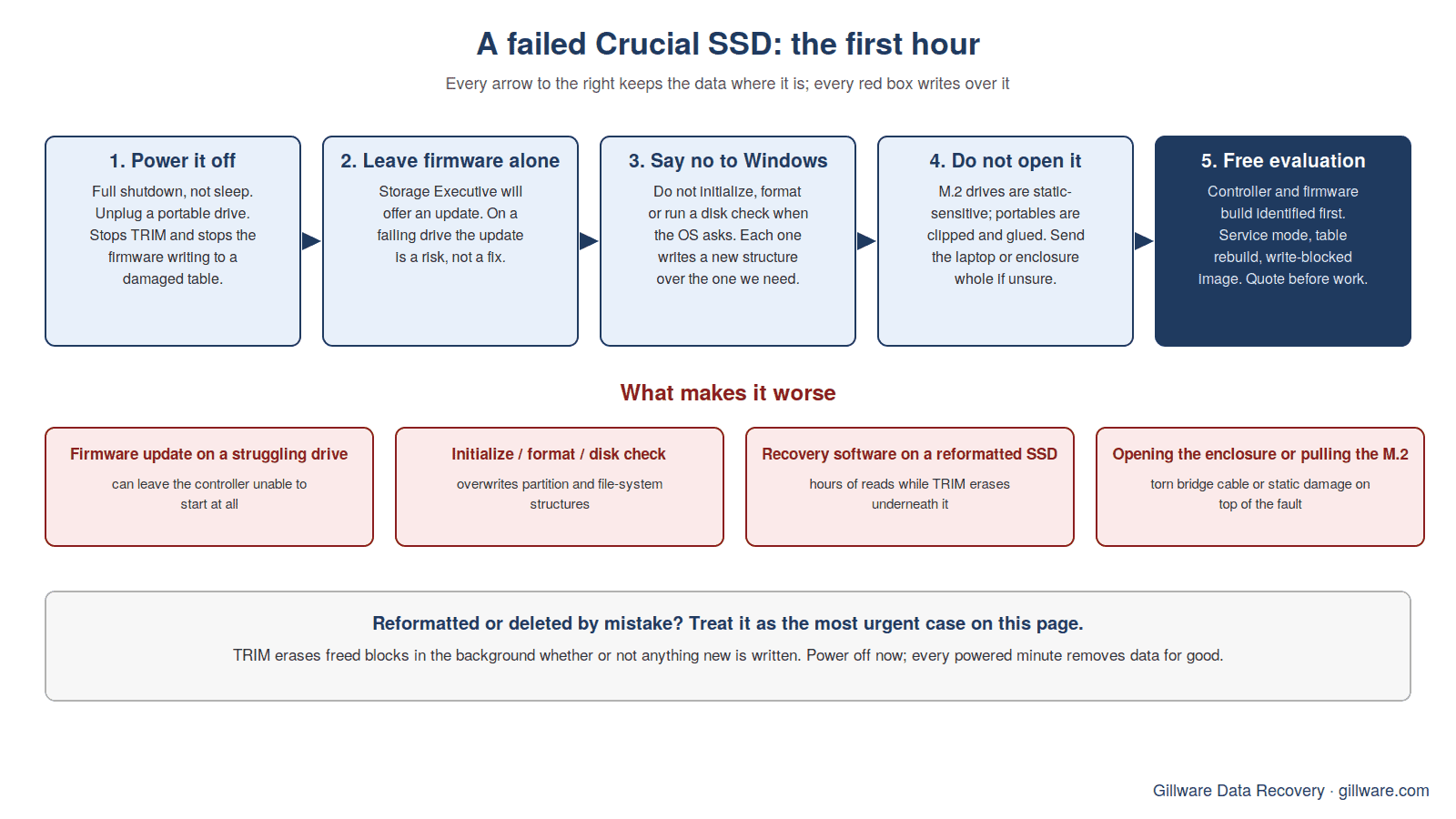
- Power it off. Shut the laptop down fully, not sleep. Unplug a portable drive. This stops TRIM, stops the firmware from writing more to a damaged table, and stops a failing drive from retrying weak blocks.
- Do not update the firmware. Storage Executive will offer an update for most Crucial drives. On a drive that is already misbehaving, the update is a risk, not a fix.
- Do not initialize, format or run a disk check. When Windows or macOS asks whether to initialize or erase the disk, say no. Each of those writes a new structure over the one we need.
- Do not open it. Portable drives are clipped and glued; M.2 drives are static-sensitive and sometimes under a heatsink that is bonded to the controller. Send the whole laptop or enclosure if you are unsure.
- Write down the symptom. What the computer said, whether the drive ever appeared, whether it ran hot, slow or disconnected before it stopped. That history shortens the evaluation.
How Gillware evaluates a Crucial SSD
The evaluation is free and the drive never leaves our lab. Our engineers start by identifying the exact controller and firmware build, because on Crucial drives the retail name is not enough: an MX500 from one production run and an MX500 from another can need different tooling, and a portable X8 may hold a full NVMe drive or a bare flash board. For a portable drive we separate the bridge from the storage first. Then we put the controller into a service mode where it can be addressed without mounting the volume, read its internal state and attempt to rebuild or recover the mapping table. If that works, the drive is imaged behind a write blocker so nothing we do changes it, and the file system is recovered from the image. If the controller cannot be revived, we tell you that, and what the narrow remaining options are, before any work is quoted.
Every case is quoted after a free evaluation, so you know the cost before any recovery work begins. We do not sugarcoat the odds on encrypted NAND or signed firmware. The lab in Madison, Wisconsin has worked on solid-state drives since the first consumer models shipped, and on hard drives for more than two decades.
Crucial recovery guides and related pages
- Silicon Motion SM2259XT2 SSD recovery — the DRAM-less SATA controller inside many BX500 drives, and what its failures look like.
- How to fix a corrupted SSD — what corruption means on an SSD and why the usual fixes make it worse.
- Laptop data recovery — for a Crucial drive buried inside a laptop you do not want to open.
- Samsung SSD data recovery — the sibling page, if your drive turns out to be a Samsung.
- SSD data recovery — the hub page: firmware, encrypted NAND, TRIM, and the brands we see most.
Start a Crucial SSD recovery
Call 877-624-7206 to talk through the symptoms with a client advisor, or submit a case and we will send you a prepaid shipping label for the free evaluation. Power the drive off first.