
RAID 6 Data Recovery
RAID 6 array down or degraded?
Power it off and don’t start another rebuild. Talk with one of our enterprise storage engineers first; the consultation is free.
If your RAID 6 array has failed and you need the data back, you’ve landed in the right place. RAID 6 is the dual-parity RAID level designed for the situations where RAID 5 falls short — long rebuild windows on large arrays, mission-critical NAS units, and storage where the cost of an unrecoverable read error during a rebuild is too high to tolerate. RAID 6 tolerates two simultaneous disk failures, which makes recovery scenarios on a true RAID 6 failure rarer but also more complex. Gillware has been recovering RAID 6 arrays since 2004 in our ISO 5 Class 100 cleanroom in Madison, Wisconsin. Every case starts with a free consultation, and you approve all recovery fees in writing before any recovery work begins. See also our RAID data recovery hub.
How RAID 6 Works
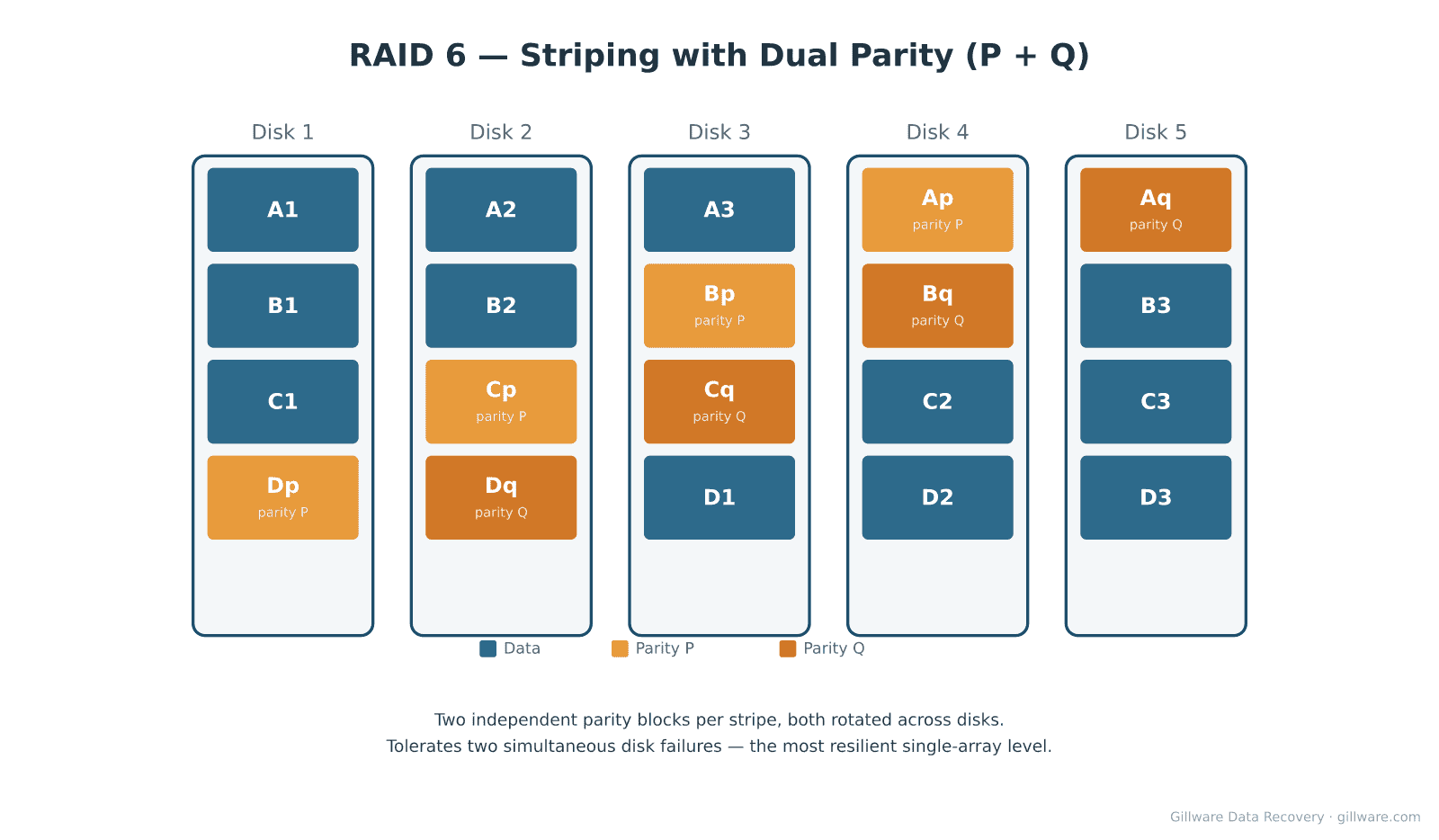
RAID 6 is essentially RAID 5 with a second, independent parity block per stripe. The first parity block (P) is the XOR of the data blocks on the stripe, just like RAID 5. The second parity block (Q) is computed using a different algorithm — typically Reed-Solomon over a Galois field — that’s mathematically independent of P. Both parity blocks rotate across the disks on different schedules. The result is that the array can tolerate the loss of any two disks simultaneously and still reconstruct the data, at the cost of two disks’ worth of parity overhead instead of one.
Why RAID 6 Arrays Fail
Three or more disk failures. RAID 6’s headline tolerance is two simultaneous disk failures. A third failure during a degraded state — or during a rebuild — ends the array. This usually happens on older arrays where all the disks were purchased together and the drive population is reaching end of life within the same window.
Failed rebuild after a double failure. Recovering from two failed disks in RAID 6 requires both P and Q parity on every stripe to be intact and correctly computed. If a third drive develops read errors during the rebuild, or if the controller miscomputes Q during the recovery process, the rebuild fails and the array is left in a partial state.
Parity corruption from an unclean shutdown. Power events during a write can leave P and Q out of sync with the data blocks on the same stripe. When a subsequent disk failure forces the controller to use parity to reconstruct, the reconstruction fails because the parity is wrong. The data is still readable from the surviving disks; the parity-based reconstruction path is what’s broken.
Controller failure. The same controller-loss scenario that affects RAID 5 applies here. The disks are healthy; the array configuration is gone. We reverse-engineer the dual-parity layout and reconstruct in software.
Vendor-specific parity algorithm variants. RAID 6 Q-parity computation isn’t standardized across controllers. Different manufacturers use different polynomial generators, different Galois field representations, and different stripe rotations. Recovery requires identifying which variant the original controller was using before software reconstruction can proceed.
How We Recover RAID 6
RAID 6 recovery starts with imaging every disk in the array on isolated, write-blocked hardware in our cleanroom. We don’t operate the original array. Physically damaged disks are restored to a readable state with donor parts as needed before imaging — head replacements, PCB swaps, firmware recovery, platter burnishing for surface damage.
Once we have images, our engineers identify the array’s stripe size, drive order, P-parity rotation, Q-parity rotation, and the specific Q algorithm variant used by the original controller. Identifying the Q variant is the most controller-specific part of RAID 6 recovery — we maintain a library of parity-algorithm signatures across major manufacturers, and our in-house software handles the common variants natively. Our RAID reconstruction software (HOMBRE) then assembles the virtual array from the images, regenerating missing data blocks from the surviving disks plus parity. File-system recovery proceeds on the reconstructed volume.
For triple-failure scenarios where three disks are degraded simultaneously, we work disk-by-disk to image whatever can be read from each. The third drive is often only marginally bad — bad sectors in a localized region rather than total failure. Recovering enough surface from each of the three to satisfy the parity equations on most stripes is often the path to a full recovery.
Related RAID Recovery Pages
Other RAID levels we recover: RAID 0 · RAID 1 · RAID 5 · RAID 10 · JBOD. Return to the RAID data recovery hub for the full overview of how Gillware handles RAID, NAS, SAN, and server array recoveries.
Start Your RAID 6 Recovery
If your RAID 6 array is down and the data on it matters to your business, the next step is to power the array off (do not attempt another rebuild) and book a free consultation. Label each disk with its bay position before removing anything from the chassis — drive order matters for reconstruction.
RAID 6 array failed? Let’s get your data back.
Our highly experienced engineers strive for the highest success rates in the industry. Talk with one of our enterprise storage engineers before anything else is done to the system.
- Free technical consultation with one of our enterprise storage engineers
- A written recovery agreement before work begins
- No billing surprises: you approve all recovery fees in advance
- Emergency service for business-critical downtime