
Swann DVR & NVR Data Recovery

Your Swann recorder is showing “No HDD detected” or “No hard drive found,” the live screen has a red square instead of recording, or playback comes back empty — and the footage you need isn’t there. For a home or small business that put cameras up to have a record when it mattered, that’s the worst moment to discover a problem. The reassuring part: in most cases the video is still physically on the drive inside the unit. What you do next decides whether it stays that way, because the recorder will offer to format the disk to clear the error, and that erases it. Here’s what’s really happening and how we get Swann footage back.
This is a brand-specific companion to our general security DVR and CCTV footage recovery guide, focused on how Swann systems store video and fail.
Why a Swann drive won’t read on a computer
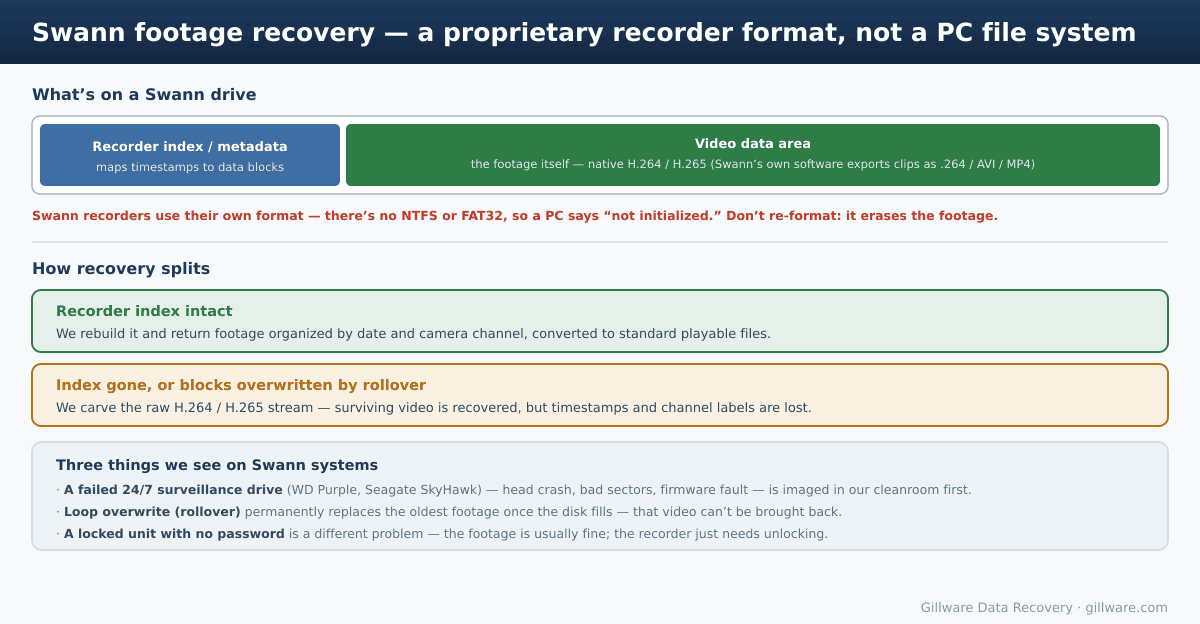
Swann is its own ecosystem, with a wide range of recorders built across several hardware generations — but they all share one thing that matters for recovery: the drive isn’t formatted in a way a computer can read. There’s no NTFS or FAT32 to choose; the recorder formats and manages the disk in its own proprietary layout, keeping an index of where each camera’s footage lives and writing the video itself as raw H.264 or H.265. Swann’s own software (SwannView, HomeSafe View, or the Swann Security app) is what converts that native footage into a .264, AVI, or MP4 file you can actually play.
So when you pull the drive and connect it to a Windows machine, the disk shows up as unallocated or “not initialized,” and Windows offers to initialize it. The footage is all there — your computer just doesn’t speak the format. Part of what we do in a Swann recovery is convert the recovered footage back into standard, playable files so you don’t need any of Swann’s software to view it.
The Swann errors and models we see
Swann’s lineup is broad — the DVR4, DVR8, and DVR16 series (the 4480, 4580, 4680, 5580, and 5680 families, among many others), the HDR hybrid recorders, the NVR-7300/7400 and NVR8/16-8580/8780 network recorders, the Master and Enforcer ranges, and the wireless NVW systems. Across all of them the symptoms that bring a drive to us are consistent:
- “No HDD detected” / “No hard drive found.” The recorder can’t see the drive, so it can’t record or play back.
- A red square on the live view. The unit isn’t recording a channel — often the first sign something is wrong, sometimes noticed only weeks later.
- “Playback failure” / no playback available. Live cameras work, but the recordings won’t come up.
- Trouble after a power event. A surge or abrupt power loss can corrupt the recorder’s format or knock the drive offline even when the disk itself is fine.
- Locked out of the unit. Sometimes the footage is fine — the recorder is just locked and no one has the password.
Here is the part that turns recoverable cases into lost ones: when the drive shows an error, the Swann menu invites you to format it to clear the problem, a lot of troubleshooting advice online tells you to format it or run disk-repair tools on a PC, and Windows offers to initialize it the moment you connect it. Every one of those overwrites the structures — or the footage — we’d otherwise use to get your video back.
What’s usually really wrong
- A failing surveillance hard drive. Swann drives run 24/7 and wear out — head crashes, bad sectors, firmware corruption. Many are purpose-built surveillance models; if yours is a WD Purple or a Seagate SkyHawk, those failure patterns and our process for them are covered on their own pages.
- Power surges and supply problems. An abrupt loss of power can corrupt the recorder’s format even when the drive is healthy, and a loose SATA or power connection inside the unit can produce the same “no HDD” symptom.
- Accidental format or factory reset. Someone clears the error the way the menu suggests, or resets the unit — recoverable if the drive is set aside quickly afterward.
- Loop overwrite (rollover). Swann records in a loop and overwrites the oldest footage once the disk fills. Video from before that point is permanently gone; we explain that hard limit in the DVR recovery guide.
- Lockouts. If the unit is simply locked and no one has the password, that’s a separate fix — see recovering a lost DVR/CCTV password.
- Network recorders on shared storage. Larger Swann NVR deployments may record to a RAID array or NAS; those are recovered as an array first, then parsed for footage.
How we recover Swann footage
We image the drive sector by sector and work only from that copy, so nothing we do can reduce your chances. From the image we read Swann’s proprietary layout directly. If the recorder’s index has survived, we rebuild it and return your footage organized by date and camera channel — converted into standard, playable files, no Swann software required. If the index is gone, or the blocks you need have been partly overwritten by rollover, we carve the raw H.264/H.265 stream out of the data area — that recovers the surviving video, though the timestamp and channel labels are lost. When the drive is physically failed, the platters are rebuilt in our cleanroom before any of that begins, and for legal or insurance matters we provide write-blocked forensic images with MD5/SHA hashing and a documented chain of custody.
What to do right now
- Stop the recorder. If the footage you need is still within the retention window, every hour the unit keeps running risks overwriting it.
- Do not format or initialize the drive — not from the Swann menu, not by running disk-repair tools on a PC, and not when Windows prompts you. This is the single most common way these cases are lost, and a lot of online advice gets it wrong.
- Don’t keep rebooting the unit to try to clear the error. Repeated reboots can rewrite the recorder’s metadata and widen the gap in your timeline.
- Pull the drive, label it, and set it aside — or send the whole unit if it’s fire- or water-damaged — so it can be imaged and worked from a copy.
What it costs
Every case begins with a free phone consultation and a free evaluation. For a standard single-drive Swann recovery our model is risk-free: no data, no charge. The honest exceptions are the rollover and overwritten-footage scenarios, and forensic or court-ordered work, which involve hands-on engineering time and sometimes amount to documenting why footage is gone — we evaluate those individually and give you a clear assessment and a quote before any work begins.
Swann recovery is one part of our broader video recovery practice — the same lab and process handle cameras, external recorders, and every major surveillance brand, including Hikvision and Dahua systems.
Swann “No HDD Detected”? Don’t Format the Drive
Power the recorder down, set the drive aside, and talk to us. Free, confidential evaluation — the footage is usually still there.
Or call us: 877-624-7206
