
LSI MegaRAID SAS 9361-8i Data Recovery: 9361-8i and 9361-4i Failures, StorCLI Traps, and CacheVault Risks
9361-8i array offline, foreign or degraded?
Don’t import, clear or force anything on the card. Book a free consultation with one of our enterprise recovery experts before anyone touches the array.
The LSI MegaRAID SAS 9361-8i is the retail SAS3108 card with the largest installed base: eight internal 12 Gb/s SAS/SATA lanes on a low-profile PCIe 3.0 card, sold under the LSI, Avago and Broadcom names, shipped inside Dell DSS systems and countless white-box servers, and increasingly bought used for home labs and small-office storage boxes. Its single-connector twin, the 9361-4i, is the same board with four lanes. Both carry 1 GB of DDR3-1866 cache, take the same CacheVault kit, and fail in the same ways: a second drive drops during a rebuild and the virtual drive goes offline, a used card arrives with the wrong firmware or a foreign configuration it refuses to import, or the card cooks itself in a tower case it was never designed for.
This page covers what is specific to the 9361-8i and 9361-4i. The complete catalog of SAS3108 messages — HII and WebBIOS prompts, StorCLI commands, the MegaRAID event codes, Linux megaraid_sas and VMware lsi_mr3 log lines, each rated by risk — is on our LSI MegaRAID SAS3108 recovery page.
9361-8i and 9361-4i: One Board, Two Connector Counts
| MegaRAID SAS 9361-8i | MegaRAID SAS 9361-4i | |
|---|---|---|
| RAID-on-chip | LSISAS3108 (PCI ID 1000:005D, “Invader”) | |
| Internal ports | 8, via two SFF-8643 connectors on the J5A1 dual connector | 4, via a single SFF-8643 connector on the same board layout |
| Cache | 1 GB DDR3 1866 MHz with ONFI cache offload; 16 MB flash ROM; 32 KB NVSRAM for the RAID configuration | |
| Cache protection | Optional CacheVault kit CVM02: CVFM04 flash module on the card plus a cabled CVPM02 supercapacitor | |
| RAID levels | 0, 1, 5, 6, 10, 50, 60; up to 64 virtual drives; strip size 64 KB to 1 MB (older virtual drives with smaller strips can be imported) | |
| Advanced software | CacheCade, FastPath, SafeStore and Recovery enabled through the J6B1 hardware key header | |
| Airflow / temperature | At least 200 linear feet per minute of airflow; 10–55 °C operating | |
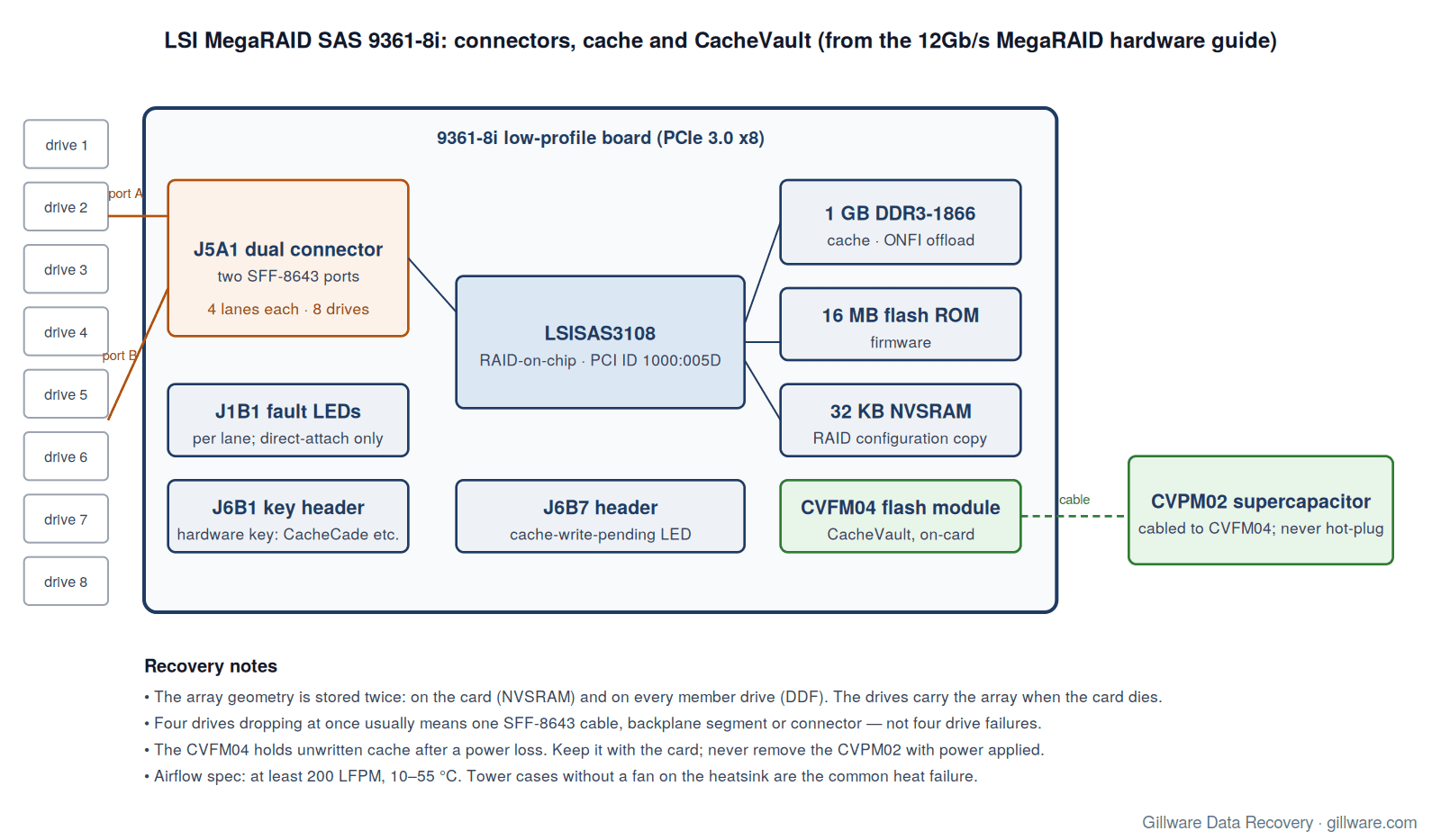
Two things on this table matter for recovery. First, the configuration lives in two places — the card’s NVSRAM and the DDF metadata on every member drive — so the drives carry the array with them when the card dies. Second, the card has a slot for a hardware key and a connector for a flash module, and a used 9361-8i may have arrived without either. A card that lost its CacheVault module may also have lost the last writes to the array; a card that lost its key may refuse to run a CacheCade pool that was created with one.
Heat: The 9361-8i in a Tower Case
Broadcom’s hardware guide specifies at least 200 linear feet per minute of airflow across the 9361 cards to keep the SAS3108 under its maximum ambient temperature, with an operating range of 10–55 °C. That is a rack-server number. The card ships with a passive heatsink and expects a wall of chassis fans pushing air front-to-back across the PCIe slots.
Owners who put the card in a desktop or tower case report what happens without that airflow. One administrator documented a 9361-8i driving eight drives in RAID 5 whose RAID-on-chip read 44 °C at boot and climbed to 74 °C under load; when he asked the vendor’s support team, they answered by quoting the airflow specification above, and a side-panel fan aimed at the PCIe cards brought the chip down to the low 50s. Another owner found the card reading about 73 °C in its own firmware after fifteen minutes of sitting idle in a non-server case and left a fan on it permanently.
What overheating looks like before the array fails
- Drives dropping out of a virtual drive and reappearing, producing “VD is now DEGRADED” events whose members all test healthy afterwards.
- “Command timeout on PD” and “PD reset” events under sustained load, and on Linux the “resetting fusion adapter” sequence.
- A controller that eventually faults — “FW in FAULT state” — or no longer completes POST.
If the array is still online, copy the important data off before you improve the cooling; opening the case and reseating cards is itself a risk to a marginal array. If the card has already died, the drives are almost always fine and the configuration is on them. The danger is the replacement card, covered below.
Two Connectors, Eight Lanes, and the “Four Drives Failed at Once” Symptom
The 9361-8i’s eight lanes leave the board through the J5A1 dual connector: two SFF-8643 ports, four lanes each. When drives are direct-attached, each port serves four drives through one breakout cable. That grouping is a useful diagnostic. If exactly four drives drop out at the same moment and all four sit on the same cable, the likely culprit is the cable, the backplane segment or the connector — not four simultaneous drive failures. If those four drives are spread across a RAID 5 or RAID 6, the single cable fault takes the virtual drive OFFLINE instantly.
The hardware guide adds a detail worth knowing when you are reading the lights: the J1B1 per-lane fault LEDs light only for direct-attached drives that are failed or Unconfigured Bad. Behind an expander backplane they tell you nothing, and an H3C guide for its 9361-8i-based cards notes that the card does not light LEDs for drives flagged with a predictive failure, nor with a pass-through backplane. Do not conclude a drive is healthy because its light is dark.
An array taken down by a cable fault is usually fully recoverable, provided no one “fixes” it by clearing the foreign configuration the returning drives present, or by forcing members online that came back at different times. Before touching anything, record which port and which bay each drive occupies.
The Double Fault: Rebuild Failed, Virtual Drive Offline
The failure that brings most 9361-8i arrays to our lab is the same one that brings most hardware RAID arrays: a drive fails, the rebuild starts, and a second drive surfaces a media error partway through. Dell’s knowledge base documents exactly this on a DSS7500 fitted with a 9361-8i running RAID 50: a drive went offline, the rebuild failed “due to source drive error”, the event log recorded state changes from ONLINE(18) to OFFLINE(10), and finally FATAL:VD 00/0 is now OFFLINE. Dell’s procedure is to use the HII utility’s Place Drive Online on the last drive that went offline — never the first — which returns the virtual drive to Degraded so a rebuild can be attempted.
That procedure is correct when you are certain of the order and the last-offline drive is readable. It is a Level 4 action when you are not. Placing the wrong drive online tells the controller to treat stale data as current; the rebuild then writes parity computed from that stale member across the array. H3C’s storage guide for the 9361-8i says plainly that forcing a failed array online “might modify the data in the RAID array.” If the array holds anything you cannot recreate, image the members first and let the order of events be established from the metadata rather than from memory.
One owner of a pair of 9361-8i cards described the pattern from the other side: a RAID 5 member was flagged failed and would not rebuild, he pulled it to test it on the motherboard, reconnected it, and a second drive went missing; after reseating both, the management console listed them as “Foreign, Unconfigured Good” with the array down. Each reseat changed the controller’s picture of which drive was current. By that point the safest move is to stop.
A cleared foreign configuration or the wrong replacement card can turn a recoverable 9361-8i array into a lost one. Start with a free consultation with one of our enterprise recovery experts.
Foreign Configurations on a 9361-8i
A 9361-8i shows drives as Foreign whenever the DDF metadata on them does not match what the card’s NVSRAM expects: after a cable fault, after drives were moved from another card, after a controller swap, or after a drive was pulled and reinserted. An integrator’s wiki for the 12 Gb/s MegaRAID cards notes that Unconfigured Bad is common after a drive is reconnected following an improper removal, and that the sequence is Make Unconfigured Good, then import or clear the foreign configuration.
Two of those words are the whole problem. Import is Level 4 because importing a stale or partial configuration can start a rebuild from the wrong member. Clear is Level 4 because it erases the DDF record on the drives — the only copy of your array geometry if the card is gone. H3C’s own knowledge base for the 9361 series documents the drive-replacement path — set good force, then delete the foreign configuration until it reports “Successfully deleted foreign configuration” — and that is the right sequence for a new, blank replacement drive. Run on a drive that still holds member data, it destroys the metadata the array needs.
Used cards add a variant: one buyer of a secondhand 9361-8i reported a POST screen that read FW package: 24.21.0-0143, then Foreign configuration import did not import any drives and Press any key to continue, with no Ctrl-R or Ctrl-H prompt, drives attached or not; the card was eventually returned as defective. A foreign-import message on first boot is not a reason to clear anything, and a card that will not show its setup utility is not a card to trust with data drives.
CacheVault: The Module, the Supercapacitor and the Pinned Cache
The 9361-8i and 9361-4i take the CacheVault CVM02 kit: a CVFM04 flash module on the card and a CVPM02 supercapacitor connected by cable. On power loss the supercapacitor powers the offload of the DDR3 cache to the flash module so that unwritten data survives the outage. The hardware guide’s power table even lists a separate state for a 9361-8i powering on with a deeply depleted CVPM02, and the CacheVault guide tells you to run write-through until the unit is charged. Three recovery consequences follow.
- Never hot-plug the CVPM02. The hardware guide is explicit that removing or inserting it with power on damages the board and the supercapacitor. If you are moving a card, power down first, and move the CVFM04 with it: the flash module may hold the last writes to the array.
- “Pinned” cache is data the drives never received. When a virtual drive goes offline while the cache holds dirty writes, the controller preserves them and logs “Controller cache pinned for missing or offline VD”. H3C’s knowledge base describes the symptom: no new array can be created because “controller has data in cache for offline or missing virtual disks.” The documented fix —
delete preservedcache— discards those writes permanently. If the virtual drive can be brought back, the cache flushes to it; if it cannot, the lab needs to know what was pinned before it is thrown away. - A card without its CacheVault still ran write-back if someone told it to. The
cachedbadbbucontroller property allows write-back caching with a bad backup unit. A used card may have been set that way by its previous owner; after an unclean shutdown, the array can be internally inconsistent without any event saying so.
The J6B7 header on the board drives an external cache-write-pending LED. If your chassis wires one, a lit LED at power-off means the cache was not empty.
CacheCade and the Hardware Key
On the SAS3108 retail cards, CacheCade, FastPath, SafeStore and Recovery are enabled by a physical key on the J6B1 header, not by a software licence. If a 9361-8i with a CacheCade SSD pool is replaced by a card without the key, or the SSDs are not moved with the drives, the pool shows as missing — an integrator’s StorCLI notes show the CacheCade virtual drive listed as Msng when its SSD is absent. In write-back CacheCade configurations, those SSDs can hold data that never reached the hard drives. Send them with the array.
Choosing a Replacement Card
The hardware guide’s drive-migration rules are short and strict: the destination controller must have no existing configuration, the drive order should be preserved, and moving all drives to a controller that already has a configuration produces an NVSRAM mismatch error. For the 9361-8i specifically, three more traps come from the firmware side.
- Firmware line. The 9361-8i runs the MR 6.14 / 24.21.x firmware family; Dell distributes package MR6.14_24.21.0-0012 for the card. The later 24.22.0-0061 package, by contrast, lists only the 9361-16i, 9361-24i and 9380-8i8e as supported controllers. A replacement 9361-8i flashed to a different build than the one that wrote the array can refuse the import with no clear error; our LSI MegaRAID brand page describes that pattern, and the SAS3108 family page covers the “backward incompatible upgrade” event you may see instead.
- Lookalikes. The 9361-16i and 9380-8i8e are SAS3316 cards and the 9361-24i is SAS3324; they use different firmware packages, carry their own flash, and are not drop-in replacements for a 9361-8i. See cards that look like SAS3108 cards but are not.
- Auto-import. The
foreignautoimportcontroller property makes a card import whatever foreign configuration it finds at boot. On a replacement card with data drives attached, that is an unattended Level 4 action. Check it before connecting anything.
VMware ESXi on the 9361-8i
The 9361-8i is common under ESXi, and the family page covers the lsi_mr3 behaviour that matters most: an offline virtual drive is reported to the host only as a NO_CONNECT path failure, so the datastore goes All-Paths-Down and the host stops responding before anyone sees a RAID event. One administrator reported a 9361-8i under ESXi 6 whose I/O stopped completely for seconds at a time while the card reported no fault at all — the kind of stall that is easy to blame on the hypervisor and that often precedes a drive drop.
9361-8i Messages: Quick Index
The messages 9361-8i owners most often search for, with links to the full explanation and risk rating on the SAS3108 page:
- “Foreign configuration found”
- Drives shown as (Foreign) Unconfigured Bad
- Place Drive Online and Force Online on a failed array
- “VD is now OFFLINE” (0x00fc)
- “Rebuild failed on … due to source drive error” (0x0065)
- “Controller cache pinned for missing or offline VD” (0x0143)
- “Controller cache discarded for missing or offline VD” (0x0128)
- “Drives missing from configuration at boot” (0x00ee)
- StorCLI commands that change or destroy data
- “Reset failed, killing adapter”
- ESXi: datastore All-Paths-Down with no RAID event
- 9361-16i, 9361-24i and 9380-8i8e are not this card
If Your 9361-8i Array Is Down Right Now
- If the volume is still accessible, copy the most important data off it before any rebuild, reseat or cooling work.
- Save the read-only StorCLI output to another machine:
storcli /c0 show all,storcli /c0/eall/sall show all,storcli /c0 show preservedcache,storcli /c0/cv show allandstorcli /c0 show events file=events.txt. These are the safe commands; nothing withset,import,del,delete,initorstartin it is. - Label every drive with its bay and its port on the J5A1 connector before anything is unplugged.
- Do not import or clear a foreign configuration, do not Make Unconfigured Good a drive that held data, do not place or force a drive online, and do not delete preserved cache.
- Do not replace the controller and connect the drives to it with
foreignautoimporton. Do not flash firmware with data drives attached. - Power the system down. If a CacheVault module is fitted, leave it on the card; never remove the CVPM02 with power applied.
- Send every member drive, any CacheCade SSDs, and the controller with its flash module. We do not need the server.
How We Recover 9361-8i Arrays
We image every member drive — hard drives and any CacheCade SSDs — on write-blocked hardware in our ISO 5 Class 100 cleanroom, working around physical damage with donor parts first so that a drive the controller marked failed still gives up most of its surface. Our HOMBRE reconstruction software reads the DDF metadata from each image, establishes member order, strip size and parity rotation, and determines which members dropped out and in what sequence. The array is assembled virtually — no 9361-8i, no replacement controller, no firmware involved — and the file systems are recovered from the assembled volume. The full approach is described on our SAS3108 family page and our RAID data recovery page; the previous generation of LSI cards is covered on the SAS2108 page.
MegaRAID SAS 9361-8i Documentation
- 12Gb/s MegaRAID SAS RAID Controllers User Guide (pub-005183, v1.3) — 9361-8i and 9361-4i connectors, cache, headers, airflow, power states, drive roaming and migration
- CacheVault CVPM02 / CVFM04 User Guide — which cards take which module, charging, write-through until charged, no hot-plug
- StorCLI Reference Manual — every StorCLI command, including the foreign, preserved-cache and drive-state commands
- Dell KB 000219727 — the DSS7500 / 9361-8i RAID 50 double fault and the Place Drive Online procedure
- 45Drives KB450033 — replacing a failed drive on a 9361 card (set offline, set missing, spin down, swap)
- Dell firmware page for the MegaRAID SAS 9361-8i — the MR6.14 / 24.21 firmware line
MegaRAID 9361-8i Frequently Asked Questions
Is the 9361-4i the same card as the 9361-8i?
The hardware guide describes it as the identical board with a single SFF-8643 connector instead of two. Same chip, same cache, same CacheVault kit, same firmware family. Everything on this page applies to it with four lanes instead of eight.
Four drives disappeared at once. Are they all dead?
Almost certainly not. Each SFF-8643 port on the J5A1 connector carries four lanes. Four simultaneous drops on one cable point to the cable, backplane or connector. Do not clear the foreign configuration the drives present when they return; label the layout and power down.
My 9361-8i runs at 70 °C or more. Is that a problem?
The specification is 200 linear feet per minute of airflow and a 10–55 °C operating range. Owners who measured their cards in tower cases report 73–74 °C without a dedicated fan and the low 50s with one. Treat timeouts, resets and drives that drop and return as the early warning, and back up before you re-cable anything.
The controller says it has pinned cache and will not let me create a new array. Can I just delete it?
You can — delete preservedcache is the documented command — but what you delete is data the drives never received. If the virtual drive that owned that cache can be brought back, the cache flushes to it. If it cannot, that cache may be the difference between a consistent file system and a damaged one. Image first.
Will a 9361-16i read my 9361-8i arrays?
The 9361-16i is a different chip (SAS3316) on a different firmware package. The drive-migration rules in the hardware guide assume a blank destination controller; do not create or initialize anything on the new card, and do not let it auto-import. Use another 9361-8i on the matching firmware build, or have the array reconstructed from images.
What should I send you?
Every drive that was attached to the card, labeled by bay and port — including any CacheCade SSDs — plus the controller with its CVFM04 module still fitted. We do not need the server, and in most cases we do not need the controller to run.
Start Your 9361-8i Recovery
Power the system down, label the drives, and do not import, clear, force, initialize or migrate anything. Our engineers image every member and reconstruct the array without the controller. Gillware has been recovering RAID arrays for more than two decades.
9361-8i array down? Let’s get your data back.
Our highly experienced engineers strive for the highest success rates in the industry. Talk with one of our enterprise storage engineers before anything else is done to the system.
- Free technical consultation with one of our enterprise storage engineers
- A written recovery agreement before work begins
- No billing surprises: you approve all recovery fees in advance
- Emergency service for business-critical downtime