
Intel RAID Controller RS2BL080 and RS2BL040 Data Recovery: Failures, Error Messages, and Ctrl+G Utility Prompts
RS2BL080 array offline or not importing?
Don’t import, clear or force anything on the card. Book a free consultation with one of our enterprise recovery experts before anyone touches the array.
The Intel RAID Controller RS2BL080 and its four-port twin, the RS2BL040, are Intel’s own versions of the LSI MegaRAID SAS 9260-8i and 9260-4i: the same LSI SAS2108 chip, 512 MB of DDR2 ECC cache, and the same on-disk array format, sold under Intel part numbers with Intel firmware, Intel batteries and Intel management tools from 2010 until Intel discontinued them. They went into Intel server boards and chassis by the thousand — one UK integrator alone shipped them in large numbers from 2012 to 2016 — and many are still running behind the same drives they started with.
When one fails today, the LSI playbook applies, but the prompts and tools have Intel names: the RAID BIOS Console 2 behind Ctrl+G instead of WebBIOS behind Ctrl+H, Intel RAID Web Console 2 instead of MegaRAID Storage Manager, a “configuration mismatch” chapter in Intel’s hardware guide, and a product that moved to self-service support when Intel discontinued it. This page covers what is specific to the RS2BL080 and RS2BL040. The full catalog of SAS2108 messages, each rated by risk to the data, is on our LSI MegaRAID SAS2108 recovery page.
RS2BL080 and RS2BL040 at a Glance
| RS2BL080 | RS2BL040 | |
|---|---|---|
| LSI equivalent | MegaRAID SAS 9260-8i | MegaRAID SAS 9260-4i |
| Internal ports | 8 (2 × SFF-8087), up to 32 devices through expanders | 4 (1 × SFF-8087) |
| Cache | 512 MB DDR2 ECC | |
| Battery | Optional Intel RAID Smart Battery AXXRSBBU7 / AXXRSBBU8 | |
| Chip / host | LSI SAS2108, PCIe 2.0 x8; ships with standard and low-profile brackets | |
| Modes | RAID only — no JBOD / pass-through mode | |
| Lifecycle | Launched Q2 2010; last order 2017; discontinued — Intel self-service support only | |
The family is one card in two port counts. Everything on the family page about how a SAS2108 stores its configuration, how members go Foreign, and which prompts destroy data applies to both Intel cards without change.
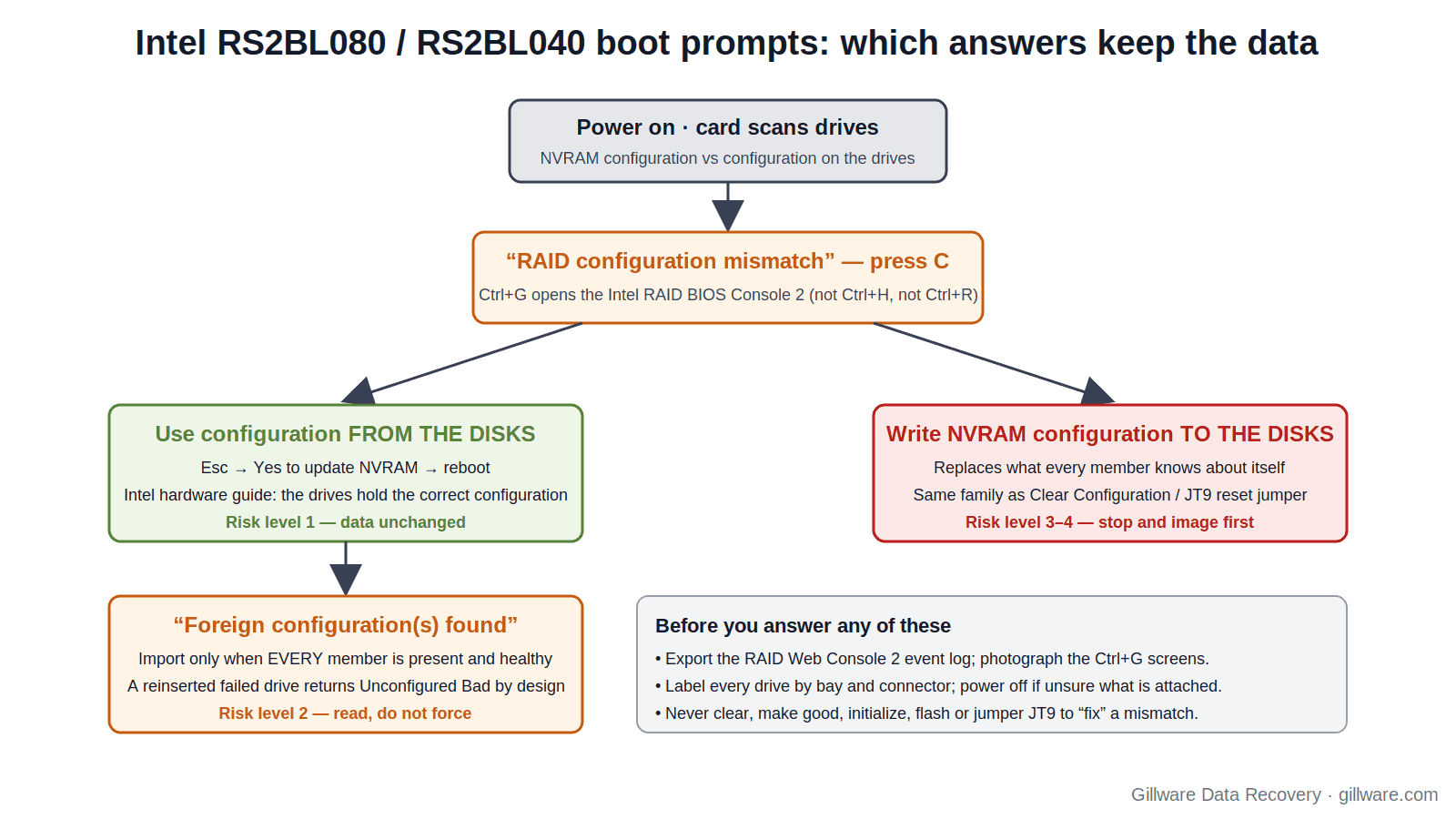
“RAID configuration mismatch” and the Choice That Follows
This is the prompt most specific to the Intel cards, and the family page gives it its own entry. At boot the RS2BL080 compares the configuration stored in its own NVRAM with the configuration written on the attached drives. When they disagree — after a card swap, after drives were moved, after some members were absent for a boot — the card reports a configuration mismatch and offers to open the configuration utility (press C).
Intel’s hardware guide for the RS2BL080 has a short chapter on resolving it, and the safe choice is stated plainly: since the drives contain the correct configuration, use the configuration from the disks, press Esc, select Yes to update the NVRAM, exit and reboot. The dangerous choice is the other one. Writing the card’s NVRAM configuration onto the drives replaces what the drives know about themselves with what a possibly different, possibly empty controller remembers.
One administrator on Intel’s community forum documented the sequence on an RS2BL080 in an S5520HC-based server: the card had run two SAS RAID 1 sets, one drive failed, he removed both pairs and attached SATA drives instead, flashed the latest RAID BIOS, and on the next cold boot was told there was a configuration mismatch and to press C. The card had a configuration in NVRAM; the new drives had none. In his case the old data was not the goal. If it had been — if those were the original drives — “use configuration from disks” would have been the only correct answer.
Two rules for this prompt on an RS2BL080 or RS2BL040. If the drives you want data from are attached, always take the configuration from the disks. If you are not sure which drives are attached, or some are missing, do not answer at all: power off and label everything first. The general entry is on the family page under Intel RS2BL080: configuration mismatch at boot.
Ctrl+G, a Black Screen, and the JT9 Jumper
On Intel’s RAID cards of this generation the pre-boot utility is the Intel RAID BIOS Console 2, entered with Ctrl+G. Intel’s support articles are split by that key: the import-foreign-arrays procedure for Ctrl+G-based controllers is a different article from the one for later Ctrl+R-based cards, and the Ctrl+R article’s Frn-Ba (Foreign Bad) screens do not describe what an RS2BL080 shows. Make sure any instructions you follow are the Ctrl+G ones.
The same community thread above records what happened next: Ctrl+G, which had worked days earlier, produced a black screen and never reached the graphical console. The owner found the JT9 two-pin reset header in the hardware guide and considered jumpering it to reset the controller; the eventual way back into the console was toggling the server board’s USB Legacy setting. Intel’s answer was to use RAID Web Console 2 from the operating system as a workaround.
What to take from that for a failed array: a black screen at Ctrl+G is not evidence the card or the drives are dead, and resetting the controller through JT9 is a configuration-clearing action, not a diagnostic one. Clearing the controller’s configuration on a SAS2108 does not erase the drives, but it converts every member to Foreign and makes the next boot a foreign-import decision. The family page’s Clear Configuration entry explains why that is one step from an initialize.
The Pulled Drive That Will Not Rejoin
Intel documents a behaviour that catches administrators testing a rebuild or reseating a suspect drive. The controller is designed to refuse a drive that has previously failed out of the array: reinsert the same drive and, instead of rebuilding, the card raises a Foreign Configuration error and marks the drive Unconfigured Bad. Intel’s workaround is to reboot, enter the RAID BIOS with Ctrl+G, and act on the Unconfigured Bad drive from there.
The companion Intel article for Ctrl+G cards adds the step people skip: if a drive marked Foreign Unconfigured Bad had earlier predictive-failure or defective events — a solid amber LED — it should come out of the backplane and a new drive should go in, be scanned, be set as a global hot spare, and be scanned again before the reboot. In other words, Intel’s own procedure distinguishes a drive that dropped for a path reason from a drive that dropped because it was failing, and only the first should be made good.
On a degraded RAID 5 this is the decision that matters. A drive that was failing when it dropped is holding stale, possibly unreadable data; making it Unconfigured Good and importing tells the controller to trust it. The family page covers the state and its risks under “(FOREIGN) Unconfigured Bad” and “Make UnconfGood”.
Expanders, Consumer SATA, and “Transient error detected while communicating with PD”
The RS2BL080 was frequently paired with Intel’s RES2SV240 SAS expander to run twenty or more drives from one card. One documented build — an RS2BL080, a RES2SV240 and twenty 3 TB desktop SATA drives in two RAID 6 arrays — logged Unexpected sense: PD = 13 – Invalid field in CDB every few seconds and Transient error detected while communicating with PD roughly every ten minutes in RAID Web Console 2, then dropped a drive. The owner’s workaround, after Intel pointed at the enclosure, was to jumper the drives down to a 3 Gb/s link; the warnings stopped. Another owner reported the same pattern on 4 TB desktop-class drives in a RAID 10.
Those are reports, not vendor confirmations, but the pattern is familiar from every SAS2108 behind an expander: link-rate negotiation problems between an expander and consumer SATA drives show up as sense errors and transient communication faults long before a drive actually fails. If an RS2BL080 array has been logging these for months, the drives it has dropped may be healthy and the drive it finally fails may not be the problem.
Intel’s hardware guide adds a detail that explains a common surprise on these cards: there must be disk activity for a missing drive to be marked failed. A lightly used archive array can lose a member and not report it until the next heavy write, which is often the moment a second drive is also struggling.
Firmware on the RS2BL080: Beeps That Will Not Stop and “Fatal firmware error line 629”
Because these cards shipped for six years and were updated by many hands, the firmware spread in the field is wide. Two documented behaviours are worth knowing before you flash anything on a failed array.
An integrator’s knowledge base records that on firmware level 0104, a glitch in the Copyback feature can leave an RS2BL040 or RS2BL080 beeping after a failed drive has been replaced, and beeping again after a reboot. The array in that case is usually fine; the alarm is the problem. Do not clear a configuration to silence an alarm.
Several Intel customers reported fatal firmware error line 629 on RS2BL040 and RS2BL080 cards in S2600GZ-based servers after updating to firmware 12.14.0-0185; one reporter downgraded to 12.14.0-0167 and the error stopped. The family page’s “Fatal firmware error” entry explains what the controller may do to its configuration when it hits one. On a card that has already lost an array, a firmware update is not a recovery step; if the firmware must change, do it with no drives attached.
RAID Web Console 2: What It Can and Cannot Do
Intel RAID Web Console 2 is Intel’s version of MegaRAID Storage Manager for this generation of cards, and the technical product specification describes its scope: it is limited to properties and actions that do not require a controller reboot and are not data-destructive, while the Ctrl+G console and the command line can do everything. Cache policy is set per virtual drive and can be changed from any of the three. Intel’s specification also warns against enabling cache policies that depend on the Intel RAID Smart Battery when none is installed, and notes that the battery does not protect data in the drives’ own caches.
For recovery purposes RWC2’s event log is the most valuable thing on the server. Its entries — drive state changes, the sense and transient errors above, battery events, foreign-configuration detections — are the same MegaRAID events the family page catalogs under MegaRAID Storage Manager and Event Log Messages. Export it before you do anything else. Importing a foreign configuration from RWC2 is possible and carries exactly the same risk as doing it from Ctrl+G.
Discontinued: What Self-Service Support Means for Your Array
Intel lists the RS2BL080 and RS2BL040 on its product discontinuance announcement for RAID and storage products. Discontinued Intel RAID products move to self-service support: the knowledge base and download pages stay up, but there is no one at Intel to walk through a foreign-import decision with you. The LSI documentation for the 9260 family still applies to the hardware, and Intel’s own hardware guide and technical product specification remain available — both are linked below.
Replacement cards are now secondhand by definition. An “RS2BL080” from the used market may carry any of six years of firmware, may have been cross-flashed to LSI 9260 firmware, and will not come with your battery. The replacement-card rules from the family page apply in full: no drives attached until you have checked the firmware, no import until every member is present, and no clear, make-good or initialize to force a result.
RS2BL080 Messages: Quick Index
- Intel RS2BL080: configuration mismatch at boot
- “Foreign configuration(s) found on adapter…”
- “All of the disks from your previous configuration are gone”
- “The following VDs have missing disks”
- “There are offline or missing virtual drives with preserved cache”
- “(FOREIGN) Unconfigured Bad” — and the reinserted-drive behaviour above
- “Make UnconfGood” / “Make Online”
- Clear Configuration — including the JT9 reset jumper
- “Foreign drives cannot be imported as they don’t form a complete configuration.”
- “State change on PD … from ONLINE(18) to FAILED(11)”
- “Fatal firmware error”
- Command-line tools that write to your drives
If Your RS2BL080 Array Is Down Right Now
- If the volume is still accessible, copy the most important data off it before any rebuild, import, firmware change or mismatch answer.
- If the configuration-mismatch prompt is on screen and the original drives are attached, the only safe answer is to use the configuration from the disks. If you are not certain which drives are attached, power off instead.
- Photograph the POST and Ctrl+G screens, or export the RAID Web Console 2 event log and controller/drive properties to another machine.
- Label every drive with its bay, which SFF-8087 connector or expander port it hangs off, and its serial number.
- Do not import, clear, make good, force online, jumper JT9, flash, downgrade or rebuild — and do not move the drives to a PC or to a different card.
- Ship every drive together. We do not need the server, the expander or, usually, the card.
How We Recover RS2BL080 and RS2BL040 Arrays
We image every member drive on write-blocked hardware in our ISO 5 (Class 100) cleanroom, restoring physically failed drives with donor parts first. Our HOMBRE software reads the MegaRAID metadata from each image — identical under Intel and LSI firmware — establishes member order, stripe size and parity layout, and works out which drives dropped out and when, which matters most on expander builds with a history of transient errors. The array is assembled virtually, with no controller involved, and the file systems are recovered from the assembled volume. The full approach is on our SAS2108 page and our RAID data recovery hub.
RS2BL080 and RS2BL040 Documentation
- Intel RAID Controller RS2BL080 Hardware User’s Guide — card layout, JT9 jumper, “Resolving a Configuration Mismatch”, drive roaming and migration
- Intel RAID Controller RS2BL080 and RS2MB044 Technical Product Specification — RAID Web Console 2 scope, cache policies, battery warnings
- Intel: Importing Foreign RAID Arrays on Ctrl+G-based Intel RAID Controllers
- Intel: RAID Array Rebuild Does Not Start on Removal and Reinsertion of the Hard Drive
- Intel: Support for Discontinued Intel RAID/Storage Products
- Intel ARK: RS2BL080 specifications
- MegaRAID SAS Software User Guide (Rev. I) — the LSI event and message appendix that Intel’s cards share
RS2BL080 and RS2BL040 Frequently Asked Questions
The card says “configuration mismatch” and wants me to press C. Which configuration do I choose?
If the drives attached are the ones holding your data, use the configuration from the disks, as Intel’s hardware guide says. Never write the controller’s NVRAM configuration to the drives. If you are not sure what is attached, power off.
Ctrl+G gives me a black screen. Is the controller dead?
Not necessarily; one owner regained the console by toggling the board’s USB Legacy setting, and Intel suggests RAID Web Console 2 from the OS. Do not jumper JT9 to “fix” it — that clears the controller’s configuration.
I pulled a drive and put it back, and now it is Unconfigured Bad. Did I kill it?
Probably not. Intel’s cards refuse a previously failed drive by design. But a drive that dropped because it was failing should not simply be made good again; Intel’s own procedure says to replace it.
Can I replace a dead RS2BL080 with an LSI 9260-8i?
It is the same chip and the array format is the same, but firmware differs. Attach no drives until the firmware is checked, and never clear or initialize to force an import.
Intel no longer supports this card. Does that affect recovery?
No. The array is written in the SAS2108 format regardless of Intel’s support status, and we reconstruct it from the drives without the controller.
What should I send you?
Every drive that was attached, labeled by bay, connector and expander port. We do not need the server, the expander or, usually, the card.
Start Your RS2BL080 Recovery
Power the system down, label the drives, and do not import, clear, force, flash or rebuild. Our engineers will image every member, reconstruct the array without the controller. Gillware has been recovering RAID arrays for more than two decades.
RS2BL080 array down? Let’s get your data back.
Our highly experienced engineers strive for the highest success rates in the industry. Talk with one of our enterprise storage engineers before anything else is done to the system.
- Free technical consultation with one of our enterprise storage engineers
- A written recovery agreement before work begins
- No billing surprises: you approve all recovery fees in advance
- Emergency service for business-critical downtime