
A county records office runs a dispatch and vehicle-fleet system that was originally coded in Clipper and dBASE IV in 1993, migrated onto Windows Server 2003 in 2004, and has been running the same .DBF, .DBT, and .NDX files on a modest RAID 1 ever since. This morning the RAID controller failed. The hardware is a decade past end-of-life. The .DBF files are readable but the .DBT memo file is throwing “Invalid DBF file” on any query touching a memo field. A commercial fishing operation still runs its catch-tracking database in dBASE 5 for DOS under DOSBox, and after a USB thumb drive corrupted mid-copy the primary .DBF now reports 0 records even though the file is 240 MB. A retired accountant needs 25 years of client records extracted from a set of dBASE III+ files pulled off a Zip disk that hasn’t been read since 2007.
We recover dBASE databases when the storage under them fails, and we recover them from a lot of storage that failed a very long time ago. dBASE is one of the most resilient database formats ever designed — a fixed-length record format with almost no internal metadata — and even severely damaged files often yield most of their records to careful reconstruction.
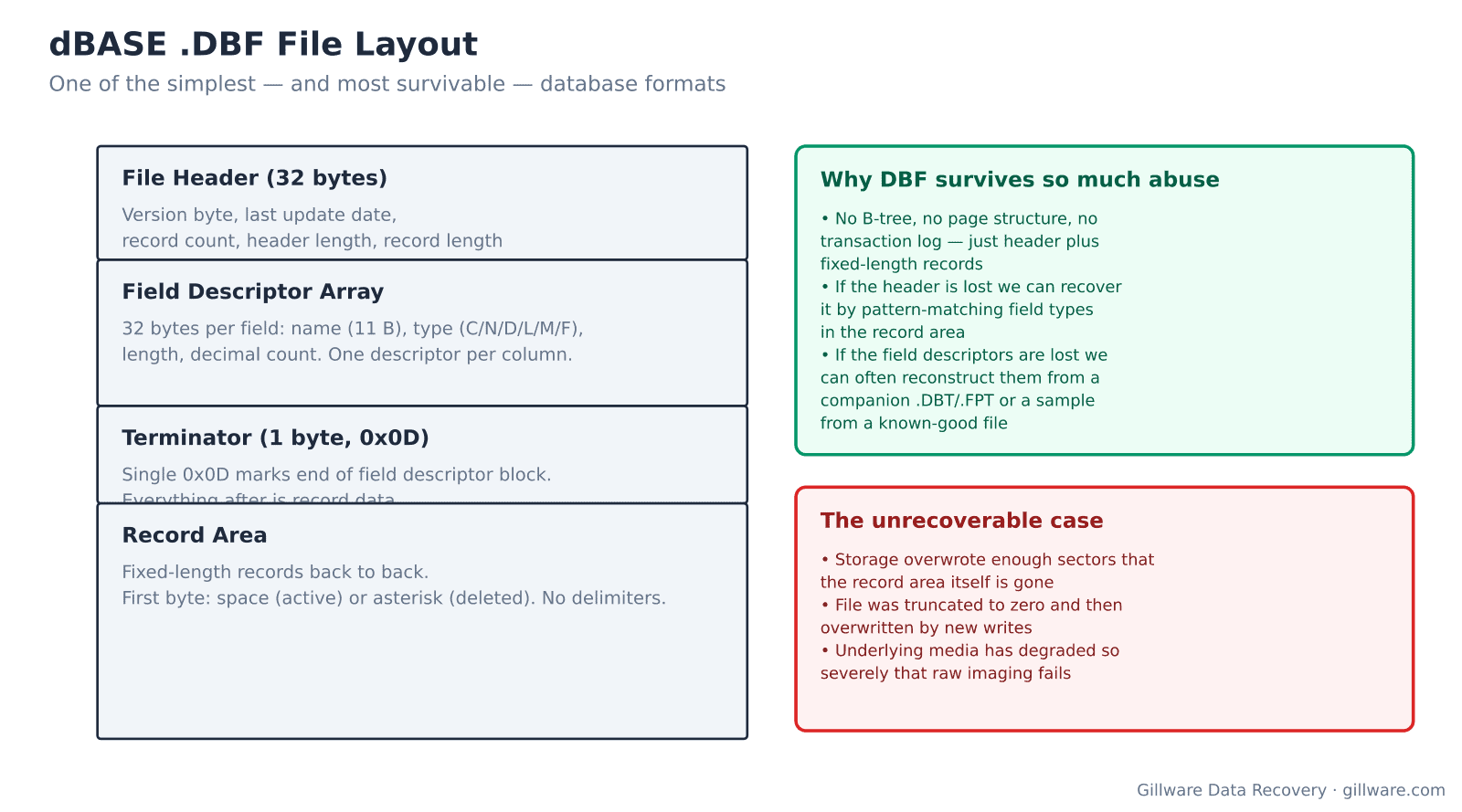
Why dBASE survives so much abuse
A .DBF file is one of the simplest database formats in commercial use. It starts with a 32-byte header carrying the version byte, last update date, record count, header length, and record length. The header is followed by a 32-byte field descriptor per column: name (11 bytes), type (C for character, N for numeric, D for date, L for logical, M for memo, F for float), field length, and decimal count. A single 0x0D byte terminates the descriptor block. Everything after is record data: fixed-length records back to back, each starting with a single-byte deletion flag (space for active, asterisk for deleted). No delimiters. No page structure. No transaction log. No B-tree inside the file.
The consequence for recovery is that even severe storage damage often leaves enough intact record data to reconstruct the database. A .DBF whose header has been overwritten can be re-headered by pattern-matching the field types across the record area — character fields have distinctive byte patterns, numeric fields have consistent decimal alignment, date fields follow YYYYMMDD, and the record boundaries reveal themselves in the deletion-flag column. A .DBF whose middle sector is destroyed loses the records in that specific range but leaves everything before and after fully intact.
The companion files — .DBT (dBASE III/IV memo) or .FPT (dBASE 5/FoxPro memo), .NDX and .MDX (index files) — are also straightforward to recover or rebuild. Indexes can be regenerated from a good .DBF and are effectively rebuild-only. Memo files are more nuanced: they use a block structure where memo fields in the .DBF store block numbers into the .DBT/.FPT, and when the memo file is damaged, we recover it separately and re-link.
Formats and versions we handle
- dBASE II (version byte 0x02) — the 1980-era original. Rarely encountered but occasionally shows up in archived data from bank and insurance systems.
- dBASE III / III+ (0x03, 0x83 with memo) — the dominant late-1980s format. Still runs in many county-level records systems.
- dBASE IV / IV SQL (0x43, 0xCB) — introduced SQL-like queries. Common in 1990s business applications.
- dBASE 5 (0x30 with .DBC container) — the Windows-era format. Compatible with FoxPro internals in many respects.
- Clipper & dBASE Fast (custom variations) — slightly different header layouts but same record format. Handled the same way.
Error messages and symptoms
- “Not a dBASE file” or “Invalid DBF file” — the header page is unreadable or its version byte does not match a known signature. Most commonly caused by sector damage at the beginning of the file.
- Record count reports as 0 but file is large — the 4-byte record count in the header at offset 4 has been zeroed while the record area is intact. Trivial to fix by recomputing from file size divided by declared record length.
- “Corrupted file – other than header” from dBASE runtime — the record area contains bytes that violate the field-type expectations. A specific range of records is damaged; we determine which range and recover around it.
- Memo field displays as garbage or throws “Invalid memo” — the .DBT or .FPT companion memo file is damaged or missing, or the block pointers in the .DBF have become inconsistent with the memo file’s block map.
- Index files reject the table (“NDX file does not match DBF”) — the index was rebuilt against a different version of the data. Usually cosmetic — we regenerate indexes from the recovered .DBF.
- File size is not a valid multiple of the record length — the file has been truncated mid-record. The last partial record is lost; everything before is recoverable.
How we recover a dBASE database
The storage the files live on gets imaged first — this is especially important for legacy media like Zip disks, tape backups, or ancient hard drives that may not survive a second read attempt. Once the image is stable, we extract every .DBF, .DBT, .FPT, .NDX, .MDX, and .CDX file from the imaged filesystem.
For each .DBF: if the header is intact, we parse it and validate every record against its declared field types, cataloging active records, deleted records, and any that fail type validation. If the header is damaged, we scan the file for the record boundary pattern — deletion-flag bytes at regular intervals — and infer the record length from the pattern, then reconstruct the field descriptors by analyzing the byte patterns within each column. Character fields are ASCII with padding; numeric fields are right-aligned digits; date fields follow known formats; logical fields are single bytes. This reconstruction is deterministic when enough intact records survive.
Memo files get handled separately. When a .DBT or .FPT is present and intact, we cross-reference block numbers between the .DBF and the memo file to preserve memo content. When the memo file is damaged, we recover it block by block and re-link surviving blocks to the surviving .DBF records. When it’s completely gone, we deliver the .DBF with memo fields showing as null and note it in the recovery report.
Deliverables are working .DBF files that open in any dBASE-family runtime — original dBASE, Clipper, FoxPro, Visual FoxPro, Harbour, or modern ODBC drivers — plus regenerated indexes if requested and a per-file recovery report.
When we can’t recover
DBF files are so simple that unrecoverable cases require significant media destruction. When enough sectors of the record area have been physically overwritten — not just deleted but overwritten by new writes — the affected records are gone. When the storage medium itself has degraded to the point that raw imaging fails (magnetic degradation on 25-year-old drives, dead Zip disks, unreadable tape), there is nothing to work with. When a file has been truncated to zero bytes and then overwritten by new writes, there is nothing to recover.
Related recovery services
Legacy dBASE systems often share hosts with other aging applications. See our database data recovery hub, FoxPro and Visual FoxPro recovery for related formats, hard drive recovery for the underlying failed media, and Paradox recovery for other legacy business databases from the same era.
Talk to a dBASE recovery engineer
Free consultation, free evaluation, free inbound shipping. If we can’t recover your data, you don’t pay.
877-624-7206