
Database Data Recovery
A RAID 5 lost its second disk during a rebuild and the ERP database refuses to attach — the .mdf is there, the .ldf is there, but the DBMS declares the file “is corrupt or is not a database.” A PostgreSQL cluster on a Proxmox host came back from a power event with heap files that pass file-system checks but throw invalid page in block whenever the app queries them. An accounting firm’s QuickBooks company file went from 380 MB yesterday to 0 bytes this morning, and the .TLG is still full. A 1998-vintage Paradox database on a Windows Server 2003 VM — still running because the field crew’s dispatch software has never been replaced — started throwing “Corrupt table/index header” after the host’s hardware RAID controller failed.
We are not a database repair software vendor. We do not sell a utility that runs against a corrupt file and promises to fix it. What we do is professional data recovery on the storage device or filesystem the database was living on, then reconstruct the database file itself when the DBMS won’t. When the underlying hardware caused the corruption — a drive that dropped from a RAID, a SAN LUN that went zero-byte, a filesystem that returned bad blocks mid-write, a SSD controller that started returning garbage — the recovery starts at the sector level and works its way up to a database file that mounts.
When database corruption is really storage corruption
Most database recovery advice on the internet assumes the storage is fine. It walks you through DBCC CHECKDB, or eseutil /p, or REPAIR TABLE, or dbverify — DBMS-level tools that assume the file on disk is the same file the DBMS wrote, and that the corruption is a logical inconsistency the engine can reason its way out of.
That assumption breaks the moment the storage lies. A degraded RAID that’s returning stale stripes will hand the DBMS a page whose header looks intact and whose contents belong to yesterday. A SAN controller that failed over mid-write will hand back pages assembled from two different points in time. A filesystem journal that replayed after a crash may have “fixed” the filesystem while leaving the database file in a state that satisfies no version of itself. A dying SSD will return checksum-valid pages that are simply the wrong pages because the flash translation layer has scrambled which logical block maps to which physical erase block.
When any of that has happened, the DBMS’s repair tools will produce one of two outcomes. The best case is that they refuse to run, throwing an error that says the file is unreadable. The worst case — more common than it should be — is that they succeed. They rebuild indexes over the wrong data, they truncate transaction logs, they mark corrupt pages as free, and now the database mounts cleanly and returns numbers that no longer correspond to anything real. That is a much harder problem to recover from than an unmountable file, because the corruption is now committed.
The database platforms we recover
We recover database files from storage failures across every major DBMS in commercial use plus a long list of legacy formats still running critical business systems in the field.
Modern relational
- SQL Server Data Recovery — .mdf/.ldf/.ndf recovery, RAID and SAN failures, dirty shutdowns, TempDB corruption, backup chain reconstruction. Lives under our Windows Server cluster; the same team handles it.
- Oracle Database Data Recovery — datafile corruption, ORA-01578 block errors, ASM disk group failures, RMAN backup reconstruction, control file loss.
- MySQL & MariaDB Data Recovery — InnoDB page corruption, .ibd extraction, MyISAM index rebuilds, binary log recovery.
- PostgreSQL Data Recovery — heap corruption, WAL segment reconstruction, invalid page block errors, pg_dump-worthy output from unmountable clusters.
Email & SMB business systems
- Microsoft Exchange Server Recovery — EDB dirty shutdowns, JET errors, missing transaction logs, mailbox-level extraction. Lives under our Windows Server cluster.
- Microsoft Access Data Recovery — .accdb / .mdb corruption, unrecognized format errors, torn writes, OLE attachment recovery.
- QuickBooks Data Recovery — .qbw company file corruption, .TLG transaction log replay, zero-byte files, Sybase SQL Anywhere engine failures.
Legacy business databases still in production
- dBASE Data Recovery — .DBF, .DBT, .NDX file recovery for dBASE III, IV, and 5 databases still driving dispatch, inventory, and records systems.
- FoxPro & Visual FoxPro Data Recovery — .DBF, .CDX, .FPT, .DBC recovery from single-file tables through Visual FoxPro database containers.
- Paradox Data Recovery — .DB table recovery, .PX primary index rebuilds, .MB blob file reassembly, .VAL referential integrity restoration.
- Informix Data Recovery — dbspace and chunk-level reconstruction, tblspace extraction, unloaded database rebuild.
- InterBase & Firebird Data Recovery — .gdb / .ib / .fdb recovery, multi-generational page reconstruction, PIP/TIP integrity rebuilds.
What we look at when a database file arrives
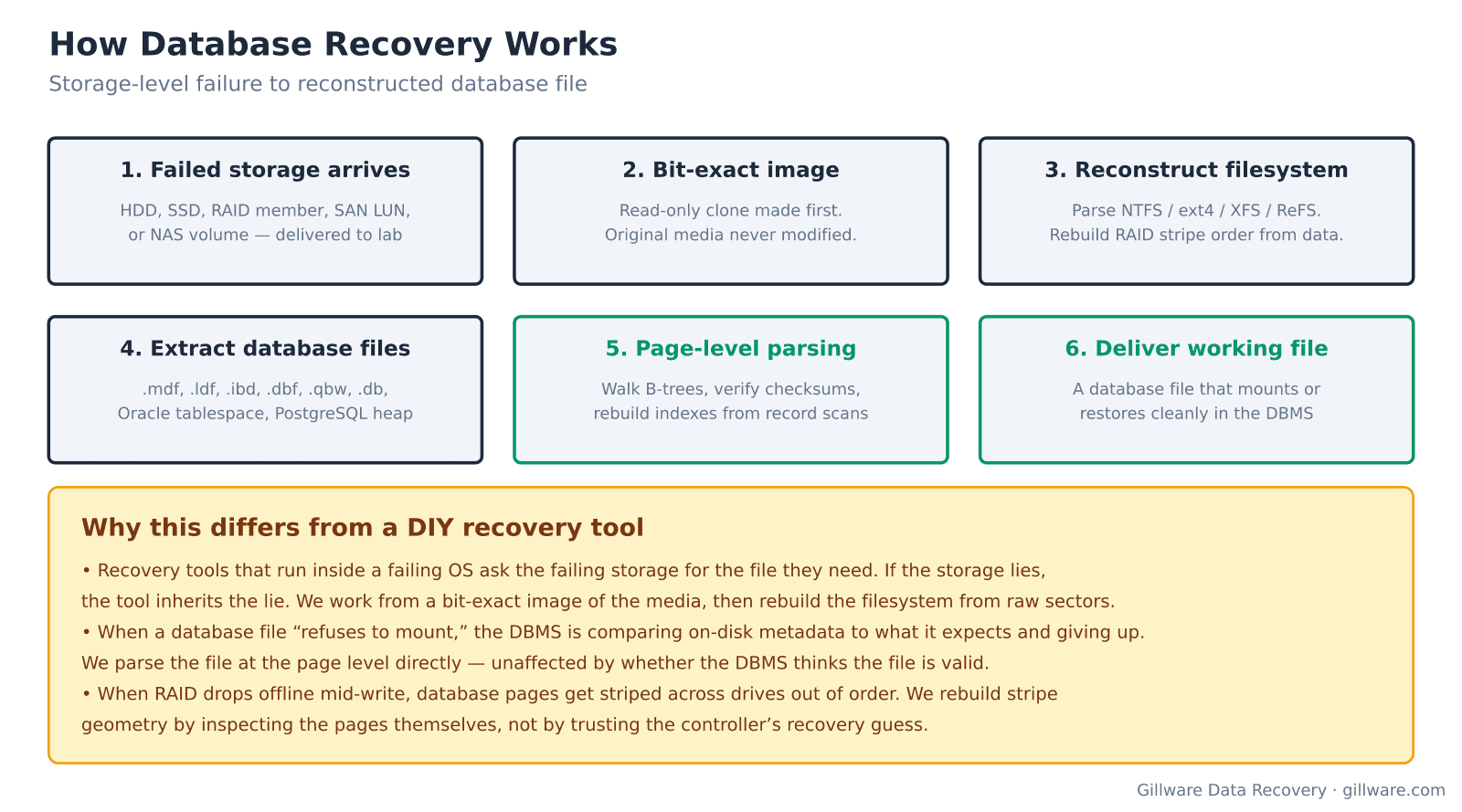
The first decision is whether the failure is the file’s or the storage’s. The storage question comes first, because the file’s state is meaningless if the storage under it is still lying. That means we start by imaging every drive involved, at the sector level, into a bit-exact clone. We never work against the original media. We never let the DBMS or the operating system write anything back to the drives that were involved in the failure.
Once the images exist, we reconstruct the filesystem — NTFS, ReFS, ext4, XFS, ZFS, or whatever the database was living on. If it was a RAID array or a SAN LUN, we determine stripe geometry from the data itself rather than trusting the controller’s reported layout, because when a controller has failed mid-write, its own metadata is often exactly wrong. The output of that stage is a virtual disk image that presents the database file the way the DBMS should have seen it.
Then we look at the file. Depending on which DBMS is involved, that means walking pages or blocks or extents. It means verifying checksums where the format supports them, and pattern-matching page structures where it doesn’t. It means finding the pages that are internally consistent, cataloging the ones that aren’t, and rebuilding the indexes and pointer chains that the corrupt pages used to hold. The deliverable at the end is a database file that mounts in its DBMS — plus a report of exactly which pages, rows, or records could not be recovered and why.
What we don’t do
We do not sell a self-service database repair tool. We do not license page-level extraction software. We do not run remote repair sessions where we log into your server, run a utility, and hand you back a repaired file — the risk of committing further corruption to storage that’s still failing is too high for that model to work honestly.
We also do not undo intentional deletes that the DBMS committed cleanly. If someone ran TRUNCATE TABLE on Monday, the DBMS wrote a valid transaction log entry, the log was flushed, and the storage recorded it correctly, there is no on-disk artifact for us to reconstruct from. Point-in-time recovery from that scenario is a job for your backup rotation, not for us. Where we help is when the deletion happened along with a hardware failure — when the truncate was in flight during a power loss, or the transaction log itself was on a failing drive, or the backup that was supposed to catch it turned out to be corrupt.
What a recovery case looks like from your side
Cases start with a phone call or web form describing what happened. We ask about the storage architecture — single drive, RAID, SAN, virtualization host — and about the sequence of events that led to the failure. We ask what has already been tried, because certain repair operations are irreversible and change what recovery methods are still available. That conversation is free and does not obligate anything.
If the case is one we can help with, the storage devices ship to our Madison, Wisconsin lab. Evaluation is free. You receive a firm price quote before any work begins, and Gillware has been running on a “no data, no charge” model for more than two decades. If we cannot recover, you do not pay.
Talk to a database recovery engineer
Free consultation, free evaluation, free inbound shipping. If we can’t recover your data, you don’t pay.
877-624-7206