
Dash Cam Video Recovery

Something happened on the road — an accident, a hit-and-run, a parking-lot scrape, someone behaving dangerously — and you went to pull the clip off your dash cam, only to find it isn’t there, or the camera is throwing a memory-card error. With dash cam footage, whether it can be recovered comes down mostly to one question, and it’s worth answering honestly before you do anything else: has new recording already overwritten the footage you need? If it has, no one can bring it back. If it hasn’t, there’s usually a real chance. This page explains how to tell the difference and how we recover footage from a dash cam’s memory card.
This is part of our broader video recovery practice. If your footage is on a fixed security system rather than a dash cam, see our security DVR and CCTV recovery guide instead.
First, the honest part: was it overwritten?
Almost every dash cam uses loop recording. The camera writes video to the microSD card in short segments, and once the card fills up, it deletes the oldest segments and records new video directly over them. That’s the whole point of the design — the camera is always recording the most recent drive — but it means a clip you need has a limited life before it’s replaced.
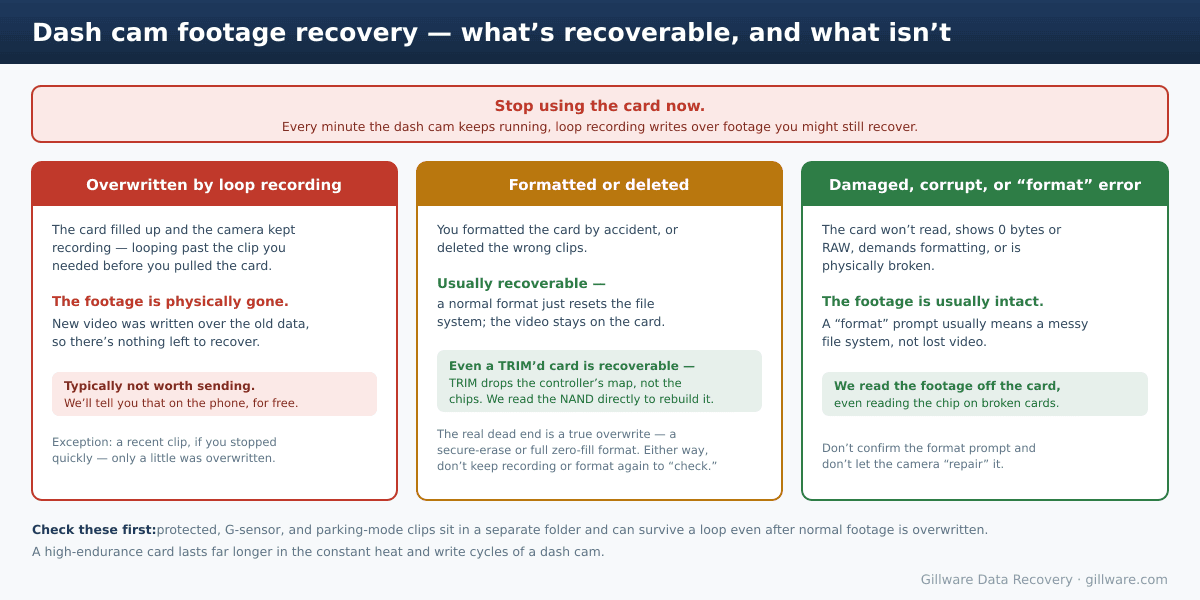
So if the card filled up and the camera kept running for hours or days after the moment you care about, the sectors that held your footage have been physically overwritten with newer video. That isn’t a deleted file waiting to be undeleted — the original data is gone, and no tool or lab can reconstruct it. In that situation a recovery typically isn’t worth sending the card in for, and we’ll tell you that honestly on the phone before you spend anything.
Two things can change that outcome in your favor:
- You stopped quickly. If only a little new footage recorded over the old before you pulled the card, we can often recover a meaningful portion. The clock matters — the sooner the card comes out, the better.
- The clip was protected. Footage locked by the G-sensor (a bump or collision), saved manually with the protect button, or captured in parking mode is stored in a separate area and isn’t overwritten by the normal loop until that area fills. Check that folder first — an incident clip may have survived even if the regular timeline has looped past it. Worth knowing: if the G-sensor didn’t trigger, the clip is not automatically protected.
The single most useful thing you can do is stop recording immediately — pull the card or power the camera down. Every minute of driving is more of your footage written over.
Accidentally formatted or deleted — including TRIM
This is one of the more recoverable situations, with one important caveat. When you format a card in the camera or on a computer, or delete the wrong clips, the device normally just resets the file system — it marks the space as available but leaves the actual video on the card. Until something writes over it, that footage can usually be recovered.
The case people worry about is TRIM (or discard): on cards and readers that support it, formatting tells the controller to drop its map of where your footage lives, and a computer then reads the card as empty. That is not the end of it — we recover TRIMmed cards routinely. TRIM throws away the controller’s map, not the data in the flash itself, so we work below the controller: we perform a chip-off or access the NAND chips directly, emulate the card’s controller to reassemble the raw flash sectors into a contiguous file-system image, and pull the footage out of that. It’s more involved than a logical recovery, so we scope and quote it, but it’s work we do every week. The genuine dead end is a true overwrite — a secure-erase or a full zero-fill format that actually wrote over every cell, or footage the loop already recorded over. Either way the practical advice is the same: don’t format again to “check,” and don’t keep recording, since those are what can turn a recoverable card into a lost one.
Damaged, corrupt, and worn-out cards
Dash cam cards take more abuse than almost any other memory card. They’re written and rewritten continuously, all day, often in a hot windshield-mounted camera, and consumer-grade cards wear out under that load. The symptoms we see:
- “Memory card error” or a “format SD card” prompt that keeps coming back. Usually this means the file system is corrupted, not that the video is gone — do not confirm the format.
- The card won’t mount, reads as 0 bytes, or shows up as RAW on a computer.
- The camera no longer recognizes the card — worn-out flash, a failed controller, or a card corrupted by a power cut when the car shut off mid-write.
- A physically broken card — snapped, cracked, or with damaged contacts.
In most of these the footage is still on the card, and we read it off at the engineering level. For a physically destroyed card, or one whose controller has failed, we can read the raw memory directly — on the monolithic cards used in dash cams that means accessing the flash chip itself and rebuilding the data from it. That work is more involved than a standard logical recovery, and we’ll scope it before any of it begins.
What to do right now
- Stop recording. Pull the microSD card, or power the camera down, the moment you realize footage is missing. This is the one thing that most affects whether we can recover it.
- Don’t view footage on the dash cam. Some cameras write temporary files just from browsing the gallery. Review the card on a computer instead.
- Don’t format, and don’t let the camera “repair” the card. If a computer prompts you to format or initialize it, decline.
- Use the write-protect tab. If you’re putting the card into a full-size SD adapter to look at it on a PC, slide the little lock switch on the adapter to the locked position first — that prevents accidental writes while you review.
- Set the card aside and label it. For an accident or anything that may become a claim or a case, keep the original card untouched and hand it to a recovery lab.
What it costs — and when it’s worth it
Every case starts with a free phone consultation and a free evaluation, and that conversation usually sorts out quickly whether your situation is worth pursuing. For a standard microSD recovery — an accidental format, a corrupt card, a card that won’t mount — our model is risk-free: no data, no charge. A physically destroyed card or one needing chip-level work is more involved, so we scope and quote that before starting.
The one situation where we’ll save you the trouble up front: footage that’s already been overwritten by the loop, or wiped by a true secure-erase or full zero-fill format, is genuinely gone and generally not worth sending. We’d rather tell you that on the phone than have you ship a card for footage that isn’t there. A TRIMmed card is a different story — that’s recoverable at the chip level, and we’ll tell you so. For accident, insurance, or legal matters, when there is recoverable footage we can handle the card to a forensic standard and provide a documented recovery report.
Dash cam recovery is one part of our broader video recovery work — the same lab handles cameras, recorders, and the cards and drives they record to. A related issue worth knowing about: when a recording is cut off by a sudden power loss, the last clip can be left unplayable; we cover that in our guide to recovering an interrupted recording after a power loss.
Need Footage Off a Dash Cam? Pull the Card First
Stop recording, set the microSD card aside, and talk to us. Free, confidential evaluation — and an honest answer on whether it’s recoverable.
Recover Your Dash Cam Footage →
Or call us: 877-624-7206
