
Security DVR & CCTV Footage Recovery

Security DVRs and NVRs sit in almost every business with a storefront, warehouse, or office, and increasingly in homes as well. Most run for years without trouble — until the day someone needs a specific clip and discovers it won’t export, the recorder won’t boot, the drive is clicking, or the footage simply isn’t there. When that happens, the video you need is usually still on the hard drive inside the unit. Our job is to get it off.
Before anything else, though, there is one honest limit worth understanding up front, because it decides a large share of the cases we’re asked about: if the footage you need was already overwritten by the recorder’s normal rollover, no one can bring it back. Everything below explains where that line falls, how these systems store video, the failures we see most often by brand, and how a professional recovery actually works.
First question: has the footage already been overwritten?
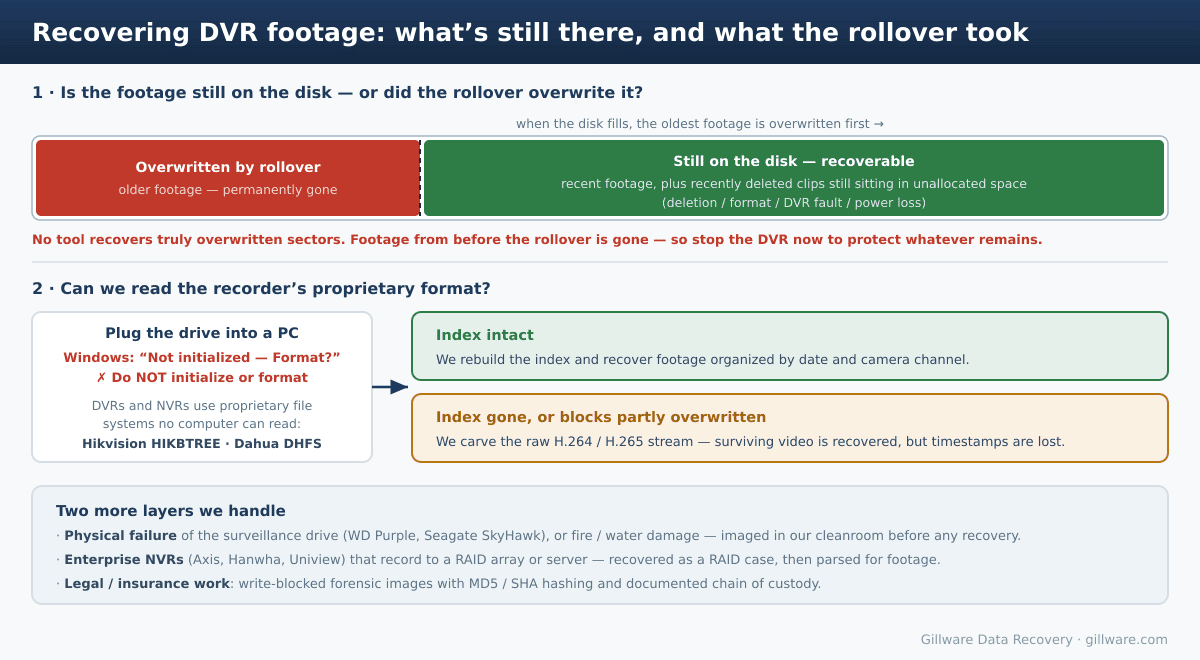
A security DVR has a finite amount of storage, so it records in a loop. Footage is typically kept on a rolling 30-, 60-, or 90-day schedule; once the disk fills, the recorder begins deleting the oldest footage to make room for new recording, and then writes the new video directly over those same sectors. This is by design, and it’s the single most important thing to understand about DVR recovery.
If the clip you need was recorded within the retention window — or was deleted, lost to a DVR fault, or knocked out by a power loss but not yet overwritten — the data is still physically on the disk, sitting in unallocated space, and we can almost always track it down. But if you need footage from before the rollover point, the sectors that held it have been permanently overwritten with newer video. That is not a deleted file waiting to be undeleted; the original data is physically gone, and no tool or lab can reconstruct it.
This matters most in high-stakes situations — major losses, criminal matters, civil litigation — where there is sometimes a court order to attempt recovery of footage that has almost certainly rolled over. We’re glad to help, but we’ll be straight with you: these attempts are not our standard risk-free recovery. We can usually tell during a free phone consultation that the odds are very small, and in many of these cases what we’re really being engaged to provide is documented verification that the rollover occurred and a clear technical explanation of why the footage is unrecoverable. That documentation has real value in a legal or insurance context, but unless there’s a compelling reason, it’s worth knowing in advance that an overwritten-footage case can mean paying to confirm the data is gone. For matters like these we much prefer to work directly with the client’s attorney or with law enforcement professionals rather than with end users, so that everyone understands the technical reality before any work begins.
The practical takeaway: if you need footage off a DVR, stop the unit from recording immediately. Every additional hour it runs is more rollover, and more risk that the footage you care about gets overwritten.
Why a DVR drive won’t open on a computer
A DVR or NVR is essentially a stripped-down Linux computer with a CPU, memory, and one or more hard drives. As the cameras stream in, video is written continuously to the disk and packaged at intervals into media segments. The catch is that these recorders do not use a standard file system like NTFS or ext4. They use proprietary, vendor-specific file systems built for continuous video writing — and no Windows, Mac, or Linux machine can read them.
So when you pull the drive and connect it to a PC, the disk shows up as “not initialized” or unallocated, and the system prompts you to initialize or format it. Do not. Initializing or formatting that drive is one of the fastest ways to destroy recoverable footage. The data is there; your computer simply doesn’t speak the format.
What that format is depends on the recorder brand, which shapes how recovery proceeds:
- Hikvision — the world’s largest manufacturer, common across small business, retail, and enterprise (the DS-7200, DS-7300, and DS-9000 lines, among others). Hikvision uses its own file system, identifiable by a
HIKVISION@HANGZHOUsignature on the disk and a HIKBTREE index that maps timestamps to the data blocks holding the H.264/H.265 video. - Dahua — the second-largest manufacturer (XVR, NVR Lite/Pro/Ultra series), and the engine behind a number of rebranded OEM systems such as Lorex and Amcrest. Dahua stores its footage and metadata in an equivalent proprietary format, DHFS.
- Axis, Hanwha (Wisenet), and Uniview — the names you’ll see more often on the enterprise side, particularly where U.S. procurement rules steer agencies and contractors away from Chinese-made hardware. Enterprise installations like these frequently don’t keep footage on a single internal disk at all; they record to a NAS or to a RAID array on a server running a video management system. Those become RAID or NAS recoveries first, after which we parse the footage out — see our NVR RAID and surveillance server recovery guide.
Whichever the brand, the recovery splits two ways. If the proprietary index has survived, we rebuild it and return your footage organized by date and camera channel, exactly as you’d expect to browse it. If the index is gone, or the relevant blocks have been partly overwritten, we fall back to carving the raw H.264/H.265 video stream directly off the disk — that recovers the surviving footage, but the timestamp and camera-channel associations are lost. (This is also why generic “undelete” tools tend to fail here: they may pull bytes off the disk, but without rebuilding the recorder’s metadata the result is often unplayable.) Consumer brands like Swann use their own proprietary recorder formats too, and are recovered the same way.
Common DVR and NVR data-loss scenarios we see
Across brands, the cases that reach us tend to fall into a handful of patterns:
- Accidental or intentional deletion. A tired employee clears the wrong recordings, someone performs a factory reset, or footage of an incident is deliberately deleted to cover something up. If it hasn’t been overwritten, it’s very likely recoverable.
- “HDD Error” and won’t-boot states. Hikvision and Dahua units commonly throw an HDD error, show “No Record,” or stop displaying video after a power surge or as the drive wears — frequently a sign of file-system corruption or a failing disk rather than lost footage.
- Failed USB export. The footage is fine, but exports error out (“please try again later,” “an error occurred”) or the unit skips the file. Often the underlying drive is starting to fail.
- Traditional hard-drive failure. The drives in these recorders run 24/7, and they fail like any other hard drive — head crashes, motor seizure, firmware corruption, accumulating bad sectors. Most are purpose-built surveillance drives; if yours is a Western Digital WD Purple or a Seagate SkyHawk, those failure modes and our recovery process for them are covered in detail on their own pages.
- Power loss and surges. An abrupt loss of power while the recorder is writing can corrupt the file system even when the drive itself is healthy.
- Lockouts. Sometimes nothing is wrong with the footage at all — the unit is simply locked and no one remembers the password. That’s a different problem with its own fixes; see our guide to recovering a lost DVR/CCTV password.
Fire, water, and physically damaged DVRs
Most of the time we ask clients to send only the hard drive from inside the recorder, since that’s all we need. The exception is a physically damaged appliance. We’re regularly sent DVRs pulled from structure fires — sometimes by insurance adjusters reconstructing how a loss occurred, sometimes by fire and arson investigators, and sometimes after a unit was deliberately destroyed to hide what it captured. In nearly all of these, the drive’s platters have to be removed in our cleanroom and rebuilt into a donor drive before anything can be read. Once we’ve imaged the rebuilt disk, we can give a realistic estimate of how much is recoverable, and only then — with your go-ahead — do we scan the image with our proprietary in-house software, Hombre, rebuild the data, and export the footage.
Forensic and legal DVR recovery
A significant part of this work is for law firms, investigators, and insurers, and it’s handled to a forensic standard. We can make write-blocked forensic images of the DVR drives and provide MD5/SHA hashing to establish a verifiable forensic baseline and chain of custody. We also frequently help simply by converting footage that’s trapped in a proprietary streaming format into a standard, viewable file an adjuster or attorney can actually open and use as evidence. Our computer scientists can work directly with your legal or investigative team to answer technical questions and document the process. As noted above, for high-stakes matters we strongly prefer engaging through counsel or law enforcement.
What to do right now
- Stop the DVR from recording immediately. This is the most important step — it stops the rollover clock and protects whatever footage is still on the disk.
- Don’t initialize or format the drive if you’ve connected it to a computer and Windows asks you to. That prompt is normal; acting on it can destroy the footage.
- Don’t run repair tools (CHKDSK, First Aid, or file-system repair utilities) on the drive, and avoid “free” recovery software — a misfired repair can make a straightforward recovery much harder.
- Preserve the chain of custody. For anything that may become evidence, handle the drive minimally, label it, and have your attorney or investigator coordinate with us directly.
- Send us the drive (or the whole unit, if it’s fire- or water-damaged) and we’ll take it from there.
How recovery works, and what it costs
Every case starts with a free phone consultation and a free evaluation. We image the drive, identify the recorder’s file system, and either rebuild the proprietary index or carve the raw video stream, then deliver the footage as standard, playable files organized by date and camera channel wherever the metadata allows. For the great majority of cases — deletion, corruption, a failed but recoverable drive — this is risk-free: no data, no charge.
The honest exception, again, is the rollover and overwritten-footage scenario. Those cases are not risk-free, and we’ll tell you so plainly on the phone before you commit to anything. When the footage you need predates the rollover, the realistic outcome is often documentation that it’s gone rather than the footage itself — valuable for a claim or a case, but not the recovery you were hoping for. We’d rather you hear that from us at the outset than spend money learning it later.
Sharing your situation with Gillware is confidential. If the footage matters, the best thing you can do is power the recorder down and get in touch — we’ve helped businesses, legal teams, insurers, and investigators recover missing, deleted, locked, and fire-damaged DVR footage, and we can tell you quickly and honestly where your case stands.
Recovering DVR and security-camera footage is one part of our broader video recovery work — the same lab and engineering process handle cameras, external recorders, and surveillance systems alike.
Need Footage Off a Security DVR? Power It Down First
Stop the recorder, set the drive aside, and talk to us. Free, confidential phone consultation and evaluation — including honest guidance on rollover and legal cases.
Talk to a DVR Recovery Expert →
Or call us: 877-624-7206
