
“The Parameter is Incorrect” Error
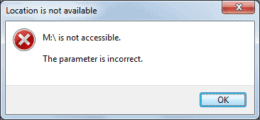
If you are visiting this page you may have recently got the “parameter is incorrect” error message on your external hard drive, USB drive, or SD card. This is one of the most common errors associated with partitions. This error usually occurs in Windows 10/8/7 and prevents you from accessing data and opening the partition.
“The parameter is incorrect” on your drive?
Stop running fixes and don’t format the disk. Our engineers will diagnose it for free before anything else is done to it.
This error may present itself for a number of different reasons including:
- the disk being removed incorrectly
- cable or USB port issues
- hard disks damaged by viruses
- outdated Windows operating system
While there are ways to resolve this issue, it can be difficult to do so without losing data, especially if the error is not fixed as soon as possible. Some things you can try to stop the “parameter is incorrect” error from showing up include:
- running CHKDSK to repair disk errors
- running an SFC scan to fix corrupted system files
- doing an automated repair with a portable fixing tool
- formatting the disk
If none of these fixes work for you, it may be time to start looking into data recovery options. If your device is having other issues, such as the external hard drive making clicking or beeping noises, or damage to your USB drive or SD card. you may not be able to solve the problem using the suggestions above. In these cases, you will most likely need the help of a professional data recovery company to get the data saved on the device recovered. Here at Gillware, we can help you recover data from the parameter is incorrect error. We provide financially risk-free data recovery services including a free evaluation and in-bound shipping. To get the data recovery process started, click the button below.
Parameter still incorrect? Let’s get your files back.
Our highly experienced engineers strive for the highest success rates in the industry. Send us the device and we’ll diagnose it for free.
- More than 20 years recovering data from failed drives
- Trusted by 1,500+ IT professionals nationwide
- Whatever failed, we’ve seen it hundreds of times
- Pay only if we meet your recovery goals