
ReFS Data Recovery
The Windows Server 2022 box came back from a planned reboot and the 40 TB ReFS volume that holds the Veeam backup repository now shows as RAW in Disk Management. Or a Storage Spaces pool lost a drive, the pool went into a degraded state, and after the drive was replaced the virtual disk refuses to attach. Or a Hyper-V cluster shared volume formatted with ReFS dismounted with event ID 133 and won’t come back. Or — the newest variant — a Windows 11 machine with a Dev Drive took an OS reinstall, and the reinstalled Windows reports the ReFS partition as an unrecognized filesystem.
ReFS failures have a specific character: the volume tends to be fine or gone, with very little in between — and when it’s gone, the usual toolbox is empty. There is no chkdsk for ReFS. Most consumer recovery software either doesn’t parse ReFS at all or parses only the older versions. And the failure that produces most of the RAW-volume cases isn’t disk damage at all — it’s a version mismatch that leaves perfectly healthy data unreadable by the Windows that’s trying to read it. This page covers where ReFS actually gets deployed, how it differs from NTFS in ways that matter for recovery, the failure patterns we see, and what reconstruction looks like on a filesystem most tools don’t understand.
A short tour of ReFS
The Resilient File System shipped with Windows Server 2012 as Microsoft’s eventual successor to NTFS, built around a different set of priorities: integrity, scale, and self-healing rather than backward compatibility. The design borrows concepts you may recognize from our Btrfs and ZFS pages — ReFS is Windows’ entry in the same copy-on-write, checksummed generation of filesystems.
The properties that matter for recovery:
- Everything is a B+ tree. Where NTFS has the Master File Table — a flat array of fixed-size records — ReFS stores all metadata in B+ trees keyed by object ID. Directories are trees, the file table is a tree of trees, and the whole structure hangs off a small set of root structures. The practical consequence: there’s no single contiguous MFT region to find and parse; reconstruction means locating and validating tree pages scattered across the volume.
- Copy-on-write metadata. ReFS never updates a metadata page in place. Changes are written to new locations and the parent pointers are updated upward to the root. Like Btrfs and ZFS, this means older generations of metadata linger on disk until their space is reclaimed — a genuine recovery asset.
- Checksums on all metadata, optional on data. Every metadata page carries a checksum, so corruption is detected rather than silently trusted. File contents are checksummed only if integrity streams are enabled (default on Storage Spaces mirror/parity volumes, off otherwise).
- Self-healing instead of chkdsk. When ReFS detects a bad checksum and a redundant copy exists (mirrored Storage Spaces, for example), it repairs automatically. When no redundant copy exists, it salvages: the damaged file or directory subtree is removed from the namespace, online, without taking the volume down. There is deliberately no offline repair tool — no chkdsk /f equivalent exists for ReFS at all.
- Block cloning and mirror-accelerated parity — the features that made ReFS the recommended filesystem for Veeam repositories and Hyper-V storage. Block cloning lets a synthetic full backup or a VHDX checkpoint merge complete as a metadata operation instead of a data copy. The recovery-relevant consequence: cloned regions are shared between files, so the “same” clusters can legitimately belong to many files at once, and naive tools that assume one-cluster-one-file misread the volume badly.
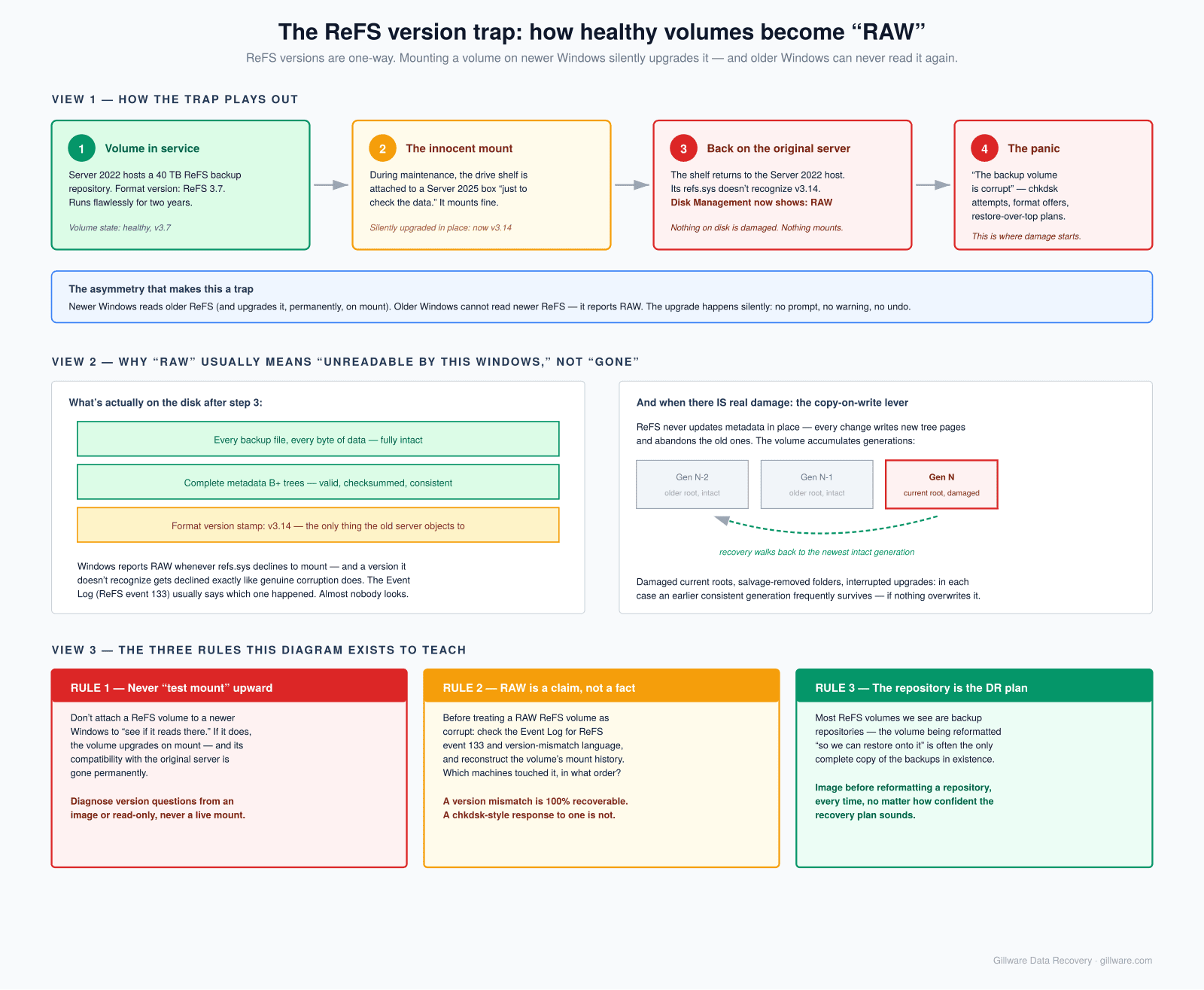
The version history matters more than it should. ReFS 1.x (Server 2012) through 3.x (Server 2016 onward) are meaningfully different on-disk formats, and minor 3.x revisions have shipped with nearly every Windows release since. Mounting a ReFS volume on a newer Windows upgrades the volume format in place, silently and irreversibly. That single behavior generates a steady stream of our ReFS caseload, as the next section explains.
Where ReFS shows up
- Backup repositories — Veeam explicitly recommends ReFS for backup targets because block cloning makes synthetic fulls nearly free. Large ReFS volumes full of backup chains are the single most common ReFS case we see, and the stakes are high because the volume is the disaster recovery plan.
- Storage Spaces and Storage Spaces Direct — ReFS on top of mirrored or parity spaces is the canonical Microsoft software-defined storage stack, on standalone servers and S2D clusters both. These cases are two-layer recoveries: the Storage Spaces pool metadata below, the ReFS volume above.
- Hyper-V storage — cluster shared volumes and standalone host volumes formatted ReFS for the checkpoint-merge and fixed-disk-creation speedups. A failed ReFS volume here contains VHDX containers, making it a three-layer problem: ReFS, then VHDX internals, then the guest filesystem.
- Exchange Server volumes — Microsoft’s preferred architecture puts Exchange databases on ReFS (with integrity streams disabled for the database files themselves).
- Windows 11 Dev Drive — the first mainstream client-side ReFS deployment. Developers format a Dev Drive for repos and build output; an OS reinstall to an older build, or moving the drive to another machine, produces the version-mismatch RAW volume on a desktop instead of a server.
- Windows Server Essentials and small-business file servers — less common, but ReFS gets chosen at format time by admins who read that it’s “more resilient,” and then a failure lands them on a filesystem their usual tools can’t touch.
The failure patterns we see
The version-mismatch RAW volume. The signature ReFS failure, and often the least damaged. A volume formatted or auto-upgraded under a newer Windows build is attached to an older one — a rebuilt server on the previous LTSC release, a recovery environment on older media, a Dev Drive after a reinstall — and the older refs.sys doesn’t recognize the newer format, so Windows reports RAW. Nothing on disk is damaged. The reverse direction has its own trap: mounting on newer Windows upgrades the volume in place, which can foreclose ever mounting it on the original server again. Event log entries from ReFS (event 133, “the volume was mounted with an incompatible version”) usually tell the story if anyone looks.
Storage Spaces failures underneath a healthy ReFS. The pool loses drives, the virtual disk detaches or shows “no redundancy,” and the ReFS volume on top is unreachable — not because ReFS is damaged, but because the block device beneath it is gone. These are layered reconstructions: image every physical drive, rebuild the Storage Spaces mapping from the pool metadata each drive carries, then mount or reconstruct the ReFS volume against the virtual assembly. Parity spaces with a stale or missing member are the hard version; the write pattern of parity spaces means naive reassembly produces subtly wrong data if generation states aren’t reconciled first — the same class of problem described on our RAID recovery pages, wearing Microsoft’s clothes.
Storage Spaces failures that stay at the pool layer — a drive pulled without being retired, a journal SSD failure that detached the virtual disk, drives stuck in “retired, removing from pool” after a node rebuild, a DRT log filled during an extended outage — are covered separately on our Storage Spaces data recovery page. When both layers fail together, which is the common case, we handle the full reconstruction: pool metadata parsing and virtual disk reassembly at the storage-virtualization layer, then ReFS recovery on top.
Salvage took the data out of the namespace. ReFS’s self-healing has a sharp edge: on a volume without redundancy, detecting corruption in a directory tree page means that subtree gets salvaged — removed from the live namespace so the volume stays online. Users experience folders that simply vanish. The copy-on-write design means the removed structures often still exist on disk in older generations; recovery is a matter of finding the pre-salvage tree roots and extracting from them.
Corruption on the metadata roots. Bad sectors or an interrupted write landing on the small set of critical root structures can take down an otherwise healthy volume. Because ReFS keeps checkpointed copies and old generations linger under copy-on-write, there’s usually an earlier consistent root to recover from — the work is locating and validating it.
Dedup and block-cloning complications. Volumes running Windows Server deduplication or heavy block cloning (every mature Veeam repository) have file data that’s shared, chunked, and indirected. Recovery tools that don’t model these features recover files full of holes or garbage. Correct extraction requires honoring the sharing structures — another reason generic tools underperform on exactly the volumes where the data matters most.
How we approach ReFS recoveries
Imaging first, always: every physical drive in the volume or pool, on hardware that can’t write back to the source, with any mechanically failed drives repaired in the cleanroom to imaging condition first. For Storage Spaces cases, the pool is reconstructed virtually from the images before any filesystem work begins.
On the filesystem itself, the approach mirrors what our NTFS reconstruction work does, adapted to ReFS’s structures: scan the image for ReFS metadata pages — they carry identifiable headers and checksums that make them validate-able in isolation — parse every credible tree page, and rebuild the object hierarchy relationally. Copy-on-write is the recovery’s best friend here: the volume usually contains multiple generations of the metadata trees, and when the current generation is damaged or half-upgraded, an earlier consistent generation frequently isn’t. Version-mismatch cases resolve by parsing the newer format directly from the image rather than fighting Windows about mounting it. Salvage cases resolve by walking pre-salvage generations. Block-cloned and deduplicated data gets extracted with the sharing structures honored.
The honest limits: ReFS tooling — ours and everyone’s — is younger than NTFS tooling, and Microsoft’s on-disk documentation is thin, so the format knowledge is reverse-engineered and version-dependent. Volumes that took a partial in-place upgrade (power loss mid-upgrade is rare but real) can be left between formats. And integrity streams cut both ways: when file data fails its checksum and no redundant copy exists, ReFS refuses to serve it, and recovery of that data means extracting it checksum-failures-and-all and assessing what’s usable.
What not to do while the volume is down
- Don’t mount the volume on a newer Windows build “to see if it reads there.” If it does, it may upgrade the volume in place and permanently break compatibility with the original server.
- Don’t run chkdsk — it will report that it can’t run on ReFS, but the attempts we see usually come packaged with other write-happy troubleshooting on the way to that discovery.
- Don’t reformat and restore until the volume has been imaged — especially on backup repositories, where the volume being reformatted is often the only complete copy of the backups.
- Don’t rebuild or “optimize” the Storage Spaces pool after a failure, and don’t remove and re-add drives to it. Pool repair operations write to every member and can overwrite the generation history a reconstruction needs.
- Don’t run generic recovery software expecting NTFS-quality results. Most tools either skip ReFS or parse old versions only, and a scan that misreads block-cloned data produces convincingly named files with wrong contents — worse than an honest failure.
How the engagement works
ReFS cases are almost always in our complex-case category: server hardware, layered storage, business data. The engagement is the structure we use for all complex work — free initial consultation, an evaluation phase that’s free or fixed-price depending on what imaging requires, and any engineering charges explained clearly and in writing before work begins. You decide whether to proceed on those terms. Where a case is simple enough for the standard risk-free model — a single-drive Dev Drive version mismatch, for instance — we use it, and we’ll tell you which category yours is in during the consultation.
Related reading: the Windows data recovery hub, the NTFS deep-dive, and our Btrfs and ZFS pages for ReFS’s copy-on-write cousins on the Linux side.
ReFS Volume Showing RAW? Storage Spaces Pool Down?
Free initial consultation. There’s no chkdsk for ReFS — but there’s usually a recovery path. We’ll walk through your situation honestly before anything touches the drives.
Or call us: 877-624-7206