
A logistics company still runs a 2004-vintage InterBase 7.5 database as the backbone of its warehouse management system, and this morning its .GDB file — sitting on aging RAID 5 — came up throwing “database file appears corrupt” and refusing every attempt to attach. A regional accounting firm has been running Firebird 3 for their custom client-billing application for a decade, and after a Windows Server 2019 reboot the .FDB file’s header page is unreadable while the rest of the file is intact. A software vendor with hundreds of small-business installs of their Firebird-embedded application starts getting support calls after a widely-deployed OEM SSD firmware bug caused checksum failures across .FDB files in the field — several of those customers need production data extracted before their businesses can operate.
We recover InterBase and Firebird databases when the storage under them fails. InterBase and Firebird share on-disk formats — Firebird began as an open-source fork of the InterBase 6.0 source code in 2000 and the two products have diverged since, but the fundamental page structure remains the same across a range of versions. The recovery approach also applies to compatible variants (embedded Firebird, InterBase XE).
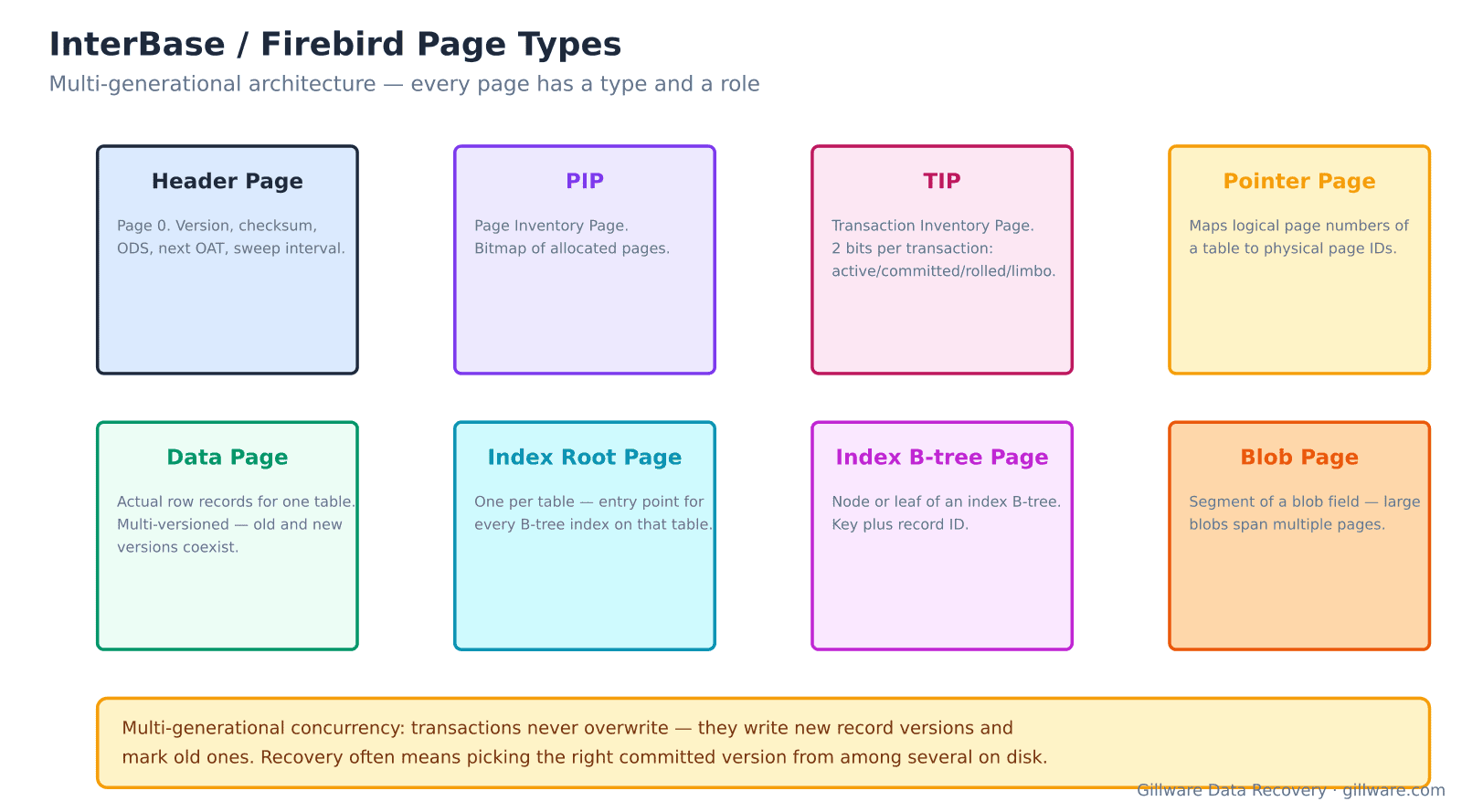
Multi-generational architecture and its implications
InterBase and Firebird are unusual among relational databases because they use multi-generational concurrency control (MGCC). Transactions never overwrite existing records — they write new record versions and mark old ones with transaction IDs, letting concurrent readers see the version that was current when they started. Only the sweep process eventually reclaims garbage record versions that are no longer visible to any transaction.
The practical consequence for recovery is that a damaged database may contain multiple versions of any given row, spanning committed and uncommitted transaction states. Recovery involves not just reading pages but choosing the correct version from among the several on disk. The Transaction Inventory Page (TIP) stores 2 bits per transaction ID indicating active/committed/rolled-back/limbo status; without a working TIP, we cannot determine which record versions are the ones the customer would have seen as “current.”
Page types and where corruption strikes
The .GDB (InterBase) or .FDB (Firebird) file is organized into typed pages. Page 0 is the header page, storing version, checksum, on-disk structure (ODS) number, next OAT, sweep interval, and pointers to critical system pages. Page Inventory Pages (PIP) maintain a bitmap of which pages in the file are allocated. Transaction Inventory Pages (TIP) track transaction state. Pointer pages map a table’s logical page numbers to physical page IDs. Data pages hold the actual row records. Index root pages anchor each table’s indexes, one per table. Index B-tree pages hold the leaf and interior nodes of each index. Blob pages hold segments of blob fields; large blobs span multiple pages.
Storage failures produce different symptoms depending on which page type gets damaged. Header page corruption makes the database entirely unopenable. PIP corruption confuses page-allocation logic and can cause the engine to overwrite live data. TIP corruption causes transaction-state confusion — committed rows may become invisible or uncommitted rows visible. Data page corruption loses specific rows. Index page corruption is usually recoverable because indexes can be rebuilt from data pages.
Error messages that indicate storage-level issues
- “I/O error during ‘open’ operation for file” — the filesystem cannot read the .GDB/.FDB. Storage-level failure.
- “Database file appears corrupt” or “wrong page type” — a page read returned a page whose type byte does not match what the engine expected at that location. Almost always a torn write or misdirected read from failing storage.
- “bad checksum” or “checksum error on database page” — a page’s stored checksum does not match its contents. Direct indicator of storage returning modified bytes.
- “internal gds software consistency check” with a specific error code — the engine has found an inconsistency that its recovery logic cannot handle. Codes 179 (invalid transaction) and 291 (partner index descriptor mismatch) are common with torn writes.
- “database is not on-line” after a normal shutdown attempt — the database entered forced shutdown due to an unrecoverable error and cannot be brought back up without repair or restore.
- “segment record not found” when reading a blob field — the blob page chain is broken; some blob segments are missing or damaged.
- gbak backup fails with “damaged page” or gfix -mend reports uncorrectable damage — the built-in repair utilities have exhausted what they can do; deeper reconstruction is required.
How we recover an InterBase or Firebird database
The storage the .GDB or .FDB lives on gets imaged first. When the database file lives on a filesystem, we image the underlying block device. When it lives on a RAID array or SAN LUN, we image the underlying member drives and reconstruct the array from the images. Nothing writes to the original storage after arrival.
The .GDB or .FDB gets extracted from the reconstructed filesystem. We validate its size against the header’s declared page count and identify which pages are readable. The first pass identifies the header page and, if damaged, reconstructs it from surviving PIP and TIP pages that reveal the file’s ODS and structural parameters. With a working header, we walk the PIP to identify allocated pages, then walk the TIP to determine which transactions were committed.
Table reconstruction follows: for each table, we locate its pointer page from the system catalog (RDB$RELATIONS, RDB$RELATION_FIELDS), read every data page the pointer page references, and extract the record versions that the TIP identifies as committed. When multiple versions of a row exist, we select the version tagged with the most recent committed transaction that would have been visible at the time of failure. Blob fields are recovered by following blob page chains from the data pages.
Damaged pages are handled case by case. Data pages with intact record headers but damaged trailer regions yield most of their records; we flag any that could not be fully parsed. Index pages get discarded and rebuilt from the recovered data. Blob pages with broken chain pointers may lose partial blob contents; the record row survives with the blob field flagged as damaged.
Deliverables are either a working .GDB/.FDB that opens in the customer’s InterBase or Firebird version and passes gfix/gstat validation, or an unloaded set of tables in .SQL insert-statement form or delimited flat files ready for reload into a new instance.
Versions we handle
- InterBase 4.x-7.x — the classic Borland InterBase era. Still runs many field-deployed applications.
- InterBase 2007-2020, XE-XE7, and modern releases — Embarcadero-era InterBase.
- Firebird 1.0-1.5 — the earliest open-source fork.
- Firebird 2.x-3.x-4.x-5.x — the modern Firebird series, including embedded deployments packaged with third-party applications.
Embedded Firebird in commercial applications
A significant portion of Firebird recovery cases involve applications that ship Firebird embedded — not a separately-installed database server, but a Firebird engine linked into the application executable. These typically use .FDB files in the application’s data directory. Recovery works the same way regardless of whether the database was accessed via a separate server or an embedded engine.
What we don’t do
We do not sell page-repair utilities. We do not undo cleanly-committed DELETEs or DROP TABLEs where the storage recorded them properly. We do not decrypt password-protected databases. We do not migrate InterBase/Firebird applications to other database platforms — that is application-level work the customer can pursue with the recovered data in hand.
Related recovery services
See our database data recovery hub, Paradox recovery for other Borland-era business database platforms, PostgreSQL recovery for open-source RDBMS recovery, and our RAID recovery services when the underlying array is the source of the failure.
Talk to an InterBase/Firebird recovery engineer
Free consultation, free evaluation, free inbound shipping. If we can’t recover your data, you don’t pay.
877-624-7206