
Power Loss Mid-Recording? Your Unfinalized Video File Is Usually Still Recoverable

It is the call no production company wants to make. You were paid well to cover a concert, a conference keynote, a once-only live event — multiple cameras, a long continuous record, no second takes. The show ends, someone kills the power, and when the drive lands on the edit bay the file won’t open. QuickTime throws an error. The editor sees nothing, or a clip that “exists” but plays a few frozen seconds and quits. Hours of footage you cannot reshoot appear to be gone, and your reputation is riding on it.
Here is what years of these cases have taught us: the footage is almost always still on the disk. When a recording is cut short by a power loss, the video you captured does not evaporate. What goes missing is the small piece of bookkeeping that turns a stream of data into a file a player can open — and that piece can be rebuilt. This article explains why an interrupted recording won’t play, why it happens across every major recorder brand, what newer gear does to prevent it, and what recovery actually involves.
Why an interrupted recording won’t open
A file-based recorder does not write a finished video file as it records. It writes the video stream — the actual compressed footage — to the disk continuously, frame after frame, for the length of the take. The part that makes it a playable file, the index or header (in QuickTime and ProRes .mov files this is the “moov” atom), records the codec, the resolution, the frame rate, and where every frame lives in the stream. On most recorders that index is written at the very end, the moment you press stop and the unit finalizes the clip.
That is the vulnerable moment. If power is lost, a battery cliffs off, or the unit is switched off before it finishes finalizing, the stream is already on the disk but the index is never written. With no index, no player or editing system has any way to read the footage — so the file appears corrupt, won’t open, or simply doesn’t show up at all. Long recordings make this worse: finalizing a multi-hour clip can take several minutes, and that whole window is exposed if the power goes.
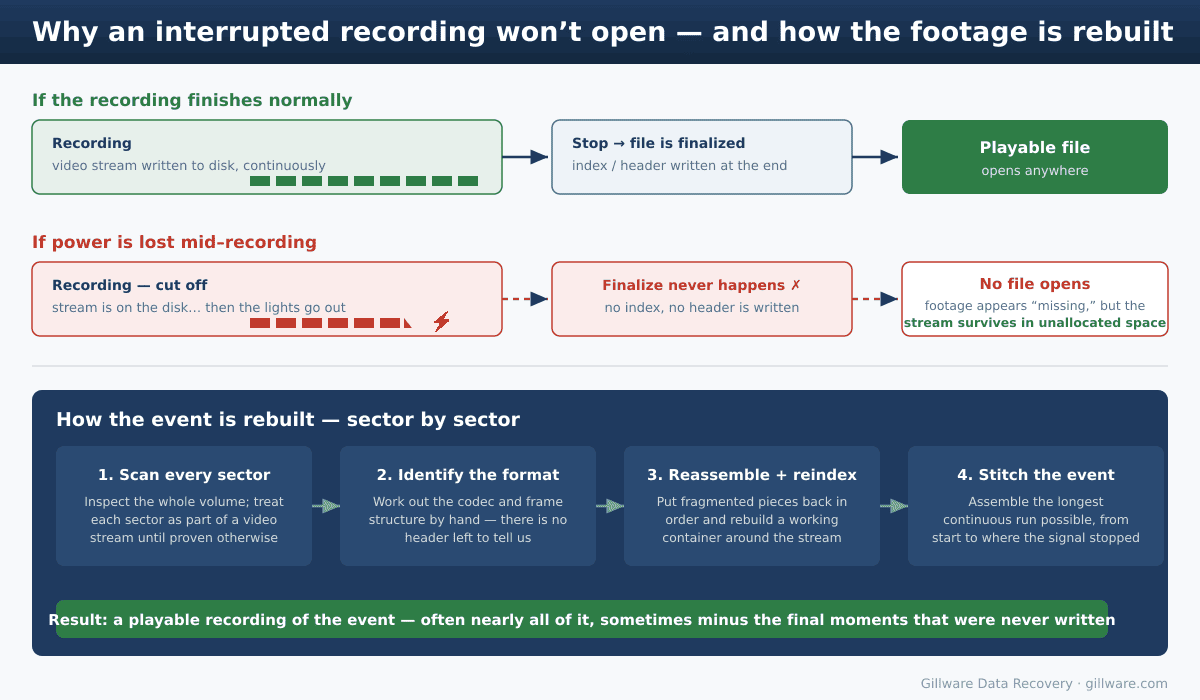
Crucially, this is not a file system problem. The footage can be sitting on an HFS+, APFS, or exFAT volume — the file system is fine. The problem is that the contents the file system needs to describe were never finished. In many of these cases the bulk of the recording — sometimes well over 90% of it — is sitting in unallocated space, with nothing in the directory pointing at it.
That is different from a related failure where the file was finalized but the file system later corrupts its record — common on Mac exFAT drives, where a large video can suddenly read as 0 bytes. We cover that case in our guide to a video file showing 0 bytes on a Mac.
It is not one brand’s problem — it is how recorders work
Because finalizing at the end of a clip is the standard design, the same failure shows up across the recorders working professionals rely on. It is worth recognizing the symptoms, because they are remarkably consistent:
- AJA Ki Pro. Operators describe pressing stop and never seeing the “closing file” step complete — after a power interruption the clip is left unfinalized and won’t mount on a computer, even though it may still play back on the unit itself. Long records and battery “cliff-off” are common triggers.
- Atomos Ninja and Shogun. Powering down with the hardware button instead of stopping cleanly, or losing battery mid-take, leaves ProRes
.movfiles that won’t open in QuickTime or import into an NLE. Atomos even flags interrupted recordings on screen so you know a break occurred. - Blackmagic HyperDeck and Video Assist. Editors report ProRes files that play fine on the deck but throw a “bad public movie atom” error elsewhere, or a record that freezes and leaves an unreadable clip behind.
None of this means any one of these recorders is poorly made — they are excellent tools, and an interrupted recording is an inherent risk of any device that finalizes a file at the end of a take. The point is simply that if it has happened to you, you are in very familiar territory, and it is usually recoverable.
The modern fix — and why many recorders are still exposed
The manufacturers know about this, and newer hardware addresses it directly. The most robust approach is to stop relying on a single finalize step at the end. AJA’s recent Ki Pro Ultra 12G, for example, includes a feature called Ki Protect that pre-allocates the recording space when you hit record and then continuously updates the file header as data is written, so an unexpected power loss costs you only the last few frames rather than the whole clip. Atomos recorders similarly write continuously and offer a recovery prompt when a clip didn’t close cleanly, preserving all but the last few seconds.
If you are buying or speccing gear for high-stakes live work, that continuous-header behavior is worth looking for, along with reliable power: conditioned power or a UPS on the recorder, batteries with real fuel gauges, and a habit of letting long clips finalize fully before anything gets unplugged.
That said, an enormous amount of older and mid-generation equipment is still in daily service, and plenty of recorders across brands still finalize only at the end. So while the newest gear has largely solved this, the failure is still landing on real shoots every week — which is exactly when recovery comes in.
What to do the moment it happens
How much of the event we recover depends heavily on what happens to the media after the interruption. Because the footage is living in unallocated space, anything that writes to the drive can overwrite it. Protect it:
- Stop recording to that media immediately. Don’t shoot the next segment, the next day, or anything else onto the same drive or card. New footage can land directly on top of the event you’re trying to save.
- Don’t let the recorder “repair” or reformat the media. If the unit prompts to fix or reinitialize the drive, decline. That process can overwrite the very stream data we need.
- Don’t run disk repair tools (First Aid,
fsck,chkdsk) on the volume, and don’t reformat it on a computer. - Set the media aside and label it. For an irreplaceable event, the safest path is to hand the original drive or card to a recovery lab so it can be imaged and worked from a copy.
How Gillware rebuilds an interrupted recording
Recovering an unfinalized recording is genuinely different from undeleting a normal file, and it is hands-on work. Because there is no index telling us where anything is, our engineers work from a sector-by-sector image of the media and inspect the entire volume, treating each sector as part of a continuous video stream until the data proves otherwise. From there we determine the codec and frame structure by hand, account for fragmentation to put the pieces back in their original order, rebuild a working container around the recovered stream, and stitch together the longest continuous run of the event we can — from the start through to the point where the signal actually stopped.
These recoveries are highly successful, though they can be imperfect: if the final moments of the show were never written to disk because the power was already gone, those moments cannot be recovered. But the body of the event — the keynote, the performance, the ceremony — is usually all there. We have been doing this kind of work for video professionals for many years; one documented example is our earlier AJA Ki Pro recovery case study, where a charity event’s footage had “vanished” after the deck sat idle and our engineer carved the stream back out of the drive, recovering the segment containing the entire CEO’s speech.
This work applies to footage from standalone recorders, camera media, and the external drives and storage modules they record to. Every interrupted-recording case is evaluated individually: the diagnostic and a clear assessment of what’s recoverable are free, and because these recoveries involve significant manual engineering time, we’ll quote the work and show you exactly what we can get back before you commit to anything.
Recovering interrupted and unfinalized recordings is one part of our broader video recovery work — the same image-and-rebuild process applies across cameras, recorders, and security systems.
Lost an Event to a Power Failure? Don’t Erase the Evidence
Set the media aside and talk to us. The footage is usually still on the disk — free evaluation, no obligation.
Click Here to Recover Your Interrupted Recording →
Or call us: 877-624-7206
