
The AI Storage Crunch Is Forcing Small Businesses to Run Servers Past Their Expiration Date

If you follow the markets at all, you already know the broad strokes of the storage story. Shares of the major hard-drive manufacturers have climbed several hundred percent over the past year. Western Digital has told investors its hard-drive production is essentially sold out for all of 2026, with supply commitments now stretching into 2027 and 2028. And retail drive prices have jumped sharply — by some trackers, close to 50% in a matter of months.
The cause is no mystery: artificial intelligence runs on data, and that data has to live somewhere. Training sets, model checkpoints, inference logs, and endless archived output are far too large and far too cheap-per-terabyte to keep on flash, so the world’s largest cloud and AI operators have been buying high-capacity hard drives about as fast as they can be made. Manufacturers have understandably prioritized their largest data-center customers, and the supply that used to flow freely into consumer and small-business channels has tightened to a trickle.
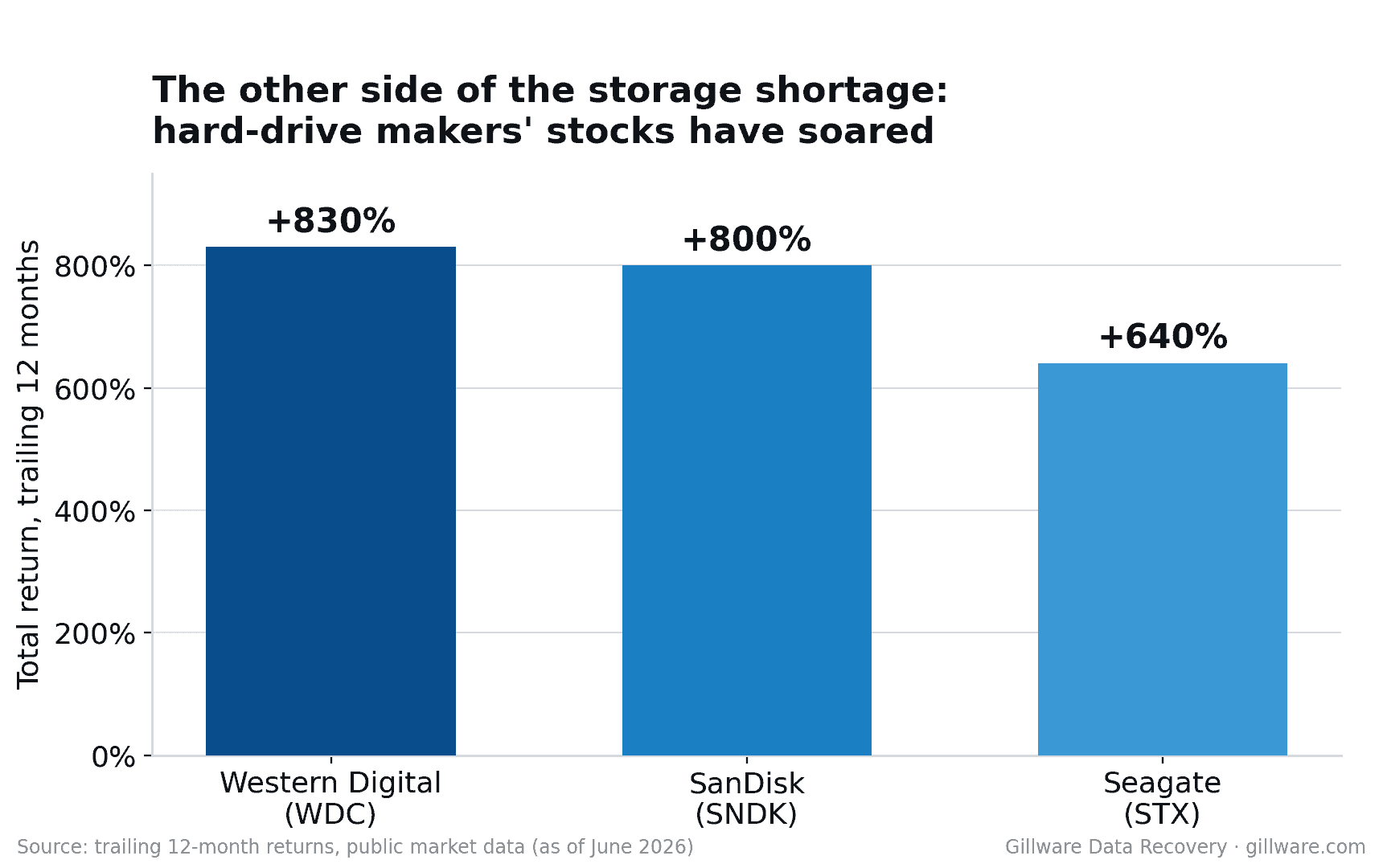
That part has been covered everywhere. Here’s the part almost no one is talking about — the part we see every week from inside a recovery lab.
The shortage didn’t stop at the data center
It’s easy to read the headlines as a problem for hyperscalers and PC builders. But a supply shock at the top of the market doesn’t stay at the top. It pushes downward through every business that already owns storage and now has to think differently about replacing it.
Small and mid-sized businesses are feeling this acutely, and in a way that’s quietly reshaping the risk profile of their infrastructure. For most of the last decade, the lifecycle of a small-business server or NAS was predictable. You bought an array, ran it for its useful life, and when it approached end-of-life — out of warranty, drives aging, capacity tight — you budgeted for a refresh and retired the old hardware before it became a liability.
That cycle has broken.
The replacement math no longer works
Two things have changed at once for the small business owner or IT generalist staring at an aging array.
First, the cost of replacement has climbed steeply. The same forces driving up drive prices have made a full storage refresh substantially more expensive than it was even a year ago — and an IT budget set in a cheaper era simply doesn’t stretch to cover today’s numbers.
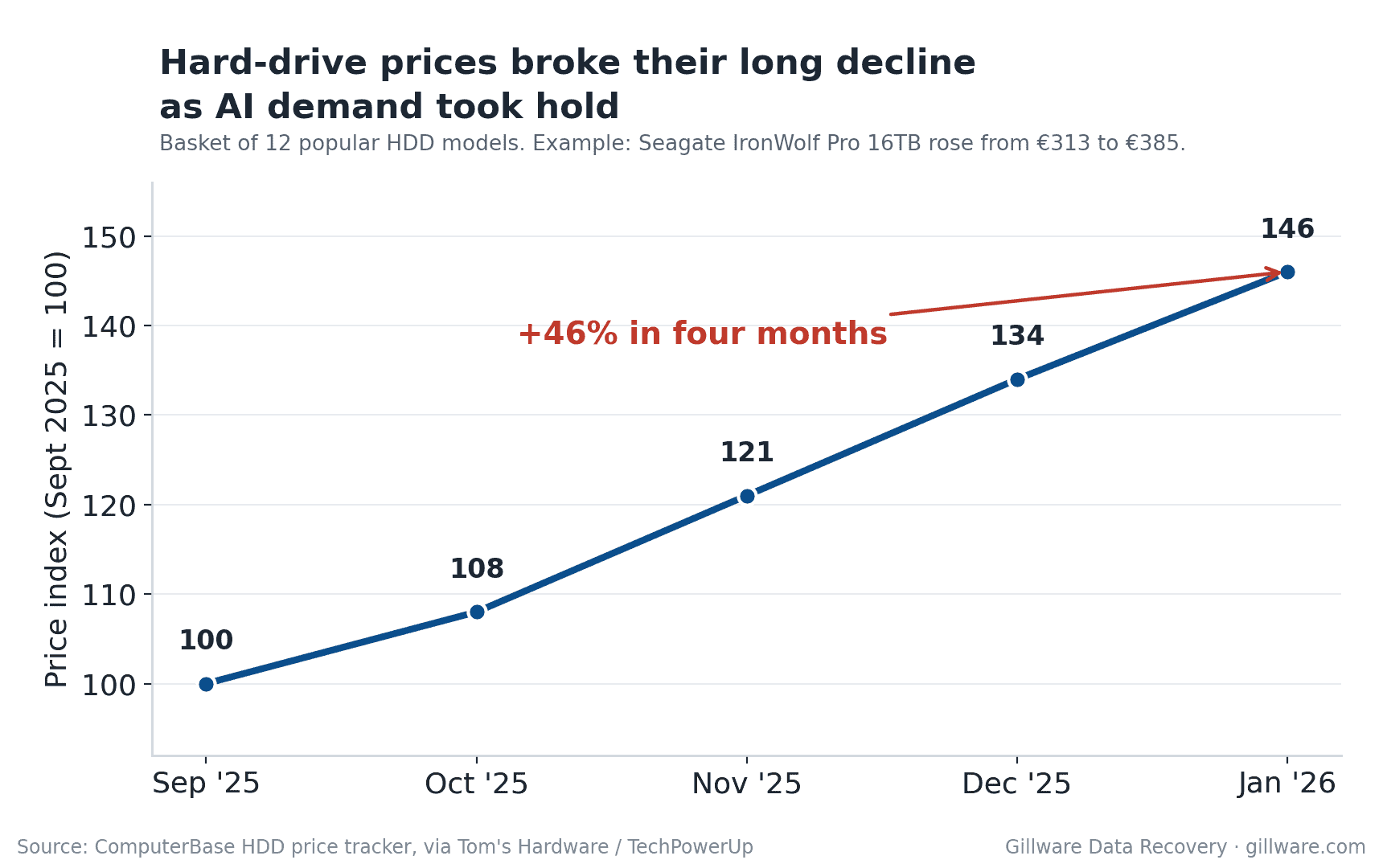
Second, and less obvious, is availability. Even a business willing to absorb the higher cost can’t always buy what it needs. High-capacity drives and the arrays built around them are on long lead times, and “sold out for 2026” is not just a line in an earnings call — it’s a real constraint when you’re trying to source replacement hardware on a normal business timeline.
Put those together and you arrive at a decision that, frankly, makes rational sense for a lot of small businesses: wait it out. Keep the existing server running another year, maybe two, in the hope that prices ease and supply loosens. Defer the refresh. Ride out the crunch on the hardware you already have.
Individually, that’s a defensible call. In aggregate, it means a large and growing population of business-critical storage is now being asked to run well past the point at which it would normally have been retired.
The budget pressure is often coming from more than one direction at once. We’ve heard anecdotally that in some organizations, the cost of new AI tools and services is landing on the same IT budget that’s supposed to cover infrastructure — so dollars that might once have funded a storage refresh are being absorbed by AI initiatives the budget was never sized for. When unplanned AI spending and a more expensive hardware market hit the same line item in the same year, deferring the server refresh stops being a choice and starts feeling like the only option.
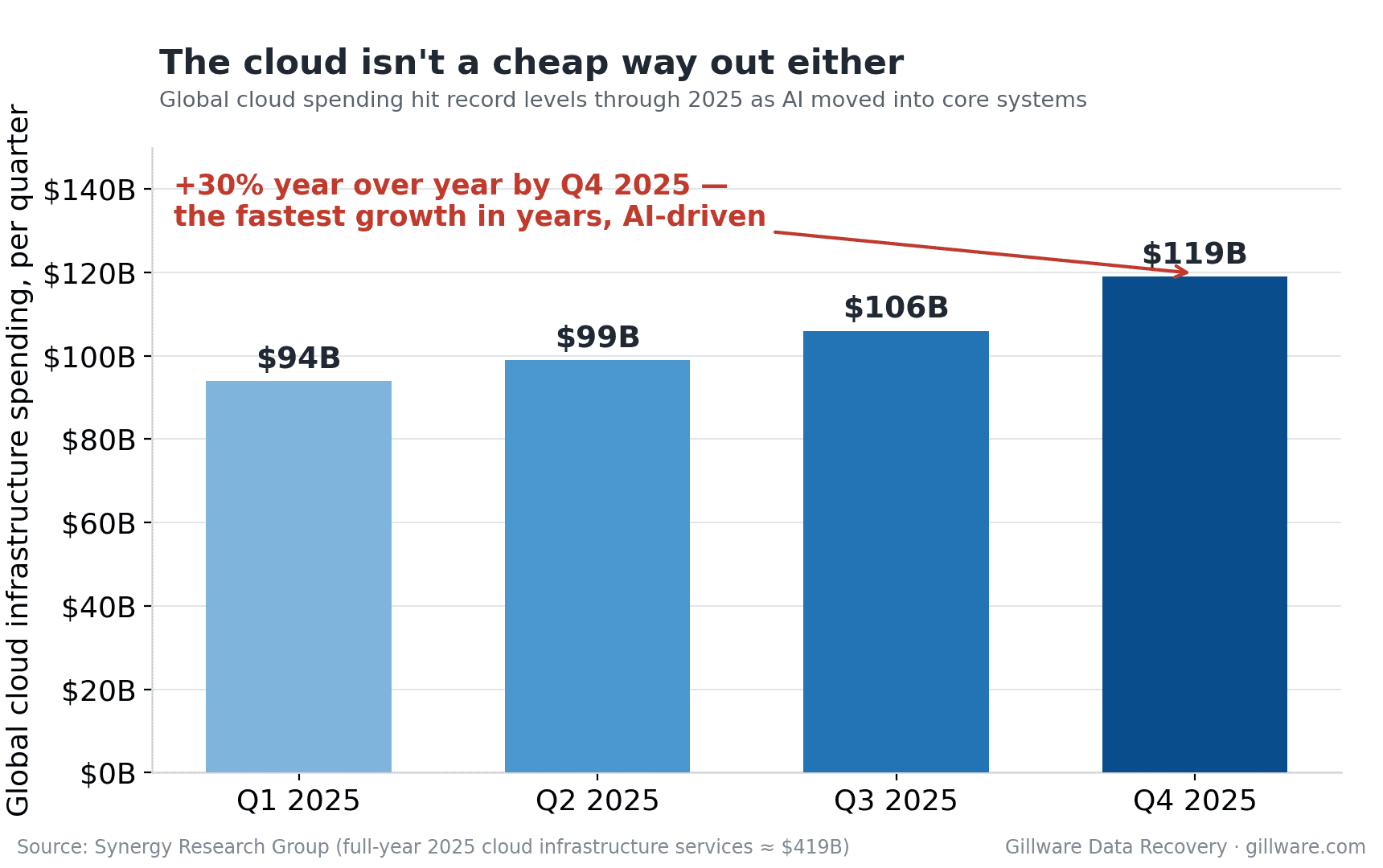
Moving everything to the cloud isn’t the clean escape hatch it might seem, either. While some consumer plans remain competitive, overall cloud infrastructure spending has been climbing fast — up roughly a quarter year over year as AI moves into core business systems — and some providers have raised individual storage tiers outright, in at least one case by 50%. For a business already over budget, “just put it in the cloud” increasingly trades one rising bill for another.
What that looks like from a recovery bench
We’ve started seeing the consequences. More of the server and array cases coming through our lab involve systems that, under normal conditions, would already have been decommissioned — older multi-drive RAID setups, kept in service past their planned lifespan because the replacement that should have happened simply didn’t.
That matters because aging arrays don’t fail gracefully. The drives in a server were typically bought together, ran together, and aged together, which means when one fails the others are often not far behind. A degraded array running on borrowed time is a fragile thing: a second drive failure during a rebuild, a controller fault, or a power event can turn a recoverable situation into a genuine emergency. The longer hardware runs past its intended life, the more these scenarios stack up — and they tend to land on exactly the systems a business can least afford to lose.
The crunch has reached our side of the equation, too. Recovering data from a failed drive often depends on sourcing matching donor parts, and those donors come from the same constrained, more expensive market as everything else. Our small-business customers increasingly need faster turnaround, because the old fallback — just buy a replacement and restore — is far less available when replacements are backordered. And when we return recovered data, it has to come back on new media that is caught in the same price surge. Those pressures are real, and like everyone else in this chain, we’ve had to adjust to them.
The quiet risk worth naming
None of this is cause for panic, and it isn’t an argument that every aging server is about to die. Plenty of older hardware runs reliably for years. The point is narrower and more useful: the economics that used to retire risky hardware on a schedule have stopped working, and that changes the math every storage owner should be doing.
The recover-versus-replace calculation has shifted. It used to be that a failed drive in an older system was often a prompt to simply upgrade. Today, with replacements expensive and slow to arrive, the data on that aging array is frequently the only practical path forward — which makes protecting it, and knowing your options if it fails, more important than it has been in a long time.
What small businesses can actually do
If you’re running storage you’d normally have replaced by now, a few practical steps go a long way:
- Verify your backups — actually verify them. Confirm that backups are running, complete, and restorable. An untested backup is a hope, not a plan, and aging hardware is the worst place to discover the difference.
- Watch the health signals. Monitor drive SMART data and array status. Reallocated sectors, rising error counts, and degraded-array warnings are early signs worth taking seriously rather than clearing and ignoring.
- Don’t run a degraded array harder than you have to. If a drive has failed and the array is rebuilding or running degraded, that is the highest-risk moment. Reducing load and getting the situation resolved promptly protects the data that’s still there.
- Have a plan before you need one. Know who you’d call and what you’d do if the array failed tomorrow. The businesses that come through a storage failure best are the ones that decided their next move before the emergency, not during it.
The AI boom reshaped the storage market faster than almost anyone expected, and the effects are still working their way down to the businesses furthest from the data center. For a lot of small companies, the most consequential line in this story isn’t a stock price or a sold-out earnings call — it’s the aging server humming in the back office that was supposed to be replaced last quarter, and now has to last another year.
Worth making sure it does.
Dealing with a failed server, RAID, or NAS?
Gillware has spent more than two decades recovering data from business storage systems — including the aging, multi-drive arrays that are staying in service longer than ever. Our engineers offer a free, no-obligation evaluation of your situation before any work begins.
Request a Server & RAID Recovery Evaluation
or call 877-624-7206
