
WD My Book Data Recovery Services
WD My Book stopped working?
Unplug it and stop troubleshooting. Our engineers will diagnose your My Book for free, and you only pay if we meet your recovery goals.
If your WD My Book external hard drive has stopped working (the white light won’t come on, the drive isn’t showing up in Windows or macOS, it clicks when plugged in, or it shows up but won’t mount), you’re dealing with one of the most common external drive failures we see at the Gillware lab. The My Book has been Western Digital’s desktop external drive for nearly two decades, and people use it for everything from family photo libraries to small-business backups to photographers’ working archives. Recovery on a My Book has one complication most drives don’t: the hardware encryption built into its USB bridge. This page explains what’s inside a My Book, the failures we see, how the encryption affects recovery, and what recovery looks like.
What’s Actually Inside a WD My Book
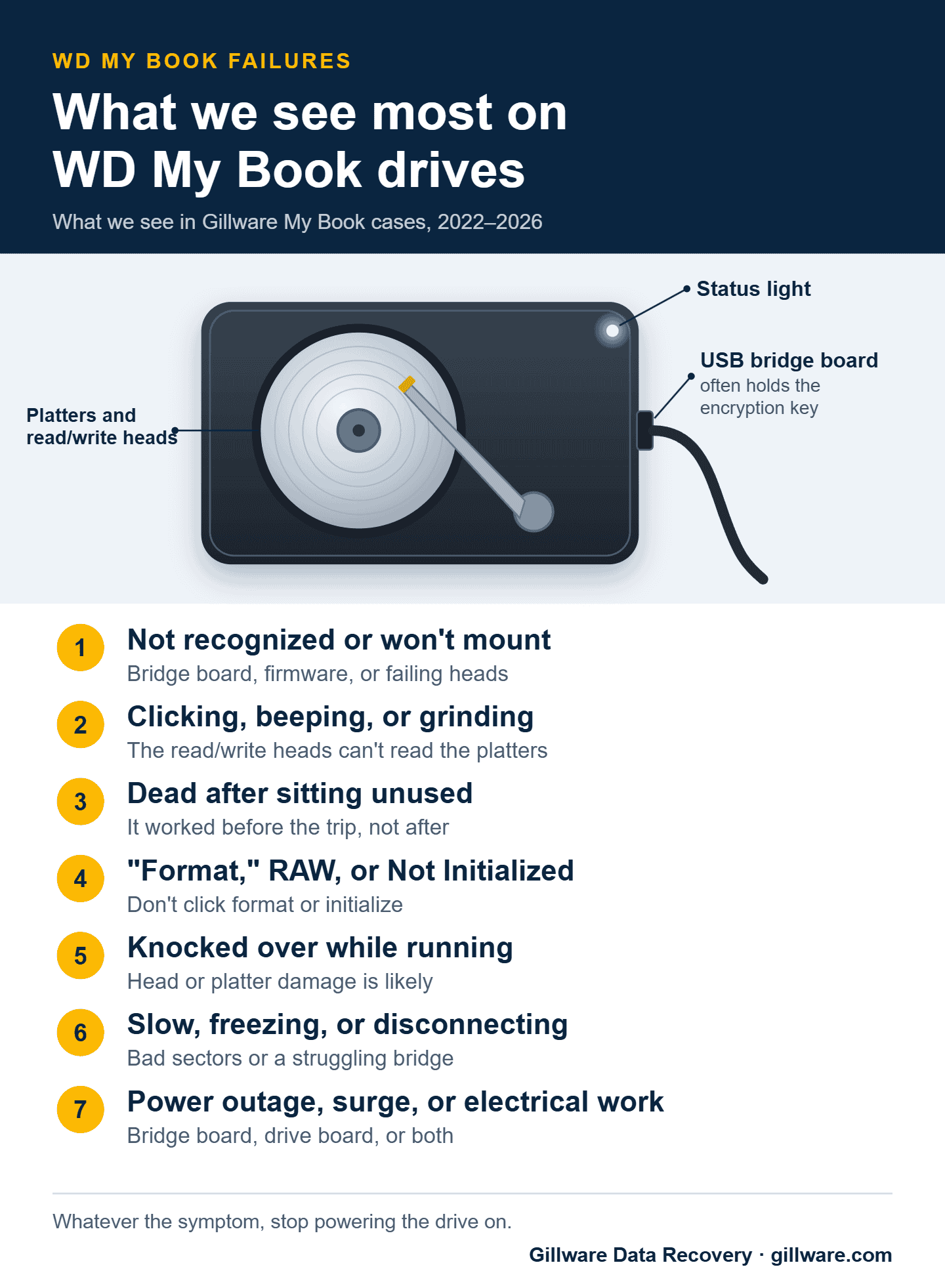
A WD My Book is a 3.5-inch desktop hard drive inside the familiar book-shaped case, with a USB bridge board that connects the drive’s SATA interface to the USB port. It runs on the included wall adapter, because a 3.5-inch drive needs more power than a USB port can supply.
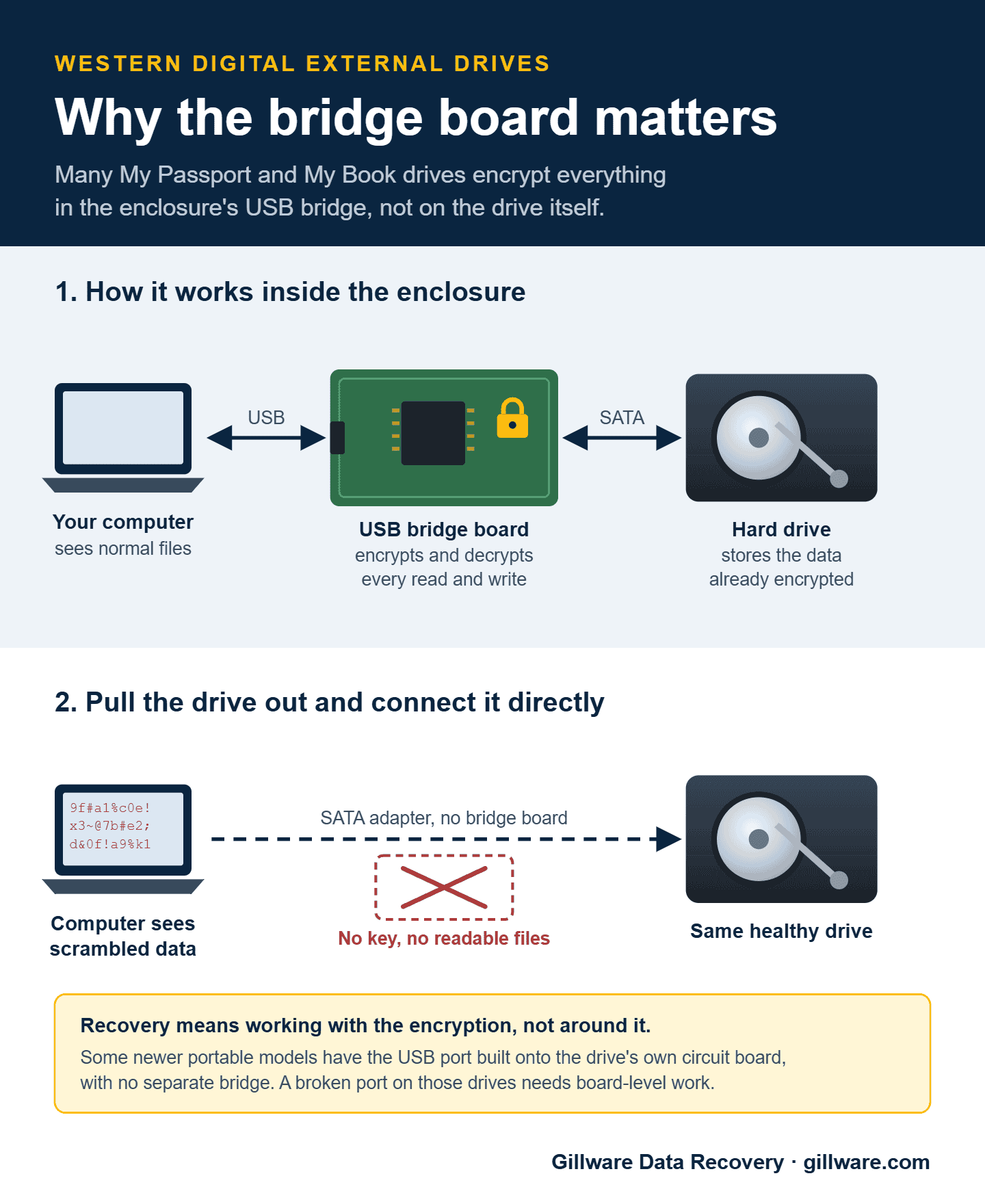
The detail that matters for recovery is the USB bridge. On most My Book models, the bridge encrypts everything written to the drive with hardware AES encryption, and it does so by default, whether or not you ever set a password. Every byte going between the drive and the USB port passes through the bridge, encrypted on the way in and decrypted on the way out. If you never set a password, your data is still encrypted; the drive simply unlocks itself automatically.
In practice, that means you can’t pull the drive out of a My Book and read it on a SATA cable. You’ll see scrambled data that looks like a blank or corrupted drive, and the bridge that knows how to decrypt it is part of the unit that failed.
Common WD My Book Failure Patterns
Power adapter failure
One of the most common reasons a My Book stops working has nothing to do with the drive: the power adapter has failed. The symptoms are immediate and complete: no light, no spin-up, no sign of life. Check that the adapter’s own light is on and that it’s the original adapter, or one with exactly the same voltage and polarity. The wrong adapter can damage the bridge or the drive’s circuit board, turning a simple case into a harder one. If the adapter checks out and the drive is still dead, the problem is in the unit itself.
USB bridge failure
The bridge is the other common failure point. The drive spins up (you can hear it) but doesn’t appear on your computer; it appears and disappears; Windows reports “USB device not recognized”; or it shows up at the wrong capacity. The bridge can fail from controller damage, port damage from cable strain, or an electrical event through the computer’s USB port. The pattern is the same: the drive inside is alive, the bridge is the problem, and the data is unreachable through it. A replacement bridge from another My Book won’t help, because it can’t decrypt data written by yours. Recovery takes specialized work that handles the encryption correctly.
Shows as “Unknown,” “Not Initialized,” or the wrong capacity
This is the My Book symptom we see most in online forums. Windows Disk Management lists the drive as “Unknown” and “Not Initialized,” or with a capacity that doesn’t match the label, and offers to initialize it. Don’t. Initializing writes a new partition table over the old one, and forum advice to “just initialize it” or run command-line disk tools is how a recoverable drive becomes a much harder case. The usual causes are the bridge, the drive’s firmware, or read/write heads that can no longer read the drive’s own service data. Our guide to a WD drive that isn’t showing up covers the safe checks in more detail.
Stopped working after sitting unused
A surprising number of the My Book cases we see share the same story: the drive worked fine, then sat unplugged for a vacation, a holiday break, or a year on a shelf, and never came back. The first power-up after a long rest is hard on an aging drive. The heads can stick to the platters, the motor can fail to spin up, or a board component that was already weak gives out. If a drive that’s been sitting won’t start, don’t keep plugging it back in hoping it will. Each attempt can turn a stuck-heads case into a scratched-platter case.
Internal drive failure
The drive inside a My Book can fail like any other hard drive: failed heads, a seized motor, board damage, bad sectors, or firmware corruption. The symptoms include clicking or beeping, spinning up briefly and then powering down, reporting the wrong capacity, or being recognized but never mounting. A My Book that’s been knocked off a desk while running belongs in this category too. Recovery means work on the drive itself in our cleanroom, then handling the bridge and encryption layer when the data comes off.
Drive failure combined with bridge failure
The hardest My Book recoveries are the combined cases: the drive is mechanically failed and the bridge is damaged. We see this after power events (outages, surges, nearby electrical work) that took out both components, and after drops that damaged the unit where the bridge meets the drive. These cases need physical drive recovery and bridge-level encryption work on the same unit.
Logical failures on a healthy My Book
Not every My Book case involves failed hardware. Plenty arrive in perfect mechanical and electrical condition with the data inaccessible: a partition that suddenly reads as RAW, an accidental format, a Windows install that went to the wrong drive, or files deleted by accident or by ransomware. These cases need logical reconstruction, which still has to happen through the encryption layer so the data comes back decrypted.
WD My Book Duo
The My Book Duo is a two-drive version of the My Book. It’s often set up as RAID 0 (striped) for maximum capacity, which spreads every file across both drives, so if either drive fails, everything on the unit becomes inaccessible. Some owners set it up as RAID 1 (mirrored) instead, where each drive holds a full copy; that protects against one failure, but the two drives are the same age and from the same batch, and the second often follows the first. Either way, don’t replace a drive or start a rebuild until the data is safe, and if you remove the drives, mark which bay each came from. A Duo is treated like any other single device here: free evaluation and a firm price.
Not showing up, clicking, or dead after sitting? Send your My Book in for a free diagnosis.
What Not to Do With a Failing WD My Book
- Don’t open the enclosure. Taking the drive out of the case doesn’t get you to your data, it can damage the bridge connection, and it voids the warranty.
- Don’t swap the bridge with one from another My Book. A donor bridge can’t decrypt data written by yours.
- Don’t connect the bare drive to a SATA cable. The data is encrypted, so you’ll see what looks like a blank or scrambled drive, and Windows may offer to format it.
- Don’t use the wrong power adapter. The wrong voltage or polarity can damage the bridge or the drive’s circuit board.
- Don’t initialize or format a drive that won’t mount. If the problem is mechanical or in the bridge, it won’t help, and it writes over the structures that point to your files.
- Don’t run chkdsk or other repair tools on a My Book that’s clicking, slow, or disconnecting. They assume healthy hardware and can write into damaged areas.
- Don’t keep power-cycling a drive that won’t start. Each attempt adds wear.
Password-Protected My Book Drives
If you set a password on your My Book with WD’s software, that password is what unlocks the drive’s encryption, whether the drive is healthy or failed. If your drive has failed and you know the password, we can still recover your data. We’ll need the password to decrypt it, and your client advisor will ask for it by phone after the evaluation, so there’s no need to include it on the case form. If you’ve forgotten it or only partly remember it, tell your advisor what you do remember.
How WD My Book Recovery Works at Gillware
Every My Book starts with a free evaluation. Our engineers diagnose whether the failure is in the power adapter, the bridge, the drive, or some combination, and what’s recoverable. Then we write a short recovery agreement with you covering the data you need and a firm price if we meet those goals. You approve the price before any recovery work begins, and you only pay when we meet your recovery goals.
For drive failures, the work proceeds like any other hard drive recovery, with head replacements in the cleanroom, motor work, board work, and firmware work, plus the extra step of handling the encryption so the data is decrypted as it comes off. For bridge failures on a healthy drive, the work centers on the encryption layer. For combined failures, both happen in sequence. We’ve recovered My Book drives across every bridge generation Western Digital has shipped, including the larger desktop capacities.
What My Book Recovery Costs
Every My Book case is quoted individually. The price reflects what failed, the time and parts the recovery takes, and how risky the work is. A quick call with a client advisor gives you a realistic idea up front, and you get a firm price after the in-lab evaluation. Our data recovery cost overview explains how quotes are built.
Related Recovery Information
For the broader Western Digital picture, see our Western Digital data recovery page. The same encryption considerations apply to the portable WD My Passport. If your “My Book” is actually a network drive, like a My Book Live or My Book World Edition, see our WD My Cloud and WD NAS data recovery page. For how hard drives fail in general, see our hard drive data recovery page.
My Book failed? Let’s get your files back.
Our highly experienced engineers strive for the highest success rates in the industry. Send us the device and we’ll diagnose it for free.
- More than 20 years recovering data from failed drives
- Trusted by 1,500+ IT professionals nationwide
- Whatever failed, we’ve seen it hundreds of times
- Pay only if we meet your recovery goals