ZFS Data Recovery: Deleted Files, Faulted Pools, and Unmountable Arrays

ZFS earned its reputation for resilience: built-in checksums, redundant metadata, and copy-on-write writes that never overwrite live data in place. That same design is also what makes recovery possible after events that would be terminal on other filesystems. Whether a critical dataset was deleted, a pool refuses to import after a power loss, or a stale drive came back online and corrupted the array, the artifacts ZFS leaves behind on disk give us something to work with. Here’s a short overview, the failure patterns we see most often in the lab, and what recovery actually looks like.
ZFS in 60 seconds
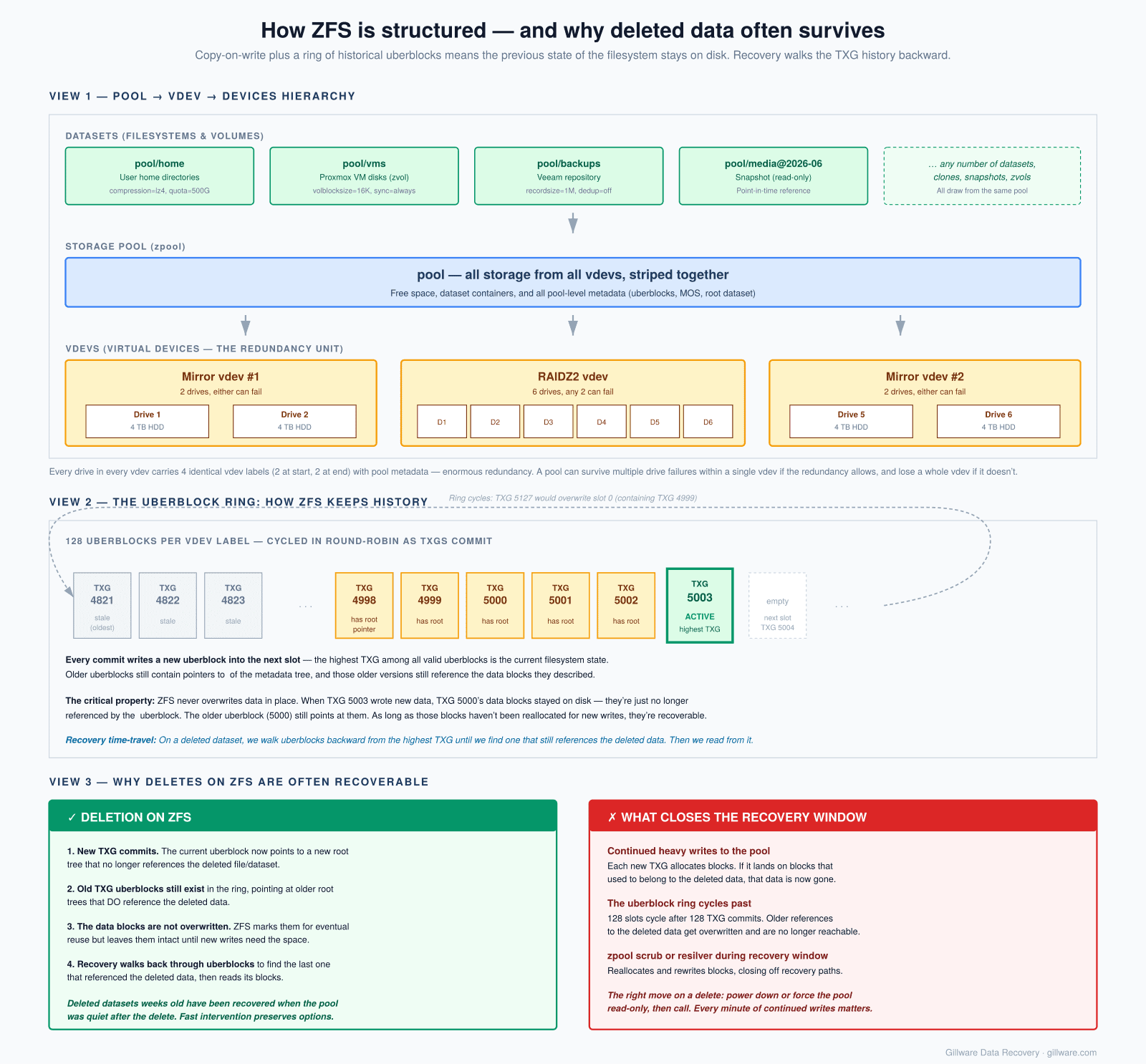
ZFS combines volume management and the filesystem in one stack. Physical drives are grouped into virtual devices, or vdevs — mirrors or RAID-Z groups — and one or more vdevs make up a zpool. On top of the pool sit datasets (filesystems and snapshots, each behaving like its own filesystem with its own properties). Each drive carries four copies of its vdev label — two at the start of the disk, two at the end — plus a 128-slot uberblock ring that records the most recent transaction groups (TXGs).
The critical property for recovery is copy-on-write. ZFS never modifies a block in place. When a file changes, ZFS writes the new version to a new location and updates the metadata tree to point at it. Old blocks aren’t freed immediately, and the metadata pointing at them often survives in older uberblocks and indirect block trees — sometimes long after the user thinks the data is gone. That’s the lever recovery work pulls on. (For comparison, our walkthroughs of Btrfs recovery and Ext4 recovery cover how the equivalent situations play out on those filesystems.)
Three flavors of ZFS in the wild
Most ZFS cases we see come from one of three implementations, and they aren’t interchangeable:
- OpenZFS — the open-source descendant that runs on FreeBSD, TrueNAS, Proxmox, Linux, and most do-it-yourself NAS builds. Standard tooling, well-documented on-disk format.
- Oracle ZFS — the closed-source version that stayed inside Solaris and the Oracle ZFS Storage Appliance line after the OpenZFS fork. The on-disk format has diverged from OpenZFS over the years.
- QNAP ZFS (QZFS) — QNAP’s modified ZFS that powers QuTS hero. Metadata structures and RAID-Z algorithms have been customized enough that standard OpenZFS tools cannot read a QZFS pool directly.
Knowing which variant created the pool changes both the tooling and what’s possible.
Recovering deleted files and datasets
This is the case ZFS’s design helps most. When a user — or a piece of ransomware, or an angry ex-admin — deletes a file, folder, or whole dataset, ZFS doesn’t go back and erase the underlying blocks. It writes a new TXG that no longer references them. The data extents, the dnodes that describe the file, and the indirect blocks that map file offsets to physical locations all remain on the platters until ZFS decides to reuse those sectors for new writes.
That gives us a window. If the pool kept running and busy after the deletion, that window narrows quickly as new TXGs overwrite the free space. If the pool was put into a read-only state or powered down soon after the incident, the window can stay open for a long time — we’ve recovered datasets that were deleted weeks before the case reached us.
We work from cloned images of every member drive, walk the older uberblocks back through the TXG history, and reconstruct the file tree as it existed before the deletion. For users whose snapshots also got destroyed in the same incident — a common ransomware pattern, since attackers know snapshots are the obvious recovery path — this is often the only route back.
Unmountable pools and corrupted metadata
The other common case is a pool that simply will not come online. ZFS reports something like:
state: FAULTED
status: The pool metadata is corrupted.
action: The pool cannot be imported due to damaged devices or data.
cannot import 'tank': I/O error
Destroy and re-create the pool from a backup source.
see: https://openzfs.github.io/openzfs-docs/msg/ZFS-8000-72
That ZFS-8000-72 message — and the matching support.oracle.com/msg/ZFS-8000-72 on Solaris — is the most common pool-import failure we see referenced in user forum threads. The “destroy and re-create from backup” advice is the only safe thing the OS can suggest; it doesn’t mean the data is actually gone. What it usually means is that the active uberblock and the metadata it points at are damaged, but earlier consistent TXGs are still on disk.
Triggers we see most often:
- Power events during a write. Loss of power mid-TXG can leave the uberblock ring in an inconsistent state, especially on systems without a working ZIL/SLOG device or with a failed UPS.
- Drive failures stacked on each other. A degraded RAID-Z1 silently runs for weeks on a single failed disk, then a second disk drops out and the pool refuses to import. (We’ve documented a similar pattern on traditional RAID arrays in our QNAP RAID-6 case study.)
- “Zombie” stale drives. A drive dropped out of the pool weeks ago — maybe a cable issue, maybe an early SMART failure — and at some point the array was powered down. On reboot, the long-dead drive negotiates back online, and either ZFS or the underlying enclosure reinserts it. Now the pool has one member with a stale transaction group ID trying to reconcile against fresher data on the surviving disks, and the metadata tree no longer agrees with itself.
- Multi-drive mechanical failures. Common on aging NAS hardware where all the drives were bought in the same batch and reach end of life within months of each other. We perform temporary head, firmware, or PCB repairs to image each drive cleanly, then reconstruct the pool from the cloned images.
- VM-on-ZFS misimports. A pool gets force-imported on the host while the guest still has it in use, or imported on two systems at once. The metadata gets crossed and the pool faults on the next clean boot.
QNAP QuTS hero specifics
QuTS hero — the ZFS-based sibling of QNAP’s standard QTS firmware — generates its own pattern of cases. The front-panel error is usually “Storage Pool Error” with the pool listed as inactive in Storage & Snapshots. QNAP’s own forum has long threads of users in this exact spot, and QNAP support’s typical answer is to restore from backup. If you’re not sure whether your NAS is running QuTS hero or the standard QTS firmware, our guide to reading NAS error lights and messages covers the major QNAP, Synology, and WD models and how to tell them apart.
What makes QZFS recoveries different from generic OpenZFS work is that the on-disk format has been modified enough that standard zpool import tooling on a Linux or FreeBSD box will not read the pool. The vdev label layout is similar but not identical, and the RAID-Z geometry calculations diverge in places. In practice, that means QZFS pools either need to go back onto compatible QuTS hero hardware to mount, or be reconstructed offline using tooling that understands the QNAP variant. We do the second.
There are also a couple of QuTS-specific footguns. The web UI sometimes presents an “Initialize Storage Pool” prompt when it can’t read the existing pool — accepting it overwrites the vdev labels and the metadata tree, which is fatal. And QNAP’s pool-expansion model is more restrictive than upstream OpenZFS; threads on the QNAP forum show users hitting walls when they try to grow a QuTS hero pool the same way they would a standard ZFS pool.
What not to do before calling
If a pool won’t import:
- Don’t accept the “Initialize Storage Pool” prompt on a QuTS hero NAS. It overwrites vdev labels.
- Don’t run
zpool import -frepeatedly. Each forced import writes new transaction groups that can erase the older metadata we need to roll back to. - Don’t run
zpool clear -Funless you fully understand which TXG you’re rolling back to and you accept the data loss it implies. - Don’t pull and reinsert drives to “see if it helps.” Track which physical bay each drive came from before you touch anything.
- Don’t replace a failing drive and resilver if the pool is already degraded and one more drive has dropped. A resilver on an unstable array can finish the job of overwriting the metadata we’d otherwise recover from.
If the data matters, the safest move is to power the system down and image the drives before anything else gets written.
When ZFS recovery is risk-free — and when it isn’t
Most ZFS recoveries — multi-drive RAID-Z arrays, QuTS hero pools, large multi-vdev pools, and anything with mechanical drive damage in the mix — are complex enough that they don’t fall under our standard no-data, no-charge terms. Single-drive NAS units running ZFS, and small all-logical recoveries (deleted files on a healthy pool, simple import failures) are sometimes simple enough to evaluate risk-free. We’ll tell you upfront which category your situation lands in before any work starts.