
JBOD Data Recovery Services
If your JBOD array or spanned volume has failed and you need the data back, you’ve landed in the right place. JBOD — “just a bunch of disks” — isn’t strictly a RAID level. It concatenates multiple physical disks into a single logical volume without striping or parity. JBOD failures look superficially similar to RAID failures, but the recovery path is different because there’s no cross-disk reconstruction to perform. Gillware has been recovering JBOD volumes and spanned arrays since 2004 in our ISO 5 Class 100 cleanroom in Madison, Wisconsin. Every case starts with a free in-lab evaluation. See also our RAID data recovery hub.
Start a free JBOD recovery evaluation →
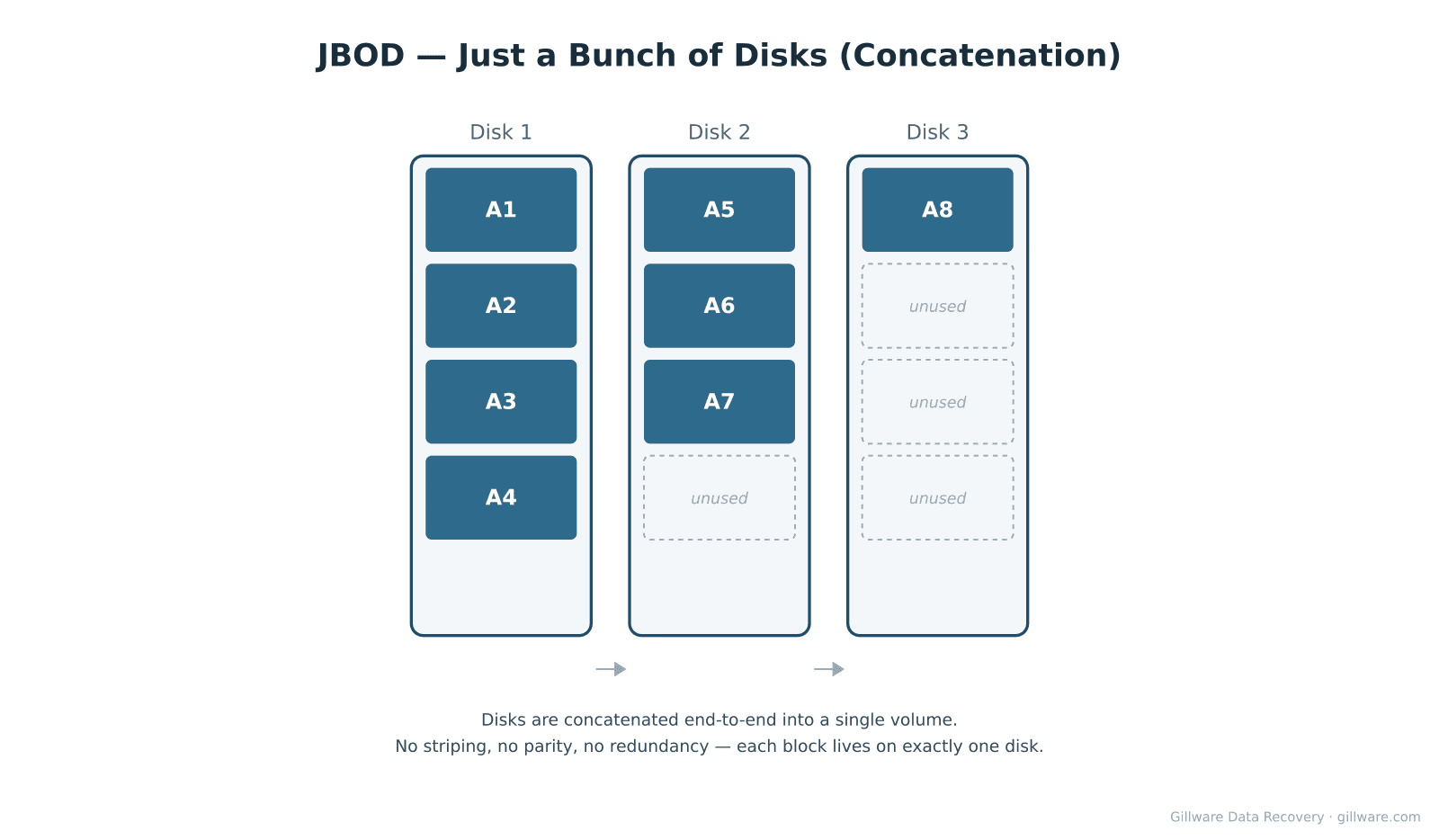
How JBOD Works
A JBOD volume presents multiple physical disks to the operating system as one logical drive, but unlike RAID it doesn’t stripe data across them. Disks are concatenated end-to-end — the first disk fills with data first, then writes move on to the second disk, then the third, and so on. Each block of data lives on exactly one disk. There’s no parity, no mirror, no redundancy. The volume looks like a single drive but mechanically behaves like a sequence of independent drives.
JBOD is commonly used for bulk storage, archive volumes, scratch space, and in some NAS units that want to combine mismatched-capacity disks into a single namespace. Some vendors implement spanning under different names — Synology Basic, BIG/JBOD modes on external enclosures, Windows spanned volumes — but the underlying behavior is the same.
Why JBOD Volumes Fail
Single disk failure. When one disk in a JBOD volume fails, you lose the data that was stored on that specific disk — not the entire volume. The data on the other disks is physically intact. The complication is that the file system spans the disks, so file allocation tables, directory structures, and metadata may have been split across the boundary between healthy and failed disks. The file system can’t see the surviving disks correctly until the missing portion is reconstructed.
File system corruption. Because the file system covers the entire concatenated volume, corruption affecting the metadata regions (typically near the start of the volume) can render the whole volume unmountable even when every physical disk is fine. This is recoverable because the data blocks are still there; only the file system structure is damaged.
Disk reorder after enclosure swap. JBOD relies on the disks being assembled in the original order. If disks are moved to a different enclosure, reinserted in different bays, or attached in a different order through USB hubs, the resulting volume layout doesn’t match the file system’s expectations — even though every disk is healthy.
Controller or enclosure failure. Many JBOD volumes live behind hardware controllers in external enclosures. When the enclosure controller fails, the disks may be inaccessible until they’re connected directly or to a working enclosure of the same model. The disks themselves usually contain the data unchanged.
How We Recover JBOD
JBOD recovery starts with imaging every disk in the volume on isolated, write-blocked hardware in our cleanroom. Physically damaged disks are repaired with donor parts as needed before imaging. For the disks that are healthy, imaging is straightforward; for any disk that’s failed, we recover as much of the surface as possible.
Our engineers then identify the original disk order, partition starting offsets, and any per-disk metadata used by the original enclosure or operating system. Our in-house software (HOMBRE) concatenates the images in the correct order, recreating the original logical volume. File-system recovery proceeds on the reconstructed volume.
When one or more disks have unrecoverable surface damage, we recover everything that’s intact on the surviving disks and report exactly which regions of the logical volume are missing. Because JBOD doesn’t stripe, the missing regions translate to specific files or directories — we can usually tell you precisely which files were lost on the failed disk rather than reporting damage spread across the entire namespace.
Related RAID Recovery Pages
Other configurations we recover: RAID 0 · RAID 1 · RAID 5 · RAID 6 · RAID 10. Return to the RAID data recovery hub for the full overview of how Gillware handles RAID, NAS, SAN, and server array recoveries.
Start Your JBOD Recovery
If your JBOD volume or spanned array is down and the data on it matters, the next step is a free evaluation. Power the array off, label each disk with its original position and connection order, and ship all the disks together — reconstruction needs every disk in the volume.
Start a free JBOD evaluation →
Prefer to talk to someone first? Call 1-877-624-7206 during business hours (M–F 8 am–7 pm, Sat 10 am–3 pm Central) or schedule a 15-minute consultation with a client advisor.