
A mid-market manufacturer runs Informix Dynamic Server as the backbone of their ERP, deployed in 2003 on a Solaris SPARC system, migrated to Linux in 2012, and still on the same IBM Informix 12.10 release the vendor supports. This morning a member of the underlying multi-terabyte SAN LUN failed and Informix came up in fast recovery with three chunks reporting “chunk not found” and the ERP application refusing any transactions. A regional retailer’s Informix installation lost its rootdbs during a filesystem crash and the entire instance refuses to start — the ONCONFIG points at a chunk that no longer has a valid tblspace header. A utility company’s Informix-SE deployment on aging hardware lost multiple disks during a controller failure and needs its billing data extracted from unmountable dbspaces.
We recover Informix databases when the storage under them fails. Informix has a distinctive storage architecture — logical dbspaces sitting on top of physical chunks that map to raw devices, files, or partitions — and the recovery work targets each of those layers. We are not IBM support and do not license the Informix engine; what we do is professional data recovery on the physical devices the chunks lived on, then reconstruct the dbspaces and tblspaces so the data can be brought up in a working instance.
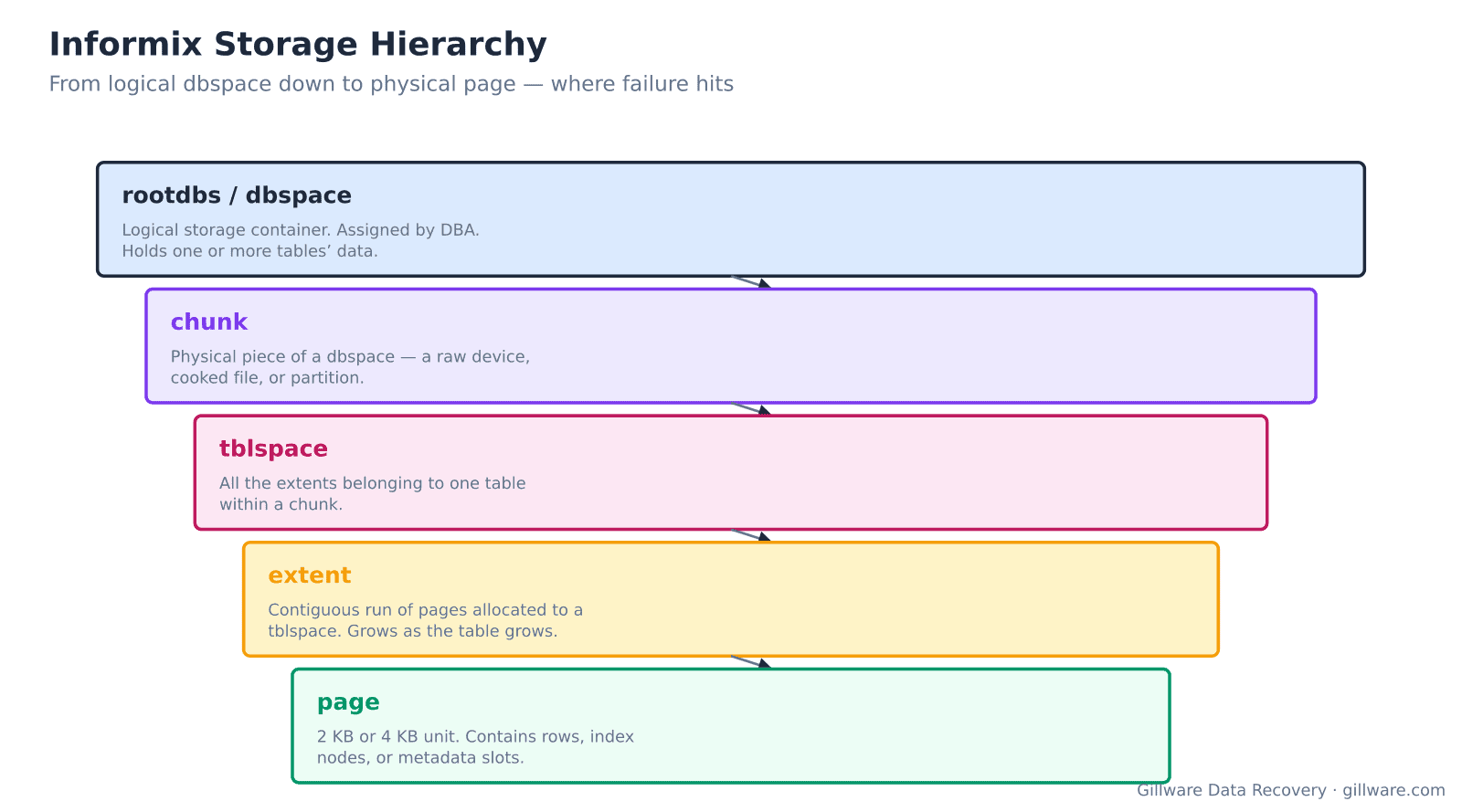
Informix’s storage hierarchy and where failures happen
Informix organizes storage in a strict hierarchy. At the top, a dbspace is a logical container assigned by the DBA — rootdbs (mandatory), tempdbs, logdbs, and one or more user dbspaces are typical. Each dbspace consists of one or more chunks, which are physical pieces of storage: a raw device, a cooked filesystem file, or a partition. Within a chunk, space is allocated to tblspaces — all the extents belonging to a single table (or single fragment of a partitioned table). Each tblspace holds one or more extents — contiguous runs of pages allocated to that table. And each extent is made of individual 2 KB or 4 KB pages, which hold rows, index nodes, or metadata slots.
Failure at each layer has different symptoms and requires different recovery work. A dead chunk (missing raw device, corrupted file) makes every tblspace that had extents in that chunk unavailable, but leaves the rest of the instance intact if rootdbs and logdbs survived. A damaged tblspace can be recovered from surviving extents even when some extents are lost. A torn page loses that page’s rows but does not affect anything else. Loss of the rootdbs is the worst-case scenario — rootdbs holds the system catalog that maps everything else, and without it, the entire instance is unbootable.
Error signatures that indicate storage-level problems
- “chunk not found” or “cannot read chunk header” in the online log — a raw device or chunk file is missing or its first page has been damaged. The dbspaces that depended on that chunk are unavailable.
- “Assert failed: check chunk sanity” during startup or during checkpoint — internal consistency check against the chunk’s free-list or extent metadata failed. Torn writes during a previous checkpoint are the usual cause.
- “Fast recovery aborted” with logical-log restore failure — the logical log chain cannot be replayed forward because logdbs itself is damaged or logs are missing. The instance cannot reach a consistent state.
- “Cannot read tblspace tblspace page” — the metadata page describing a specific table’s extents is unreadable. Table queries will fail.
- “Assert failed on file bt_prep.c” or similar B-tree assertion errors — the index B-tree pages disagree with their expected structure. Common after torn writes to index-heavy tables.
- oncheck reports corrupted pages, corrupted extents, or partition-list inconsistency — the diagnostic utility has found on-disk damage. When damage spans multiple tables or dbspaces, the storage under the chunks is the source.
- Instance refuses to start with “RSAM error: unable to lock chunk file” — the chunk file exists but its metadata is unreadable, so the engine cannot even open it to lock it.
How we recover an Informix instance
Every device that hosted a chunk is imaged first, at the block level. This is straightforward for raw-device chunks and for chunk files sitting in filesystems. When the chunks live on a RAID array or SAN LUN that has failed, we image the underlying member drives and reconstruct the array from the images.
Chunk reconstruction comes next. When a chunk was on a raw device that’s now unreadable at some sectors, we recover as much of the chunk as possible from the imaged storage; the recovered chunk becomes a file that can be read by our own parsers even when Informix would refuse it. When a chunk file was on a filesystem that crashed, we extract the file from the imaged filesystem and validate its internal structure.
From reconstructed chunks, we walk each chunk’s tblspace directory to identify every table whose data lived there. For each tblspace, we walk the extent list, read each extent’s pages, and preserve intact rows. Pages that fail checksum or internal validation get inspected individually; often the top of a page is intact and can be recovered row by row even when the trailer is damaged.
When rootdbs survived, we use its system catalog (sysmaster, syscolumns, systables) to guide reconstruction — we know what each tblspace is supposed to contain, what columns each table has, and how the data is expected to look. When rootdbs is destroyed, we reconstruct the schema by pattern-matching row data across surviving tblspaces — more labor-intensive but achievable.
Deliverables come in two forms depending on customer preference. For customers with a working Informix instance available, we return reconstructed chunk files that can be re-registered into the target instance, or oncheck-clean unloaded tables ready for LOAD FROM. For customers whose original Informix environment is no longer runnable, we deliver the extracted data as delimited flat files or in a format ready for import into a modern database platform.
Versions we handle
- Informix Standard Engine (SE) 5.x-7.x — the file-per-table architecture used in smaller deployments through the mid-1990s.
- Informix OnLine 5.x-7.x — the chunk-based enterprise engine that became the foundation for later releases.
- Informix Dynamic Server (IDS) 9.x-14.x — the modern enterprise engine, including IBM Informix 12.10 and 14.10 which remain in production at many mid-market and enterprise customers.
What we don’t do
We do not provide Informix DBA services, tune query performance, or configure new installations. We do not undo cleanly-committed DELETE or DROP TABLE operations where the storage recorded them correctly — that is what the logical log archive and point-in-time restore are for. We do not migrate Informix schemas to other platforms as a service — we can deliver the data in a portable form and the customer’s DBA takes it from there.
Related recovery services
See our database data recovery hub, RAID data recovery when the chunks lived on a failed array, server data recovery when the entire host failed, and our Linux data recovery and Windows data recovery pages for the host operating systems Informix runs on.
Talk to an Informix recovery engineer
Free consultation, free evaluation, free inbound shipping. If we can’t recover your data, you don’t pay.
877-624-7206