
An accounting firm arrived Monday morning to find that Friday’s 480 MB QuickBooks company file is now 0 bytes. The .TLG next to it is full — still growing all through Friday afternoon, still 78 MB — but the .QBW is empty and Rebuild Data refuses to run against it. A dental practice’s server rebooted after a Windows Update and QuickBooks threw “Error -6000, -83” on every workstation, then C=44 on the server itself when the admin tried to open the file locally. A construction contractor’s consolidated multi-year company file, running fine yesterday at 1.9 GB, is now throwing “QuickBooks has stopped working” the moment it tries to load, and the accountant needs it to close the quarter.
We recover QuickBooks company files when the storage under them fails. QuickBooks stores everything — every transaction, every list, every custom field, every attached document reference — in a single .QBW file backed by the Sybase SQL Anywhere database engine. When that file becomes unusable because the disk, RAID, server, or network share it lives on has failed, standard QuickBooks recovery tools cannot help. Storage-level recovery starts from the bytes on disk and works up.
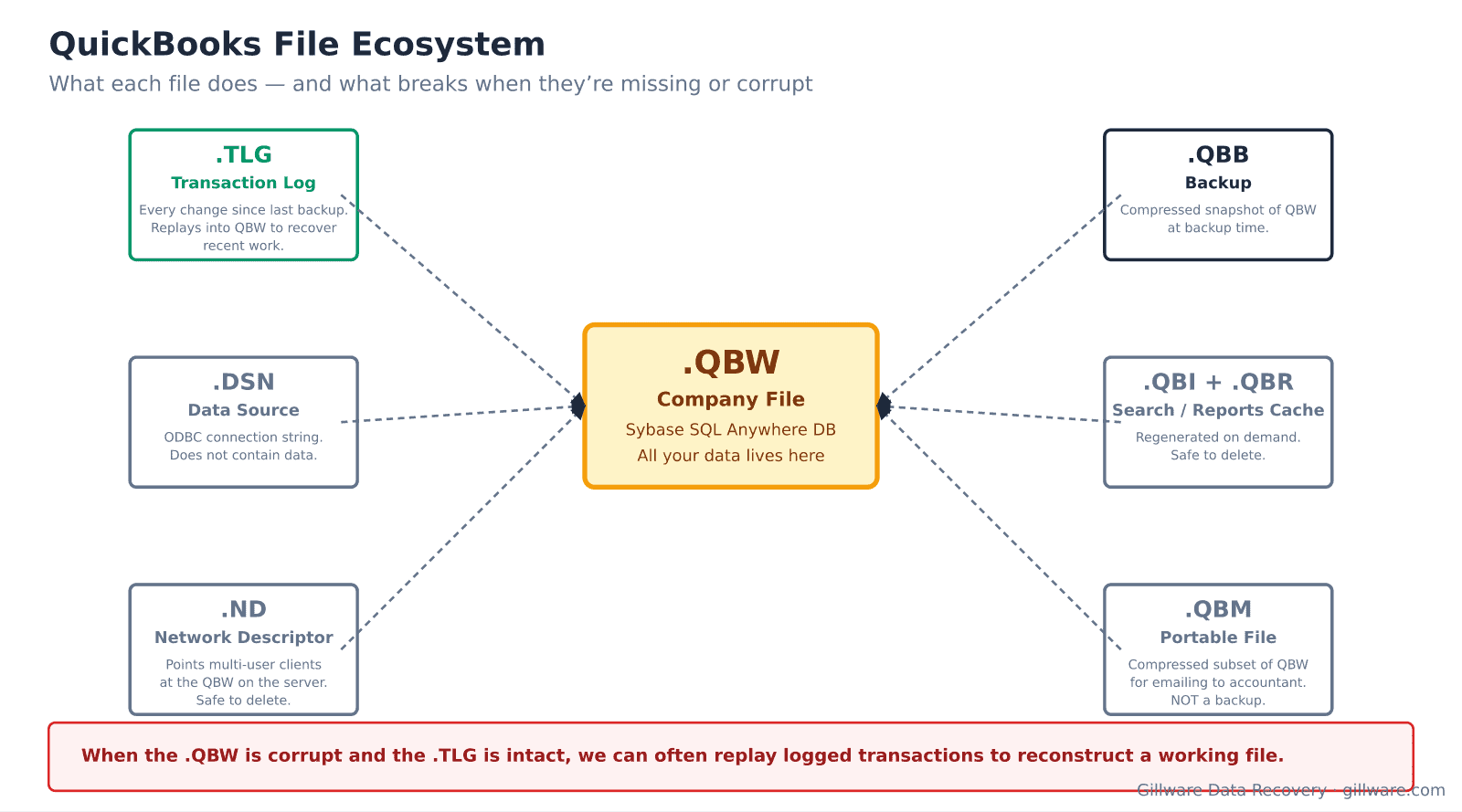
The QuickBooks file ecosystem and what depends on what
The .QBW is the company file itself — a Sybase SQL Anywhere database that holds all your accounting data. Every other QuickBooks file relates to it. The .TLG transaction log records every change since the last backup and is the mechanism QuickBooks uses to bring a restored .QBB backup up to the current state; without a good .TLG, restoring a backup means losing every transaction entered since that backup. The .QBB is a compressed backup, safe to move but not runnable directly — it must be restored into a .QBW. The .ND network descriptor points multi-user workstations at the .QBW on the server; if the .QBW moves, the .ND becomes stale. The .DSN is the ODBC data source used by the QuickBooks Database Server Manager. The .QBM is a compressed portable version used for emailing to an accountant, not a substitute for a proper backup. .QBI (search index) and .QBR (report cache) are safe to delete and will regenerate.
When storage fails, the .QBW is what gets damaged and the .TLG is what makes recovery possible — if it survived. A missing or truncated .TLG makes rollback-based recovery from an older .QBB much less useful. A .QBW that is present but zero bytes almost always paired with a running .TLG points to a filesystem-level metadata failure where the file’s data extents were deallocated while the file entry survived.
Error messages that indicate storage problems
- Error -6000, -83 — the QuickBooks Database Server Manager cannot access the .QBW. When it appears on multiple workstations at once and paired with any disk or network event, the underlying storage is the issue.
- Error -6000, -77 — the folder containing the .QBW cannot be accessed, or QuickBooks cannot create the .ND file. Common after a NAS reboot leaves permissions in a broken state, but also common when the underlying storage is returning I/O errors on directory operations.
- Error -6000, -305 — the .QBW is damaged. This is the specific error QuickBooks throws when the file’s internal database structure fails validation, which happens after torn writes and storage-level corruption.
- C=44 or C=47 in the QBWin.log — the Sybase engine detected internal database corruption. C=44 typically means a torn transaction, C=47 typically means an index/data mismatch. Both are hallmarks of storage that failed mid-write.
- Verify Data (or Rebuild Data) refuses to run paired with a company file that opens partially — the file has passed enough of QuickBooks’ startup checks to load, but is too damaged to run integrity operations against. Storage recovery is required before any repair tool can be useful.
- “QuickBooks is unable to open this company file” immediately on double-click, with no more specific error — usually indicates the file’s Sybase database header is unreadable. Points to sector-level damage at the beginning of the .QBW.
- Company file size drops to 0 or shrinks dramatically — filesystem-level metadata corruption. The file entry survives but its data extents were freed. The bytes are still on the physical disk in most cases and are recoverable if the disk is imaged before other writes overwrite them.
How we recover a QuickBooks company file
The drive, RAID, NAS, or server the .QBW lives on gets imaged first. This is especially important with zero-byte-file cases — the data is still on the physical media and every subsequent write to that storage risks overwriting it. Imaging preserves the state at the moment of the failure and gives us something stable to work from.
Filesystem reconstruction produces a working copy of the .QBW and any related files (.TLG, .ND, .DSN, plus any recent .QBB backups on the same storage). When the .QBW is present but small or corrupt, we work directly with it. When the .QBW is zero-byte, we scan the imaged storage for the file signature and reassemble the .QBW from its constituent extents, using NTFS metadata when it survives and pattern-matching when it does not.
The recovered .QBW gets validated against the Sybase engine format. Where the file passes, we hand it back and QuickBooks can run standard Verify/Rebuild against it. Where the file has internal damage, we extract the individual table pages, walk the transaction chain, and reconstruct the database into a fresh .QBW that QuickBooks can open. When a .TLG survived and contains transactions newer than the last clean state, we can replay it forward against the reconstructed .QBW to recover as much recent work as possible.
Multi-user and hosted deployments
QuickBooks Multi-User Mode adds a Database Server Manager to the equation. When corruption happens under multi-user, we usually work from the server’s copy of the .QBW; workstation cache files are not authoritative and are usually discarded during recovery. QuickBooks Enterprise Solutions files (also .QBW) recover the same way as Pro/Premier files — the underlying Sybase engine and file format are identical. QuickBooks Online is a separate product hosted by Intuit; we do not work with QBO cases because the data is not on customer storage.
What we don’t do
We do not sell a QuickBooks repair utility. Several exist and can help with logical corruption on healthy storage, but they do not recover from storage failures — they need a readable file to work against. We do not undo cleanly-committed voids or deletes; if QuickBooks flushed the operation and the storage confirmed it, standard backup rotation is the only route back. We do not extract passwords from encrypted company files.
Related recovery services
See our database data recovery hub, Windows data recovery when the QuickBooks host has failed, NAS data recovery when the company file lives on a shared network drive, and our hard drive recovery services when a single-drive workstation is the source of the failure.
Talk to a QuickBooks recovery engineer
Free consultation, free evaluation, free inbound shipping. If we can’t recover your data, you don’t pay.
877-624-7206